
Why spend over a thousand dollars on a brand new laptop when your current machine is likely just one component away from outperforming it? You’ve probably felt the frustration of a computer that takes five minutes to boot up or apps that freeze the moment you try to get to work. If you’re searching for an SSD upgrade Pleasanton CA, you’re likely caught between the desire for speed and the fear of losing your precious files during a DIY attempt. It’s a common struggle, but the solution is more straightforward than the big-box retailers want you to believe.
We understand how stressful technology can be when it stops keeping up with your life. That’s why we’ve put together this 2026 guide to show you how a professional SSD upgrade can make your aging PC or Mac up to 10x faster while keeping every single photo and document safe. You’ll discover the real differences between SATA and NVMe drives and learn why a quick trip to see a local expert on Main Street is the most cost-effective way to bypass planned obsolescence. It’s time to stop settling for a slow computer and start enjoying a machine that feels brand new again.
Key Takeaways
- Identify why your current hardware is likely still capable and how an SSD removes the primary performance bottleneck holding your processor back.
- Compare the significant cost savings of an SSD upgrade Pleasanton CA against the high price of purchasing a brand new MacBook or PC.
- Decode the technical differences between SATA and NVMe drives to find the perfect speed and storage match for your specific device architecture.
- Learn about our secure, bit-for-bit data migration process that protects your personal files and photos while reviving your system’s responsiveness.
- See why choosing local, transparent support on Main Street provides a more reliable and stress-free experience than navigating complex DIY repairs alone.
What is an SSD Upgrade and Why Does Your Computer Need One?
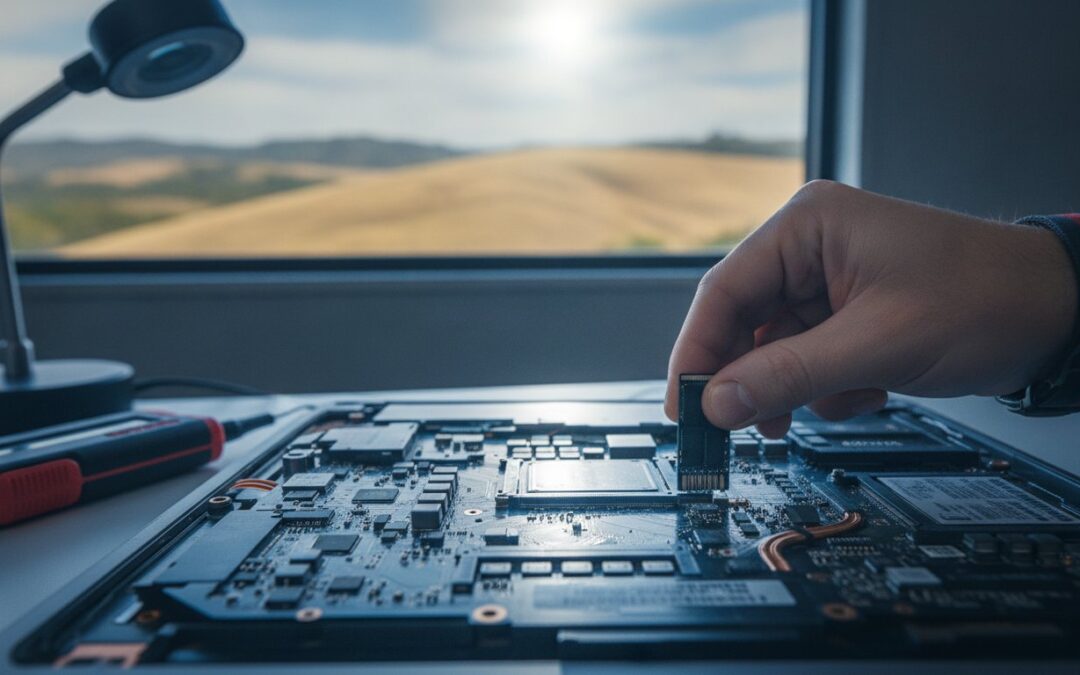
Imagine your computer is a high-performance sports car, but it’s trying to drive through thick mud. That mud is your old hard drive. A Solid State Drive, or SSD, is the modern standard for data storage. Unlike traditional Hard Disk Drives (HDDs) that rely on physical spinning platters and a moving read-arm, an SSD uses flash memory chips. There are no moving parts inside. This simple change is the secret behind an SSD upgrade Pleasanton CA that can make an eight-year-old laptop feel faster than a brand new budget model from a big-box store.
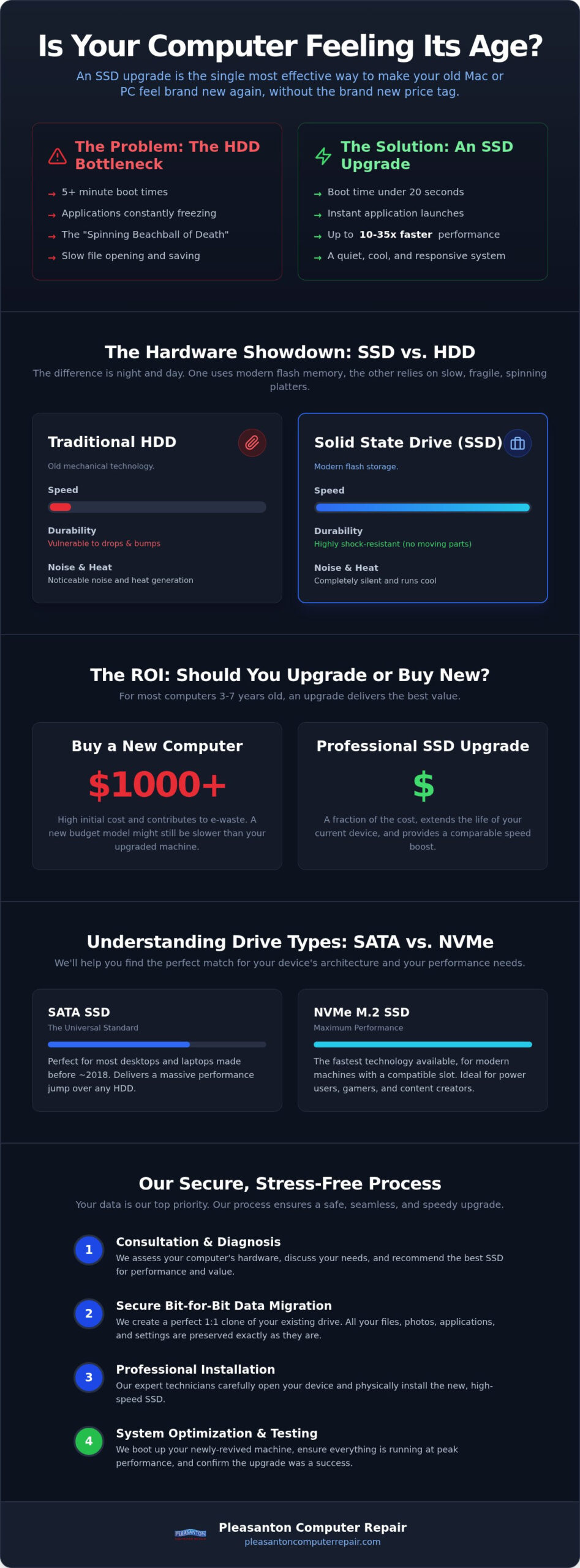
The “bottleneck” effect happens when your fast processor has to wait for a slow mechanical drive to find files. It’s like having a world-class chef waiting for a delivery truck that’s stuck in traffic. When you switch to an SSD, that traffic disappears. Boot times that used to take several minutes often drop to under twenty seconds. Applications that used to bounce or freeze now open almost instantly. Beyond speed, the lack of moving parts means your data is safer. If you bump your laptop on your desk, there’s no physical needle to scratch a spinning disk, which significantly reduces the risk of sudden data loss.
SSD vs. HDD: The Performance Gap in 2026
The physical difference between these two technologies is night and day. A traditional HDD is a mechanical device, much like a record player. It has to physically spin up to thousands of rotations per minute just to read a single file. In contrast, an SSD works entirely through electrical signals. This allows for read and write speeds that are typically 10x to 35x faster than old mechanical drives. Because there are no spinning disks, your computer will also run much quieter and cooler. You’ll notice your laptop fans don’t kick on as often, and the bottom of the machine stays comfortable on your lap during a long work session.
Is Your Mac Dying or Just Slow?
If you see the “spinning beachball” every time you try to check your email or open a browser tab, your Mac isn’t necessarily ready for the recycling bin. Often, the internal components like the processor and logic board are still perfectly healthy, but the storage technology has simply fallen behind modern software demands. In many cases, your Mac might just need an SSD upgrade to return to its former glory. An SSD is the most impactful hardware upgrade for any computer built before 2022. It provides a massive boost in responsiveness for a fraction of the cost of a new machine, making it a smart choice for anyone looking for a reliable SSD upgrade Pleasanton CA.
The ROI of Upgrading: Should You Fix Your PC or Buy a New One?
Is your computer actually “old,” or is it just poorly equipped for modern software? Big-box retailers thrive on the idea that you need a new device every three years. In reality, most high-quality laptops and desktops built in the last several years have plenty of processing power left. Choosing an SSD upgrade Pleasanton CA is often the most financially responsible move you can make. While a new MacBook or professional-grade PC can easily exceed $1,000, an SSD upgrade costs a small fraction of that price while delivering a similar feeling of speed.
Beyond the immediate savings, repairing your current machine is a win for the environment. Extending the life of your hardware keeps toxic e-waste out of our East Bay landfills. Performance parity is also a major factor. Many people are surprised to find that an older Intel i7 processor paired with a modern SSD will actually outperform a brand new “budget” laptop that uses slower storage. Speed depends on how quickly your machine can access data, not just the year it was manufactured. If your current machine can still run the latest Windows or macOS updates, it’s likely a prime candidate for a revival. Pairing a new SSD with a thorough PC optimization service near me can deliver an even more dramatic improvement in overall system performance.
When an Upgrade Makes Sense
We generally follow the “5-Year Rule.” If your computer is between three and seven years old, it’s usually in the sweet spot for an upgrade. Before we begin, we always assess the secondary hardware. If your screen is vibrant and your battery still holds a reasonable charge, the drive is the only thing holding you back. This is especially true for students and photographers who need to move large files quickly. If you’re tired of waiting on your machine, you can check your computer’s health with a quick visit to our shop.
When It Might Be Time to Buy New
There are times when an upgrade isn’t the best path forward. If your motherboard shows signs of failure, or if the laptop has suffered extreme physical damage like a cracked chassis or water exposure, the investment might not be wise. We provide honest, data-driven advice to help you decide if a repair is worth it. If your machine is beyond help, we can guide you toward our refurbished laptop options in Pleasanton. These systems are fully tested and offer much better value than the entry-level models found in traditional retail stores.
Understanding Drive Types: SATA, NVMe, and Compatibility
Walking into a store or browsing online for an SSD upgrade Pleasanton CA can feel overwhelming. You’ll see different shapes, sizes, and acronyms that don’t always make sense at first glance. The two most common types are SATA and NVMe. SATA SSDs are the universal replacement for traditional 2.5-inch hard drives. They fit into almost any laptop or desktop built in the last decade. NVMe M.2 SSDs, on the other hand, look like a small stick of gum. These are found in modern, high-end machines and offer even faster speeds by connecting directly to the motherboard’s PCIe lanes.
Picking the right drive isn’t just about speed; it’s about electrical and physical compatibility. If you buy a high-speed NVMe drive for a computer that only supports the older SATA standard, you’ve wasted money on a part that won’t even plug into your motherboard. We help our clients navigate these technical hurdles to ensure the hardware matches their specific system architecture. This prevents the frustration of ordering parts that don’t work or, worse, damaging the sensitive pins on your motherboard during a forced installation. This attention to detail is vital for all modern electronics, and for those interested in smartphone hardware, First Help Tech offers an excellent guide on sourcing the right replacement parts.
Capacity planning is just as vital as speed. For most casual users who primarily browse the web and store a few thousand photos, a 500GB drive is a solid starting point. However, if you’re a gamer, a professional handling 4K video, or someone who stores a massive library of high-resolution family videos, a 1TB or 2TB drive provides the breathing room you need. It’s much more cost-effective to install a larger drive now than to realize you’ve run out of space in six months and need to start the process all over again.
The MacBook and iMac Challenge
Apple hardware adds another layer of complexity to the process. Many MacBooks and iMacs use proprietary connectors that don’t follow standard industry designs. While some models are easily upgradeable, others require specialized adapters or are unfortunately soldered in place. This is where our expert Mac repair services in Pleasanton become essential. Attempting a DIY upgrade on an iMac often leads to torn screen cables or broken thermal sensors because the glass must be carefully unsealed with specialized tools. We have the experience to perform these delicate teardowns safely without risking your expensive display.
External vs. Internal SSDs
You might be tempted to just plug in an external SSD and call it a day. While external drives are great for extra storage or backups, they are limited by the speed of your USB port. To get the most out of an SSD upgrade Pleasanton CA, you need to replace the internal boot drive. Replacing the internal drive allows your operating system to communicate at full speed with your hardware. Internal SSDs offer the most significant system-wide speed improvements, ensuring your computer feels snappy from the moment you press the power button.
Our Professional SSD Installation Process in Pleasanton
Buying a new drive from a website is only half the battle. Many users end up with a high-speed part but no clear way to transfer their operating system or personal files without losing data. When you trust us for an SSD upgrade Pleasanton CA, you aren’t just buying hardware; you’re getting a complete, professional transition. Our process is methodical and designed to ensure your machine returns to you in peak condition.
We begin with a comprehensive diagnostic. It’s vital to confirm that the storage drive is the true cause of your slow performance. If a virus or a failing cooling fan is the culprit, we’ll let you know before any parts are installed. Once confirmed, we move to the data phase. We offer a bit-for-bit clone of your current drive, which means your desktop icons, saved passwords, and applications stay exactly where they are. If your system feels cluttered, we can also perform a clean OS installation to give you a fresh start.
The physical installation is handled with precision. Swapping the drive is only one part of the job. Our technicians perform a thorough internal cleaning to remove the dust and debris that naturally accumulates over time. This simple step helps your computer run quieter and stay cooler. After the hardware is secure, we move to post-installation optimization. We verify the drive’s speed and adjust system settings to ensure you’re getting every bit of performance you paid for. If you’d like to go even further, our PC optimization service near me guide walks through the additional software and system tuning steps that complement a hardware upgrade perfectly.
Data Migration: Keeping Your Files Safe
The biggest fear most people have during an upgrade is losing their photos or work documents. Cloning is our most popular option because it provides a seamless transition. However, if your old mechanical drive is already clicking or crashing, a standard clone might not be possible. If your drive has already stopped responding, we can step in with our specialized data recovery services. We have the tools to rescue files from drives that are physically failing, providing a safety net that DIY methods simply can’t offer.
Turnaround and Convenience
We know you can’t be without your computer for long. That’s why we prioritize efficiency, often offering same-day or next-day service for most SSD upgrades. There’s no need to deal with the hassle of mailing your device to a faceless repair center. You can visit us right on Main Street, talk to a local expert, and get a clear timeline for your repair. Before you walk out the door, we’ll boot up your machine and show you the speed verification results. You can schedule your upgrade today and experience the difference of a professionally optimized system.
Why Choose Pleasanton Computer Repair for Your Upgrade?
We’ve been a staple of the local community since 2002. While technology has changed drastically in those two decades, our commitment to providing honest, reliable service hasn’t wavered. When you’re searching for an SSD upgrade Pleasanton CA, you aren’t just looking for a new part; you’re looking for a partner who understands the value of your time and your data. We’ve spent years helping our neighbors in Pleasanton, Dublin, and Livermore avoid the high cost of unnecessary hardware replacements by focusing on smart, effective repairs.
One of the biggest advantages of working with a local shop is transparency. You won’t find the hidden fees or aggressive upselling common at big-box retailers here. Instead, you get straightforward advice and a clear explanation of how an upgrade will benefit your specific machine. You’ll talk directly to the technician who’s actually working on your computer. This personal connection ensures that your unique needs, whether you’re worried about a specific software suite or a library of family photos, are understood and respected throughout the entire process.
We also believe in standing behind our work. Every drive we install comes with a professional warranty and the peace of mind that comes from knowing we’re right here on Main Street if you ever have a question. Our goal is to make the transition to a faster computer as stress-free as possible, providing a level of accountability that online retailers and distant repair centers simply can’t match.
Serving the East Bay Community
Our shop is conveniently located at 400 Main Street, Suite 205, right in the heart of downtown. This location makes it easy for you to drop off your device and enjoy a coffee at a nearby cafe while we handle your initial diagnostic. While we love seeing our residential clients in the shop, we also understand that local businesses have different needs. To support our professional community, we offer small business computer repair in Pleasanton and on-site support options for businesses throughout San Ramon and Danville. Whether you have one laptop or a dozen workstations that need a boost, we’re ready to help.
Ready to Speed Up Your Tech?
There’s no reason to struggle with a sluggish computer for another day. An SSD upgrade Pleasanton CA provides the perfect blend of speed, reliability, and cost savings. You can bypass the “planned obsolescence” of the tech industry and keep your perfectly good hardware running like new for years to come. We’re ready to show you just how fast your current machine can be. Visit us on Main Street or use the link below to get started on your computer’s revival.
Schedule Your SSD Upgrade Today
Restore Your Computer’s Speed and Reliability Today
Reviving your PC or Mac is a smart, sustainable choice that saves you from the high cost of an unnecessary replacement. You now know how a professional SSD upgrade bypasses the bottlenecks of older hardware while secure data migration keeps your files exactly where they belong. Choosing an SSD upgrade Pleasanton CA ensures you get the perfect drive for your specific architecture without the technical risks of a DIY attempt.
Since 2002, we’ve served as your local East Bay experts, providing 5-star rated service right here on Main Street. We focus on transparent pricing and personalized support to make your technology feel brand new again. Don’t let a slow boot time or freezing applications disrupt your day any longer. We’re ready to help you rediscover the joy of a fast, responsive computer.
Book Your SSD Upgrade at Our Pleasanton Main St. Shop
Frequently Asked Questions
How much faster will my computer be after an SSD upgrade?
You can expect a dramatic improvement in speed, often making your machine feel up to 10x faster than it did with a mechanical drive. Boot times that previously took several minutes typically drop to under 20 seconds. You’ll also notice that demanding applications, like photo editors or web browsers, open almost instantly. This upgrade removes the physical delays of spinning platters, allowing your processor to work at its full potential without waiting for slow data access.
Will I lose my photos and documents during the upgrade process?
No, your data stays exactly where you left it because we perform a secure, bit-for-bit clone of your existing drive. This process moves your operating system, desktop icons, saved passwords, and personal files to the new SSD. You won’t have to worry about reinstalling software or searching for missing folders. We treat your digital life with the highest level of care, ensuring a seamless transition that feels familiar but much faster.
Can every laptop be upgraded to an SSD?
Most laptops and desktops manufactured within the last decade are excellent candidates for an upgrade. While older machines use standard SATA connections, newer high-performance models often require NVMe M.2 drives. Some very recent “ultrabook” style laptops have storage soldered directly to the motherboard, which makes them permanent. We always perform a quick compatibility check during your initial visit to confirm your device can physically accept a new drive before we begin any work.
How long does a professional SSD installation take at your Pleasanton shop?
We typically complete most installations within 24 to 48 hours at our local shop. Our goal is to minimize your downtime, and we often provide same-day or next-day service for an SSD upgrade Pleasanton CA. The total time depends on the volume of data we need to migrate from your old drive to the new one. You can drop your machine off on Main Street and often have it back in your hands by the following afternoon.
Is it better to upgrade my RAM or my SSD for better speed?
An SSD is almost always the most impactful upgrade you can make for overall system responsiveness. While adding RAM helps with multitasking and keeping many browser tabs open, it won’t fix the slow boot times or laggy app launches caused by a mechanical hard drive. If you’re looking for the best “bang for your buck” to revive an aging computer, an SSD provides a much more noticeable speed boost than a memory increase alone.
Do you offer SSD upgrades for both Mac and PC?
Yes, we have extensive expertise in performing an SSD upgrade Pleasanton CA for both Mac and PC systems. Whether you have an older iMac that needs a delicate screen removal or a Windows gaming laptop that requires a high-speed NVMe drive, we have the specialized tools for the job. Our technicians understand the unique proprietary connectors used by Apple and the various motherboard configurations found in modern PCs, ensuring a perfect fit every time.
Is my data private and secure during the repair process?
Your privacy is our top priority, and we handle every device with strict professional confidentiality. As a local business rooted in the Pleasanton community since 2002, we’ve built our reputation on trust and transparency. We only access the data necessary to verify a successful migration and system stability. Your personal files, photos, and login information remain secure and private throughout the entire installation and optimization process at our Main Street shop.
What happens if my old hard drive is already failing?
If your old drive is clicking or crashing, we prioritize data preservation before attempting the upgrade. We use specialized data recovery tools to extract your files even when a standard clone isn’t possible. In these cases, we’ll discuss the health of your data with you and can often perform a fresh operating system installation on your new SSD while manually moving your recovered documents back into place. We’ll guide you through every step to ensure your memories are saved.