
You are deep into a project when your MacBook Pro suddenly cuts to black, despite the battery indicator showing plenty of life just moments ago. It is a sinking feeling that many of us in the Tri-Valley have experienced, usually followed by the dread of long wait times for appointments or the fear that a repair might mean losing years of saved data. You shouldn’t have to choose between a functional computer and your peace of mind, especially when you have deadlines looming.
We understand that your Mac is more than just a tool; it is your connection to work, creativity, and family. This guide is designed to help you identify common hardware failures and find the most dependable MacBook battery replacement Pleasanton has to offer. You will discover how to get your device back to peak performance while ensuring your files remain exactly where you left them, all without the high-pressure environment of a crowded retail store.
We will walk through the signs of a failing battery, the impact of the shift to Apple Silicon in the upcoming macOS 27 Golden Gate, and how local experts provide transparent, flat-rate pricing. Whether you are running the latest macOS 26 Tahoe or keeping a classic Intel model alive with a strategic SSD upgrade, you can restore your device quickly and confidently.
Key Takeaways
- Learn to recognize early warning signs like the “spinning beach ball” or trackpad bulging to address hardware issues before they cause total system failure.
- Discover how a professional MacBook battery replacement Pleasanton can instantly restore your laptop’s mobility and prevent damage from old, swollen cells.
- Compare the benefits of local repair, including faster 24-72 hour turnarounds and expert care for older Mac models that the Genius Bar might decline to fix.
- Master five essential preparation steps, such as using Time Machine for backups, to protect your personal data and speed up your service appointment.
- See how choosing a local specialist with 20+ years of community history ensures a stress-free experience backed by a 60-day warranty and a focus on data integrity.
Common Mac Issues Pleasanton Users Face (and How to Spot Them)
Your Mac is a finely tuned machine, but even the best hardware eventually shows its age. In Pleasanton, we see everything from the latest M-series laptops to vintage iMacs that just need a little help to stay current. Recognizing the symptoms of a failing device early can save you from a total system crash or expensive data recovery efforts. It’s about staying ahead of the problem before it interrupts your workflow.
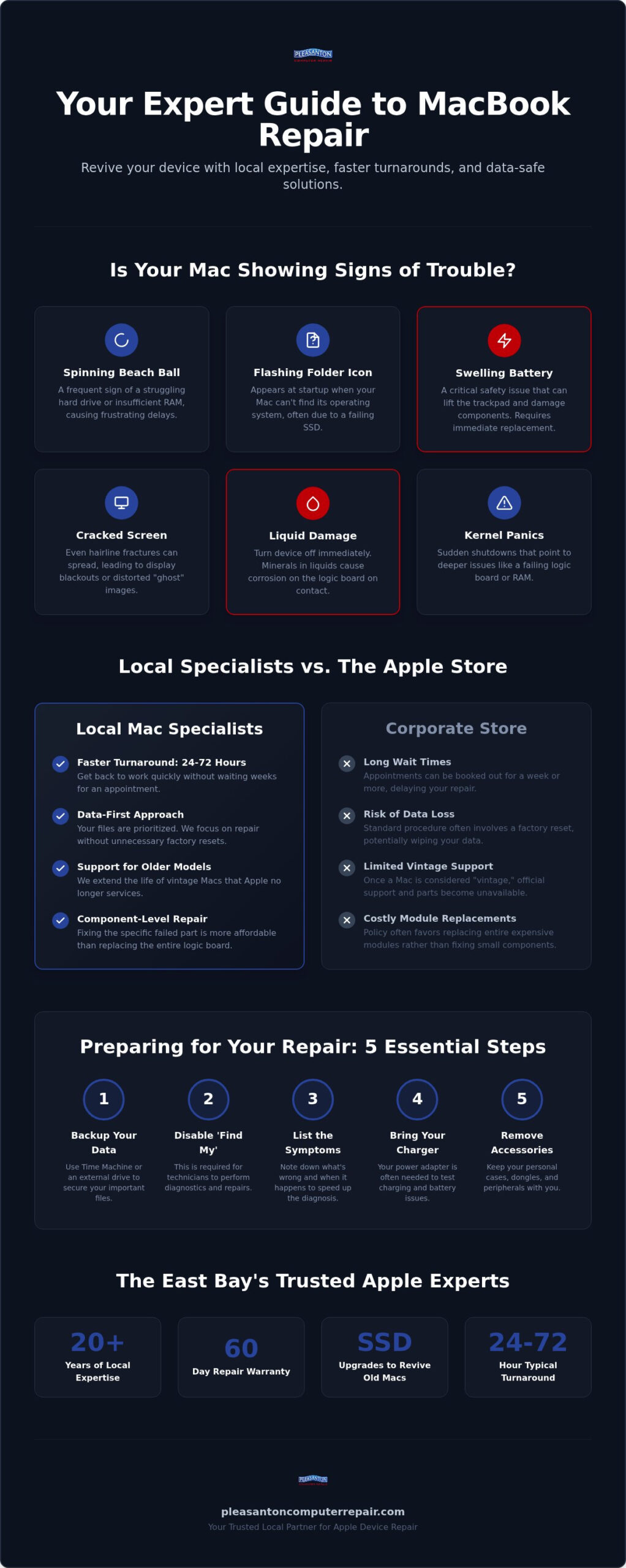
The Spinning Beach Ball is more than just a minor annoyance. While it sometimes indicates a temporary software hang, frequent appearances usually point toward a failing drive or insufficient memory. If you’re using an older Mac with a traditional hard drive, this is often the moment to consider an SSD upgrade Pleasanton CA residents rely on to make aging machines feel brand new again. Moving to solid-state storage can make a ten year old computer feel faster than the day you bought it.
The Question Mark Folder appearing at startup is a clear signal that your Mac cannot find its operating system. This usually means the SSD has failed or become disconnected. Similarly, sudden shutdowns or kernel panics often indicate deeper logic board issues. A kernel panic is a critical system error where the operating system reaches a point where it can no longer safely operate, forcing an immediate and unexpected restart.
Software Glitches vs. Hardware Failures
Not every slow Mac needs a new part. Sometimes, a clean install of macOS 26 Tahoe is all that’s required to clear out years of system clutter. We often find that older iMacs are bogged down by hidden bloatware or conflicting background processes that mimic hardware failure. If you’ve ever found yourself wondering why is my MacBook so slow all of a sudden, the answer is often a software issue rather than a hardware failure that requires costly parts. The right to repair movement continues to advocate for your ability to choose whether to troubleshoot these software bugs yourself or bring them to a local expert who can accurately distinguish between a simple glitch and a hardware failure. A MacBook battery replacement Pleasanton might fix a power issue, but software optimization is what keeps the interface snappy.
Physical Damage: Screens and Keyboards
Hardware issues aren’t always internal. Many users still struggle with the Butterfly keyboards found in older MacBook models, where a single speck of dust can render a key useless. Cracked Retina displays are another common sight in our shop. Even a hairline fracture can lead to complete display failure over time because the glass provides structural integrity to the thin lid. If you want to understand the MacBook screen repair cost Pleasanton residents can expect before bringing in a damaged display, our detailed pricing guide breaks down what Air and Pro models typically require. If you experience a liquid spill, turn the device off immediately. Every second counts to prevent corrosion from setting in on the delicate logic board components.
Comprehensive Mac Repair Services: From Screen Fixes to Logic Boards
Restoring your Mac to its original glory involves more than just swapping parts. It’s a matter of precision. Whether you are dealing with a dim Retina display or a battery that dies before you reach the office, professional restoration ensures your device stays reliable for years to come. For those looking for high-quality replacement components, retailers like Computech-Solutions offer a variety of LCD panels and IT hardware. We focus on getting your tech back to peak performance so you can focus on your day without hardware-induced stress.
For many Pleasanton commuters, a MacBook is a mobile office. If your laptop only lasts an hour on a full charge, it’s time for a change. A professional MacBook battery replacement Pleasanton restores that portable productivity you rely on during your morning commute or while working from a local cafe. We don’t just put in a new part; we ensure the system is calibrated for optimal power management. This service is one of the most common ways we help local professionals keep their edge without buying an entirely new machine.
Screen issues are equally disruptive. A cracked or flickering Retina display ruins the experience of using a Mac. We provide high-quality screen replacements that restore the color accuracy and brightness you expect from Apple hardware. This isn’t just about aesthetics; it’s about making your device usable again for photo editing, spreadsheets, or streaming your favorite shows. Before committing to a repair, many of our clients find it helpful to review the MacBook screen repair cost Pleasanton pricing guide so they can budget confidently and avoid surprises. If your drive is failing or your Mac has suffered a liquid spill, our data recovery team works to preserve your photos, documents, and work history before the damage becomes permanent. The same expertise that drives our Mac data recovery also powers our iPhone data recovery Pleasanton services, so your memories are protected across all your Apple devices.
The Power of the SSD Upgrade in 2026
Many Macs from the 2015-2019 era are still incredibly capable, but they’re often held back by aging storage. Moving from a mechanical hard drive to a modern solid-state drive is the most effective way to breathe new life into these machines. This simple change can extend the life of your device by several years. If you’re looking for the SSD upgrade Pleasanton CA residents trust, this is the quickest path to a faster computer without the high cost of a new model.
Logic Board and Component-Level Repair
When a Mac won’t turn on at all, many big-box retailers will simply tell you it’s “vintage” or requires a full logic board replacement. This is often unnecessary and expensive. We focus on component-level repair, which involves fixing the specific circuits or chips that have failed. This approach is more sustainable and significantly more affordable than replacing the entire board. The FTC report on repair restrictions highlights how independent shops provide these vital services that manufacturers sometimes limit. It’s about giving you more options to keep your tech running. If you’re facing a complex failure, you can check our availability to see how we can help you today.
Local Mac Specialists vs. The Apple Store: Finding the Best Value
Choosing where to fix your computer often feels like a trade-off between brand authority and personal convenience. While the Apple Store offers a familiar corporate environment, many users find the actual experience frustrating. Between the struggle to find an open appointment and the high probability that your device will be shipped away for a week or more, the “official” route often feels distant. Speed matters. When your work is on the line, you need a solution that respects your schedule.
The most significant difference lies in turnaround times. While corporate repair centers often deal with massive backlogs and shipping logistics, a local specialist focuses on the devices right in front of them. We maintain an average turnaround of 24-72 hours. This efficiency is especially vital for a MacBook battery replacement Pleasanton. Instead of losing your laptop for five business days, you can often have it back and fully functional in a fraction of that time. We understand that being without your primary computer isn’t just an inconvenience; it’s a disruption to your livelihood.
Then there is the “vintage” device policy. Apple typically stops offering hardware support for models after five to seven years. If you’re still happily using a 2015 MacBook Pro, the Apple Store might refuse to touch it. Local shops don’t follow these arbitrary expiration dates. We believe that if a machine is still useful to you, it’s worth fixing. We also prioritize cost transparency. Corporate pricing often uses tiered systems that can feel opaque. We prefer flat-rate labor and clear communication, so you know exactly what you’re paying for before the work begins.
Why Proximity Matters in the East Bay
Convenience is about more than just a short drive. Choosing a Main Street Pleasanton location means avoiding the chaotic parking and heavy foot traffic of a regional mall. It’s about supporting the East Bay economy and building a relationship with a business that has been part of the community since 2002. If you want to see how these two paths compare in detail, you can read more about choosing a local Mac repair specialist Pleasanton over the corporate alternative. You’ll find that personalized care often leads to a better technical outcome.
Warranty and Post-Repair Support
Peace of mind shouldn’t end when you walk out the door. We provide a 60-day warranty on all repairs, ensuring that your device performs as expected long after the initial fix. Local accountability means you can talk directly to the technician who opened your Mac if you have questions later. We even offer minor remote support for post-repair tweaks. This level of neighborly support is something you simply won’t find at a massive retail chain. We’re here to ensure your technology serves you, not the other way around.
Preparing for Your Mac Repair: 5 Essential Steps Before You Visit
Walking into a repair shop with a clear plan saves you time and reduces the anxiety of being without your essential tech. Whether you are coming in for a MacBook battery replacement Pleasanton or a complex logic board fix, these five steps ensure our technicians can get to work immediately. It’s about creating a clear path toward restoration while protecting your most valuable digital assets. A little preparation goes a long way in ensuring a stress-free experience.
- Perform a Full Backup: Use Time Machine or a cloud service like iCloud to secure your files. While we prioritize a zero-data-loss approach, having a redundant copy of your work is the best way to ensure total peace of mind. If you haven’t backed up in a while, now is the perfect time to sync those recent photos and documents.
- Disable Find My Mac: This security feature can block certain diagnostic tools and hardware tests. Turning it off in your System Settings allows us to verify your repair and run full system benchmarks without unnecessary delays. Don’t worry; you can toggle it back on the moment you pick up your device.
- Gather Your Accessories: If you are experiencing power issues or intermittent charging, please bring your original power adapter. Testing your specific charger helps us rule out external cable failures. Sometimes the problem isn’t the Mac itself but a frayed charging cable that only fails when bent a certain way.
- Document Your Symptoms: When does the problem happen? Does it occur only when the Mac is unplugged or under a heavy workload? Does the screen flicker only at specific angles? These details are invaluable. They turn a vague “it’s slow” into a targeted diagnostic path, often shortening the time your Mac spends on our bench.
- Check Your AppleCare Status: As noted in current industry trends for 2026, newer devices might still be covered under AppleCare+ for certain battery services. Checking this beforehand helps you make the most informed decision for your budget and timeline.
Data Privacy and Security
Your privacy is just as important as your hardware. To keep your personal files secure while still allowing us to run performance benchmarks, consider setting up a guest user account. This provides a sandbox environment where we can test the system without accessing your private folders. A guest account is a simple, effective shield. It allows us to verify that a MacBook battery replacement Pleasanton has successfully restored your device’s power cycles without ever needing to see your photos or emails. We take our zero-data-loss focus seriously, having served the local community since 2002. Your personal passwords should never be shared; we can usually perform all necessary tests through a guest login or by having you unlock the device during drop-off.
Scheduling Your Appointment
We welcome walk-ins at our 400 Main Street location, but using our online booking tool is the best way to guarantee a specific slot in our 24-72 hour service window. During your initial diagnostic review, a technician will evaluate your device and provide a clear, transparent quote. This prevents any surprises and ensures you know exactly how we plan to restore your device to peak performance. We respect your time and aim to make the process as predictable as possible. Ready to get started? You can book your Mac diagnostic online right now to skip the wait and get back to your routine.
Why Pleasanton Computer Repair is the East Bay’s Trusted Apple Expert
Technology moves at a breakneck pace, but the need for dependable, neighborly service remains constant. Since 2002, Pleasanton Computer Repair has served as a cornerstone for Mac users across the Tri-Valley. We’ve navigated every major Apple hardware transition, from the early days of PowerPC to the current Apple Silicon era. This deep history allows us to approach every repair with a level of calm competence that only comes from decades of hands-on experience.
A Legacy of Local Reliability
Serving the communities of Pleasanton, Dublin, and Livermore for over 20 years has taught us the value of accountability. We aren’t a distant corporate entity; we’re your neighbors. When you bring your device to our office at 400 Main Street, Suite 205, you’re working with experts who prioritize your device’s longevity over a quick sale. Every repair is backed by a 60-day warranty, giving you the security of knowing the job was done right the first time. We’ve seen every possible issue, and we remain unfazed by even the most complex technical challenges.
Beyond Repair: Refurbished Options
There are instances where a repair might not be the most cost-effective choice for an aging machine. If your Mac has reached a point where the cost of parts exceeds its practical value, we’ll be the first to tell you. We believe in honesty and transparency above all else. In these cases, trading in your device for one of our high-quality refurbished Mac laptops can be a smarter investment. To help you decide, we’ve put together a refurbished laptops Pleasanton CA guide that highlights how to find the best value for your needs. We’re here to guide you toward the best solution for your unique situation.
Don’t let a hardware failure slow you down any longer. Schedule your Mac diagnostic today at Pleasanton Computer Repair and experience the difference that 20 years of local expertise can make for your Apple devices.
Restore Your Mac’s Performance Today
Reclaiming your digital life starts with a single, informed decision. By recognizing the early warning signs of hardware failure and choosing a local partner who understands the nuances of every Apple generation, you ensure your device stays reliable for years to come. Whether you require a specialized MacBook battery replacement Pleasanton or a comprehensive system optimization, professional care is the most sustainable way to keep your tech at peak performance.
Finding a trusted partner for repairs is essential for all your high-value equipment; for instance, those needing professional assistance with household appliances in Germany can turn to Reparatur24 Berlin for expert service that mirrors our own commitment to quality and longevity.
Since 2002, our team has prioritized data integrity and neighborly service for every client in the East Bay. We back our work with a 60-day warranty and maintain a 24-72 hour average turnaround to get you back to your routine without delay. You don’t have to navigate technical headaches alone; we’re ready to provide the calm, competent support you deserve.
Book Your Mac Repair Appointment in Pleasanton
We look forward to helping you get your device back to the fast, reliable tool you love. Your path to a stress-free resolution is just a click away.
Frequently Asked Questions
How much does a typical Mac repair in Pleasanton cost?
Repair costs vary depending on the specific hardware failure and the age of your device. We provide free diagnostics to identify the exact issue and offer a transparent, flat-rate quote before any work begins. This ensures you have a clear understanding of the investment required to restore your Mac without worrying about hidden fees or tiered corporate pricing structures.
How long will it take to fix my MacBook Pro?
Most repairs are completed within our average window of 24 to 72 hours. We understand that your MacBook Pro is essential for your daily work, so we prioritize a fast turnaround that avoids the week-long shipping delays common at larger retail centers. If a specialized part is required, we will give you a specific timeline so you can plan accordingly.
Will I lose my data if I get my Mac repaired?
We maintain a strict zero-data-loss focus for all hardware services, ensuring your files, photos, and settings remain untouched. Unlike some service providers that default to factory resets, our technicians work to preserve your system’s integrity throughout the repair process. We still suggest performing a Time Machine backup before your visit as a standard safety precaution for your own peace of mind.
Is it worth repairing an older MacBook from 2015 or 2017?
Many Macs from this era are excellent candidates for restoration because they feature upgradable components that modern models lack. A professional MacBook battery replacement Pleasanton combined with an SSD upgrade can make a 2015 or 2017 model feel as fast as a new machine. It’s often a much more sustainable and budget-friendly choice than replacing the entire computer.
Do you use original Apple parts for Mac repairs?
We use high-quality, professional-grade components that meet or exceed the performance standards of the original hardware. This commitment to quality allows us to provide a 60-day warranty on all repairs we perform. Our goal is to ensure your device operates reliably and at peak performance long after you leave our shop.
Can you fix a Mac that has had liquid spilled on it?
We specialize in liquid damage recovery and component-level repair for logic boards that have suffered from spills. If your device gets wet, turn it off immediately and bring it to us as soon as possible to prevent permanent corrosion. Our technicians have the specialized tools needed to clean internal components and replace damaged circuits that other shops might ignore. If you also have an iPhone that suffered liquid damage and you’re concerned about lost files, our iPhone data recovery Pleasanton service can help retrieve your photos and documents from even severely damaged devices.
Do I need an appointment for Mac repair at your Pleasanton location?
Walk-ins are always welcome at our 400 Main Street office, but scheduling an appointment online is the best way to guarantee a specific diagnostic slot. An appointment helps us manage our workflow and ensures you receive personalized attention the moment you arrive. You can use our online booking tool to find a time that fits your schedule.
What is the difference between an SSD upgrade and a memory upgrade?
An SSD upgrade replaces your older hard drive with modern solid-state storage, which significantly speeds up boot times and file access. A memory upgrade increases the RAM, allowing your Mac to run more applications at once without slowing down. For most users looking to revive an older machine, an SSD upgrade Pleasanton CA professionals recommend provides the most dramatic improvement in overall responsiveness.