
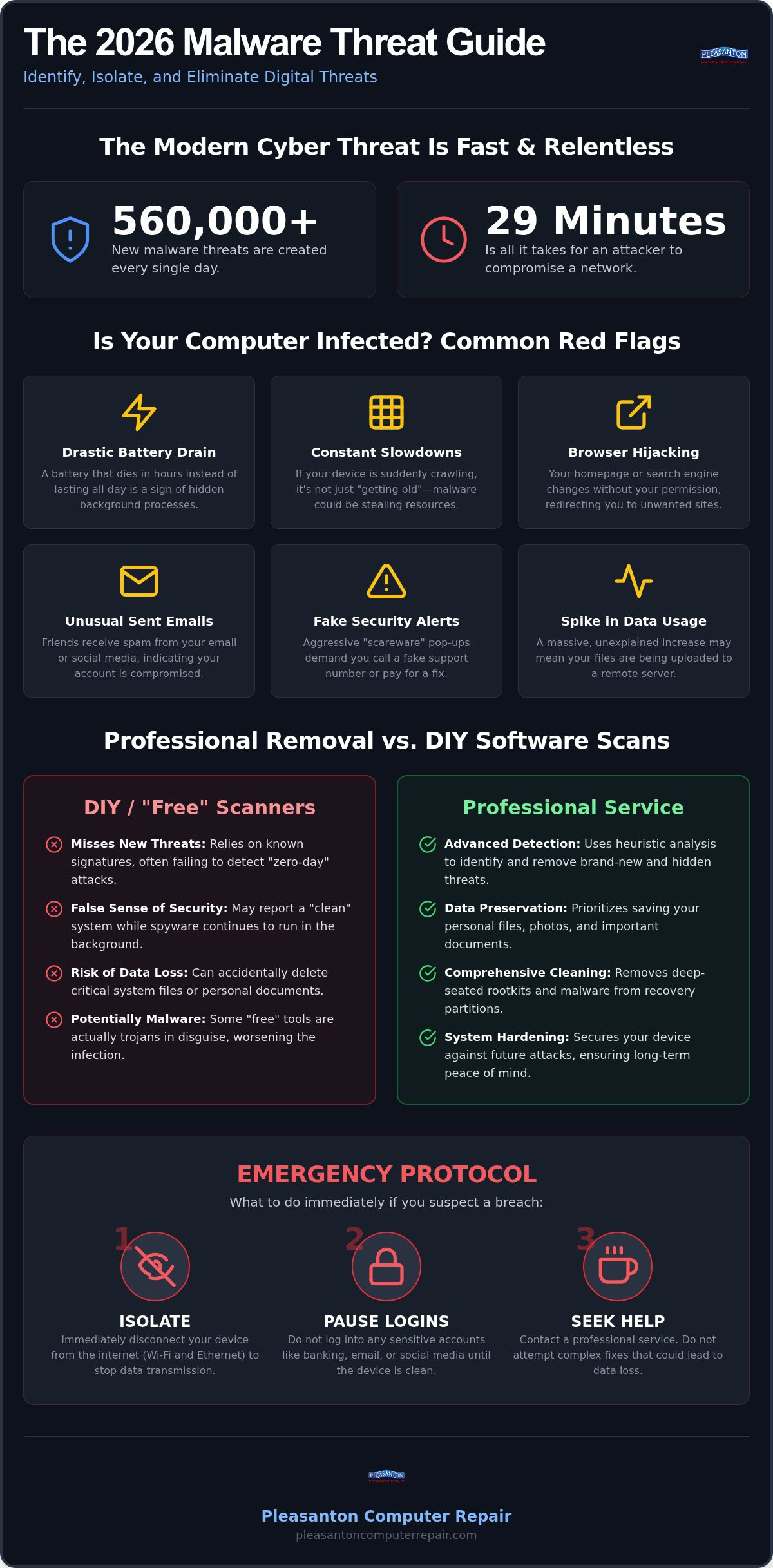
Did you know that over 560,000 new malware threats are identified every single day? Even more startling is the fact that once a cybercriminal gains access to a device, it takes an average of just 29 minutes for them to move through a network and target your sensitive data. If you’re searching for malware removal Pleasanton, you probably feel that pressure. Maybe your laptop is suddenly crawling at a snail’s pace, or perhaps you’re staring at a wall of conflicting antivirus warnings that don’t make any sense. It’s completely normal to feel a sense of dread about your identity or your private files when your tech starts acting up.
We understand how stressful these digital headaches can be for our neighbors here in the East Bay. You deserve a computer that works as hard as you do without the constant fear of hidden trackers or data breaches. This 2026 guide will help you identify modern threats, isolate infections, and professionally clean your system to restore its original speed. We’ll also cover how to verify your data is secure and what steps you can take to prevent future infections, ensuring your peace of mind stays intact.
Key Takeaways
- Learn to spot the subtle signs of “silent” malware that hides in background processes to bypass standard security alerts.
- Understand why professional malware removal Pleasanton services are essential for clearing deep-seated threats that off-the-shelf software often misses.
- Compare the benefits of in-store, on-site, and remote support to choose the most efficient path for your device’s recovery.
- Follow a clear emergency protocol to isolate your tech and pause sensitive logins immediately if you suspect a breach.
- Find out how a professional cleanup restores your computer’s speed and protects your personal information from sophisticated 2026 threats.
Identifying Malware Infections in the 2026 Digital Landscape
In the early days of computing, an infection was usually obvious. You might have seen a clunky pop-up or experienced a total system crash. Today, the situation is much more sophisticated. Modern threats are designed to be “silent,” hiding in plain sight while they quietly harvest your data or use your processor power for background tasks. Understanding what is malware in 2026 means looking past the obvious crashes and paying attention to the subtle shifts in how your device behaves. Many people searching for malware removal Pleasanton initially think their computer is just “getting old,” but that persistent lag is often a sign of a hidden background process stealing your resources.
Windows systems still face traditional file-based attacks, but Mac users aren’t immune. On a Mac, you’re more likely to see browser hijackers that change your default search engine or persistent adware that mimics system notifications. Windows malware often aims for deeper system integration, hiding in recovery partitions where basic scans can’t reach them. Don’t fall for “scareware” pop-ups that claim your computer is infected and provide a phone number for “Apple Support.” These are almost always scams designed to gain remote access to your device. Real security alerts won’t ask you to call a random number or pay for a fix using gift cards.
Common Red Flags for Pleasanton Home Users
If you’re noticing your laptop battery dying in two hours when it used to last six, something is likely running without your permission. This unexplained battery drain is a hallmark of modern infections that use your hardware for data mining. Similarly, if your browser keeps redirecting you to unfamiliar search engines, your settings have been hijacked. One of the most frustrating signs is when friends in the East Bay start receiving strange messages or spam emails from your account. These are clear indicators that your digital identity is being used as a springboard for further attacks, making malware removal Pleasanton a high priority to protect your reputation.
Advanced Threats: Ransomware and Spyware
Ransomware continues to be a major concern for small businesses in Pleasanton. These attacks encrypt your vital files and demand payment for their release, often causing total operational shutdowns. Even more common now are “stealer-logs.” These programs specifically target the saved passwords in your browser, allowing hackers to access your bank accounts or social media without you ever noticing a login attempt. If you see a sudden, massive increase in your monthly data usage, it might be your computer uploading your private life to a remote server. Catching these signs early is the best way to prevent a minor infection from becoming a total identity theft crisis.
Professional Malware Removal vs. DIY Software Scans
It’s tempting to think a quick download from the internet will solve your tech troubles. You want your speed back, and you want it now. Most people start by clicking a “scan” button on a free tool they found online. While these tools have their place, they often struggle with the persistent threats we see in 2026. These programs typically rely on a database of known “signatures.” If the malware is brand new or has been slightly modified, the software might give you a clean bill of health while a “stealer-log” continues to monitor your keystrokes. This creates a dangerous “false negative” scenario where you feel secure but remain vulnerable. Following cybersecurity best practices involves recognizing that a single software scan isn’t a silver bullet for modern infections.
One major risk of DIY scans is the “delete first, ask questions later” approach. A generic tool might identify a suspicious file and delete it, only for you to realize later that it was a critical system component or a folder containing your family photos. We prioritize keeping your personal files safe throughout the cleaning process. It’s about more than just removing a bug; it’s about making sure your digital life remains intact. Choosing expert malware removal Pleasanton ensures that your hardware is hardened against future attacks without sacrificing your important documents. Before committing to a solution, it’s worth reviewing a detailed breakdown of the cost of virus removal Pleasanton residents can expect so you can make an informed decision.
Why “Free” Scanners Often Miss the Mark
Free tools are often limited by design. They might find the easy stuff, but they frequently miss “zero-day” threats that haven’t been added to public databases yet. There’s also a darker side to free downloads. Some websites offer “free removal tools” that are actually trojans in disguise. Once you click install, you’ve handed the keys to your system to the very people you were trying to block. Professional tools use heuristic analysis to find unknown patterns and suspicious behaviors rather than just matching files against a list. This proactive approach is vital for effective malware removal Pleasanton users can rely on to catch what basic software misses.
The Professional Eradication Process
True security requires more than just deleting a malicious file. Modern infections often dig deep into the system registry or hide within your computer’s recovery partition. If the root cause isn’t addressed, the infection will simply reinstall itself the next time you reboot. Expert technicians perform manual registry cleaning and repair damaged system files to ensure the “hooks” are completely removed. We also look for persistent “rootkits” that load before your operating system even starts. This level of detail ensures your computer isn’t just “clean” for an hour, but stable for the long term. If your system feels compromised, a professional virus removal service can protect your data integrity while restoring performance.
Choosing the Right Service: In-Store, On-Site, or Remote
When you’re dealing with a digital infection, speed and convenience are usually your top priorities. You want to know if you can get help without leaving your desk or if you need to pack up your hardware for a trip to Main Street. We offer three distinct paths for malware removal Pleasanton residents can choose from based on the severity of the issue and their specific setup. Each method has its own strengths, but the goal is always the same: getting you back to work with a secure, high-performing device that you can trust again.
Remote support is often the fastest way to get professional eyes on your system. If your computer still connects to the internet and you’re mostly seeing annoying pop-ups or browser redirects, we can often log in securely and clean the system while you watch. It’s an efficient way to handle minor troubleshooting without any travel time or the need to unhook all your cables. This is especially helpful for quick diagnostics to see if the issue is a simple fix or something that requires more intensive care. For more details on how this process works, check out our remote computer support Pleasanton guide.
When to Bring Your Computer to Main Street
Some infections are too deep for a remote connection to handle. If you’re seeing the “Blue Screen of Death” or your computer won’t boot into Windows or macOS at all, an in-store visit is the best choice. Being at our Main Street office allows us to run deep hardware-level diagnostics that just aren’t possible over the web. We can bypass the infected operating system entirely to scan your drive from a clean environment, ensuring no hidden code remains. While we’re cleaning out the software, it’s often the perfect time to handle physical maintenance. Many customers choose to pair their cleanup with a MacBook battery replacement Pleasanton to ensure their laptop feels brand new both inside and out. This comprehensive approach ensures that when you pick up your machine, it’s truly ready for another several years of service.
On-Site and Business Security Resources
For companies in Dublin, San Ramon, and Livermore, an infection on one workstation can quickly spread to networked printers, shared drives, and servers. On-site support allows us to look at the “big picture” of your office security. We don’t just clean the infected machine; we help implement firewalls and security protocols to prevent a re-infection across your entire team. This is vital because modern 2026 threats often move laterally through a network in under half an hour. If you’re managing an office, our small business computer repair Pleasanton services provide the specialized attention required for these complex environments. This proactive approach is the most reliable way to ensure your malware removal Pleasanton strategy keeps your business running smoothly without unexpected downtime.
Emergency Protocol: What to Do If You Suspect an Attack
The moment you realize your computer is compromised is a stomach-turning experience. Maybe your mouse is moving on its own, or perhaps you’ve been hit with a message demanding payment. Whatever the case, your immediate actions will determine how much data you can save. The first and most important step is to isolate the machine. Turn off the Wi-Fi and unplug any Ethernet cables. Most modern threats require a connection to communicate with an attacker’s server or to spread across your home network. By cutting the cord, you effectively “freeze” the infection in its tracks.
Once you’re offline, stop all financial transactions. Don’t log into your bank, even if you think the site is safe. If you need professional malware removal Pleasanton, it’s better to act quickly while the threat is contained. Use your phone to take pictures of any error messages or suspicious pop-ups. These photos are invaluable for technicians because they provide a “snapshot” of the infection’s behavior before the system was powered down.
Containing the Threat at Home
A common mistake is trying to “Google the solution” on the infected computer. This is dangerous. The malware may be monitoring your keystrokes or could redirect your searches to even more malicious sites. Similarly, don’t plug in a USB drive to try and back up your files. Many 2026 virus strains are designed to infect any removable storage the second it’s connected; this could lead to you accidentally spreading the virus to your other devices later. If you suspect ransomware is actively encrypting your files, perform a “hard” shut down by holding the power button until the screen goes black. This is often safer than a graceful shut down, which might give the software time to finish its malicious tasks.
Next Steps for Data Protection
While your computer is offline, use a secondary, clean device like a smartphone to change your most important passwords. Start with your primary email and your banking accounts. Keep a close eye on your statements for any unauthorized East Bay or international charges. If your system was heavily compromised, you might want to consider an SSD upgrade Pleasanton CA during the recovery process. This allows us to give you a completely fresh start on a faster, more reliable drive while ensuring the old infection is physically removed from the machine. If you’re currently facing an attack, don’t wait for things to get worse. Reach out for a secure virus removal diagnostic to protect your digital life.
Why Pleasanton Computer Repair is Your Local Security Partner
Technology should empower your daily life, not become a source of constant anxiety. Since 2002, we’ve served the East Bay community from our office on Main Street, acting as a reliable shield against digital threats. We understand that finding malware removal Pleasanton services isn’t just about deleting a few bad files; it’s about restoring your peace of mind. Our team brings decades of experience to the table, ensuring that whether you’re using a PC, a Mac, or a mobile device, your tech is in capable hands. We pride ourselves on transparent communication, explaining exactly what went wrong and how we plan to fix it without hiding behind confusing jargon.
Our approach goes beyond a one-time fix. We focus on both immediate restoration and long-term prevention. After we’ve cleared an infection, we work with you to harden your system against future attacks, providing the tools and knowledge you need to stay safe online. This commitment to the community has made us a trusted partner for home users and local businesses alike for over twenty years. We’re here to ensure your digital tools remain fast, functional, and, most importantly, secure.
Comprehensive Tech Support Beyond Malware
Sometimes a security breach reveals that a system is simply too old to keep up with modern protection requirements. If your current computer is struggling to run updated security software, we can guide you toward high-quality refurbished laptops Pleasanton CA that offer a fresh, secure start at a great value. Our expertise also extends to mobile devices, including specialized iPhone data recovery Pleasanton services for those critical moments when your phone’s data seems lost. From custom PC building to hardware optimization, we provide the comprehensive support needed to keep all your devices running at peak performance.
Visit Us in Downtown Pleasanton
Our office is conveniently located at 400 Main Street, Suite 205, right in the heart of downtown. We’ve designed our service process to be as smooth as possible for residents throughout the Tri-Valley, including Livermore, Dublin, and San Ramon. You can easily schedule an appointment that fits your busy lifestyle, knowing that expert help is just a short drive away. We invite you to visit us and experience firsthand how stress-free and straightforward professional tech support can be. Let us handle the technical headaches so you can get back to what matters most. For reliable malware removal Pleasanton and beyond, we are ready to help you secure your digital world.
Take Control of Your Digital Security
Modern threats move fast, but you don’t have to face them alone. We’ve explored how to spot the silent signs of infection and why professional intervention is the only way to ensure deep-seated rootkits are truly gone. By following a clear emergency protocol and choosing expert care, you can protect your personal data from the sophisticated threats of 2026. You’ve worked hard for your data; it’s worth the extra layer of protection to keep it out of the wrong hands.
If your tech is acting up, don’t wait for a minor glitch to become a major security breach. Our team has been serving the East Bay since 2002 from our convenient Main Street office. We provide expert PC and Mac support to get your devices back to peak condition quickly and safely. Schedule Your Malware Diagnostic at Pleasanton Computer Repair and let our friendly experts handle the heavy lifting. Professional malware removal Pleasanton is just a visit away, ensuring your digital life stays private and your computer stays fast. You deserve technology that works for you without the stress of hidden infections.
Frequently Asked Questions
How do I know if my computer has a virus or just a slow hard drive?
You can often tell the difference by looking for erratic behavior versus consistent lag. A failing hard drive usually slows down every task equally, but malware often causes specific issues like browser redirects, unrequested emails, or a fan that runs at full speed even when the laptop is idle. We perform comprehensive diagnostics to see if you need a software cleanup or a hardware repair like an SSD upgrade.
Can malware be removed from a Mac, or are Apples immune?
Yes, we can remove malware from any Mac system. The idea that Apple computers are immune is a myth that attackers exploit. In 2026, we see a significant amount of “scareware” and sophisticated spyware specifically designed for macOS, making professional intervention just as important for Mac users as it is for those on Windows. We have the specialized tools to clean Apple devices safely.
Will I lose my photos and documents during the malware removal process?
Protecting your personal data is our top priority during every repair. We use specialized tools to isolate your photos and documents from the infected system files before we begin the eradication process. This ensures that the malicious code is destroyed while your memories and important work files remain untouched and safe. We’ll always discuss your data recovery options if an infection has already damaged your files.
How long does a typical professional malware removal take?
A thorough professional cleanup usually takes between one and two business days. While a simple software scan might take an hour, a professional service includes manual registry repairs and deep-system verification to ensure the infection doesn’t just reinstall itself. We value your time and work efficiently to get your tech back as quickly as possible without cutting corners on your security.
Is it safe to use my computer for banking after a virus has been removed?
It is safe once we’ve verified the system is clean and implemented new security barriers. As an extra precaution, you should always change your banking and email passwords from a clean device after an infection is discovered. This prevents hackers from using any login info they might have harvested before the malware removal Pleasanton process was completed. We’ll help you verify that your data is secure.
Do I need to buy new antivirus software after you clean my computer?
Not necessarily, but we’ll review your current setup and suggest the best path forward. Sometimes your existing software just needs a proper configuration, but other times we might suggest an upgrade to a more robust 2026 security suite. Our goal is to provide you with a “hardened” system that stops threats before they can take root again, giving you long-term peace of mind.
Can you remove malware remotely, or do I have to bring my computer in?
We offer both options depending on the severity of the infection. Remote support is perfect for removing adware or fixing browser issues without you having to leave your home. If the malware is preventing your computer from starting or has disabled your internet connection, a visit to our Main Street office is the most reliable solution for a deep, hardware-level clean.
What is the difference between a virus, malware, and ransomware?
Malware is a broad category that includes everything from annoying tracking cookies to dangerous viruses. A virus is a specific type of malware that spreads by attaching to other files, while ransomware is a much more aggressive threat that encrypts your data and demands payment for its release. We have experience dealing with all these variations to provide the effective malware removal Pleasanton residents expect for their home or business. If you’re weighing your options, our guide to the cost of virus removal Pleasanton homeowners and businesses face can help you plan ahead and budget appropriately.