
You’re trying to open a folder of family photos when your screen suddenly freezes, replaced by a flickering window you didn’t open. It’s a sinking feeling that many of our neighbors in the East Bay have felt recently. You start to worry if your private documents are safe or if your identity is at risk, all while your computer crawls at a snail’s pace. We understand that tech failures like this aren’t just annoying; they’re genuinely stressful.
The good news is that you don’t have to face these digital headaches alone. This guide will help you understand the current 2026 threat landscape, from fileless malware to AI-powered scripts, and provide a clear breakdown of the cost of virus removal pleasanton. You’ll learn exactly how to identify malicious software and the specific steps required to secure your personal data. We will also look at how a professional cleaning can restore your peace of mind and even make your PC faster than it was before the infection. By the end of this article, you’ll know exactly how to get your digital life back on track and ensure you’re receiving a fair price for expert local service.
Key Takeaways
- Spot early warning signs like sudden system freezing or strange browser redirects before they lead to permanent data loss.
- Master the safe way to isolate your PC by disconnecting from the web and using Safe Mode to stop malicious processes in their tracks.
- Understand the current market rates and the cost of virus removal pleasanton so you can budget for a professional cleanup without any technical jargon surprises.
- Secure your future with the “Patch” rule and Multi-Factor Authentication to keep your personal photos and documents protected from evolving 2026 threats.
- Learn why local Main Street expertise provides a faster, more reliable recovery than shipping your computer to a distant repair center.
Identifying the Infection: Signs You Need Virus Removal in 2026
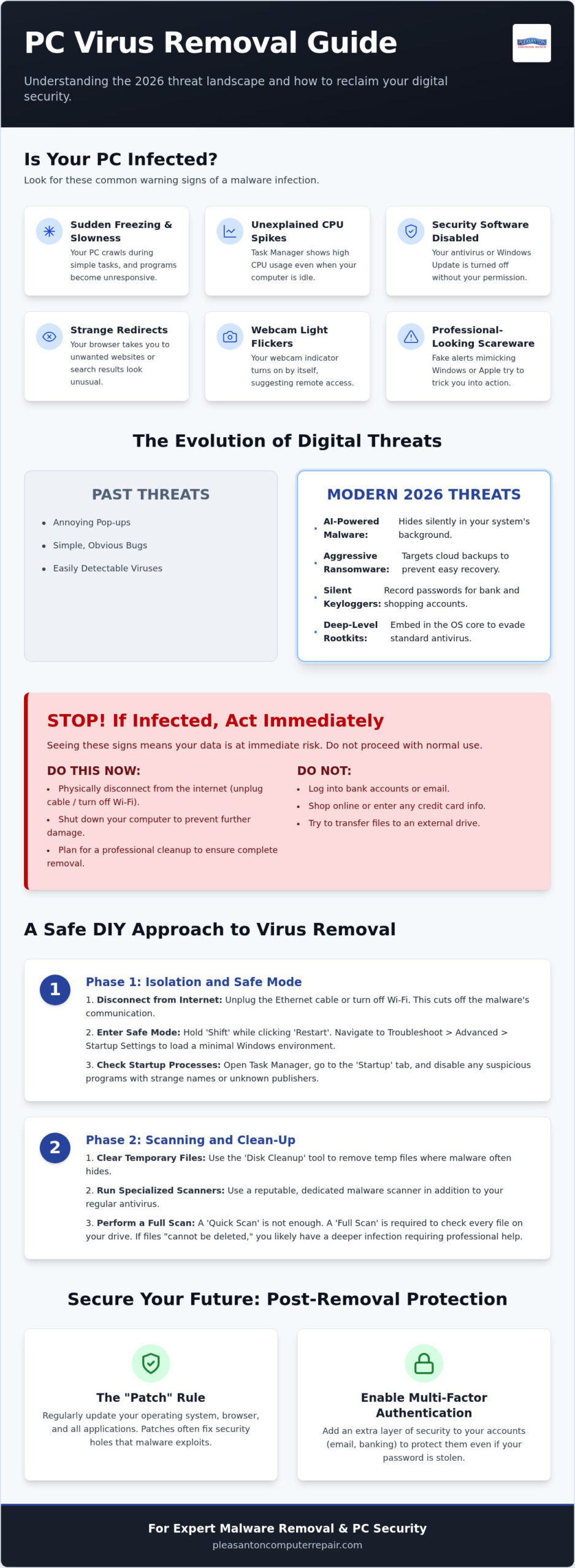
Is your computer suddenly acting like it’s ten years old? You might notice your PC freezing during simple tasks or a sudden sluggishness that makes even opening a web browser feel like a chore. These aren’t just signs of an aging machine. They are often the first indicators of a malicious infection. You’ve probably started looking into the cost of virus removal pleasanton to see if a repair fits your budget, but understanding what’s happening under the hood is vital. If your CPU usage is spiking while no programs are visibly running, your computer is likely working for someone else. Another major warning is when your security software or Windows Update gets disabled automatically. Malware does this to protect itself from being deleted.
Modern Malware vs. Traditional Viruses
The digital threats we see today are far more sophisticated than the simple bugs of the past. To get a better sense of how these threats have changed over time, you can read about What is a computer virus? and its evolution. In 2026, we’ve moved away from loud, annoying pop-ups. Now, malware often uses AI to hide in your system’s background, performing silent tasks like data exfiltration or cryptojacking. Modern ransomware is particularly aggressive, specifically targeting your personal cloud backups so you can’t easily recover your photos. We also see a rise in scareware that mimics official Windows or Apple alerts. These fake warnings look incredibly professional and aim to trick you into providing remote access to your system.
When to Stop Using Your Device Immediately
There are moments when you need to walk away from the keyboard to protect your data. If you see your webcam light flicker when you haven’t turned it on, stop immediately. Someone may be remotely accessing your hardware. You should never log into bank accounts or shop online if you suspect an infection, as keyloggers can record every password you type. Rootkits are deep-level infections that hide from standard antivirus software by embedding themselves in your operating system’s core. If you notice search results that look off or constant browser redirects, the infection is likely trying to lead you to further malicious sites. Knowing the cost of virus removal pleasanton helps you plan for the fix, but shutting down now prevents the situation from getting worse.
Step-by-Step Guide: How to Remove a Virus from Your PC Safely
You’ve identified the signs of an infection. Now, it’s time to take control. While you might be worried about the cost of virus removal pleasanton, taking these initial steps yourself can often prevent the damage from spreading further. It’s about acting quickly and methodically to protect your personal photos and sensitive documents. Dealing with malware is stressful, but a structured approach can help you reclaim your digital space without losing your data.
Phase 1: Isolation and Safe Mode
First, physically disconnect your computer from the internet. Unplug the Ethernet cable or toggle your Wi-Fi off. This is vital because modern malware often communicates with a remote server to send out your data or download more harmful scripts. Once you’re offline, trigger Safe Mode. In the latest 2026 Windows builds, you can do this by holding the Shift key while clicking Restart from the Power menu. Then, navigate through Troubleshoot and Advanced Options to find Startup Settings. This loads only the bare essentials, preventing many malicious processes from starting. Open your Task Manager and look for suspicious items under the Startup tab. If you see a process with a random string of letters or an unknown publisher, disable it to stop it from launching on the next boot.
Phase 2: Scanning and Clean-up
Next, you’ll want to clear out your temporary files. Browser-based “droppers” often hide in these folders, waiting to reinstall the virus the moment you think you’re safe. Use the Disk Cleanup tool to wipe these out. Now, it’s time to run a scan. While your basic antivirus is a good start, you often need a more specialized malware scanner to catch deep-level threats. PCMag offers a great resource on how to remove malware using these tools. A Quick Scan is useful for a fast check, but a Full Scan is necessary to search every corner of your hard drive.
If you find files that “cannot be deleted,” they are likely locked by the system or a persistent rootkit. This is a clear sign that the infection has deep roots. Don’t forget to reset your browser settings to factory defaults. Malicious extensions can linger even after the main virus is gone, continuing to track your activity. If this process feels overwhelming or your computer still feels sluggish, it’s okay to ask for help. Our team at Pleasanton Computer Repair can handle the heavy lifting for you, ensuring your data is secure and your system is optimized. Understanding the cost of virus removal pleasanton helps you choose the right level of support for your peace of mind.
The Cost of Virus Removal in Pleasanton: What to Expect
When your computer is compromised, the first question is usually about the bottom line. You want to know if the repair is a fair investment or if you’re better off buying a new machine. The cost of virus removal pleasanton residents encounter typically depends on the complexity of the infection and the time required for a deep-system scan. Most reputable local shops charge a diagnostic fee. This isn’t an extra “tax”; it’s a way to protect you from guessing. It ensures the technician identifies whether the problem is a simple browser hijacker or a deep-rooted rootkit before you commit to a full repair.
The total volume of data on your machine also plays a role. If you have two terabytes of family photos and business documents, the scanning and backup process takes much longer than it would for a student laptop with just a few files. Furthermore, the severity of the threat matters. Simple adware removal is relatively straightforward. However, specialized ransomware removal often carries a premium. This is because it involves forensic data recovery and complex decryption attempts that require a higher level of expertise and time.
Factors That Influence Your Final Bill
Choosing between in-store and on-site service often shifts the price. In-store repairs at our Main Street location are usually more cost-effective because technicians can run multiple automated scans simultaneously. On-site visits add travel time and dedicated labor hours to the bill. Sometimes, a virus works the hardware so hard that it causes an older drive to fail prematurely. If your system is already open for cleaning, it’s often the perfect time for an SSD upgrade Pleasanton CA. This bundle not only removes the threat but leaves you with a computer that feels faster than the day you bought it.
The Hidden Costs of DIY Failures
Trying to save money with a DIY fix can sometimes backfire. We often see customers who accidentally “brick” their operating system by deleting critical system files they thought were part of the virus. This turns a standard cleanup into a much more expensive full OS reinstall and data recovery job. Incomplete removals are another trap. If a single “dropper” file remains, your PC will be reinfected within hours, leading to double labor costs. For minor glitches or suspicious pop-ups, remote computer support Pleasanton might be a cheaper first step. It allows a professional to peek at the system without you needing to leave your house, potentially resolving the issue before it escalates. Understanding the cost of virus removal pleasanton helps you make an informed decision that prioritizes your data’s safety.
Post-Removal: Securing Your PC and Preventing Future Attacks
Getting your computer cleaned is a huge relief. However, you don’t want to find yourself searching for the cost of virus removal pleasanton again in a few months. The best defense is a proactive one. Start by following the ‘Patch’ rule. This means you should update your operating system and all third-party software as soon as a notification appears. These patches often fix security holes that hackers are actively trying to exploit. By staying current, you close the doors that digital intruders use to get back in.
You should also implement Multi-Factor Authentication (MFA) on every account that supports it. This extra layer of security ensures that even if a password is stolen, your data remains safe. We also recommend DNS filtering. This technology acts like a digital filter for your internet connection, blocking access to known malicious websites before they can even load on your screen. For your most critical files, set up ‘air-gapped’ backups. By keeping a copy of your data on a drive that isn’t physically connected to your computer or network, you protect your photos and documents from ransomware that spreads through connected systems.
2026 Security Essentials for Pleasanton Residents
The digital landscape has changed, and free antivirus software is often not enough in 2026. Many free tools lack the advanced behavioral analysis required to stop AI-driven threats. We’re seeing more AI-generated phishing emails that are specifically tailored to target East Bay businesses and residents. These messages are nearly impossible to distinguish from legitimate correspondence. Zero-day exploits are vulnerabilities in software that are unknown to the developer, which means that regular updates are the only defense to ensure you’re protected the moment a fix is released.
Protecting Your Small Business
Cybercrime costs are projected to reach $23 trillion by 2027, and nearly half of small businesses already experience cyberattacks. This makes your team the most important part of your defense. Employee training is vital because a single mistake can open the door to your entire network. To keep your company safe, consider small business computer repair Pleasanton for your ongoing maintenance needs. Understanding the cost of virus removal pleasanton is important, but professional malware removal Pleasanton is also a key part of staying compliant with data protection regulations.
Don’t wait for the next infection to take action. The team at Pleasanton Computer Repair can audit your systems and implement the latest security protocols to keep your data safe.
Why Choose Pleasanton Computer Repair for Malware Removal?
Choosing a repair shop is about more than just finding a fix. It’s about trust. If you’re concerned about the cost of virus removal pleasanton, you deserve a partner who offers transparency rather than technical jargon. Since 2002, our team has served the East Bay from our Main Street location, providing a level of local reliability that big-box retailers simply can’t match. We don’t ask you to ship your laptop away to a distant warehouse. Instead, you can walk right into our shop and speak directly with the expert who will be handling your data.
Our philosophy is data-first. We understand that while a computer can be replaced, your personal documents and photos cannot. Before we begin any deep cleaning, we prioritize the integrity of your files. This approach ensures that the cost of virus removal pleasanton includes the peace of mind that comes from knowing your digital life is in safe hands. We don’t just “wipe and start over” unless it is absolutely necessary; we always communicate with you before taking major steps. Our goal is to return a machine that is both clean and optimized for your daily tasks.
Our Proven 4-Step Cleanup Process
We’ve refined our methods over two decades to ensure your PC returns to you faster and more secure than before. First, we perform deep hardware diagnostics. This ensures your system is stable enough to handle the intensive scanning process. Next, we use multi-engine malware scanning to catch hidden threats that single-brand antivirus programs often miss. The third step involves system registry repair and performance tuning. We clear out the digital junk left behind by the infection. Finally, we implement security hardening and install the latest updates to protect you from future attacks.
Visit Us on Main Street
You can find us conveniently located at 400 Main Street, Suite 205. We are proud to serve neighbors from Dublin, Livermore, and the entire Tri-Valley area. Our team works to make the repair process as stress-free as possible, moving you from technical frustration to a fast, functional computer. If you’re ready to secure your data and restore your PC’s performance, Schedule your virus removal appointment today and let our seasoned experts take it from here.
Restore Your Peace of Mind and System Performance
Navigating a technical crisis is never easy, but you’ve already taken the most important step by learning how to protect your machine. Remember to isolate your PC immediately when signs of infection appear and stick to the “Patch” rule for all your software updates. While the cost of virus removal pleasanton can vary based on the severity of the threat, investing in professional cleanup is the best way to ensure your private photos and financial documents remain secure. You’ve now got the tools to spot threats before they escalate.
Our team has been serving Pleasanton since 2002, offering A+ rated local tech support that you can trust. With our expert PC and Mac technicians, we don’t just remove the malware; we optimize your system to run better than before. You don’t have to let a digital intruder slow you down or compromise your peace of mind. We are here to act as your protective barrier against technical headaches, ensuring your data stays right where it belongs.
Ready to get back to work with a fast, secure computer? Book Your Professional Virus Removal on Main Street and let us handle the technical heavy lifting for you. We look forward to seeing you at our shop and helping you stay safe in the digital world.
Frequently Asked Questions
How much does professional virus removal typically cost in Pleasanton?
The total price depends on the complexity of the infection and the amount of data that needs to be scanned and protected. Most local experts start with a diagnostic fee to identify whether you’re dealing with simple adware or a deep-rooted rootkit. Factors like the type of malware and whether you need on-site or in-store service will influence the final cost of virus removal pleasanton residents pay for a clean system.
Will I lose my photos and documents during the virus removal process?
We prioritize a data-first philosophy to ensure your personal files remain intact. Our technicians focus on isolating and removing malicious code without touching your family photos or important documents. In cases of severe ransomware, we use forensic recovery techniques to save as much data as possible, but for standard infections, your files are typically very safe during the process.
Can a virus be removed from a Mac, or are they immune?
Macs are definitely not immune and require professional malware removal just like PCs. While macOS has strong built-in security, modern threats like spyware, “scareware,” and browser hijackers frequently target Apple users. We specialize in both PC and Mac repairs to ensure every device in your home or office stays secure and functional.
How long does it take to get my computer back after a virus cleanup?
Most standard virus removals are completed within 24 to 72 hours. This timeframe allows us to run multiple deep-system scans and perform the necessary registry repairs to ensure the infection is completely gone. If your system requires forensic data recovery or has extensive hardware damage from the malware, it might take a bit longer, but we always keep you updated on the progress.
Is it worth fixing an old laptop with a virus, or should I buy a new one?
It’s often much more cost-effective to clean and upgrade an old laptop than to buy a new one. If your hardware is still in good shape, removing the virus and adding an SSD upgrade can make your computer feel faster than the day you bought it. We can evaluate your laptop during the diagnostic phase to help you decide if a repair is a smart investment.
Can you remove a virus remotely, or do I have to come to the shop?
Many minor infections and browser issues can be resolved quickly through remote support. However, deep-level threats like rootkits often hide from remote tools or disable your internet connection entirely. For a comprehensive cleaning that guarantees the infection is gone, visiting our Main Street shop is usually the most reliable option.
What is the difference between malware and a computer virus?
Malware is a broad term that includes everything from ransomware to spyware, while a virus is just one specific type of malicious code that self-replicates. When people ask about the cost of virus removal pleasanton, they’re usually looking for a solution to any type of malicious software slowing down their PC. We handle the full spectrum of these digital threats to keep your system running smoothly.
Does my antivirus software guarantee I won’t get infected again?
No software can provide a 100% guarantee because new “zero-day” exploits are discovered every day. Antivirus is a vital first line of defense, but it works best when combined with safe browsing habits and regular software updates. We provide final security hardening after every cleanup to help you stay protected against the latest 2026 threats.