
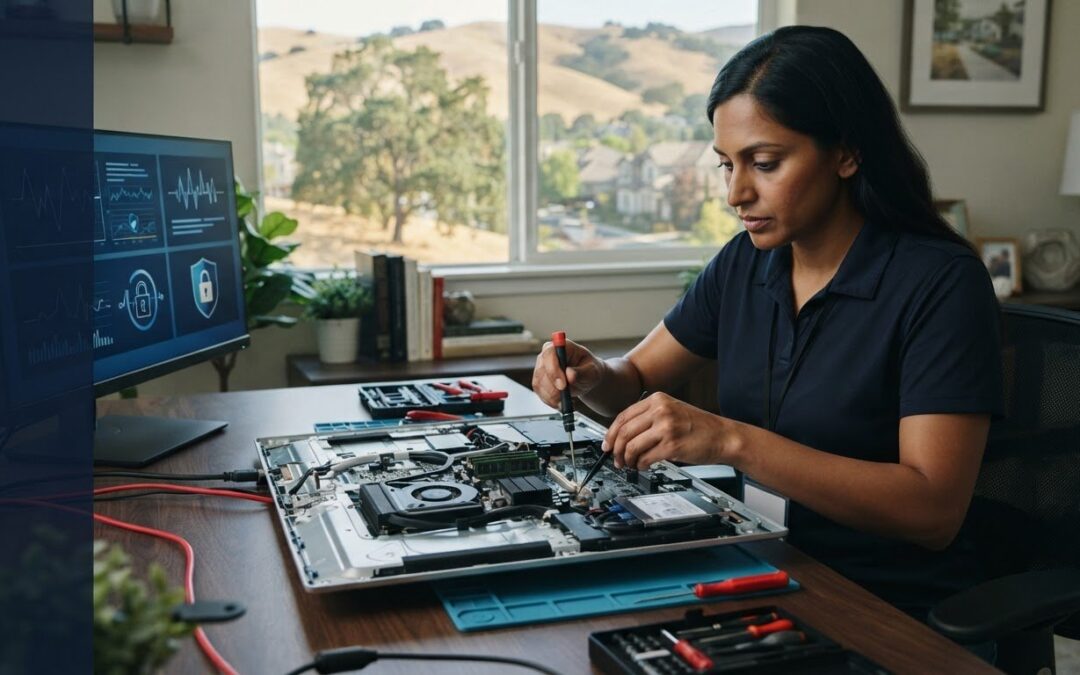
What if you never had to unplug a maze of workstation cables, wedge a fragile 27-inch iMac into your back seat, and surrender your business files to a crowded retail service counter? When system errors or sudden hardware failures interrupt your workday, your immediate question is practical: can an expert handle reliable on-site Mac repair Danville visits directly at your home or office?
You already know how stressful it is to face multi-day turnaround times or worry about private data while your computer sits in a distant depot. Discover how professional on-site Mac service works in Danville to diagnose and resolve hardware faults, macOS corruption, and networking issues right before your eyes. Ahead, we break down what to expect during a visit, how to prepare your setup, and how local support protects your daily productivity.
Key Takeaways
- Eliminate transit risks and save hours of downtime by keeping fragile iMac displays and complex workstation cabling set up right where you work.
- Discover why choosing on-site Mac repair Danville professionals bypasses rigid retail Genius Bar queues while keeping confidential files securely under your roof.
- Understand which technical issues, from virus removal to drive upgrades, can be swiftly resolved at your desk versus those requiring dedicated bench diagnostics.
- Learn simple preparation steps, such as data backups and organizing login credentials, to ensure your technician visit is fast and seamless.
- Find out what questions to ask when vetting local East Bay specialists to ensure experienced, transparent support for your home or business.
Understanding On-Site Mac Repair in Danville: When Mobile Support Makes Sense
Packing up an Apple computer is rarely as simple as sliding a laptop into a sleeve. Disconnecting an iMac or desktop Mac Studio means dealing with delicate display panels, tangled peripheral cables, and carefully calibrated external monitors. Opting for professional on-site Mac repair Danville services removes the friction of unhooking your setup and hauling fragile hardware across town.
Beyond the physical hassle, off-site visits break the context of your daily workspace. Many persistent Mac errors stem from local network configurations, faulty Thunderbolt hubs, or automated backup drives that cannot be reproduced on a store service counter. Having support arrive at your location preserves your digital ecosystem intact. It also protects your personal privacy; sensitive corporate records, client files, and private photos stay under your direct supervision.
The Logistics of In-Home and In-Office Technician Visits
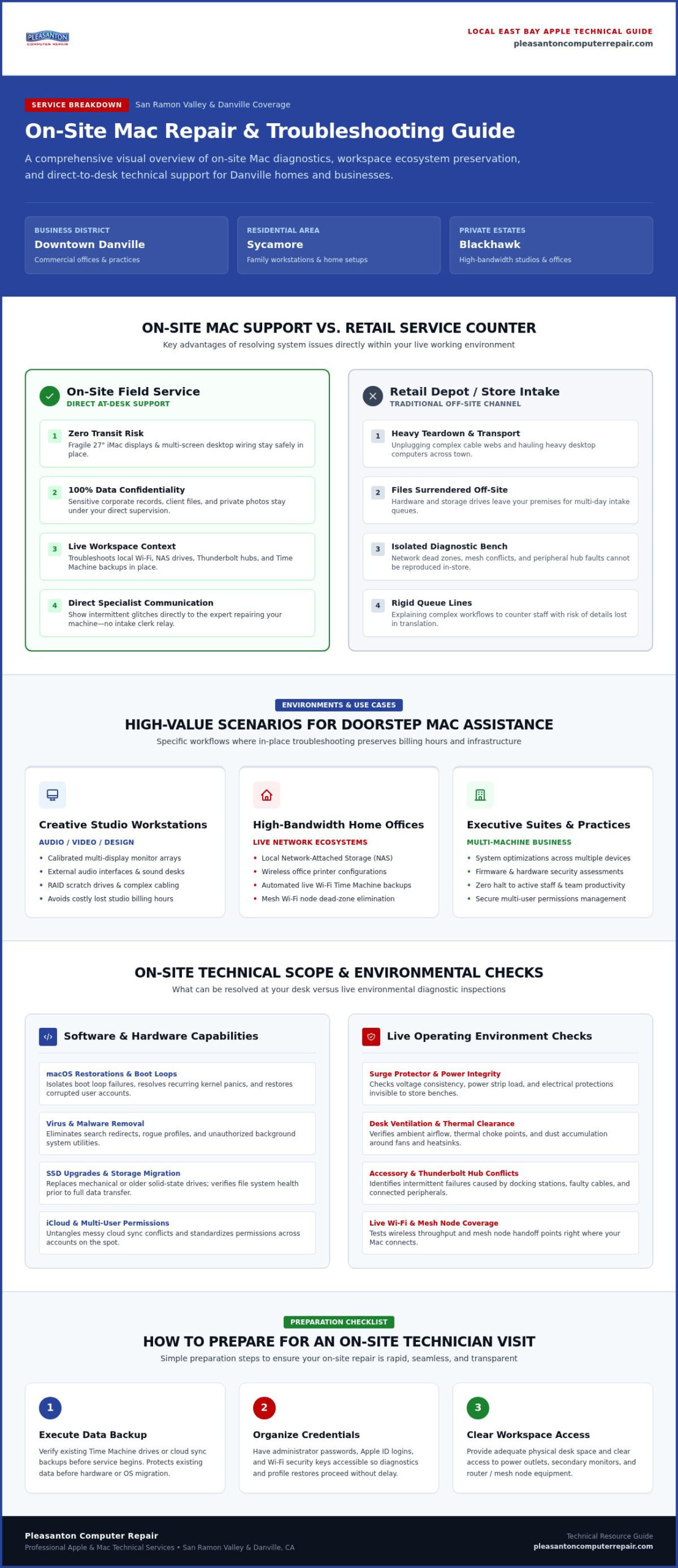
Mobile dispatch provides convenient coverage across the San Ramon Valley, serving businesses near Downtown Danville, family properties in Sycamore, and private estates in Blackhawk. When an experienced computer repair technician arrives at your door, diagnosis begins within your actual operating environment.
A mobile technician quickly inspects practical factors that workshop staff cannot see, such as surge protector integrity, desk ventilation, and accessory conflicts. You also skip the frustration of explaining intermittent glitches to a retail intake clerk. Instead, you show the exact failure mode directly to the specialist who will perform the repair, ensuring nothing gets lost in translation.
High-Value Scenarios for Mobile Apple Assistance
While some issues can be handled in a dedicated laboratory, specific environments benefit significantly from doorstep troubleshooting:
- Creative Studio Workstations: Setups tethered to calibrated multi-display arrays, audio interfaces, and RAID scratch drives where tearing down cabling costs valuable billing hours.
- High-Bandwidth Home Offices: Systems dependent on local network-attached storage, wireless printer networks, and automated Time Machine backups that must be tested on your live Wi-Fi network.
- Executive Suites and Small Practices: Professional offices needing system optimizations, virus removal, or hardware assessments across multiple machines without halting team productivity.
Addressing these challenges in place makes on-site Mac repair Danville properties rely on an efficient, stress-free alternative to packing up your technology.
Evaluating On-Site Capabilities: What Can Be Fixed at Your Danville Location?
A common misconception about mobile technical support is that field technicians can only handle simple software fixes. Thanks to modern diagnostic toolkits and evolving right to repair laws, independent specialists can address a wide spectrum of issues right at your desk. However, setting realistic expectations means understanding where mobile field service thrives and when a sterile repair bench becomes necessary.
Software Diagnostics, macOS Restorations, and Virus Removal
Operating system issues represent some of the most practical applications for mobile dispatch. A technician can isolate boot loop failures, recover corrupt user profiles, and resolve recurring kernel panics without packing up your machine. If your browser suddenly redirects to unwanted search engines or system banners prompt you to download suspicious utilities, thorough virus removal and rogue profile cleanup can be executed while you watch. Technicians also streamline multi-user permissions and untangle messy iCloud synchronizations on the spot.
Storage Migration, Network Troubleshooting, and Peripheral Integration
Replacing an aging mechanical drive or an early solid-state drive with a high-speed SSD upgrade dramatically extends hardware longevity, breathing fresh life into older configurations. Before initiating any drive transfer, a technician verifies file system health to prevent data corruption during migration. Technicians can also troubleshoot stubborn local Wi-Fi dead zones, resolve mesh node communication errors, and integrate complex backup storage directly within your production environment. If you want a tailored look at your system’s upgrade paths, you can easily consult with Pleasanton Computer Repair to map out the best options.
Hardware Triage: On-Site Resolution vs. Lab Requirements
Certain physical fixes are well suited for mobile work mats, while catastrophic failures require specialized facilities:
- On-Site Feasible: Memory replacements, auxiliary port cleaning, external device handshakes, and diagnostic hardware testing for on-site Mac repair Danville clients.
- Dedicated Laboratory Required: Ultrasonic cleaning for liquid spills, board-level micro-soldering, and intricate multi-layer display assemblies that demand electrostatic discharge (ESD) safe benches and specialized heat fixtures.
When catastrophic hardware faults require shop intervention, reputable specialists use strict chain-of-custody protocols. Your Mac is cataloged, protected in transit, and returned directly to your workspace once lab repairs conclude.
On-Site Mac Repair vs. The Apple Store: Evaluating Convenience, Speed, and Focus
When an essential Mac stops functioning, booking a Genius Bar appointment at a regional mall like Stoneridge or Broadway Plaza is often the default reaction. Yet retail service counters come with rigid appointment slots, noisy environments, and lengthy queues. Deciding whether to visit a retail store or book professional on-site Mac repair Danville services comes down to your tolerance for downtime, travel logistics, and how you prefer your hardware handled.
Personal attention sets local mobile service apart. Rather than having a clerk hand your device off to an unseen backroom team, an independent specialist examines your machine directly on your desk. This transparent setting lets you observe diagnostics in real time. It also protects you from unscrupulous third-party actors; learning how to spot a tech support scam helps verify you are working with an authentic local professional rather than an unvetted operator.
Turnaround Times and Workflow Continuity
Retail store repairs frequently involve sending machines out to central depot facilities. That logistics pipeline can leave you without your primary workstation for three to seven business days, severely disrupting critical business operations. By contrast, a mobile technician focuses exclusively on your equipment during the service call, working to achieve immediate resolution during the visit.
This direct approach keeps projects moving. Instead of taking personal time off to deliver, track, and retrieve hardware, you maintain control of your daily schedule. For complex hardware decisions, reviewing our guide on expert Mac repair can help you evaluate which specific service approach best protects your ongoing workflow.
Preserving Legacy Systems and Vintage Hardware
Apple enforces strict hardware classification policies. Once a computer reaches vintage or obsolete status (typically five to seven years after distribution ends), official retail counters generally decline repairs or parts orders. This leaves owners of perfectly serviceable Intel-based setups or older Apple silicon machines with limited direct options.
Local specialists take a more sustainable approach:
- Targeted Component Upgrades: Replacing worn thermal paste, installing fresh solid-state storage, or cleaning clogged heatsinks to extend practical usability without requiring new machine purchases.
- Cost-Effective Component Repairs: Addressing specific faulty boards or connectors rather than defaulting to expensive, wholesale logic board swaps.
- Hardware Transition Planning: Assisting with migrations to certified refurbished hardware when restoring legacy machinery is no longer economically sound.
Choosing localized on-site care ensures your hardware decisions prioritize functional lifespan and operational convenience over forced device turnover.
How to Prepare Your Mac and Workspace for an On-Site Technician Visit
Scheduling a technician to visit your home or business saves significant travel time, but a smooth appointment starts with a few minutes of groundwork. Simple upfront steps allow your specialist to dive straight into diagnosing issues rather than hunting down passwords or clearing desk space. Taking time to prepare ensures your on-site Mac repair Danville session proceeds efficiently from the moment your technician walks through the door.
Start by documenting what went wrong. If your Mac displays specific kernel error dialogues, crashes under heavy application loads, or fails to wake from sleep, snap a quick photo with your phone or jot down the exact time it occurred. Noting which external accessories were connected when the fault appeared gives your technician valuable clues to isolate root causes quickly.
Essential Pre-Visit Data Protection
Even though professional diagnostics prioritize data preservation, maintaining an independent safeguard remains good practice:
- Execute a Fresh Backup: Run a complete Time Machine backup to an external hard drive, or verify that your critical files are safely synchronized to a cloud platform.
- Organize Critical Credentials: Have your macOS administrator username and password written down, alongside your Apple ID credentials and any relevant software license keys.
- Protect Confidential Records: If company policy requires strict data isolation during third-party servicing, place sensitive client documents into encrypted folders prior to the visit.
Physical Workspace Preparation Checklist
A mobile technician needs room to stage diagnostic gear, test equipment, and protective static-dissipative mats. Setting up an accessible work zone eliminates delays:
- Clear a Flat Work Area: Provide a clean dining table or sturdy desk with comfortable overhead lighting and direct access to a functioning grounded electrical outlet.
- Assemble All Relevant Peripherals: Set out original Apple power adapters, secondary monitors, docking stations, and external backup drives involved in your typical workflow.
- Locate Network Details: Keep your local Wi-Fi network name and password ready so network connectivity and peripheral handshakes can be verified immediately after repairs.
Ready to restore your Mac to top shape without leaving your desk? Schedule your on-site Mac service with Pleasanton Computer Repair today to get expert, neighborly assistance at your location.
Choosing the Right Local Apple Specialist for Your Danville Home or Business
Inviting a service specialist into your private residence or executive office requires confidence and trust. When evaluating options for on-site Mac repair Danville properties need, longevity across the East Bay matters. A business with established roots throughout Contra Costa County provides accountability that mobile-app gig technicians cannot match. Clear communication, dependable warranty backing, and a hybrid service model give you complete peace of mind. Discovering how full-spectrum local computer repair keeps your connected environment running smoothly ensures every desktop, laptop, and network component stays in sync.
Key Questions to Ask Before Booking a Mobile Technician
A short qualifying conversation helps separate amateur hobbyists from experienced field engineers:
- Field Protection: Do you carry electrostatic discharge (ESD) grounded mats and dedicated diagnostic kits to protect sensitive Apple silicon circuitry?
- Transparent Estimates: How are billing updates handled if diagnostics uncover secondary hardware complications during the visit?
- Post-Service Support: Does the repair include clear parts warranty protection and remote follow-up capabilities if minor configuration questions arise later?
An established specialist will answer these inquiries directly, providing honest recommendations without pushy sales tactics.
Schedule Expert On-Site Mac Care with Pleasanton Computer Repair
Since 2002, Pleasanton Computer Repair has delivered dependable, neighborhood-focused technical support across Danville, Blackhawk, Diablo, and surrounding Tri-Valley communities. We believe technology maintenance should feel straightforward and stress-free. Our dual-delivery approach pairs rapid doorstep dispatch with a fully equipped hardware laboratory, giving you the right solution for any mechanical or software failure.
Whether you need urgent data recovery, a screen replacement, or virus removal, our technicians handle the entire process with calm competence. For local offices operating multi-workstation environments, our dedicated small business computer repair programs prevent costly downtime and keep your staff productive. Connect with our team today to coordinate your next on-site Mac repair Danville appointment and get your Apple setup running at peak performance.
Restore Your Apple Workflow Without Leaving Your Danville Space
Navigating unexpected Apple malfunctions shouldn’t derail your schedule or force you to haul sensitive hardware across town. Choosing qualified on-site Mac repair Danville specialists keeps delicate workstations intact, safeguards confidential business files, and bypasses the lengthy queues of distant retail counters. Whether you need malware removed, storage upgraded, or network communication untangled, doorstep troubleshooting brings fast clarity to stubborn technical faults.
Serving Danville and the East Bay community continuously since 2002, Pleasanton Computer Repair offers a proven hybrid model combining mobile dispatch, remote triage, and dedicated workshop support. From vintage Intel setups to high-performance Apple silicon workstations, we deliver seasoned technical care tailored to your exact environment. Don’t let tech trouble slow your momentum. Schedule your on-site Mac repair with Pleasanton Computer Repair today and experience calm, neighborly service right at your desk.
Frequently Asked Questions
Can a technician fix my MacBook screen during an on-site visit in Danville?
MacBook display panels are typically handled at our Pleasanton service center rather than during mobile appointments. Modern Retina screens require dust-free environments, specialized adhesive presses, and precise torque drivers to seat correctly. An on-site technician can assess the physical damage, verify whether underlying display cables or logic boards were affected, and manage secure transport to our dedicated lab for complete screen replacement.
How quickly can an on-site Mac repair technician arrive at my Danville home?
Dispatch windows depend on current scheduling queues across the East Bay, but appointments are typically coordinated within one to two business days. Booking early helps secure your preferred morning or afternoon window. For urgent bottlenecks that cannot wait for an on-site Mac repair Danville dispatch, we also provide immediate remote diagnostics or direct walk-in assistance at our Pleasanton Main Street location.
What happens if my Mac issue cannot be resolved on-site?
If diagnostics reveal severe board-level failures, liquid exposure, or extensive storage corruption, your technician outlines what bench equipment is required. With your approval, the computer is safely logged into our chain of custody and transported to our specialized workshop. Once advanced lab repairs or delicate clean-room data recovery conclude, your equipment is returned directly to your workspace.
Do I need to back up my Mac before an on-site technician arrives?
Yes, securing your data before any service visit is always recommended. Run a fresh Time Machine backup to an external drive or verify your cloud storage sync is current. If your machine is locked in a boot loop or the drive is unresponsive, don’t attempt forced utilities. Inform your technician right away so data recovery protocols can take priority before troubleshooting hardware.
Can you help resolve Wi-Fi, printer, and networking problems with my Mac on-site?
Yes, resolving local connection conflicts is one of the biggest advantages of mobile dispatch. Many network drops, wireless printer timeouts, and network-attached storage errors only happen inside your specific environment. A technician tests your Mac alongside your local router, mesh nodes, and peripheral hubs to identify interference and restore reliable communication across all your devices.
Will working with an independent Mac technician void my Apple warranty?
No, using an independent repair service does not automatically void your remaining consumer warranty protections. Under federal Magnusson-Moss regulations, consumers maintain the freedom to choose third-party support providers for servicing and hardware maintenance. However, if your Mac is currently covered by active AppleCare+ coverage for accidental breakage, checking your existing policy terms helps you choose the most practical route.
Do you provide on-site Mac support for small businesses and commercial offices in Danville?
Yes, we routinely assist commercial practices, legal offices, and creative agencies throughout Contra Costa County. We provide on-site Mac repair Danville teams count on to maintain continuous productivity. Our technicians handle multi-system health audits, secure network integration, peripheral setup, and virus removal across executive workstations so your staff avoids disruptive technical delays.