
Imagine you’re settling in at a local cafe in downtown Pleasanton, ready to knock out some work, but your MacBook is acting like it’s stuck in 2010. Your browser keeps redirecting to strange search engines, and you’re starting to worry if your banking info is actually safe. It’s a common misconception that Apple devices are immune to viruses, but by 2026, threats have become much more sophisticated. If you’re dealing with these frustrations, you aren’t alone. Seeking professional mac malware removal pleasanton is the fastest way to stop the lag and protect your digital life.
You deserve a computer that works as hard as you do without compromising your privacy. We understand how unsettling it is to feel like your personal data is at risk. That’s why we’ve put together this guide to help you identify Mac-specific threats and find reliable, local solutions. We’ll preview the signs of modern infections and explain how our expert team restores your computer’s speed and security. Whether you need an in-store scan or remote support, you’ll see exactly how to get your Mac running like new again.
Key Takeaways
- Learn to spot the subtle signs of modern Mac infections that often masquerade as simple system lag or hardware aging.
- Understand why automated “cleaner” apps can be dangerous and how professional mac malware removal pleasanton ensures deep-seated threats are fully erased.
- Discover the immediate steps to isolate your compromised Apple device to protect your personal data and other home electronics.
- Explore our local 3-step process for hardening your macOS security while ensuring your important files remain untouched and secure.
Recognizing the Signs of Mac Malware in 2026
For years, Apple users felt safe behind the “Macs don’t get viruses” shield. While macOS has robust security, the landscape in 2026 has changed significantly. Sophisticated threats now bypass standard Gatekeeper protections by mimicking legitimate software or hiding within system updates. If you’ve noticed your computer acting strangely, you might need professional mac malware removal pleasanton to clear out hidden scripts that standard antivirus tools often miss. Modern malware isn’t always loud; it’s designed to be stealthy.
One of the most frustrating signs of an infection is system lag. It’s easy to assume your hardware is just getting old or that your SSD is failing. However, malware often runs intensive background processes that hog your resources. If simple tasks like opening an email or launching Safari feel like they take an eternity, it’s likely not your hardware. You might also notice your browser behaving like it has a mind of its own. If your homepage has suddenly switched to Yahoo or a search engine you’ve never heard of, you’re likely dealing with a browser hijacker that’s tracking your every click.
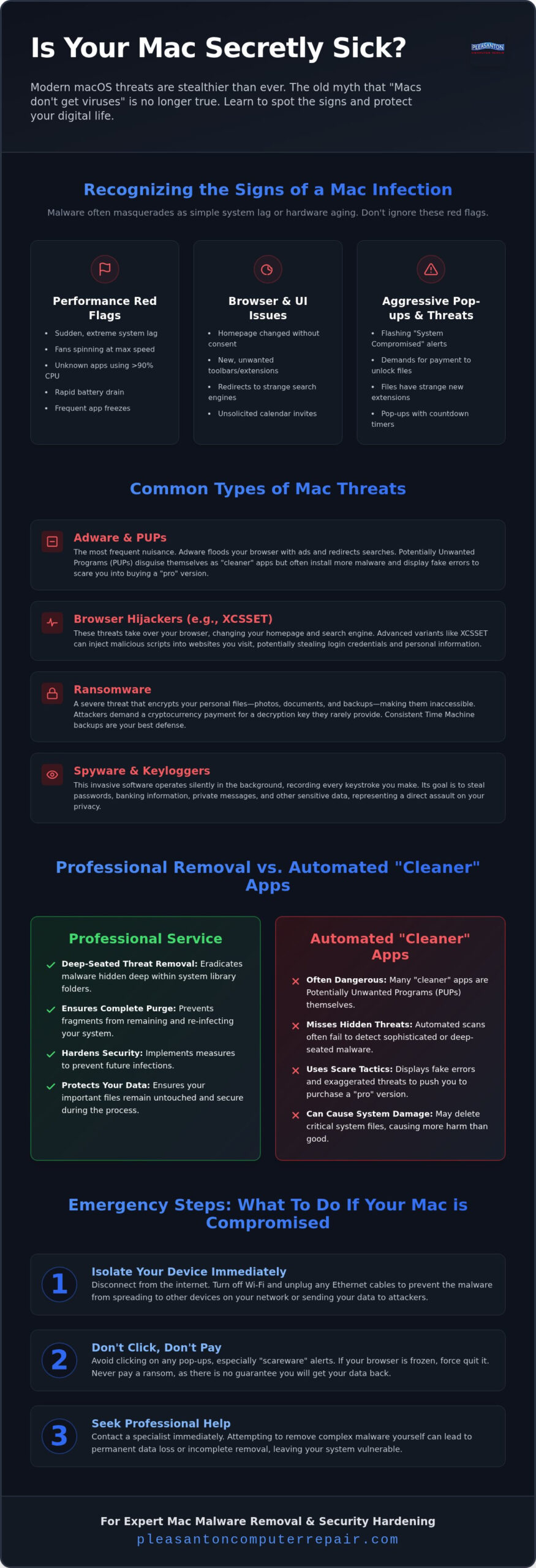
Then there are the “scareware” tactics. You’re browsing the web when a flashing red window appears, claiming your system is compromised. These pop-ups often look like official Apple system alerts, but they’re usually just clever web-based scams. Real macOS security warnings don’t come with a countdown timer or a toll-free number to call. If you see these, don’t click anything; simply close the tab or force quit your browser.
Performance Red Flags You Should Not Ignore
Your Mac should be quiet during everyday tasks. If your fans are spinning at maximum speed while you’re just typing a document, something is wrong. Check your Activity Monitor; you’ll often find an unknown process consuming 90% or more of your CPU. This constant strain leads to “Application Not Responding” errors and drains your battery in record time. A MacBook that used to last eight hours shouldn’t suddenly die after two. These are clear indicators that a malicious program is working overtime in the background.
Visual and Functional Anomalies
Keep an eye on your interface. New toolbars in Safari or extensions you didn’t install are major red flags. Some modern malware even targets your productivity tools. You might see unsolicited calendar invites for “Security Updates” or system notifications demanding payment to unlock files. If your documents suddenly have strange file extensions or won’t open, it’s time to seek expert mac malware removal pleasanton. Taking action early prevents these nuisances from turning into a total data loss situation, ensuring your personal files remain private and secure.
Common Types of Mac Threats Facing East Bay Users
Mac malware isn’t just a generic term for a “computer bug.” It’s software specifically engineered to infiltrate macOS security layers by exploiting vulnerabilities in the system architecture. While Apple’s Gatekeeper and XProtect offer strong protection, they aren’t invincible. We often see local users struggling with threats like XCSSET, which can hijack Safari and inject malicious scripts into your browsing sessions. If you suspect an infection, getting expert mac malware removal pleasanton is the most reliable way to ensure these deep-seated scripts are fully purged from your library folders.
Adware is easily the most frequent nuisance we encounter in the Tri-Valley area. It’s designed to flood your browser with unwanted ads and redirect your search queries to profit-generating sites. Alongside adware, Potentially Unwanted Programs (PUPs) often sneak onto your system. These are usually disguised as helpful “optimization” or “cleaning” tools. In reality, they do little more than consume system resources and display fake errors to scare you into buying a “pro” version. Trojan Horses take this deception further by hiding malicious code inside legitimate-looking software downloads, such as cracked apps or unofficial media players. Dealing with these requires professional mac malware removal pleasanton to prevent the infection from spreading to your other devices.
The Rise of Mac Ransomware
Ransomware has become a serious concern for both home users and small businesses in the East Bay. This malicious software encrypts your local user folders, making your photos, tax documents, and work files completely inaccessible. The attackers then demand a payment, usually in cryptocurrency, to unlock your data. This is why maintaining a consistent Time Machine backup is vital; it’s often the only way to recover your files without engaging with criminals. You’ll want to remember that paying the ransom rarely results in data recovery, as there’s no guarantee the attackers will actually send the decryption key.
Spyware and Data Exfiltration
Spyware represents a direct hit to your personal privacy. Keyloggers are a common form of spyware that records every character you type, allowing hackers to harvest passwords for your local bank accounts or social media profiles. More advanced versions can even hijack your microphone and webcam, essentially turning your Mac into a surveillance device in your own home. Exfiltration is the silent theft of personal data from your device to an external server controlled by hackers. If you’re worried about your privacy, the team at Pleasanton Computer Repair can help you identify and remove these hidden threats to restore your peace of mind.
Professional Malware Removal vs. Automated “Cleaner” Apps
When your Mac starts lagging, it’s tempting to search for a quick, free fix online. You’ll find dozens of “cleaner” apps promising to speed up your system in seconds. Unfortunately, many of these programs are actually malware in disguise. They use aggressive marketing to scare you into buying useless subscriptions or, worse, they install hidden backdoors while claiming to protect you. If you’re looking for genuine mac malware removal pleasanton, you need more than just a downloaded utility. Automated scans often miss sophisticated rootkits and persistent daemons that hide deep within the system architecture.
DIY removal carries another significant risk: accidental data loss. Without a deep understanding of macOS file structures, it’s easy to delete a critical system file while trying to hunt down a virus. This can lead to a computer that won’t boot or applications that constantly crash. At Pleasanton Computer Repair, our manual verification process ensures we only remove malicious code while keeping your personal documents and system integrity perfectly intact. We don’t just click a button; we meticulously inspect your system to ensure every trace of the infection is gone.
The Limitations of Consumer Antivirus
Most consumer security software relies on signature-based detection. This means the software only recognizes threats it has seen before. In 2026, “Zero-Day” Mac attacks are more common, using brand-new code that flies under the radar of traditional apps. Additionally, some antivirus programs impose a heavy performance tax. They scan every file you open, which can slow your Mac down more than the malware itself. You might also deal with false positives where the security software mistakenly breaks legitimate apps you use for work or school, causing unnecessary frustration.
The Value of Expert Manual Removal
A truly clean system requires a human touch. Our experts look where automated tools don’t, specifically targeting malicious LaunchAgents and LaunchDaemons hidden in the Library folders. These are the files that allow malware to restart itself every time you reboot. We also carefully clean the macOS Keychain to remove any stored credentials that hackers might have planted. During this process, a Mac repair specialist will also check your hardware health. This ensures that your system lag isn’t being caused by a failing battery or a dusty thermal system. By choosing professional mac malware removal pleasanton, you get a holistic solution that an app simply can’t offer.
Emergency Steps: What to Do If Your Mac Is Compromised
Discovering a potential breach feels like a violation of your personal space. It’s easy to panic when windows start popping up or your cursor moves on its own. However, the first rule of effective mac malware removal pleasanton is to stay calm. Quick, reactive clicks often lead to more trouble, such as accidentally granting deeper permissions to a malicious script. Instead, follow a methodical approach to contain the threat before it spreads to your sensitive accounts or other devices on your home network.
Your immediate goal is to stop the damage and protect your digital identity. This involves cutting the attacker’s access and preparing your device for a professional cleanup. If you’re looking for mac malware removal pleasanton, taking these preliminary steps makes the restoration process much smoother and protects your most valuable data.
Isolating the Infection
The very first thing you should do is disconnect from the internet. Turn off your Wi-Fi and Bluetooth immediately. This simple action cuts the cord between your private data and the attacker’s server, preventing further exfiltration of your files. You should also avoid plugging in any external hard drives or USB sticks; some modern Mac malware can “hop” onto these drives to infect other computers later. If your Mac is still responsive, try booting into Safe Mode. This prevents non-essential software and malicious startup items from running, giving you a cleaner environment to assess the situation.
Documenting the Issue
Before you bring your device into the shop, take a moment to gather some “evidence” for our technicians. Use your phone to take clear photos of any strange error messages, ransom notes, or persistent pop-ups. Try to remember when the problem started. Did it happen right after you downloaded a specific file or clicked a link in an email? Knowing what software was recently installed helps us pinpoint the source of the infection much faster. If your system is actually running fine but just feels sluggish, it might not be a virus at all. Sometimes an SSD upgrade Pleasanton CA is the real solution for a slow computer that’s simply outgrown its original hardware.
Once you’ve isolated the device, use a different, “clean” computer or your smartphone to start resetting your most important passwords. Focus on your primary email, banking accounts, and Apple ID first. Ensure that two-factor authentication is active on every account that supports it. This creates a safety net even if the malware managed to capture your old passwords. When you’re ready for a permanent solution, contact our team at Pleasanton Computer Repair to schedule a comprehensive diagnostic and ensure your Mac is 100% secure.
Reliable Mac Virus Removal at Pleasanton Computer Repair
Finding out your Mac is infected is stressful, but the resolution doesn’t have to be. Since 2002, we’ve been the calm in the middle of technological storms for East Bay residents. When you choose our team for mac malware removal pleasanton, you aren’t just getting a software scan; you’re getting a comprehensive restoration of your device’s health. We prioritize your peace of mind by ensuring your computer is fast, secure, and ready for your daily tasks. Our goal is to move you from frustration to a stress-free resolution with neighborly warmth and professional authority.
Our Proven Removal Process
Our 3-step eradication process goes beyond what home-user tools can achieve. First, we perform a deep system scan using commercial-grade forensic tools to identify every malicious file. Second, we manually remove hidden scripts and system modifications that automated apps often overlook. Finally, we verify your security patches to ensure macOS is fully up to date and hardened against future attacks. This methodical approach ensures no remnants are left behind to reinfect your system later. We don’t believe in shortcuts when it’s your personal data on the line.
One of the biggest concerns for our clients is the safety of their photos and documents. We treat your data with the highest level of care, prioritizing file integrity throughout the entire cleanup process. Unlike generic “format and reinstall” methods, we work to surgically remove the threats while preserving your personal files. This careful attention to detail is why local families and business owners have trusted us for over two decades. We understand that your computer isn’t just a machine; it’s the keeper of your digital life.
Visit Us in Downtown Pleasanton
Located at 400 Main Street, Suite 205, we’re right in the heart of downtown. Our shop is a convenient stop for residents in Dublin, Livermore, and San Ramon who need reliable tech support. You can schedule your appointment online for a faster turnaround, or even explore our remote support options if you can’t make it into the office. We’re proud to be a deeply rooted part of the local community, acting as a protective barrier between you and your technological headaches.
Once the malware is gone, we don’t just hand the device back. We perform post-removal optimization to ensure your Mac is faster than it was before the infection. By choosing professional mac malware removal pleasanton, you ensure your system is tuned for performance and security. Beyond virus issues, we provide a full range of computer repair Pleasanton CA services to keep all your devices in peak condition. We’re here to act as your dependable partner in a digital world that can sometimes feel overwhelming.
Restore Your Peace of Mind and System Speed
Your Mac is a vital tool for your daily life, and it deserves to run at its peak without the threat of hidden scripts or data theft. We’ve explored how modern threats hide behind system lag and why professional intervention is safer than relying on “cleaner” apps. By isolating your device early and seeking expert help, you protect your digital identity from sophisticated exfiltration. It’s about more than just speed; it’s about knowing your personal information is safe.
Since 2002, we’ve built an A+ local reputation by helping our neighbors navigate every type of technical headache. Whether you’re using the latest M-series MacBook or vintage Apple hardware, we have the specialized expertise to handle your mac malware removal pleasanton with precision. Our shop is conveniently located on Main Street with easy parking, making it simple to get the help you need. We take pride in being a dependable partner for the East Bay community.
Don’t let a slow or compromised computer disrupt your week. Schedule Your Mac Malware Diagnostic in Pleasanton today and get back to using your technology with total confidence. We’re here to ensure your digital life remains fast, functional, and secure.
Frequently Asked Questions
Can Macs really get viruses and malware in 2026?
Yes, Macs are absolutely susceptible to modern malware. While Apple’s built-in security layers are strong, attackers have developed sophisticated methods to bypass Gatekeeper and XProtect. Modern threats often focus on silent data theft or browser hijacking rather than traditional file destruction. If your system feels slow or shows strange alerts, professional mac malware removal pleasanton can help identify hidden scripts that standard system tools might miss.
How much does professional Mac malware removal cost in Pleasanton?
The cost varies depending on the complexity of the infection and whether data recovery is needed. We focus on providing a transparent evaluation of your system’s health before beginning any work. Factors like the depth of the malware and the number of accounts affected influence the time required for a full restoration. You’ll receive a clear overview of the necessary steps to ensure your device returns to peak performance and security.
Will I lose my photos and documents during the virus removal process?
We prioritize file integrity and aim to preserve your data throughout the entire cleanup process. Unlike automated tools that might delete compromised files indiscriminately, our manual approach identifies malicious scripts while keeping your personal documents safe. In cases where the malware has already damaged files, we use professional data recovery techniques to salvage as much as possible. Your memories and work documents are treated with the highest level of care.
How long does it typically take to clean a MacBook of malware?
Most malware removal processes are completed within a few business days. The exact timeline depends on the severity of the infection and whether deep system hardening is required. A simple adware cleanup is often faster than resolving a complex rootkit or ransomware event. We invite you to contact us for current turnaround times, as we strive to get your Apple device back in your hands as quickly as possible.
Can you remove Mac malware remotely or do I need to come in-store?
We offer both in-store and remote support options for your convenience. Many browser hijackers and adware issues can be resolved through a secure remote connection, saving you a trip to downtown. However, for deep-seated infections that prevent the system from booting or compromise network security, we recommend visiting our physical location at 400 Main Street. This allows us to perform a more thorough forensic analysis of your system hardware and software.
Is it worth fixing an older Mac that has a virus?
Fixing an older Mac is often a cost-effective alternative to buying a brand-new machine. If your hardware is still functional, professional mac malware removal pleasanton can breathe new life into a sluggish system. We often find that removing malicious background processes restores the speed you remember. During the diagnostic, we’ll let you know if a simple software cleanup or a hardware upgrade is the best path forward for your specific model.
What is the difference between a virus and a browser hijacker on a Mac?
A virus typically replicates itself to damage files, while a browser hijacker is a type of adware that takes control of your web settings. Hijackers change your homepage and search engine to force you onto sites that generate revenue for the attacker. Both are intrusive and compromise your privacy. Professional removal ensures that neither type of threat remains on your system to track your online activity or steal your private passwords.
Should I use a free Mac cleaner app instead of professional service?
Using free “cleaner” apps is risky because many of them are actually malware or “scareware” in disguise. These programs often use fake error messages to trick you into purchasing unnecessary subscriptions. They rarely have the depth required to remove persistent system daemons or secure your macOS Keychain. Professional service provides a human touch, ensuring that your system is truly clean and that no backdoors are left open for future infections.