
If your free antivirus scan says “no threats found,” why is your computer still acting like it’s possessed? It’s a common frustration in 2026. You run the scan, wait for the green checkmark, and yet the system slowness persists while those suspicious pop-ups continue to interrupt your work. It’s natural to feel uneasy about your banking credentials or personal data when your technology isn’t behaving. You want the peace of mind that comes with a truly secure device, but software alone often fails to provide it.
We understand how stressful these digital headaches can be, especially when you depend on your PC or Mac for everything. This article will show you why professional malware cleanup has become essential as threats grow more sophisticated and AI-driven. With over 560,000 new threats identified daily, modern viruses are designed to hide in the gaps that basic scanners miss. You’ll learn why a human expert is needed to verify that no data was actually exfiltrated and how a multi-layered diagnostic ensures a 100% clean system. We’ll explore the path to a fast, reliable computer so you can get back to work without the fear of hidden intruders.
Key Takeaways
- Understand why modern, fileless malware requires a holistic system restoration rather than a simple automated scan to prevent infections from returning.
- Learn how to avoid the “Whack-a-Mole” effect where viruses reappear after a reboot and protect yourself from accidental data loss during manual removal attempts.
- Discover the benefits of a professional malware cleanup that uses isolated diagnostics and forensic analysis to find every hidden trace of a compromise.
- Find out how expert intervention prioritizes the safety of your photos and documents while providing specialized recovery steps for complex ransomware threats.
- See why local residents in Pleasanton, Dublin, and Livermore choose a neighborly expert over corporate call centers for a faster, more reliable resolution.
What is Professional Malware Cleanup in 2026?
Professional malware cleanup is no longer just about clicking a “Scan” button and waiting for a progress bar to finish. In 2026, it has evolved into a holistic system restoration process. Think of it as the difference between a quick surface dusting and a deep forensic cleaning of your entire home. While a standard scan might find a few obvious files, a professional approach looks for the roots of the infection buried deep within your operating system. We focus on returning your device to a known good state, ensuring that every layer of the software environment is verified and secure.
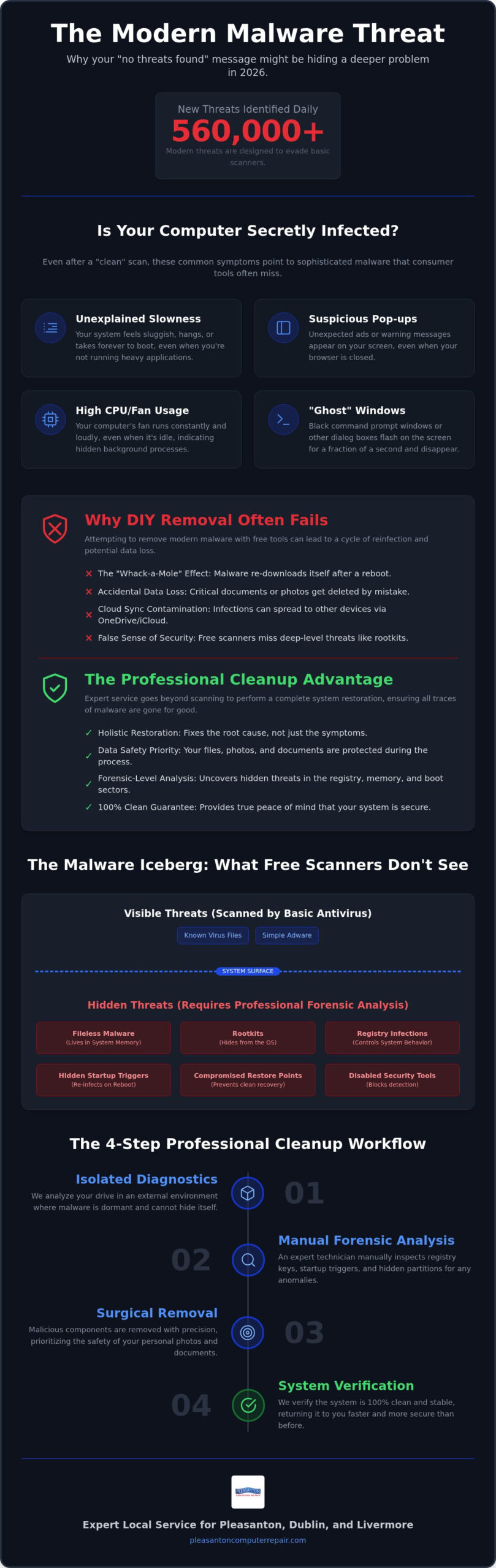
The digital landscape has shifted significantly. We’ve moved past simple executable viruses to sophisticated, fileless malware that lives entirely in your computer’s memory. To understand the complexity, it helps to look at What is Malware? and how it has evolved to bypass traditional defenses. Modern threats often leave no trace on your hard drive, making them invisible to basic file scanners. A professional technician doesn’t just look for bad files; they examine registry keys, startup triggers, and even hidden partitions that automated tools often ignore. This manual forensic removal ensures that the infection doesn’t just “hibernate” and return the moment you reboot your system.
The Limitations of Consumer Antivirus
Many “free” scanners you find online today act more like “nagware” than actual security tools. They might identify a problem but then demand a subscription to fix it, or worse, they provide a false sense of security while missing deep-seated threats. Modern malware is clever; it often disables your antivirus software before it can even initialize. Professional tools use heuristic analysis to stay ahead. Heuristic analysis is a proactive defense technique that identifies potential malware by analyzing a program’s code structure and behavioral characteristics rather than matching it against a list of known viruses. This allows us to catch “zero-day” threats that haven’t been officially cataloged yet. To explore deeper research on modern cybersecurity trends and proactive defense, visit CyberOne.
Signs You Need More Than a Simple Scan
Sometimes the signs of an infection are obvious, like the dreaded “Blue Screen of Death” (BSOD). However, many modern threats are stealthy. You might notice your computer’s fan spinning loudly while it’s sitting idle, or see high CPU usage in your task manager when no programs are open. This often indicates a hidden process is using your hardware for malicious activity. Another red flag is the appearance of “Ghost” windows. These are tiny command prompts or dialogue boxes that flicker onto your screen and disappear in a fraction of a second. If your system feels “off,” a professional malware cleanup is the only way to guarantee your data remains private and your hardware stays healthy.
Why DIY Malware Removal Often Fails
Many users start their recovery journey with a free software download, hoping for a quick fix. However, DIY malware removal often turns into a frustrating game of “Whack-a-Mole.” You might delete a suspicious file and find that your system runs well for an hour, only for the pop-ups or slowdowns to return after the next reboot. This happens because modern threats don’t just sit in one folder. They scatter components across your system registry and set up multiple “watchdog” triggers. If one piece is removed, the others simply re-download or re-activate the infection.
Modern convenience also works against you during a DIY attempt. Services like OneDrive, Google Drive, and iCloud are excellent for productivity, but they can inadvertently sync malicious scripts across all your linked devices. Similarly, malware frequently targets your system restore points. If you try to roll back your computer to an earlier date, you might just be restoring the virus along with your settings. There’s also the very real risk of accidental data deletion. In a panic to “clean” the system, many users accidentally wipe out important family photos or work documents. This is why a professional malware cleanup is the safer choice; it focuses on surgical removal rather than blunt-force deletion.
Rootkits and Boot-Level Infections
Some infections are designed to be completely invisible to your operating system. Rootkits hide at the kernel level, which is deeper than Windows or macOS can typically scan while they are running. If the virus controls the environment you’re using to look for it, it will simply lie to the scanner and report that everything is fine. To truly see these threats, we use external bootable environments. This allows us to inspect your drive while the malware is completely dormant and unable to defend itself or hide its presence.
The False Security of Factory Resets
A common DIY “nuclear option” is the factory reset. While this can solve minor software glitches, advanced BIOS or firmware malware can survive even a complete drive wipe. Beyond the security risk, there’s a massive time cost to consider. Re-installing your specialized software, re-configuring your email, and moving your data back can take days of work. Our virus removal service aims to save your customized environment. We prioritize removing the threat while keeping your settings and files exactly where you left them, saving you from hours of tedious setup and the fear of a lingering infection.
The Professional Malware Cleanup Workflow
A professional malware cleanup isn’t a single event; it’s a methodical series of steps designed to ensure no trace of the infection remains. We follow a strict protocol to protect your data and restore your system’s performance. Our process moves beyond simple scanning to provide a comprehensive resolution that addresses both the symptoms and the root cause of the compromise. You can trust that every layer of your digital environment is being scrutinized by an expert who knows exactly where modern threats like to hide.
The workflow begins with an isolated diagnostic. We boot your computer into a secure, non-compromised environment, often using a specialized USB boot drive or by scanning your hard drive on a separate, protected machine. This prevents the malware from running while we analyze the system. Once isolated, we perform a deep forensic analysis to identify every hidden component of the infection, from malicious scripts to hidden partitions. We don’t just look for known viruses; we look for the behavioral footprints that indicate something is wrong.
After identification, we move into manual registry and system file repair. Automated tools often leave behind broken links or corrupted entries that cause instability and “Blue Screen” errors. This manual attention to detail is a hallmark of a professional malware cleanup; it ensures your operating system’s integrity is fully restored. Finally, we focus on hardening and optimization. We patch the specific security vulnerabilities that allowed the malware to enter in the first place, ensuring your system is more resilient than it was before the attack. For organizations and businesses aiming to sustain long-term digital protection, managed cybersecurity providers like M.I.S. Support, Inc. recommend establishing proactive frameworks to build enduring resilience against emerging threats.
The Importance of an Isolated Environment
Why do we go to these lengths? When a computer is infected, the malware is often programmed to “call home” to a command and control server. If it detects a cleanup attempt, it might trigger a “kill switch” that encrypts your files or wipes your drive. By working in an isolated environment, we cut off its communication entirely. This keeps your photos and documents safe and ensures the virus cannot fight back while we work to remove it.
System Optimization Post-Cleanup
Removing the virus is only half the battle. Malware often leaves behind “junk” files and broken system links that slow your computer down long after the threat is gone. We take the time to repair corrupted update services and restore your system’s natural speed. For residents looking for comprehensive computer repair Pleasanton CA, this optimization phase is what makes the difference. We ensure your system is fast, stable, and ready for daily work, providing the functional continuity you need to stay productive.
Data Safety: The Core of Professional Service
Your photos, documents, and emails are the lifeblood of your digital life. When a system is compromised, the primary fear isn’t just a slow computer; it’s the loss of these irreplaceable assets. A professional malware cleanup prioritizes data preservation above all else. Unlike automated scripts that might simply delete infected files regardless of their content, we take a surgical approach. We verify that your data hasn’t been modified or “backdoored” by an attacker. This ensures that even after the virus is gone, your information remains untainted and secure. This is especially critical given the record 997 ransomware attacks recorded worldwide in August 2026. Ransomware recovery is a specialized process that requires decryption knowledge far beyond standard virus removal.
We also focus on the future. Removing the current threat is only half the battle; we want to make sure you never face this stress again. We help you set up secure, immutable backups. These are copies of your data that cannot be changed or deleted by malware, providing a final line of defense against even the most aggressive encryption attacks. By ensuring your data is both clean and properly backed up, we provide the functional continuity you need to work and live without fear.
Recovering Data from Corrupted Systems
Malware often damages the specific files your computer needs to start up. If you find yourself staring at a black screen or a persistent error message, don’t reach for unverified DIY recovery software. These tools often overwrite the very data you’re trying to save, making a bad situation worse. For severe cases where the file system is shredded or the hardware is failing, we offer specialized data recovery Pleasanton CA services. Our controlled approach protects your drive from further damage, providing a much higher success rate than risky home attempts.
Privacy Protection During the Repair
Privacy is a major concern for our East Bay clients. Whether you’re a home user with personal tax documents or a local business owner handling sensitive client information, your privacy is our top priority. At Pleasanton Computer Repair, we handle every device with strict confidentiality and neighborly respect. We don’t just clean the system; we guide you through resetting your passwords and credentials safely after the threat is neutralized. This ensures any data that might have been exfiltrated becomes useless to the attacker. If you’re worried about your sensitive information, bring your device to us for a professional Virus Removal today.
Local Expertise for Pleasanton and the East Bay
Choosing a local partner for your technology needs makes a world of difference compared to a faceless corporate call center. When you deal with a neighborhood expert, you aren’t just a ticket number; you’re a neighbor who needs a resolution. Since 2002, we’ve built a reputation for calm competence that residents in Dublin, San Ramon, and Livermore rely on daily. Our 400 Main Street location in Pleasanton provides a convenient drop-off point for busy professionals and families who value their time. We believe in complete transparency, which is why we offer straightforward pricing and a “no-fix, no-fee” philosophy for our virus removal services.
Getting a professional malware cleanup shouldn’t be a stressful financial gamble. By working with a local shop, you get the opportunity to speak directly with the technician who is handling your device. We explain exactly what went wrong and how we’re fixing it without hiding behind dense technical jargon. This level of honesty and reliability is why local businesses trust us to act as a protective barrier between them and their technological headaches. We understand the specific threats facing our community and provide the human-centric alternative to big-box retail that our clients deserve.
In-Store vs. On-Site Cleanup
While we offer remote and on-site support, some situations are best handled at our Pleasanton suite. Our shop is equipped with specialized bench tools that allow for deep hardware scans and isolated diagnostics that are difficult to perform in a home or busy office setting. For local companies needing a more comprehensive approach to their infrastructure, our small business computer repair Pleasanton service provides the on-site attention required for complex network environments. Bringing your device to our shop ensures it gets the focused, forensic attention it deserves in a controlled environment.
Future-Proofing Your Technology
Our goal is to leave your system in a better state than we found it. After the cleanup is complete, we provide a customized security roadmap to help you avoid future infections and data risks. If your system still feels sluggish after the threat is gone, we might suggest an SSD upgrade to significantly boost your performance and responsiveness. This physical improvement, combined with our software hardening, breathes new life into your existing machine. Local support is faster and more reliable because we are part of your community and deeply invested in your long-term success.
Restore Your Digital Peace of Mind Today
Living with a compromised computer is a constant source of stress. You’ve seen how modern, fileless threats can bypass standard software and why a factory reset often isn’t the total solution it appears to be. By choosing a professional malware cleanup, you’re not just deleting a virus; you’re restoring the functional continuity of your daily life. It’s about knowing your banking credentials are secure and your family photos are protected from encryption.
Our team has been serving the East Bay as local experts since 2002. We provide comprehensive PC and Mac support from our convenient location at 400 Main Street. You don’t have to navigate these technical headaches alone. We’re here to act as your protective barrier, ensuring your system is 100% clean and optimized for speed.
Schedule Your Professional Malware Cleanup in Pleasanton Today. We look forward to helping you get back to work with a fast, reliable system and the peace of mind you deserve.
Frequently Asked Questions
How long does a professional malware cleanup usually take?
Most professional malware cleanup services take between 24 and 48 hours to complete. While a basic software scan is fast, a deep forensic cleaning requires multiple passes to ensure every hidden trigger and registry key is removed. We prioritize thoroughness to prevent the “Whack-a-Mole” effect where infections return after a reboot. If your system has extensive corruption or requires data recovery, the process might take slightly longer to ensure your files remain safe.
Will I lose any of my files during the virus removal process?
We prioritize keeping your photos, documents, and emails intact during the removal process. Unlike automated DIY tools that might delete infected files indiscriminately, our technicians use a surgical approach to isolate threats without destroying your personal data. If malware has already corrupted your operating system, we focus on repairing those system links first. We always recommend a backup, but our goal is to return your computer with all your files exactly where you left them.
Can you remove a virus from a Mac, or are they immune?
Macs are definitely not immune to threats and require professional intervention just as often as PCs. While macOS has strong built-in protections, modern attackers now specifically target East Bay Mac users with sophisticated adware, browser hijackers, and even ransomware. We have specialized expertise in both PC and Mac environments. If your MacBook is running hot or showing strange pop-ups, it’s a sign that hidden scripts are likely bypassing your system’s native security defenses.
What is the difference between malware and a virus?
Malware is a broad umbrella term that stands for “malicious software,” while a virus is just one specific type of threat that self-replicates. In 2026, we see fewer traditional viruses and more complex malware like rootkits, spyware, and fileless scripts that live in your system’s memory. A professional malware cleanup addresses this entire spectrum. Whether it’s a browser hijacker or deep-seated ransomware, we identify the specific behavior of the threat to ensure it is completely neutralized.
Is it worth cleaning an old computer, or should I just buy a new one?
It is often much more cost-effective for residents in Livermore and Dublin to clean and optimize an older computer than to buy a new one. A heavy infection can make a perfectly good machine feel obsolete, but once the malware is removed and system links are repaired, performance often returns to normal. We frequently combine virus removal with an SSD upgrade to give older laptops a massive speed boost. This approach saves you money and prevents the hassle of migration.
Do you offer remote malware removal if I can’t make it to the shop?
Yes, we offer remote support for many types of infections, though some deep-seated threats require a physical visit to our Pleasanton suite. If your internet connection is still stable, we can often perform an initial diagnostic and cleanup over a secure remote link. However, if malware has blocked your network access or infected the boot layer, bringing your device to 400 Main Street is the safest option. This allows us to use specialized bench tools for forensic analysis.
Can malware hide in my computer’s hardware or BIOS?
Advanced malware can absolutely hide in your computer’s BIOS or firmware, making it invisible to standard operating system scans. These “boot-level” infections are designed to persist even if you wipe your hard drive or perform a factory reset. Our technicians use isolated environments and external bootable tools to detect these sophisticated threats. We inspect the hardware communication layers to ensure that no persistent backdoors remain, providing a level of security that DIY software downloads simply cannot reach.
How can I tell if my webcam has been hacked by malware?
The most common sign of a hacked webcam is the indicator light turning on when you aren’t using a video application. You might also notice strange video files saved on your drive or a sudden increase in background data usage. If your camera settings have changed without your input, it’s time for a professional diagnostic. We can identify the specific spyware responsible and harden your system to prevent unauthorized access to your camera and microphone in the future.