
You sit down to start your workday, press the power button, and nothing happens. That blank screen is more than a technical glitch; it’s a sudden wall between you and your productivity. We understand the immediate stress that follows. You’re likely wondering if your files are gone or if you’re facing a massive replacement bill. If you’re currently facing a laptop not turning on repair Pleasanton experts can quickly diagnose the issue to see if it’s a simple fix. It’s a frustrating position, but a non-responsive device is rarely a total loss.
This guide will help you identify why your laptop is acting up and how to restore it to peak performance with local expert help. We’ll explore common power issues, explain how professional diagnostics keep your files safe, and show you why a local repair at 400 Main Street is often the smartest path forward. Whether it’s a battery issue or an opportunity for an SSD upgrade, we’ll help you find a quick resolution. You’ll discover how to get back to work without the stress of starting over with a new machine.
Key Takeaways
- Troubleshoot your device at home first by learning how to drain static electricity and identifying if the problem is simply a dark screen or a total power failure.
- See why professional laptop not turning on repair Pleasanton experts are essential for diagnosing complex motherboard shorts without risking your hardware.
- Apply the “50% Rule” to determine if a repair makes financial sense or if it’s time to consider a refurbished upgrade instead.
- Learn how the “Zero Data Loss” approach ensures your photos and documents stay safe while technical hardware issues are being resolved.
- Benefit from a fast 24-72 hour turnaround and a 60-day warranty by choosing a local repair shop with over two decades of community experience.
Laptop Not Turning On? Try These 5 Quick Home Fixes First
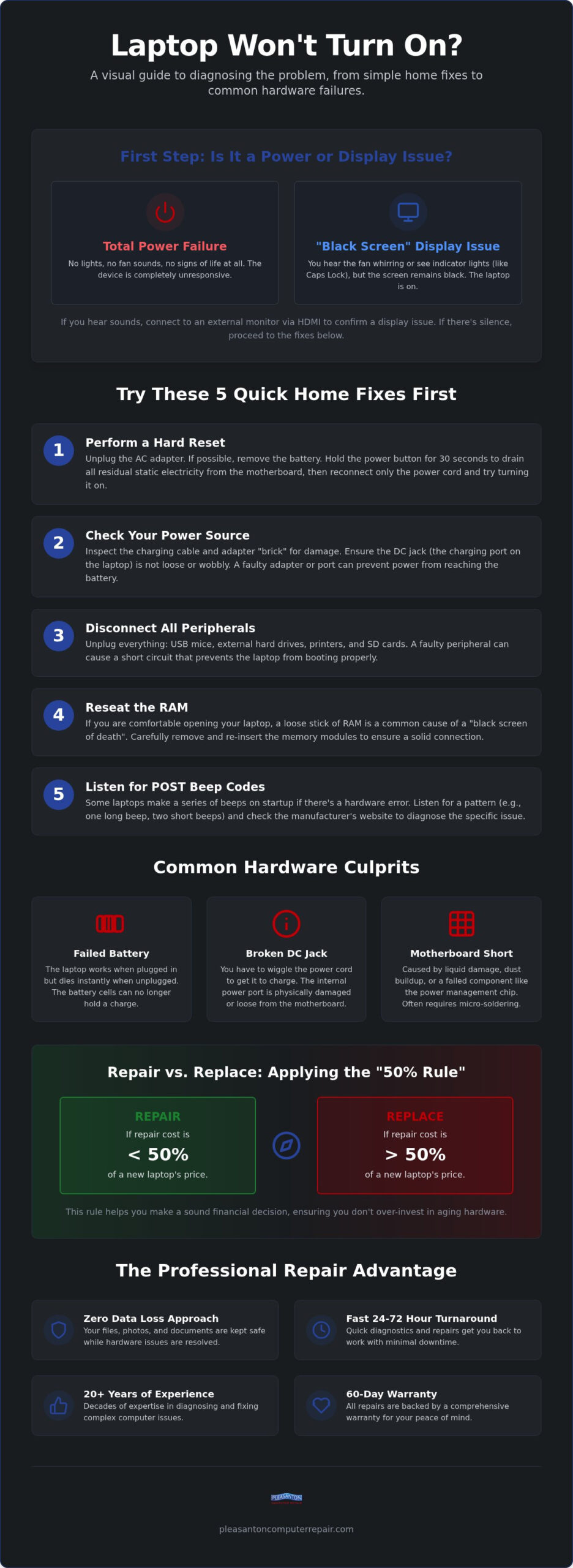
Before you assume your device is a total loss, take a deep breath. A dark screen doesn’t always mean a dead motherboard. The first step is determining if you’re dealing with a complete power failure or just a display problem. Listen closely to the chassis. Do you hear the faint whirring of a fan or the click of a hard drive? If you hear signs of life but the screen remains black, your laptop is actually on, but the display is failing. In these cases, your data is perfectly safe; you just can’t see it. Connecting your laptop to an external monitor or a TV via an HDMI cable can confirm this instantly.
Another common culprit is a “frozen” motherboard caused by trapped static electricity. To fix this, you should also remove all peripherals. Unplug your USB mouse, printers, and even your SD cards. A faulty USB device can occasionally draw too much power or create a minor short that prevents the system from booting. If you’ve tried these steps and still need a professional laptop not turning on repair Pleasanton experts can provide a more technical diagnosis, but these home checks often save a trip to the shop.
The Hard Reset Procedure
A hard reset is the most effective way to drain residual power that might be preventing a successful start. If your laptop has a removable battery, pop it out and disconnect the AC adapter. Hold the power button down for a full 30 seconds. This forces the capacitors on the motherboard to discharge completely. For laptops with internal batteries, the process is similar. Hold the power button for 15 to 30 seconds while the charger is unplugged. Once finished, plug only the power cord back in and try to start the machine. Watch for the Caps Lock light to blink or the keyboard to glow, as these are positive signs of a recovering system.
Checking Your Power Source
Don’t overlook the “brick” on your charging cable. If that power adapter has failed, your battery will eventually drain to zero, leaving the laptop unresponsive. Inspect the cord for any frays or kinks. Check the DC jack, the port where you plug the charger in, for any loose wiggling or debris. If the port feels “mushy” or the plug falls out easily, the connection is likely broken. Avoid the temptation to buy cheap, universal chargers from big-box stores. These often lack the precise voltage regulation required for your specific model. Using the wrong voltage can cause permanent damage to your internal power rails, turning a simple charger replacement into a costly motherboard repair.
Common Hardware Culprits Behind Laptop Power Failures
When you need a laptop not turning on repair Pleasanton technicians often look at the RAM first. If a memory stick has wiggled loose from its slot or failed entirely, your system won’t complete its Power-On Self-Test (POST). This leaves you staring at a frustrating “Black Screen of Death” while the fans spin uselessly. Similarly, corrupted BIOS or firmware can act like a digital padlock on your hardware. This foundational software is responsible for waking up the processor and other components; if it’s glitched, the rest of the system never receives the signal to start.
Battery vs. Charging Port Issues
A common point of confusion is whether the battery is dead or the power isn’t reaching it at all. If your laptop runs perfectly while plugged in but dies the moment you pull the cord, your battery cells are likely exhausted and can no longer hold a charge. However, if you have to wiggle the cord to get a charging light, the DC jack is the probable suspect. The DC jack is the internal socket that receives power from your adapter and distributes it to the motherboard and battery. When this port breaks or comes loose from the internal board, your laptop won’t receive the current it needs to boot or stay powered.
The Role of the Motherboard
The motherboard is the complex brain of your device, and it’s incredibly sensitive to dust, heat, and minor liquid spills. Even a tiny drop of moisture can cause a short circuit that triggers an immediate safety shutdown to prevent a fire. Often, the culprit is the CMOS battery, which is a small coin-shaped cell that keeps your system’s clock and basic hardware settings running. If this tiny battery dies, some laptop models refuse to boot entirely as a security measure. More complex failures involve the power management chip, which regulates voltage across the entire board. While some shops might suggest a full motherboard replacement, professional micro-soldering can often repair the specific failed component. This level of precision is part of a high-quality laptop not turning on repair Pleasanton residents can rely on to save their existing hardware. While we’re inside fixing a power issue, it’s often the perfect time for an SSD upgrade to make your machine feel brand new again.
Professional Repair vs. Buying New: Making the Right Call
Deciding whether to fix a broken device or head to a big-box store for a replacement is a common dilemma. Many users follow the “50% Rule” as a financial guide. If the cost of a professional repair is less than half the price of a new, comparable laptop, fixing it is the smarter investment. For most residents looking for a laptop not turning on repair Pleasanton service, the diagnosis often reveals a specific component failure that is far cheaper to address than buying a whole new system. Beyond the immediate cost, repairing your tech is the environmentally responsible choice. In California, the Electronic Waste Recycling Act of 2003 makes it illegal to toss electronics in the trash. While the Pleasanton Transfer Station offers free e-waste drop-off for residents, keeping your current machine in service is the ultimate way to reduce your carbon footprint.
You should also consider the value of your data. If your laptop won’t boot, your precious photos and work documents are essentially locked away. While specialized data recovery services are available, they can be quite expensive. Repairing the hardware itself is frequently the most cost-effective path to regaining access to your digital life. It’s a win-win situation where you save your files and your hardware simultaneously.
Evaluating the Age of Your Technology
Is a five-year-old laptop still worth fixing? In many cases, the answer is a resounding yes. Modern processors from the last few years are remarkably capable for daily tasks, school, and office work. A professional fix can extend a device’s life by another three to four years, providing a much higher return on your original investment. However, if the hardware is so old that it can’t run current security updates, a repair might only be a temporary band-aid. We help you weigh these factors honestly so you don’t spend money on a machine that will be obsolete in six months.
Upgrading While You Repair
If your laptop is already on the technician’s bench, it’s the perfect time to consider performance boosts. Combining a power-related repair with a memory increase or an SSD upgrade Pleasanton CA can make an older machine feel faster than it was on the day you bought it. If your current laptop truly is beyond saving, don’t feel pressured to buy a brand-new, expensive replacement. Pleasanton Computer Repair sells warrantied refurbished PC and Mac laptops that offer a great middle-ground for your budget and the environment. This ensures you leave with a reliable machine without the “new computer” price tag.
What to Expect During a Professional Diagnostic in Pleasanton
Walking into a repair shop shouldn’t feel like a mystery. When you bring your device in for a laptop not turning on repair Pleasanton technicians start with component-level testing. This isn’t just a quick visual inspection. We use high-precision multimeters to trace electrical currents through your motherboard, looking for “power leaks” or blown capacitors that prevent the system from completing its circuit. You won’t be left guessing about the price. We provide a transparent, firm quote before any actual repair work begins. Most hardware fixes for East Bay residents are completed within a 24 to 72-hour window, ensuring you aren’t without your computer for long.
The Diagnostic Process
Our diagnostic is comprehensive and goes beyond the immediate power issue. We check for hidden liquid damage that might have oxidized over time, even if you don’t remember a recent spill. We also verify the health of your storage drive to ensure your operating system will boot cleanly once the power is restored. As part of our standard care, we perform an internal cleaning to remove dust and apply fresh thermal paste to your processor. This maintenance helps your laptop run cooler and prevents future shutdowns caused by overheating.
Data Safety and Privacy
The fear of data loss is often more stressful than the hardware failure itself. We operate with a “Zero Data Loss” philosophy, meaning we prioritize the safety of your files throughout the entire process. For most power-related repairs, we don’t even need to access your software or personal folders to fix the physical hardware. Choosing a local shop with a physical storefront at 400 Main Street provides a level of security and accountability that mail-in services can’t match. You can find more details on our approach in our computer repair Pleasanton CA service guide. If you’re ready to see why your machine isn’t starting, contact us today for a professional diagnostic and get your digital life back on track.
Why Choose Pleasanton Computer Repair for Your Laptop
Selecting a repair partner is about more than just finding a technician; it’s about finding a neighbor you can trust with your digital life. We’ve spent over two decades refining our process to ensure every client leaves with a functional device and a lighter heart. Our deep roots in the East Bay mean we understand the importance of your time and the value of your hardware. When you search for a laptop not turning on repair Pleasanton service, you deserve a team that combines professional authority with a reassuring, local touch. We specialize in both Windows PCs and Apple MacBook repairs, ensuring that no matter your preferred platform, we have the specialized tools and expertise to get you back online.
Local Expertise You Can Trust
Our history of helping East Bay residents since 2002 has taught us that convenience is key to a stress-free experience. Shipping your laptop to a distant depot often means weeks of waiting and the constant anxiety of wondering if your data is safe. By visiting our physical shop at 400 Main Street, you get immediate, face-to-face communication and a predictable 24-72 hour turnaround. We also extend our reach beyond the shop walls. For local business owners in Pleasanton, Dublin, and Livermore, our on-site technology support ensures your operations continue without a hitch. Every repair we perform comes with a 60-day warranty on all labor and parts. This guarantee reflects our confidence in our work and gives you the peace of mind that your investment is protected by seasoned professionals.
Getting Started Today
Ready to restore your productivity? You can book an appointment online or simply walk into our Main Street shop during business hours. We strive to make the process as efficient as possible for you. To help us provide the fastest laptop not turning on repair Pleasanton diagnostic, please prepare a few things before your visit:
- Bring your charger: The power adapter is often the culprit, and we need to test yours to rule it out.
- Have your password ready: If your system is locked, we’ll need access to verify that the hardware fix successfully communicates with your software.
- Check your backups: While we specialize in zero data loss recovery, having a recent backup is always a smart best practice before any hardware service.
Don’t let a dark screen disrupt your work or school any longer. Our team is ready to act as a protective barrier between you and your technological headaches. We pride ourselves on honesty and transparency, positioning our business as your dependable partner for all things tech. Schedule your laptop repair diagnostic now.
Get Your Laptop Back to Peak Performance Today
A non-responsive laptop is a stressful setback, but it’s rarely the end of the road for your machine. By trying a few home resets and understanding common hardware culprits like battery failure or motherboard shorts, you can move from frustration to a clear path forward. Professional diagnostics ensure your files remain safe while restoring the speed and reliability you need for work or school. If you’re currently searching for a laptop not turning on repair Pleasanton specialists at our shop can quickly find the solution.
We’ve served the East Bay community since 2002 from our convenient Main Street location. Every repair is backed by a 60-day warranty, so you can feel confident in the longevity of your fix. Don’t let technical glitches keep you offline or force you into an unnecessary replacement cost. Our friendly team is ready to provide the calm, competent service you deserve. Book Your Laptop Diagnostic at our Pleasanton Shop and let us handle the technical heavy lifting. We look forward to getting you back to work.
Frequently Asked Questions
Why is my laptop screen black but the power light is on?
This usually indicates that your laptop is receiving power but failing to initialize the display or complete its boot sequence. It could be a failed backlight, a loose internal video cable, or even a corrupted BIOS. Try connecting your device to an external monitor to see if the system is still functional behind the dark screen. If you see your desktop on the external screen, the issue is likely restricted to the display panel itself.
Can a dead battery prevent a laptop from turning on even when plugged in?
Yes, a severely depleted or shorted battery can occasionally prevent the system from completing its power circuit. In some modern models, the battery must reach a minimum voltage threshold before the motherboard allows a boot sequence to begin. Removing the battery and attempting to start the machine on AC power alone is a common diagnostic test we use to identify if the battery is the primary culprit.
How much does it typically cost to fix a laptop that won’t start in Pleasanton?
The cost depends entirely on which specific component has failed within the system. Simple issues like a dead charger or a loose RAM stick are relatively inexpensive to resolve. More complex repairs involving motherboard micro-soldering or screen replacements will vary based on the parts required. We always provide a firm, transparent quote after our initial diagnostic so you can make an informed financial decision without any surprises.
Will I lose my files if my laptop needs a motherboard repair?
No, your files are stored on your hard drive or SSD, which is a separate component from the motherboard. During a laptop not turning on repair Pleasanton technicians focus on restoring the power delivery system without affecting your data storage. We prioritize a “Zero Data Loss” approach to keep your photos and documents safe. Even if the motherboard is unfixable, we can often recover your data directly from the storage drive.
How long does a professional laptop power diagnostic take?
Most power-related diagnostics are completed within 24 to 72 hours at our shop. This timeframe allows our technicians to perform component-level testing with multimeters and verify that the system remains stable under load. If specialized parts are needed for the final repair, we’ll keep you updated on the availability and shipping times from our local East Bay suppliers to ensure a quick resolution.
Is it worth fixing a laptop that had a liquid spill?
It is often worth fixing if the spill is addressed immediately before internal corrosion sets in. Professional ultrasonic cleaning and the replacement of specific damaged components can often save the machine for a fraction of the cost of a new one. However, if the cost of repairing multiple shorted circuits exceeds 50% of the laptop’s value, we might recommend recycling the unit and exploring our warrantied refurbished options instead.
Can you fix a laptop that won’t turn on if it’s an older model?
We fix many older PC and Mac models as long as the necessary replacement parts are still available. Many older laptops are excellent candidates for an SSD upgrade while we are resolving the power issue. This combination can make a five-year-old machine feel significantly faster than the day it was first unboxed. We’ll always be honest with you if the age of the machine makes a repair a poor investment.