
Imagine you’re finally sitting down to back up years of family photos or finish a critical work presentation, but your iPad screen remains stubbornly black. You wiggle the cable, try a different outlet, and hold your breath, yet nothing happens. It’s a sinking feeling that many of us in the Tri-Valley have experienced. You’re likely frustrated by unreliable cables and worried about the high cost of a total replacement or, worse, losing the irreplaceable data trapped on your device.
We understand that your iPad is a vital tool for your daily life and a vault for your memories. This 2026 guide will show you how to accurately diagnose your device and find the most reliable ipad charging port repair pleasanton has to offer. Our team has seen every iPad issue since the original model launched, and we’re here to provide calm, competent solutions. We’ll walk through common troubleshooting steps you can take at home, explain the latest USB-C standards, and help you compare professional repair options. From simple debris cleaning to expert hardware replacement at 400 Main Street, Suite 205, you’ll discover how to restore your device’s function quickly and confidently.
Key Takeaways
- Learn how to distinguish between a simple software glitch and physical port damage so you don’t pay for a repair you don’t actually need.
- Understand the technical differences between Lightning and USB-C failures and how they impact your ipad charging port repair pleasanton options.
- Discover why a professional repair is often the most cost-effective way to preserve your data and extend the life of your device.
- Identify the critical questions to ask any technician about warranties and part quality before you commit to a service.
- Find out how local expertise and a convenient location at 400 Main Street can turn a stressful tech failure into a fast, professional resolution.
Understanding iPad Charging Port Issues: Is it Broken or Just Dirty?
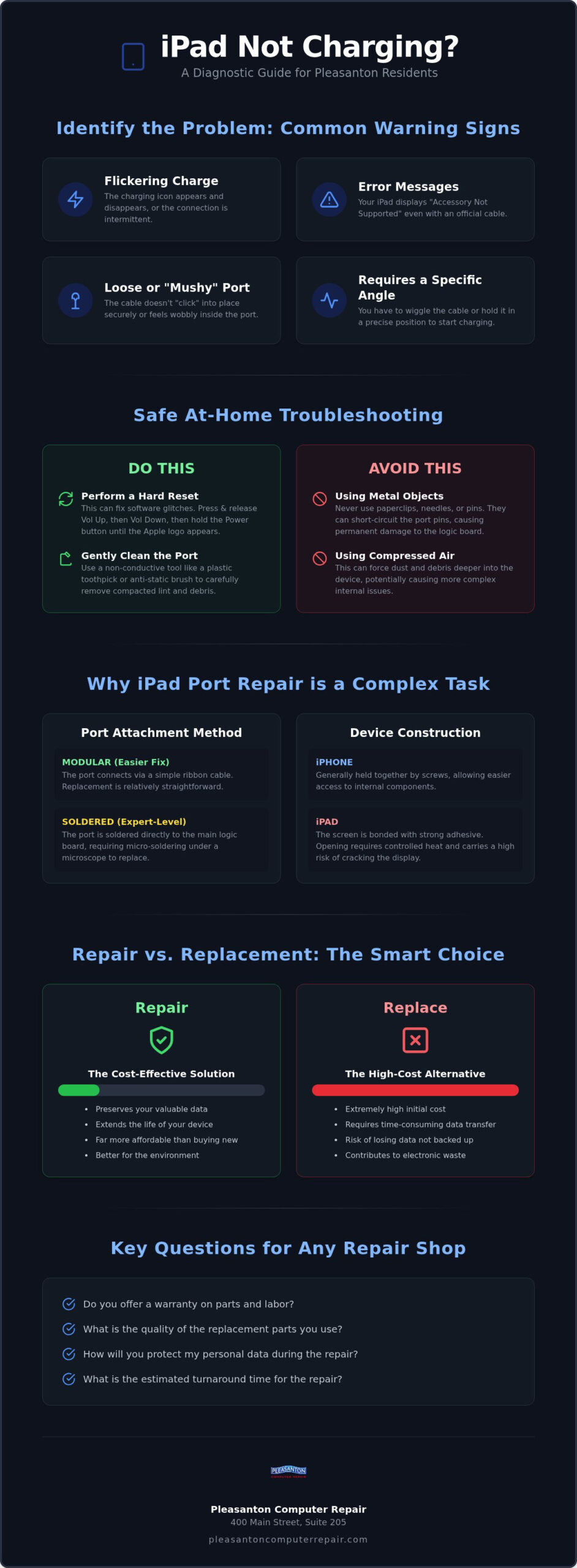
When your iPad refuses to charge, your first instinct might be to panic about the cost of a new device. However, most charging failures aren’t fatal. They usually stem from physical obstructions or minor hardware wear. Common red flags include a charging icon that flickers on and off, an “accessory not supported” error message, or a charging cable that feels “mushy” and doesn’t click into place. If you have to hold your cable at a specific angle just to get a connection, you’re likely dealing with a hardware issue that requires professional ipad charging port repair pleasanton services.
Before bringing your device into our shop at 400 Main Street, Suite 205, you can perform a safe “wiggle test.” Gently insert your cable and see if the port itself moves. A little play in the cable is normal, but if the internal housing feels detached from the logic board, the internal pins have likely snapped or desoldered. This often happens due to years of cable strain or accidental drops while plugged in. For devices using Apple’s Lightning connector, even a tiny amount of oxidation on the pins can break the circuit and prevent a steady flow of power.
The DIY Cleaning Trick: A Safe First Step
You’d be surprised how much pocket lint and debris can pack into a port over time. Every time you plug in your charger, you’re essentially tamping down that dust into a hard “cake” at the bottom. To fix this, use a non-conductive tool like a thin plastic toothpick or a specialized anti-static brush. Carefully sweep the bottom of the port to loosen any compacted lint. Never use a metal needle, safety pin, or paperclip; these can short out the pins and turn a simple cleaning into a much more expensive repair. Avoid blowing compressed air directly into the port, as this can actually force debris deeper into the device’s internal components.
Software vs. Hardware: Ruling Out the Battery
Sometimes the issue isn’t the port at all, but a crashed charging controller. Try a hard reset: quickly press and release the volume up button, then the volume down button, and finally hold the power button until the Apple logo appears. If the iPad still won’t charge after a reset, the problem is likely hardware. If your iPad charges but dies quickly, the issue might actually be the battery. We often see clients who think they need an ipad charging port repair pleasanton when they actually need an iPhone battery replacement Pleasanton or a similar iPad battery service to restore their device’s longevity.
The Technical Side of iPad Charging Port Repair
Understanding the hardware inside your tablet helps explain why some fixes are more involved than others. Unlike a simple plug-and-play component, the charging assembly varies significantly across different generations. Older models utilize Apple’s proprietary Lightning port, while newer iPad Pro and Air models have transitioned to USB-C. While USB-C offers faster data speeds, the internal “tongue” of the port is surprisingly delicate. If a cable is inserted at an angle or forced, those tiny internal pins can bend or snap. This physical damage is a primary driver for ipad charging port repair pleasanton, requiring a steady hand and professional tools to resolve.
The method of attachment also changes based on your specific model. Some iPads use a modular port that connects via a ribbon cable, making replacement relatively straightforward. However, many professional-grade models feature ports that are soldered directly onto the logic board. This distinction is crucial. A soldered port cannot simply be swapped out; it requires a technician who can perform precision work under a microscope. If you’re curious about your rights regarding these complex fixes, the Federal Trade Commission has recently taken a stand against illegal repair restrictions that often prevent consumers from seeking independent help.
Why iPad Repairs Are More Complex Than iPhones
iPads are essentially glass sandwiches held together by incredibly strong industrial adhesive. Unlike iPhones, which typically use security screws, accessing an iPad’s internals requires carefully controlled heat to soften the glue. This process carries a high risk of cracking the screen if not handled with expert care. Once inside, we often encounter components that require board-level attention. Micro-soldering is the process of repairing microscopic connections on the logic board. Because of these risks, DIY attempts often lead to more damage than the original port issue. If you’re unsure about the state of your device, you can always consult with a local expert to get a clear diagnosis.
The Role of the Charging IC Chip
Sometimes, a new port doesn’t solve the problem. If your iPad still won’t take a charge, the culprit might be the Tristar or Hydra chip. These are the integrated circuits (IC) that act as the “gatekeeper” for power. Using “cheap” or non-certified cables is the leading cause of IC failure. These cables often lack the voltage regulation needed to protect your motherboard from surges. When this chip fails, the device may show it’s charging but never actually increase the battery percentage. We use advanced diagnostics to determine if your issue is a simple port replacement or a more complex board-level failure, ensuring we use only high-quality parts for every ipad charging port repair pleasanton.
Repair vs. Replacement: Evaluating the Economics
Facing a dead device often leads to a tough choice: do you fix the one you have or buy a new one? For most modern tablets, choosing an ipad charging port repair pleasanton is the smarter financial move. A new iPad Pro or Air can easily cost hundreds of dollars, while repairing the port is a fraction of that investment. Beyond the immediate savings, a professional repair can extend your device’s life by another two to three years. This is especially true if the rest of the hardware, like the screen and processor, still performs well for your daily tasks.
Don’t forget the “Data Factor.” If your iPad won’t charge, you can’t access your local backups, photos, or documents. For many of our neighbors in Pleasanton, Dublin, and Livermore, those memories are priceless. Repairing the port is often the only gateway to recovering that data safely. Additionally, choosing repair over replacement helps our local environment. By keeping your tablet out of the landfill, you’re directly reducing e-waste in the East Bay. Before you start any DIY attempts, consult an electronics repair safety guide to understand the risks involved with lithium-ion batteries and delicate internal components.
When to Repair Your iPad
If you own an iPad Pro, a recent iPad Mini, or a newer Air model, the high resale value makes a port fix an easy decision. These devices have powerful internals that will remain relevant for years. Before committing, we recommend a diagnostic to check the overall health of your device. Our computer repair Pleasanton CA experts can test your battery health and screen integrity at 400 Main Street, Suite 205, ensuring the repair is a sound long-term investment. If the screen is pristine and the battery is holding a charge, there’s no reason to retire a perfectly good tool.
When Replacement Makes More Sense
There are times when moving on is the better path. If your iPad is so old that it no longer supports the latest iPadOS updates, it may pose security risks or struggle with modern apps. In these cases, we can help you transition your data to a more capable machine. If a brand-new model isn’t in the budget, check out our selection of refurbished laptops Pleasanton CA for a reliable, high-value alternative. We’ll always give you an honest assessment of whether your current tablet is a “forever” device or if it’s time for an upgrade.
Choosing a Reliable iPad Repair Shop in Pleasanton
Trust is everything when you hand over a device containing your personal photos and sensitive documents. When searching for ipad charging port repair pleasanton, you’ll find plenty of options, but few carry the weight of decades of local service. We’ve been serving the East Bay since 2002. This long standing presence means we’ve seen every iteration of iPad hardware. We understand the common pitfalls of independent repair and how to avoid them.
Before you leave your tablet with any shop, ask about their part quality and data safety protocols. A reputable technician should be transparent about where their components come from and how they protect your privacy. Realistically, complex micro soldering jobs for certain iPad ports take more than an hour or two. While we strive for efficiency, we prioritize a lasting fix over a rushed one. Our physical storefront at 400 Main Street, Suite 205, offers a level of accountability that mail in services simply can’t match. You can walk in, speak to a human, and know exactly where your device is at all times.
Local Expertise: Serving Dublin, Livermore, and Beyond
Our roots in the Tri-Valley run deep. Residents from San Ramon to Sunol often make the short drive to downtown Pleasanton because they value the neighborly warmth of a local specialist. Local business owners especially appreciate the convenience of having an expert nearby who can handle fleet repairs without the bureaucracy of a big box retailer. Supporting a local East Bay business keeps expertise in our community. It ensures you get personalized care that corporate chains often overlook.
Warranty and Post-Repair Support
A professional warranty is a hallmark of calm competence in tech repair. It shows that the shop stands behind their workmanship and the parts they install. A standard warranty should cover any manufacturing defects in the new port, though it won’t cover new physical damage like a drop or liquid spill. Before you walk out the door, always test your new port. Plug in a cable, ensure it clicks firmly, and verify that the battery percentage actually increases. If you’re ready to get your device back in top shape, book your iPad diagnostic today to see why our experience makes the difference.
Trust Pleasanton Computer Repair for Your iPad Fix
When your iPad stops charging, the frustration is real, but the solution is close to home. At Pleasanton Computer Repair, we pair technical expertise with a sense of neighborly warmth that big box retailers simply can’t provide. Since 2002, we’ve helped our East Bay neighbors navigate every technological headache from broken screens to complex hardware failures. Our office at 400 Main Street, Suite 205, is designed for easy drop offs, allowing you to get back to your day while we handle the heavy lifting of your ipad charging port repair pleasanton.
Our Proven Repair Process
We believe in transparency from the moment you walk through our doors. Our systematic approach ensures you know exactly what to expect without any hidden surprises. We follow a methodical path to restoration.
- Step 1: Free initial visual inspection and cleaning attempt. We often find that a thorough, professional cleaning solves the problem immediately. This can save you the cost of a full component replacement if the issue was just compacted debris.
- Step 2: Transparent quote based on your specific iPad model. If the port is physically damaged, we’ll provide a clear estimate tailored to your device’s generation and technical requirements. There are no mystery fees here.
- Step 3: Precision repair using professional-grade components. Our technicians use specialized tools to perform modular swaps or micro-soldering, ensuring your iPad charges reliably for years to come.
We know that your device is more than just hardware; it’s a vault for your digital life. If a damaged port has prevented you from backing up your files, our extensive experience with iPhone data recovery Pleasanton ensures your photos and documents are handled with the highest level of care. We treat every device as if it were our own, prioritizing functional continuity and the safety of your information. This protective approach is why local families and professionals have trusted us for over two decades.
Beyond the Charging Port
While we are specialists in ipad charging port repair pleasanton, our team is equipped to handle a wide spectrum of technology needs. We provide SSD upgrades to breathe new life into slow computers, thorough virus removal for compromised systems, and expert Mac repairs for the entire Apple ecosystem. Whether you’re a home user in Livermore or a business owner in Dublin, we act as a dependable partner for all your hardware and software challenges. Our goal is to move you from a position of technical stress to total peace of mind. Stop by our Main Street location or give us a call today to restore your iPad to peak performance.
Restore Your iPad’s Power Today
A non-charging iPad doesn’t have to mean the end of your device or the loss of your valuable data. Many issues stem from simple debris or physical wear that can be resolved with professional care. By choosing a high-quality ipad charging port repair pleasanton, you’re making an economical choice that extends the life of your tablet while protecting the environment from unnecessary e-waste.
Our team has been the trusted choice for East Bay residents since 2002. We bring a sense of calm competence to every technical challenge, ensuring your device is handled with the precision it deserves. Whether you’re in Dublin, Livermore, or right here in town, our A+ rated service is designed to get you back to your routine without the stress of a total replacement. Visit us at 400 Main Street, Suite 205, to experience the reliability of a local expert who truly cares about your peace of mind.
Don’t let a faulty connection slow you down. Schedule Your iPad Diagnostic at Pleasanton Computer Repair and let us bring your device back to peak performance. We’re here to help you stay connected.
Frequently Asked Questions
How much does it cost to fix an iPad charging port in Pleasanton?
Pricing for your ipad charging port repair pleasanton depends on the specific model and the severity of the damage. A simple cleaning to remove compacted lint is a minor fix, while a full port replacement on a newer iPad Pro requires more specialized labor. Because we offer component-level repairs rather than just swapping whole devices, we can often save you a significant amount compared to a full replacement. Stop by for a quick diagnostic.
How long does an iPad charging port repair take?
Turnaround times vary based on whether your iPad uses a modular ribbon cable or a port soldered directly to the logic board. Modular repairs are often completed the same day or by the next business day. Micro-soldering jobs for professional models require more precision and may take slightly longer to ensure the connection is perfect. We value your time and aim to get your device back into your hands as quickly as possible.
Will I lose my photos and data during a port repair?
You typically won’t lose any photos or documents during a hardware repair like a port replacement. Unlike software resets, hardware fixes don’t involve wiping your storage. However, we always recommend having a current backup as a safety precaution. Our background in data recovery means we handle every device with extreme care to protect your files. We prioritize your privacy and the security of your information throughout the entire repair process.
Can I just clean the charging port myself?
You can attempt to clean the port yourself using a non-conductive tool like a plastic toothpick. Gently sweep out any lint or dust that might be preventing a solid connection. Avoid using metal objects like safety pins or needles, as these can permanently short out the internal pins. If a gentle cleaning doesn’t restore function, it’s time for a professional diagnostic at our 400 Main Street shop to check for physical damage or internal wear.
What if my iPad still won’t charge after the port is replaced?
If a new port doesn’t fix the issue, the problem might lie with the charging controller chip on the logic board or an aging battery. These chips can fail if you’ve used non-certified charging cables that lack proper voltage regulation. We use advanced diagnostic tools to test the motherboard and determine the root cause. This thorough approach ensures we don’t just treat the symptoms but provide a lasting resolution for your device’s power issues.
Is it better to go to the Apple Store or a local Pleasanton repair shop?
The Apple Store often suggests a total device replacement for port issues, which can be quite expensive once you’re out of warranty. At Pleasanton Computer Repair, we specialize in component-level fixes. This means we repair the specific part that’s broken, saving you money and keeping your original device in service. Plus, you get the neighborly warmth and direct accountability of a local business that has served the East Bay since 2002.
Do you offer a warranty on iPad hardware repairs?
Yes, we provide a professional warranty on our iPad hardware repairs. This covers the replacement parts and our labor against any manufacturing defects. We stand behind our workmanship because we use high-quality components and seasoned technical expertise. Testing your device before you leave our shop is part of our standard process. This commitment to quality gives you the confidence that your repair is a reliable, long-term solution for your tablet.
Can a broken charging port damage my iPad’s battery?
A failing charging port can indirectly impact your battery’s health. When a connection is intermittent, the battery undergoes constant, rapid start-stop charging cycles, which can lead to increased heat and chemical wear. Over time, this stress can reduce the battery’s overall capacity. Addressing a port issue early helps maintain your battery’s longevity. If your battery has already been affected, we can evaluate it during your ipad charging port repair pleasanton diagnostic.