
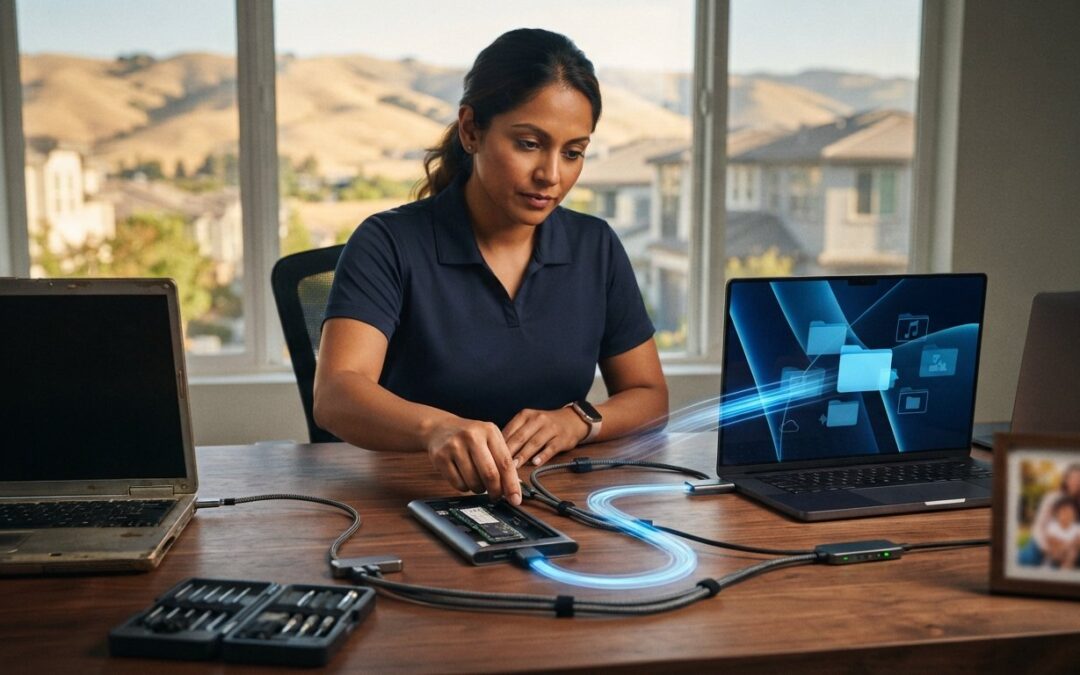
Unboxing a brand-new computer should feel exciting, yet the dread of moving your entire digital life onto it often brings that momentum to a grinding halt. If you’ve ever stared at a frozen progress bar on an external drive, wondering whether your family photos or critical software licenses will survive the jump, you aren’t alone. Moving everything isn’t just about dragging folders onto a thumb drive; it’s a precision process. Choosing a dependable data migration service Pleasanton residents trust ensures your irreplaceable files, system settings, and hidden user libraries transfer cleanly without the risk of data loss.
At Pleasanton Computer Repair, we believe upgrading your setup should bring genuine peace of mind, not hours of troubleshooting. In this guide, you’ll discover how professional migration transitions your PC or Mac so your new system feels instantly familiar, completely intact, and noticeably faster. We’ll walk through how local hardware specialists verify your transfer, safeguard software configurations, and eliminate the frustration of DIY file moves for good.
Key Takeaways
- Understand why basic copy-pasting fails to capture hidden app data, user profiles, and critical system registries.
- Discover how pairing your transfer with high-speed SSD upgrades can dramatically boost your overall performance.
- Learn how an experienced data migration service Pleasanton provider protects fragile media libraries and complex software licenses.
- Follow our pre-migration checklist to clear clutter and organize credentials before moving to your new device.
- Find out how physical bench diagnostics identify and recover files safely from failing drives before data loss occurs.
What is a Data Migration Service and Why Do You Need One?
At its core, data migration is the structured transfer of files, settings, and user profiles from one storage environment to another. While dragging folders to an external hard drive works for a few loose documents, it isn’t a complete transfer strategy. A true migration preserves the ecosystem of your digital life. It bridges your desktop layout, application preferences, browser histories, and personalized configurations over to new hardware without leaving critical data behind.
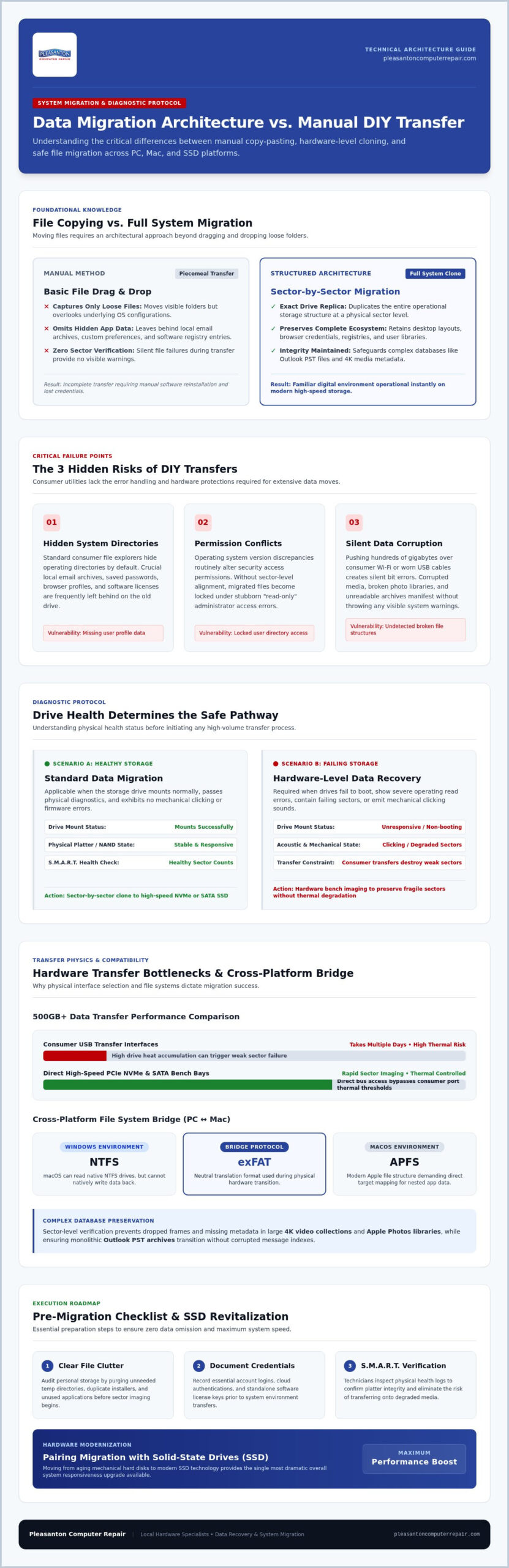
There is also a significant difference between basic file copying and full system cloning. Copying moves files piecemeal, whereas system cloning creates an exact sector-by-sector replica of your operational drive. For East Bay residents switching from PC to Mac, setting up a new computer, or pairing a transfer with fast SSD upgrades, choosing a dedicated data migration service Pleasanton homeowners and businesses rely on prevents crucial elements from falling through the cracks. Understanding what is data migration at an architectural level helps explain why professional tools deliver far cleaner results than manual transfers.
The Hidden Risks of DIY Data Transfers
Moving data yourself often reveals unexpected roadblocks. First, standard file explorers routinely hide system directories, meaning your local email archives, browser credentials, and application profiles get left behind. Second, operating system updates frequently create permission conflicts, leaving files locked with stubborn read-only errors on your new machine. Finally, transferring hundreds of gigabytes over consumer Wi-Fi or aged USB cables invites silent data corruption, which ruins files without throwing a single visible warning.
Migration vs. Data Recovery: Knowing the Difference
People often confuse migration with recovery, but they address different health levels of your hardware. A migration assumes your original drive is healthy, mounting properly, and ready to share data. Data recovery becomes necessary when a computer won’t boot, shows operating errors, or emits clicking noises from a failing mechanical platter. At Pleasanton Computer Repair, our technicians test drive health before starting, ensuring we execute a smooth migration for stable systems or initiate secure recovery protocols if your storage shows signs of physical failure.
The Technical Challenges of a Seamless Transfer
Most guides treat moving files as a simple matter of dragging folders across an external hard drive. In reality, large-scale transfers bring serious technical hurdles. Modern operating systems handle application registries, user permissions, and directory structures differently across versions. Moving massive media collections, such as 4K home video or expansive Apple Photos libraries, requires sector-level verification to prevent missing metadata or dropped frames. Similarly, transitioning monolithic email databases like Outlook PST archives demands careful extraction so your local message histories and custom rules don’t disappear.
Hardware bottlenecks present another obstacle. Moving 500GB or more of data through consumer USB ports can take days, often heating drives to points where weak sectors fail completely. Professional bench stations bypass these limitations using high-speed PCIe NVMe and direct SATA transfer bays. If your storage drive is already degrading, struggling, or failing to mount, relying on a professional data migration service Pleasanton technicians operate ensures weak sectors are read carefully using hardware-level imaging rather than destructive consumer software attempts.
PC to Mac and Mac to PC Transitions
Crossing platforms introduces file system incompatibilities that trip up home users and business owners alike. Windows uses NTFS, while modern macOS relies on APFS. Because macOS can read NTFS drives but cannot write to them natively, moving files requires reformatting external drives to neutral formats like exFAT or using direct network protocols. Technicians ensure Windows app data, nested documents, and browser profiles land in the exact target directories within macOS, preserving external backup compatibility along the way.
Migrating to an SSD for Maximum Performance
If you’re moving data from an aging hard drive, pairing that transfer with an SSD upgrade in Pleasanton delivers the single biggest performance boost available. Rather than just shifting files, upgrading to a solid-state drive breathes new life into your existing machine.
- Drive Health Verification: Technicians inspect S.M.A.R.T. health logs to ensure bad sectors won’t compromise your new drive image.
- Dynamic Partition Resizing: Professional tools adjust partition boundaries so an operating system safely fits onto drives of differing storage capacities.
- Preserved Bootability: System boot records and Master Boot Records (MBR/GPT) clone accurately, ensuring your computer starts up smoothly on the first attempt.
DIY Migration vs. Professional Local Services
Attempting a DIY transfer over a weekend often turns into a ten-hour ordeal. Between setting up external enclosures, babysitting slow progress bars, and resolving stuck file transfers, the process quickly drains your time. In contrast, professional migration is turnkey. Technicians utilize dedicated SATA and NVMe bench docks combined with forensic transfer software, moving hundreds of gigabytes in a fraction of the time consumer cables require.
Beyond raw speed, professional service includes critical verification. Technicians employ checksum validation to detect bit rot, ensuring copied files match the originals byte-for-byte. Data privacy remains another vital advantage. Instead of uploading sensitive financial records or family photos to third-party cloud servers, relying on a local data migration service Pleasanton residents trust keeps your personal information entirely contained on physical, air-gapped bench hardware.
When DIY Tools (Migration Assistant/OneDrive) Fail
Built-in utilities like Apple’s Migration Assistant or Microsoft OneDrive sound convenient, but they frequently hit walls. An unexpected network drop can trigger an “Incomplete Migration” error, leaving a new machine stuck in a boot loop with duplicate accounts. If an older system is already sluggish from failing sectors, these tools often freeze entirely. Worse, setting up automated cloud sync incorrectly can accidentally delete local files when you intended to merge folders.
The Value of Local Expertise in Pleasanton
Working with a local team provides accountability that distant cloud platforms and big-box stores cannot match. A quick face-to-face conversation ensures technicians know precisely which database folders, tax archives, or creative projects require priority handling.
- Direct Consultation: Discuss your specific file structure and user requirements directly with the technician handling your machine.
- On-Site Business Support: Tailored setups for home offices and small businesses in Pleasanton minimize operational downtime during hardware refreshes.
- Fast Local Turnaround: Avoid the anxiety and weeks-long delays of shipping delicate computers to distant out-of-state repair depots.
Choosing a dedicated data migration service Pleasanton providers deliver gives you confidence that your data is safe, fully verified, and ready the moment you power on your new machine.
How to Prepare for Your Data Migration: A Local Checklist
A little preparation before your appointment goes a long way toward ensuring a fast, error-free transfer. You don’t need a degree in computer science to get your machine ready for the bench. Taking a few proactive steps streamlines the entire workflow and guarantees no vital records are overlooked.
Start by auditing your digital workspace with these practical steps:
- Inventory Software and Licenses: Document license keys for applications like Microsoft Office, QuickBooks, or Adobe Creative Cloud. Make sure you have your account logins accessible.
- Empty the Clutter: Delete obsolete installation setup files, clear temporary folders, and empty your “Downloads” directory. Purging unneeded files saves valuable transfer time.
- Locate Hidden Data Stores: Identify localized databases such as standalone tax software returns, local Outlook archive folders, or proprietary accounting files that live outside standard desktop folders.
- Verify Administrative Passwords: Write down the exact administrative PINs or master passwords for both the source computer and the destination device. Technicians require administrative access to migrate user accounts and re-establish proper folder permissions.
Physical Preparation for Your Appointment
Bring the dedicated power supply for any laptop or all-in-one desktop you drop off, as standard wall adapters can vary widely by manufacturer and wattage. Check that your destination drive possesses sufficient capacity to hold your existing files with room to spare for future operating system updates. If you’re consolidating data from several external thumb drives or portable backup drives, label each unit clearly with masking tape to denote priority files.
Small Business Migration Considerations
Commercial migrations involve shared workflows that require extra coordination. When moving office workstations, technicians document local IP assignments, network-attached storage (NAS) drive paths, and office printer defaults so your staff returns to work seamlessly. Handling client files securely remains paramount for local firms, which is why working with a trusted data migration service Pleasanton businesses rely on keeps proprietary records protected on localized bench hardware under strict California privacy standards.
Ready to skip the technical headaches and upgrade your computer the easy way? Schedule your data migration appointment today with our local repair team.
Secure Data Migration at Pleasanton Computer Repair
At Pleasanton Computer Repair, our white-glove transfer process at 400 Main Street takes the stress and uncertainty out of updating your setup. Serving the East Bay since 2002, our team pairs deep hardware experience with neighborly customer service. Whether your existing machine is fully operational or requires advanced failed hard drive recovery to retrieve critical documents, we guide your data safely across systems.
Security and privacy sit at the core of our bench workflow. Your files transfer exclusively over a closed, local hardware connection, ensuring your personal records, photos, and commercial databases never upload to third-party cloud servers. Once the transfer finishes, we help you confirm that your primary accounts, software profiles, and local network printers communicate properly so your machine is productive immediately.
In-Store and On-Site Options for the East Bay
We tailor our service delivery to fit your routine. You can bring your devices directly to our office at 400 Main Street, Suite 205, for in-store drop-off and bench diagnostics. For busy homeowners and business offices in Dublin, San Ramon, and Livermore, our technicians provide on-site setup to handle multi-computer transitions directly on location. We also offer secure remote sessions to troubleshoot folder permissions and software settings after your move.
Comprehensive Tech Support Beyond Migration
A system move offers the perfect window to refresh your overall digital environment. When scheduling a data migration service Pleasanton clients frequently combine their transfer with thorough virus removal or storage cleanups to keep unwanted background junk off the new computer. We can also configure reliable automated backup tools, such as macOS Time Machine or dedicated physical backup drives, ensuring you remain protected against unexpected hardware failures down the road. Every project wraps up with an in-person “Success Check” where we verify together that your irreplaceable libraries and business files are completely intact.
Take the Stress Out of Your Next Computer Transition
Upgrading your technology shouldn’t feel like a high-stakes gamble with your irreplaceable memories or daily workflow. Moving to a faster machine should be an exciting step forward. By choosing a dedicated data migration service Pleasanton users trust, you protect fragile photo libraries, maintain software configurations, and avoid the frustrating bottlenecks of DIY transfers.
Since 2002, Pleasanton Computer Repair has delivered dependable PC and Mac support throughout the East Bay. Whether you visit our shop at 400 Main Street, Suite 205, or arrange on-site help for your office, our technicians ensure every file transfers cleanly without exposing your personal information to third-party clouds. Enjoy the speed of your new system without the hassle of starting from scratch. Schedule your data migration appointment in Pleasanton today and let our local team handle the details.
Frequently Asked Questions
How long does a professional data migration typically take?
Most standard migrations take between 24 and 48 hours depending on your storage volume. While moving smaller setups can happen overnight, systems with half a terabyte of photos or complex application profiles require extra time for byte-by-byte checksum verification. If your drive has physical surface damage or bad sectors, the process takes longer because technicians must extract files carefully to prevent permanent data loss.
Can you move my programs and apps, or just my files?
We transfer all your personal documents, media libraries, and app configuration files, but standard applications usually require fresh reinstallation on the new system. Operating systems need native registry entries and system links that simple file moving cannot create. For PC-to-PC or Mac-to-Mac transitions involving healthy drives, we can clone the entire bootable environment so your installed software remains ready to open immediately.
Will my new computer look exactly like my old one after the migration?
Yes, our goal is to make your new computer feel instantly familiar. When performing direct system migrations, our technicians map your desktop icons, user folder layouts, documents, and display preferences. You get the familiar comfort of your previous working environment paired with the blistering speed of modern hardware, letting you pick up right where you left off without digging for lost folders.
Can you recover data from a computer that won’t turn on?
Yes, we can safely retrieve your files even if your computer suffers from a failed motherboard or dead power supply. We extract the physical storage drive and connect it directly to our bench testing docks. As long as the internal storage platters or flash memory modules are functional, a professional data migration service Pleasanton technicians operate can access, verify, and transfer your critical data to your replacement computer.
Is it possible to move data from a PC to a new Mac?
Yes, moving across operating systems is a routine procedure in our shop. Windows and macOS utilize completely different file systems, so we reformat bridging hardware and map your files into appropriate native folders. Your photos integrate into the Apple Photos ecosystem, documents go into the Mac directory, and browser bookmarks transition smoothly to Safari or Chrome so your cross-platform switch stays seamless.
Do I need to bring my power cables and monitor for the migration?
Please bring the dedicated charging brick and power cable for any laptop or all-in-one computer you drop off. You do not need to bring standalone desktop monitors, keyboards, or mice, because our test benches at 400 Main Street are fully equipped with displays and peripherals. If you have external drives containing extra backups, bring those along as well.
Will my saved passwords and browser history move to the new computer?
Yes, we migrate your local browser caches, history archives, and saved bookmarks across setups. If you use browser-level sync services like Google Chrome or Apple iCloud Keychain, those credentials sync automatically once you sign in. For standalone browser profiles, we transfer the underlying profile folders directly to make sure your autofill information and saved website preferences carry over without manual retyping.
How do you ensure my data remains private during the transfer?
We keep your files entirely off public clouds and third-party remote servers. Using a trusted local data migration service Pleasanton residents depend on ensures your files move exclusively across closed, physical bench connections. Our technicians follow strict confidentiality protocols under California privacy laws, and we perform a full verification check before safely returning your equipment to your hands.