
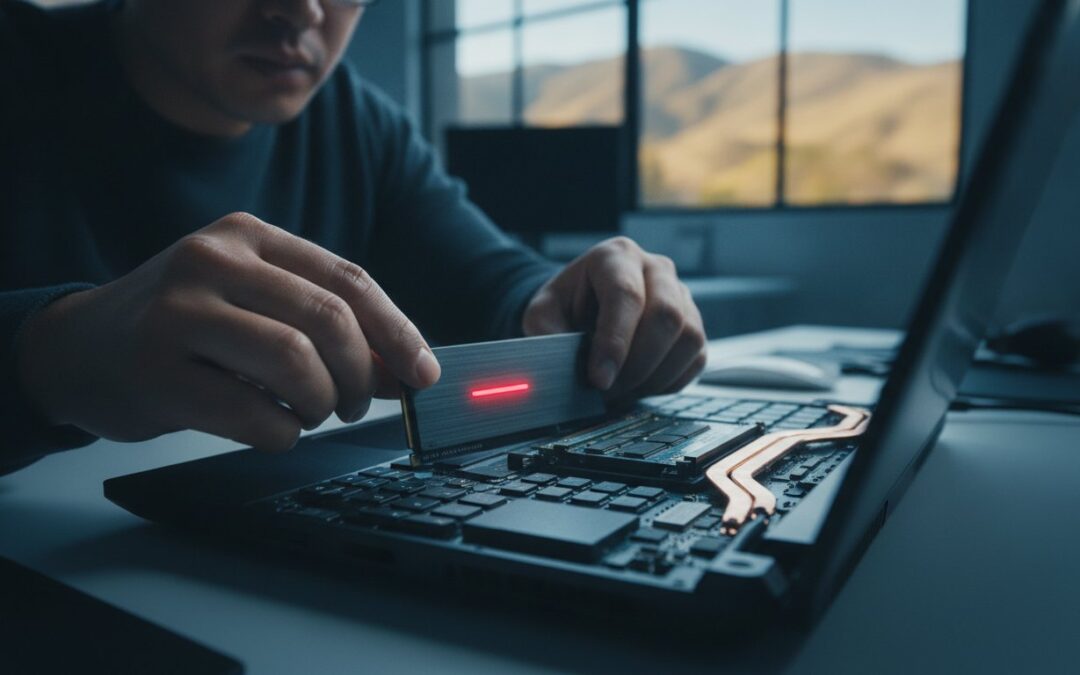
Have you ever sat staring at a spinning loading icon while a deadline looms, wondering if your once-fast computer has finally given up the ghost? It’s a frustrating experience many of us in the East Bay face, especially when trying to manage high-res photo libraries or demanding software. You might feel like your only choice is to replace the whole machine, but that’s often an expensive and unnecessary move. In 2026, the smartest way to regain your productivity is through strategic computer hardware upgrades in Pleasanton that provide a massive performance boost at a fraction of the cost of a new device.
We understand the anxiety of a slow system and the fear of losing your data during a hardware swap. This guide shows you how to breathe new life into your current setup, extending its lifespan by three years or more. You’ll learn why modern SSDs are the ultimate cure for lag, how to safely expand your storage for high-resolution media, and why local service on Main Street is the best way to get back to work quickly. It’s time to stop waiting for your computer to catch up and start enjoying a device that works as fast as you do.
Key Takeaways
- Learn why an SSD upgrade is the single most effective way to eliminate the “spinning beachball” and restore instant responsiveness to your Mac or PC.
- Discover why 16GB of RAM is the new baseline for 2026 and how it helps your system handle modern AI-driven software and multitasking.
- Master the “5-Year Rule” to confidently decide whether it’s more cost-effective to invest in computer hardware upgrades in Pleasanton or replace your device entirely.
- Understand our professional diagnostic and backup process that ensures your precious high-res photos and business data remain protected throughout the hardware swap.
- Explore how tailored hardware solutions, from custom workstations to business fleet optimizations, can extend your technology’s lifespan for three or more years.
2026 Tech: Why Hardware Upgrades in Pleasanton Matter
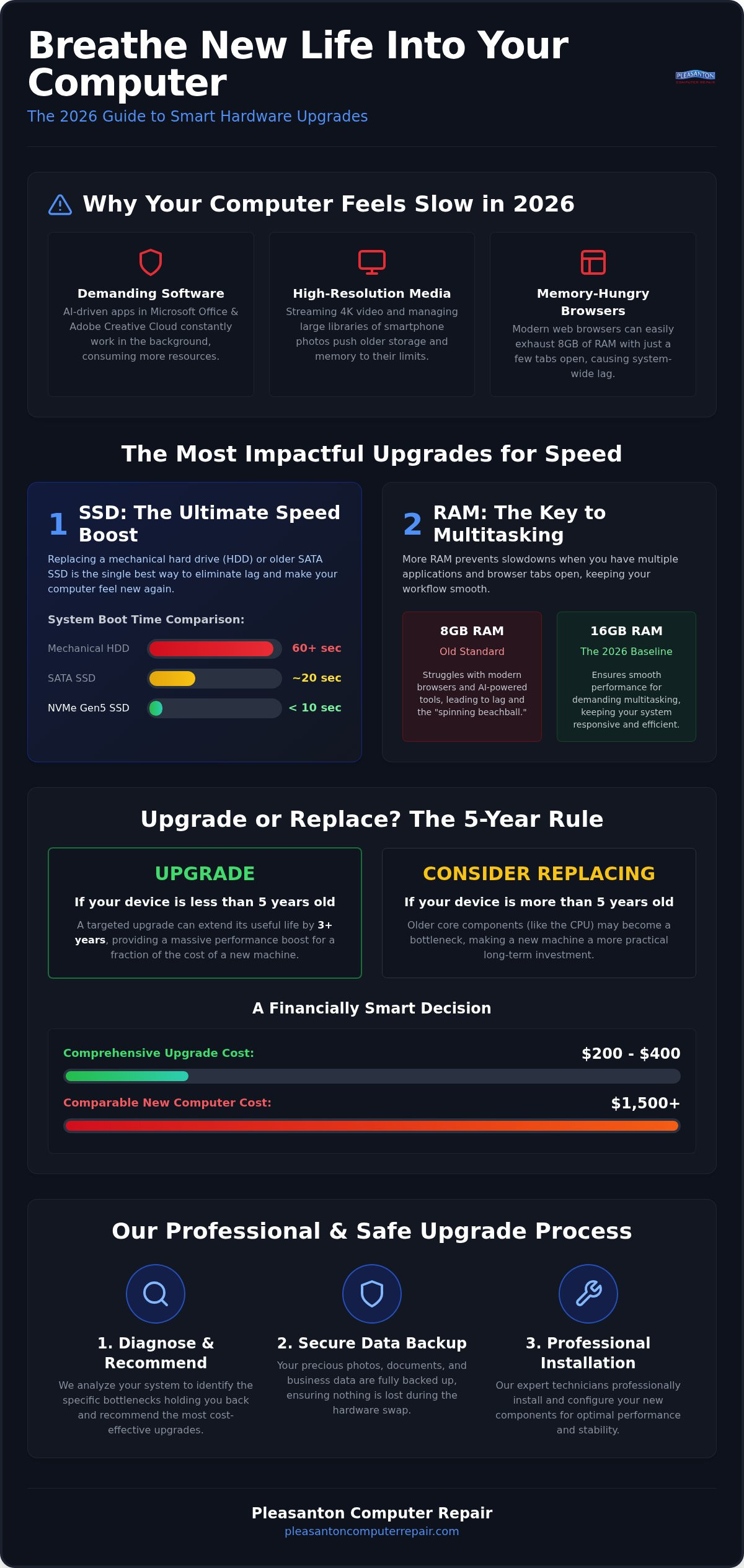
The digital environment of 2026 looks vastly different than it did just a few years ago. With the widespread integration of artificial intelligence into everyday applications like Microsoft Office and Adobe Creative Cloud, your processor and memory are working harder than ever before. Even streaming 4K video or managing a library of high-resolution smartphone photos can push an older machine to its breaking point. For many neighbors in the East Bay, the solution isn’t a trip to a big-box store for a new laptop; instead, they’re discovering the power of computer hardware upgrades in Pleasanton to bridge the performance gap.
At its core, understanding hardware upgrades means identifying the specific parts of your computer that are holding you back. By swapping out a sluggish traditional hard drive for a lightning-fast Gen5 SSD or increasing your RAM, you can often achieve a machine that feels faster than it did on the day you bought it. There is a profound psychological relief in keeping the keyboard, screen, and file structure you already know, while simply installing a much more powerful “engine” under the hood.
The Shift in Software Demands
Modern operating systems like Windows 11 and the latest macOS versions are designed to leverage high-speed hardware for background tasks and security. Web browsers have also evolved into massive memory consumers; opening just a few tabs in 2026 can easily exhaust 8GB of RAM, leading to those dreaded loading icons. A hardware bottleneck occurs when a single underperforming component, such as an aging drive or limited memory, prevents the rest of your high-end system from reaching its full potential. By targeting these specific bottlenecks, we restore fluid multitasking and instant app launches to your daily routine.
Economic and Environmental Benefits
Choosing an upgrade is a financially savvy move that aligns with our local commitment to sustainability. Consider the math: a comprehensive hardware refresh typically costs between $200 and $400, while a comparable new machine often starts at $1,500 or more. This approach also helps you stay ahead of California’s evolving environmental standards. As of January 1, 2026, Senate Bill 1215 has expanded e-waste regulations, reflecting the fact that electronics are growing three times faster than regular trash according to the EPA. By extending the life of your device, you reduce your carbon footprint and avoid the headache of migrating every password, file, and setting to a brand-new system. We help you keep what works while fixing what doesn’t, right here on Main Street.
The Most Effective Hardware Upgrades to Boost Speed and Performance
Identifying the right components to replace can feel overwhelming, but a few specific changes usually provide the most dramatic results. Not every part of your computer needs to be top-of-the-line to feel fast; instead, we focus on the parts that directly impact your daily responsiveness. When considering computer hardware upgrades in Pleasanton, we look for the most efficient path to restoring that “new computer” feel without the “new computer” price tag.
SSD Upgrades: From SATA to NVMe
If you’re still using a mechanical hard drive or even an older SATA SSD, you’re missing out on incredible speed. The transition to NVMe technology represents a massive leap in how quickly your computer can read and write data. While older drives might take a minute or more to boot your system, a modern Gen5 SSD can do it in seconds. This is the absolute best fix for a slow iMac or an aging MacBook that seems to struggle with basic tasks. By choosing a professional SSD upgrade Pleasanton CA, you eliminate the “spinning beachball” and make every interaction feel instantaneous. It’s the single most impactful change you can make to any device.
Memory and Graphics Optimization
Multitasking in 2026 requires more resources than ever. We’ve found that 16GB of RAM is now the minimum for a smooth experience, especially if you use modern web browsers or AI-assisted tools. When your computer runs out of physical memory, it starts “swapping” data to your storage drive, which causes significant lag. Increasing your RAM prevents this slowdown and keeps your system snappy even with dozens of tabs open. For Pleasanton’s creative professionals and gamers, we also look at GPU enhancements. With high-end cards like the NVIDIA GeForce RTX 5090 pushing the boundaries of what’s possible, a custom graphics upgrade can transform a standard workstation into a powerhouse for video editing or 3D rendering. It’s important to identify which components are actually user-upgradeable, as many modern laptops have soldered parts that require expert handling.
Don’t forget about the battery. If your laptop or iPad only lasts an hour before needing a charge, a simple battery replacement can restore the portability you’ve been missing. We help you determine which of these computer hardware upgrades in Pleasanton will provide the best return on your investment. If you’re unsure where to start, a professional assessment at our Main Street shop can pinpoint exactly which part is slowing you down.
The Upgrade vs. Replace Dilemma: A Practical Framework
One of the most frequent questions we hear at our Main Street shop is whether a device is worth saving. It’s a tough call when you’re staring at a slow screen and a mounting list of frustrations. To help our neighbors make the right choice, we use the “5-Year Rule” as a starting point for computer hardware upgrades in Pleasanton. Generally, if your machine was a high-end model purchased within the last five years, it likely has a processor that’s still very capable by 2026 standards. A 2021 laptop with a quality chip, once refreshed with a modern SSD and 16GB of RAM, can often outperform a budget-tier 2026 base model in real-world tasks.
Speed isn’t the only factor we evaluate. We also look at the physical integrity of the device. If your screen is vibrant and your hinges are solid, the “bones” of the computer are worth investing in. However, if the chassis is cracking or the display has dead pixels, even the fastest internal components won’t improve your daily experience. We prioritize your peace of mind by giving you an honest assessment of whether your hardware can truly support another three to five years of reliable use.
When an Upgrade is the Clear Winner
In many cases, spending $200 to $400 on a targeted refresh is the smartest financial move. It’s a surgical approach that saves a perfectly good high-end processor from the landfill. Many users also prefer their older machines because of “vintage” features that modern, thinner models have abandoned, such as dedicated USB-A ports, SD card slots, or more comfortable, tactile keyboards. We’ve found that strategic hardware upgrades solve 95% of performance complaints, allowing you to keep the setup you love while gaining the speed you need for modern software.
Signs It’s Time to Say Goodbye
There are times when the math simply doesn’t add up. If a device has suffered significant liquid damage or a total motherboard failure, the risk of future issues remains high even after a repair. We typically suggest moving on if the cost of multiple replacement parts exceeds 50% of the price of a brand-new computer. Additionally, some modern proprietary designs are so restrictive that they prevent any meaningful hardware from fitting inside. If your current machine has reached the end of its road, you can still find incredible value without buying new. Explore our selection of Refurbished Laptops Pleasanton CA to find a reliable, pre-tested alternative that fits your budget and performance needs.
Professional Installation: The Pleasanton Computer Repair Process
Entrusting your device to someone else requires confidence, especially when your data and productivity are on the line. We’ve refined a methodical four-step approach to computer hardware upgrades in Pleasanton that prioritizes security and performance. It begins with a comprehensive diagnostic. We don’t just guess which part is failing; we use professional testing tools to confirm that an upgrade is the most effective solution for your specific issues. This ensures you aren’t spending money on a new drive when the problem is actually a corrupted operating system or a failing power supply.
Data safety is our next priority. We never touch your internal hardware without first performing an expert data backup. This step alleviates the anxiety many of our clients feel about losing family photos or sensitive business documents during a hardware swap. Once your files are protected, we move to precision installation in our specialized Main Street lab. After the new components are seated, we conduct system optimization and ‘burn-in’ testing. This rigorous process guarantees stability, ensuring your machine can handle heavy workloads without crashing before it ever leaves our workbench.
In-Store vs. On-Site Support
We understand that your schedule is busy. For many home and office users in Dublin, San Ramon, and Livermore, the convenience of on-site support is a game changer. A technician can come directly to you to handle less invasive tasks or troubleshoot networking issues. However, complex hardware surgery is best performed at our specialized workbench in Pleasanton. Our shop is equipped with anti-static environments and precision tools that simply aren’t portable. If you’re looking for the most reliable Computer Repair Pleasanton CA can offer, our in-store service provides the controlled environment needed for delicate component replacements.
Data Migration and Recovery
The goal of a hardware refresh is to make your computer faster, not to make it feel like a stranger. Our data migration process moves your entire digital life to your new, faster drive seamlessly. We ensure your software licenses, browser bookmarks, and personalized settings remain exactly where you left them. If your current drive is already failing, we utilize specialized recovery tools to retrieve as much information as possible before completing the upgrade. We act as a protective barrier between you and your technological headaches, making the transition to better performance completely stress-free. Ready to get started? Schedule your professional hardware assessment today and see the difference local expertise makes.
Specialized Upgrades: Custom Builds and Business Solutions
While many residents need a simple speed boost, others require precision-engineered systems to handle demanding professional workloads. Whether you’re an engineer at a local firm or a small business owner in the East Bay, specialized computer hardware upgrades in Pleasanton can be the difference between a system that just works and one that excels. We move beyond basic repairs to offer comprehensive hardware strategies that keep your specific goals in mind. If your team is also expanding its broader office setup with dedicated peripherals and imaging equipment, you can visit GenX Systems LLC to explore international IT hardware options like business printers and scanners.
High-Performance Custom PCs
For Pleasanton’s creative professionals, off-the-shelf computers often fall short of the power needed for 3D rendering or complex data analysis. We design custom workstations by carefully selecting motherboards and advanced cooling systems that ensure long-term reliability under heavy thermal loads. Local gamers and streamers also benefit from these optimized builds, as we fine-tune every component for maximum frame rates and zero latency. Choosing a locally warrantied custom build provides the peace of mind that comes from knowing your support team is just down the street on Main Street.
Supporting Local Small Businesses
Small businesses in the East Bay face unique challenges when their fleet of laptops begins to slow down simultaneously. Instead of replacing twenty machines at once, bulk SSD rollouts offer a cost-effective way to skyrocket employee productivity. We specialize in Small Business Computer Repair in Pleasanton, helping offices in Dublin and San Ramon stay competitive without massive capital expenditures. Beyond internal speed, we also upgrade cybersecurity hardware like routers and firewalls to protect your local network from evolving digital threats.
Sometimes, the most critical computer isn’t the newest one. We help local businesses maintain specialized legacy equipment by using modern storage adapters that allow older machines to communicate with current hardware. This keeps expensive, proprietary systems running smoothly for years. Once your computer hardware upgrades in Pleasanton are complete, remember that maintenance is key. Keeping your fans clean and your software updated ensures your new components continue to perform at their peak. We’re here to be your long-term technology partner, protecting your investment and your productivity.
Take the Next Step Toward a Faster Device
You don’t need to accept a sluggish computer as your new normal. Strategic computer hardware upgrades in Pleasanton offer a smarter path forward, delivering the responsiveness you need for 2026’s software without the stress or high cost of a total system replacement. By focusing on the “5-Year Rule” and prioritizing high-impact parts like SSDs and RAM, you can keep your familiar setup while enjoying “like-new” speed for years to come.
Since 2002, our team has provided reliable, neighborly service to the East Bay from our convenient Main Street location. We specialize in Mac, PC, and iPhone hardware, acting as a protective barrier between you and your technological headaches. Your data stays safe, your files stay put, and your computer gets the second life it deserves. Stop waiting for loading icons and start enjoying a device that actually works as fast as you do.
Schedule Your Hardware Diagnostic at Our Pleasanton Shop today. We look forward to helping you get back to work with a system that finally keeps up with your demands.
Frequently Asked Questions
How much does a typical SSD upgrade cost in Pleasanton?
Total costs for an upgrade depend on the storage capacity and speed grade of the drive you select. While we don’t provide fixed pricing here, the investment is influenced by the current market rates for NAND flash memory and the labor required for your specific device model. We recommend a professional diagnostic at our Main Street shop to receive a precise quote tailored to your performance goals and budget.
Will upgrading my hardware void my manufacturer warranty?
Generally, upgrading components like your storage or memory does not void a manufacturer warranty in the United States. However, any physical damage caused by an improper or amateur installation could lead to a denied claim. This is why professional computer hardware upgrades in Pleasanton are the safest choice. We use specialized anti-static tools and expert techniques to ensure your device remains in peak condition and within warranty guidelines.
Can I upgrade the RAM in my MacBook Pro or is it soldered?
The ability to expand your memory depends on the specific year and model of your MacBook Pro. Most models released after 2012 feature memory that is soldered directly to the logic board, which prevents traditional upgrades. However, many older MacBook models and the majority of PC laptops still allow for physical RAM expansion. We can quickly check your serial number to confirm which components are upgradeable in your machine.
How long does a professional hardware installation take?
Most standard hardware installations are completed within 24 to 48 hours at our Pleasanton lab. We prioritize a thorough process that includes “burn-in” testing to guarantee the stability of your new components before you pick up the device. If you manage a business in Dublin or San Ramon and require on-site fleet upgrades, we can often coordinate a schedule that minimizes downtime for your entire team.
Is my data safe during a hard drive to SSD migration?
Yes, your data is protected through our rigorous migration protocols. We use professional cloning software to create an exact replica of your existing files before we ever touch the physical hardware. This bit-for-bit copy ensures your software licenses, browser settings, and precious photos remain exactly where you left them. Our team has refined these data protection steps since 2002 to provide a completely stress-free experience for every client.
What is the most important hardware upgrade for a slow computer?
Replacing an aging mechanical hard drive with a modern Solid State Drive (SSD) is the single most effective way to boost speed. An SSD removes the mechanical bottleneck that causes “spinning beachballs” and long boot times. For most users in the East Bay, this upgrade provides a more noticeable performance jump than buying a new processor. It’s the primary tool we use to restore instant responsiveness to older systems.
Do you offer on-site hardware upgrades for businesses in Livermore or Dublin?
We provide on-site technical support for businesses and residential clients throughout Livermore, Dublin, and the surrounding East Bay cities. Our technicians can visit your office to handle networking hardware, firewalls, or fleet-wide diagnostics. For delicate internal surgery, we often recommend bringing the device to our specialized workbench on Main Street. This ensures we have the precision environment required for complex computer hardware upgrades in Pleasanton.
Can an old computer from 2015 still be upgraded to run smoothly today?
Many computers from 2015 are surprisingly capable once they are freed from the limitations of older storage technology. A decade-old machine with a high-quality processor can often run modern 2026 software with ease after we install a fast SSD and maximize the RAM. This “surgical” upgrade path is a cost-effective way to gain several more years of life from a device you already know and love without buying new.