
What if the computer acting strangely isn’t infected at all? Slow performance, unfamiliar pop-ups, and browser changes can be signs of a virus or spyware, but other problems can cause similar symptoms. Before you keep using the device or try to clean it yourself, look for a virus removal service Livermore residents can access that starts with careful diagnosis rather than guesswork.
This guide covers common signs of a possible infection, practical steps to take before cleanup, and when professional help can make sense. Pleasanton Computer Repair provides Virus & Spyware Removal for residential and business customers across the East Bay, including Livermore. The company offers in-store support at 915 Main Street Suite A, Pleasanton, CA 94566, as well as remote and on-site service. Here’s how to describe the issue and choose a clear next step.
Key Takeaways
- Pop-ups, redirects, and slow performance can point to an infection, but one symptom alone doesn’t confirm one.
- Use simple, low-risk checks for isolated issues, and consider professional assessment when problems persist or are hard to explain.
- Before arranging a virus removal service Livermore residents can access, note what’s happening, when it started, and any recent changes.
- A technician can review the reported symptoms, share findings, and email a quotation for the proposed service.
- Pleasanton Computer Repair serves Livermore with in-store, remote, and on-site support from 915 Main Street Suite A, Pleasanton, CA 94566.
Virus Removal Service in Livermore: Which Computer Problems May Signal an Infection?
Unexpected pop-ups, unfamiliar web pages, or a computer that suddenly feels sluggish can be unsettling, especially if you’re concerned about personal or business information. But one unusual behavior doesn’t prove there’s a virus. A browser setting, software conflict, low storage, or network problem can produce similar symptoms. Start by noting what changed and whether the behavior keeps happening.
Virus removal is the process of identifying and addressing unwanted malicious software that may be affecting a computer. That can include viruses or spyware, but symptoms alone can’t identify a specific threat. A computer virus is one type of malicious software; people sometimes use the term broadly even when another cause may be involved.
What computer behavior can raise a virus or spyware concern?
Repeated, unwanted pop-ups or unfamiliar redirects deserve attention, particularly if they continue across browsing sessions or appear on different sites. Unexpected security messages can also be concerning, but some are web pages designed to look like system warnings. Urgent wording or a warning symbol alone doesn’t prove that your computer is infected.
Other clues include browser settings changing without your input or programs appearing that you don’t remember installing. Look for a pattern: When did it start? Does it happen in one browser or across different apps? Does it return after a restart? These details help describe the issue without guessing at its cause. A single redirect or unfamiliar program may have an ordinary explanation, but repeated unexplained changes are worth investigating.
Could a slow or unstable computer have another cause?
Yes. Older hardware may struggle with newer software, while software conflicts can cause freezing, crashes, or slow startup. Limited storage can affect performance, and a weak or inconsistent network connection may make pages load slowly or interrupt online work. These issues can resemble malware symptoms without being caused by an infection.
Think about what else changed around the time the symptoms began. Did you install an app, update software, add files, or start using a different network? That context can help distinguish a possible security concern from a broader repair need. For more general troubleshooting context, see this computer repair guide.
If unusual behavior persists or you can’t identify its cause, a professional diagnosis can help distinguish virus or spyware concerns from software, hardware, or network issues. Pleasanton Computer Repair provides Virus & Spyware Removal and computer repair for residential and business customers in Livermore. For organizations seeking ongoing network defense and proactive maintenance, OC Cubed – Your trusted MSP offers dedicated business IT solutions to help prevent security disruptions. Describe what you’ve observed to give the technician a useful starting point without trying to diagnose the problem yourself.
What Happens During Professional Virus Removal for Livermore Computers?
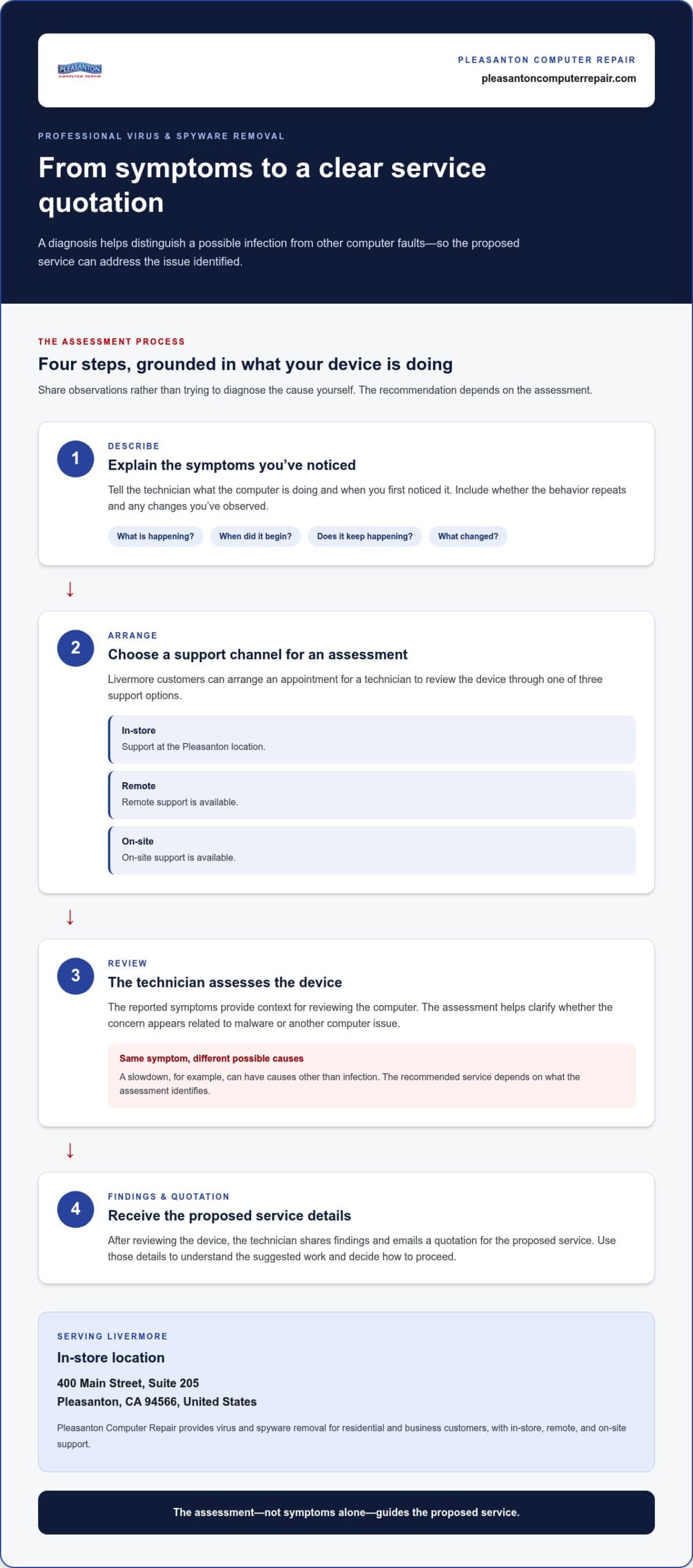
When you don’t know whether a computer has an infection, every pop-up or slowdown can feel more serious. Professional Virus & Spyware Removal gives you a way to explain what’s happening and have the device reviewed. A diagnosis helps distinguish a possible infection from other computer faults, so the proposed service can address the issue identified.
Pleasanton Computer Repair serves residential and business customers in Livermore with in-store, remote, and on-site support. The process starts with your description of the symptoms, followed by a review of the device and a quotation for the proposed service.
How does diagnosis guide the cleanup approach?
Describe what you’ve noticed, when the behavior began, whether it repeats, and what changes you’ve already observed. Those details give the technician context for reviewing the problem. For background on spyware-related concerns, the CISA spyware warning signs resource describes examples such as persistent pop-ups, browser hijacking, and slowdowns.
The device and its behavior can then be assessed in light of the symptoms you reported. The findings help clarify whether the concern appears related to malware or another computer issue. The recommended service depends on the assessment, since the same symptom can have different causes.
What should customers expect after an assessment?
For a virus removal service Livermore users can access, expect a review based on the computer’s symptoms, followed by a clear quotation. You can schedule an appointment for a technician to review the device. Pleasanton Computer Repair offers in-store, remote, and on-site support, so local customers can choose a convenient way to arrange an assessment.
- Explain the symptoms. Share what the computer is doing and when you first noticed it.
- Arrange an assessment. Choose a support channel and schedule an appointment for the technician to review the device.
- Receive the findings. The technician reviews the device and emails a quotation.
- Discuss the service. Use the findings and quotation to understand the proposed work and decide how to proceed.
This process grounds the decision in the device’s reported behavior and assessment, rather than assumptions. The result depends on the issue identified, so don’t assume that every infection, file, or account concern will have the same outcome.
Ready to arrange a review? Schedule virus removal support with Pleasanton Computer Repair and share the symptoms you’ve observed.
DIY Virus Removal vs. Professional Help: What Makes Sense in Livermore?
Not every pop-up or slow startup calls for professional virus removal. A single unusual alert may come from a website, while a brief slowdown may have an ordinary cause. The practical question is whether the behavior is isolated and understandable or keeps returning despite simple, cautious checks. Avoid making major system changes based on a guess. Record what you notice, then use the comparison below to choose a sensible next step.
| Situation | Reasonable next step |
|---|---|
| One unexpected pop-up or brief slowdown | Note when it appeared and what you were doing. Avoid clicking the alert or downloading anything it recommends. |
| A repeated issue tied to one website or program | Record the website or program involved and whether the behavior happens elsewhere. Keep observations simple. |
| Recurring redirects, alerts, or unexplained changes | Consider a professional assessment, especially if the cause remains unclear or the issue continues. |
| Symptoms affecting work or shared devices | Consider support to help identify the problem and discuss an appropriate repair path. |
When might a basic self-check be reasonable?
If the issue is occasional and limited, observe it before trying to fix it. Write down when symptoms began, which programs or websites were open, and whether the behavior repeats. Don’t download cleanup software offered through an unexpected pop-up or unfamiliar security alert. These notes can clarify the situation without introducing new changes or making diagnosis harder.
When should Livermore users consider professional assessment?
Recurring browser redirects, security messages that keep returning, or unresolved symptoms are good reasons to have the computer assessed. The same applies if you can’t tell whether a change is harmless or if the problem continues across different tasks. An assessment doesn’t mean every warning has been confirmed as malware. It gives a technician a chance to review the reported issue and discuss the appropriate service.
For a home computer, consider how disruptive the symptoms are and whether you can confidently identify what triggered them. For a business, an uncertain issue can be harder to manage if it interrupts work or affects a device shared by staff. Resources and tech insights from managed service providers like Telx Computers can offer helpful guidance on safeguarding business systems, while this small business computer repair guide offers useful context on computer support and business continuity.
Professional assessment does not guarantee data recovery. Virus removal and recovering missing or inaccessible files are different needs, and no particular outcome should be assumed before the device is reviewed. Pleasanton Computer Repair provides Virus & Spyware Removal for Livermore residential and business customers, with in-store, remote, and on-site support. Describe the symptoms to make an informed decision, whether that means continued observation or discussing professional repair.
Before Virus Removal: How Livermore Users Can Prepare Their Computer
A little preparation can make a virus removal assessment more useful. You don’t need to diagnose the problem or run cleanup software first. Gather a clear account of what changed, avoid interacting with alerts you don’t trust, and note any files or accounts you’re concerned about. These details help the technician understand the situation without adding uncertainty through unverified fixes.
What information should you have ready?
Keep your notes simple and specific. A plain-language description is more useful than trying to name a particular virus. Include what the computer did, when you first noticed it, and whether the behavior happens every time or only during certain tasks. If you don’t know the operating system, share what you do know.
- Device and system: Note whether it’s a PC or Mac and the operating system, if you know it.
- Symptoms and timing: Describe what happened and when it started. Note whether it repeats or changes over time.
- Recent activity: List any downloads, unexpected alerts, or browser changes you remember before the symptoms began.
- How you use the computer: Explain whether it’s for personal use or business, and mention if others rely on it.
Don’t worry if you can’t recall every detail. A short timeline, such as “the browser started opening unfamiliar pages after I downloaded a file,” gives the technician a useful starting point. Report what you observed rather than guessing about the cause.
How can you protect access to important files and accounts?
Be cautious with pages you don’t trust. Don’t enter passwords, payment details, or other sensitive information into a page opened by an unexpected pop-up or unfamiliar alert. Avoid downloading cleanup tools prompted by those messages. If you’re unsure whether a page is legitimate, close it rather than following its instructions.
Before arranging service, make a note of important files, accounts, or work access you’re concerned about. Tell the technician if you’re worried about reaching a particular document or signing in to an account. Virus removal doesn’t guarantee that files can be recovered or that every account concern will have the same outcome, so mention those priorities early. Don’t send passwords in your symptom notes.
Once you’ve gathered these details, you’ll be better prepared to discuss the issue and next steps. For a virus removal service Livermore residents can access, Pleasanton Computer Repair provides Virus & Spyware Removal and in-store, remote, and on-site support. Arrange a computer repair assessment and share the notes you’ve collected.
Virus Removal Service for Livermore: Choose a Clear Local Next Step
Livermore residents and businesses can arrange Virus & Spyware Removal through Pleasanton Computer Repair. The company serves the area with in-store, remote, and on-site support from its Pleasanton location. Choose the support channel that fits your situation, and describe what the computer is doing when you schedule an assessment.
How can Livermore customers arrange virus removal support?
Schedule an appointment online or visit the Pleasanton location. In-store support gives you a local place to bring a computer, and remote and on-site support are also available. Having a short description of the symptoms and when they began can make the initial discussion more focused.
Location: 915 Main Street Suite A, Pleasanton, CA 94566.
Store hours: Monday – Friday: 9:30 am – 5:00 pm; Saturday – Sunday: Closed.
Appointment hours: Appointments: Monday – Friday 9:30 am – 5:00 pm; Saturday 9:00 am – 1:00 pm.
What should readers know about timing and follow-up?
A technician reviews the device and emails a quotation after the assessment. You can use the findings and proposed service to decide how to proceed. Keep your notes about symptoms, recent changes, and important files or account access concerns handy so you can explain what you need the assessment to address.
If the device needs repair, turnaround is 24-72 hours depending on the issue and parts availability. This is not a fixed completion time for every computer. The technician’s assessment and quotation explain the proposed next step for your situation.
Pleasanton Computer Repair has served the East Bay since 2002 and provides virus removal support to residential and business customers in Livermore. The company also serves Pleasanton, Dublin, San Ramon, Danville, Brentwood, Walnut Creek, and San Jose. If unusual behavior is disrupting your work or you’d like a technician to review the computer, schedule an assessment through the available in-store, remote, or on-site channels.
Ready to take the next step? Schedule a computer repair appointment and share what you’ve observed so the assessment can start with useful context.
Take the Next Step Toward a More Reliable Computer
Unusual computer behavior can be stressful, but you don’t have to solve the mystery on your own. Keep your symptom notes handy and share what you’ve noticed when arranging help. An assessment can clarify a practical next step, whether the issue points to unwanted software or another repair need.
If you’re considering a virus removal service Livermore residents can access, Pleasanton Computer Repair provides local support for home users and businesses. For applicable repairs, the 60-day warranty with free remote support offers a defined follow-up benefit. Start by having the computer reviewed and understanding the recommended service.
Ready to move ahead? Schedule a computer repair appointment and describe the symptoms you’ve observed. A clear starting point helps you take the next step toward a more reliable computer.
Frequently Asked Questions
Does a slow computer always have a virus?
No. Sluggish performance can have several causes, so speed alone can’t confirm an infection. A computer may feel slow while handling a demanding task or after changes to its usual workload. Notice whether the slowdown is constant, limited to a particular activity, or accompanied by other unexplained behavior. That context helps a technician assess whether virus removal or another kind of computer repair may be appropriate.
Can a pop-up warning prove that my computer is infected?
No. A pop-up can be a webpage designed to resemble a security alert, and its alarming wording doesn’t prove your computer is infected. Don’t rely on a phone number or download link displayed in an unexpected warning. Note where it appeared, such as inside a browser window or elsewhere on screen, and describe what happened. A technician can review that information alongside the computer’s other symptoms.
Can I use my computer while I suspect it has a virus?
It depends on what you’re seeing, but avoid using a possibly affected computer for sensitive tasks until you understand the issue. For instance, don’t enter banking details or work credentials into a page that opened unexpectedly or that you don’t trust. If you need the computer for essential work, record what’s happening and explain the urgency when arranging an assessment. Don’t follow instructions from suspicious alerts to install software.
Can virus removal guarantee that my files will be recovered?
No. Virus removal and data recovery address different problems, and neither should be treated as a guarantee that every file will be available. If a particular document, photo, or work folder matters, identify it when describing the computer’s symptoms and discuss that concern during the assessment. Pleasanton Computer Repair offers Data Recovery, but the outcome depends on the specific situation. Raising file concerns early helps clarify what needs attention.
Does antivirus software remove an infection that is already on a computer?
Antivirus software may identify and address some threats, but having it installed doesn’t prove a computer is clean or resolve every persistent problem. If alerts or unusual behavior continue after using your existing security software, avoid downloading additional tools from pop-ups or unfamiliar websites. Note what the software reported and what changed afterward. A technician can review the remaining symptoms and discuss whether Virus & Spyware Removal or another repair is appropriate.
Does Pleasanton Computer Repair serve Livermore for virus removal?
Yes. Pleasanton Computer Repair serves Livermore customers with Virus & Spyware Removal. Its local service coverage also includes Pleasanton, Dublin, San Ramon, Danville, Brentwood, Walnut Creek, and San Jose. Customers can arrange in-store, remote, or on-site support at 915 Main Street Suite A, Pleasanton, CA 94566.
How long does virus removal take?
Turnaround is 24-72 hours depending on the issue and parts availability. The range is not a fixed completion time for every virus removal case. The technician reviews the device and emails a quotation describing the proposed service. If your computer supports time-sensitive work, mention that when arranging an assessment.