

The right small business IT support in Dublin, CA, is more than a helpdesk number: it combines clear response expectations, on-site help when a problem needs hands-on attention, and a plan to restore important data. Published service levels can differ, but one model gives Priority 1 issues a remote response within 2 hours and addresses standard helpdesk tickets within 4 business hours.
It’s understandable to want small business IT support in Dublin, CA, that resolves everyday disruptions and makes the next steps clear. This guide explains support options, what affects response and on-site service, and how backup planning helps prepare for data loss. You’ll also learn what to consider when comparing IT support for your business in Dublin, California.
Key Takeaways
- Use a 3-2-1 backup approach: keep three copies of important data on two types of media, with one copy stored offsite.
- Choose one-time, project-based, or recurring support based on whether you need a specific fix, a defined technology project, or ongoing help.
- Plan on-site visits around the issue, the skills required, the location, and when your workplace can provide access.
- Compare providers by how they handle support requests, on-site work, and recovery planning, not just by the services they list.
- For device-specific problems, identify whether the issue involves an iPhone, iPad, computer screen, virus, or lost data so you can find the relevant repair support.
Backup and disaster recovery planning
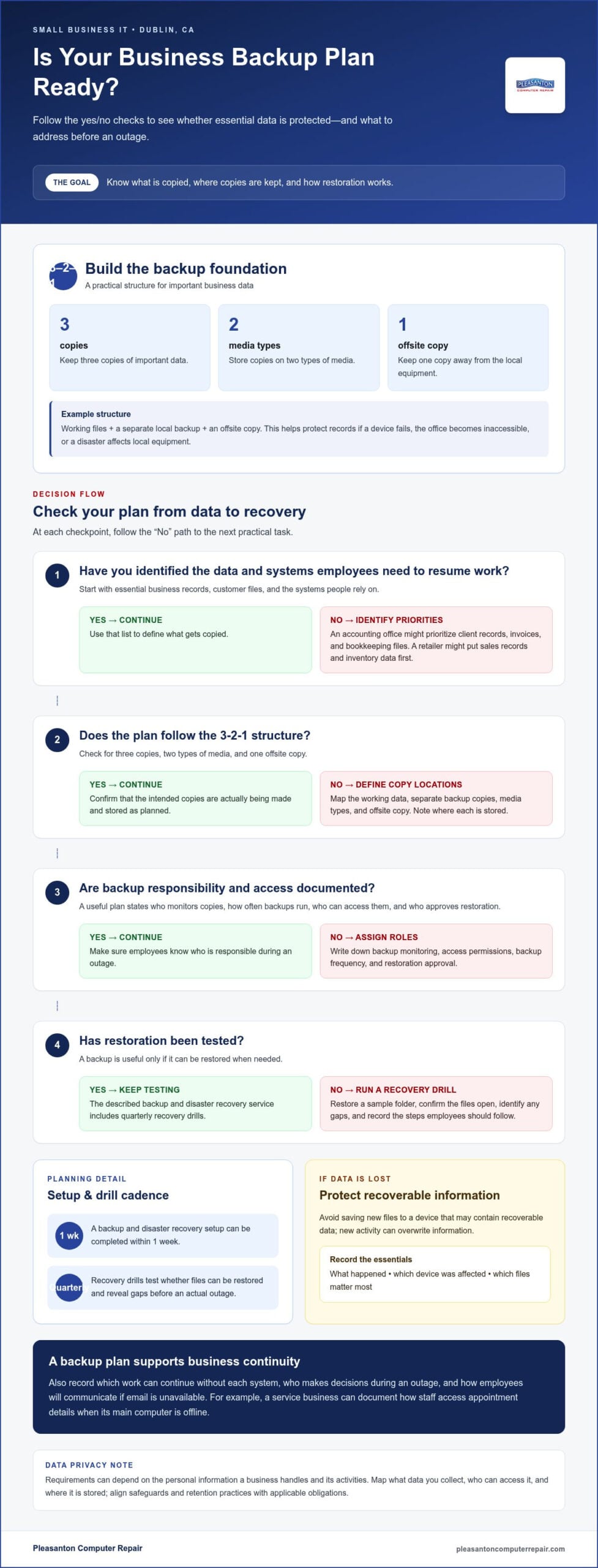
A backup plan should answer three practical questions: what gets copied, where copies are stored, and how restoration works. A 3-2-1 strategy keeps three copies of important data, on two media types, with one offsite copy. For a Dublin business, that could mean working files, a separate local backup, and an offsite copy. This structure helps protect records if a device fails, an office becomes inaccessible, or a disaster affects local equipment.
Start by identifying the files and systems employees need to resume work. An accounting office might prioritize client records, invoices, and bookkeeping files; a retailer might put sales records and inventory data first. Document who can access each backup, how often it runs, and who approves restoration. A backup is useful only if it can be restored when needed.
Make testing part of the plan, not an afterthought. The described backup and disaster recovery service includes quarterly recovery drills, which test whether files can be restored and reveal gaps before an actual outage. A setup can be completed within 1 week. Use a drill to restore a sample folder, confirm that the files open, and record the steps employees should follow during an outage.
- List essential data: identify business records, customer files, and the systems employees rely on.
- Set backup roles: assign responsibility for monitoring copies and approving access.
- Test restoration: practice recovering a sample file and record any problems.
Do local or California rules affect small business IT security and data privacy? Requirements can depend on the personal information a business handles and its activities. Map what data you collect, who can access it, and where it is stored, then align safeguards and retention practices with applicable obligations.
Recovery planning also supports business continuity. Record which work can continue without each system, who makes decisions during an outage, and how employees will communicate if email is unavailable. For example, a service business can document how staff access appointment details when its main computer is offline. This turns a backup plan into practical guidance for keeping work moving.
Dublin businesses can also explore small business advising through the City of Dublin Small Business Navigator Program. It launched on April 13, 2023, and eligible businesses must have fewer than 50 full-time employees. Eligible home occupation businesses can request help related to moving to a physical Dublin location.
If important files are lost or damaged, data recovery may help retrieve them. Avoid saving new files to a device that may contain recoverable data, because new activity can overwrite information. Record what happened, which device was affected, and which files matter most. Those details help define the recovery task and inform the broader disaster plan.
One-time, project-based, and recurring support without a long-term contract
A Dublin business can choose IT help based on the work it needs done. One-time support fits a specific problem, such as a workstation that won’t start. Project-based help suits a defined change, such as moving files to a new computer or updating office infrastructure. Recurring support offers a regular way to handle maintenance and employee requests. Define the desired outcome first, then choose an arrangement that fits the scope.
For a project, write down the starting point, required result, and completion criteria. For example, a small design office might need a workstation configured for its everyday software and workload. A custom computer can be planned around those requirements, rather than treated as a general-purpose replacement. Explore custom computer options when a tailored workstation is part of the project.
Recurring assistance can suit a business that needs ongoing help without a long-term contract. Agree on the work covered, how employees submit requests, how priorities are assigned, and how either party can end the arrangement. For a one-time repair, document the affected device and the specific outcome. A written scope reduces confusion across all three options.
What should a small business look for in an IT support contract or service-level agreement? Look for a defined scope, support channels, priority levels, response targets, exclusions, data access rules, and cancellation terms. These details help you compare commitments and understand how a request moves from reporting to resolution.
Government contracting can add documentation requirements. Each solicitation may set its own technology, security, and certification requirements, so read the specific request before choosing an IT project. Keep equipment records, access procedures, and support responsibilities organized. If a bid asks about a particular certification, check that requirement against the solicitation rather than assuming a general IT agreement meets it.
Access control and surveillance also benefit from a written plan. A Dublin office might set separate permissions for payroll files, shared work documents, and visitor areas. Assign access by job responsibility, remove permissions when roles change, and record who can approve exceptions. For cameras or other monitoring systems, define who can view recordings, how access is granted, and how footage supports the business purpose. This clarifies responsibilities without mixing physical security with general helpdesk work.
Before work begins, prepare a short project brief covering the business goal, affected systems, decision-maker, and completion test. For recurring assistance, add a simple review process: note repeated issues, unresolved requests, and changes in employee needs. A focused review helps determine whether the arrangement still fits or a separate project would be more effective.
Helpdesk response and on-site support
A useful helpdesk process separates urgent outages from routine requests. One published service model gives Priority 1 issues a remote response within 2 hours and addresses standard tickets within 4 business hours. Those are response and handling targets, not promises that every problem will be fully resolved within those periods. Ask how the organization classifies an outage, who sets priority, and how staff learn about progress.
Give each support request enough detail for effective triage. Include the affected employee, computer or system, when the issue began, and any recent changes. For example, “the accounting computer cannot open shared files after a password change” gives more useful context than “the network is broken.” Add a screenshot or error message when available, and note whether other employees have the same problem.
When a ticket is opened, record its priority, assigned technician, next action, and status updates. A problem affecting one person may have a different impact from a network outage affecting the whole organization. Documenting that distinction helps staff make consistent decisions and keeps a competitive business focused on work that is actually blocked.
Remote troubleshooting can address issues that don’t require physical access. A technician may guide an employee through a setting, review an error message, or coordinate with the organization’s existing IT team. On-site support makes more sense when someone needs to inspect a physical connection, replace hardware, or work directly with equipment. Remote troubleshooting can also guide on-site work, connecting the hands-on task with the broader diagnosis.
For a Dublin visit, scheduling depends on the work’s scope, required skills, location, and access window. Before arranging service, identify the affected equipment, work area, and any building access arrangements. If several computers are involved, list each device and explain how employees use it. These details help define the visit and reduce time spent identifying the problem on arrival.
Keep response time, repair turnaround, and resolution time distinct. The listed hardware repair turnaround is 24-72 hours, while helpdesk targets describe when a request is answered or addressed. A repair may take longer if diagnosis reveals additional work or parts are needed. Ask for status updates at meaningful stages, such as after diagnosis and before the computer returns to service.
- Report clearly: describe the impact, affected device, and error.
- Set priority: distinguish an isolated request from a business-wide outage.
- Choose the format: use remote help for software guidance and on-site work for hands-on needs.
- Track progress: record the next action and communicate changes to affected employees.
Onsite IT support in Dublin and nearby Tri-Valley cities
On-site support is useful when a technician needs to inspect equipment, wiring, or network access in person. For a Dublin office with dropped connections, a visit can help identify whether the issue involves a workstation, router, or physical connection. Remote troubleshooting can handle software checks first, narrowing the task before travel. Using both methods helps match support to the problem instead of treating every request as an on-site job.
Scheduling depends on the work’s scope, required skills, location, and access window. A network configuration may require different preparation than setting up a single computer. Same-day network configuration scheduling is available in Dublin, Livermore, Pleasanton, and San Ramon. Treat scheduling and completion as separate steps: a visit may be arranged for a particular day, while the work depends on what the technician finds.
Before a visit, prepare the workspace and a concise task list. Include the affected devices, symptoms, and any recent changes. For example, if several employees can’t reach a shared printer, note which computers are affected and whether printing stopped after a network change. Arrange building access, identify the person who can approve changes, and make relevant equipment available. These details give the technician a clear starting point.
On-site work can complement an existing IT team. A business can coordinate a local technician’s hands-on task with remote staff directing the diagnosis. For example, remote staff might identify a network configuration issue while an on-site visit checks a cable connection or equipment placement. Agree on the task owner, communication channel, and handoff details before work begins. This helps prevent duplicate troubleshooting and keeps employees informed.
How much does small business IT support cost in Dublin, CA? The price depends on the case and is given after a quote request; key factors include the work’s scope, required skills, location, equipment, and access window. A defined task, such as configuring a network, is easier to scope than a general request to improve office technology.
- Describe the issue: identify affected devices, users, and business impact.
- Choose the support method: use remote troubleshooting for software checks and an on-site visit for hands-on needs.
- Prepare access: arrange entry, equipment access, and a decision-maker for the visit.
- Plan the handoff: coordinate the local task with existing IT staff or remote engineers.
For ongoing support, keep a record of visits, completed changes, and recurring issues. A Dublin office can use that history to spot repeat network problems and plan configuration work. Review the record with the person responsible for technology, then define what needs attention and what can wait. This turns each visit into a useful step toward a more manageable support plan.
IT service providers in Dublin, California
Choosing among IT service providers in Dublin starts with matching support to business needs. A company with a few computers may need help with specific issues, while a growing office may need ongoing attention across devices, networks, and cloud services. List the systems employees rely on, recurring problems, and upcoming changes. Use that inventory to compare support scope, response processes, and experience with similar work.
How do small businesses compare local IT support providers by reviews, certifications, and experience? Read reviews for examples of communication and follow-through, then compare relevant qualifications and experience with your actual systems. For example, experience installing cloud services matters most when cloud setup is a current business need.
Look beyond star ratings. A useful review describes the problem, how updates were handled, and whether the solution addressed the stated need. Compare those details with your priorities, such as clear explanations or coordinated on-site work. Any certifications should relate to the technology or work under consideration, rather than serve as a general quality label. Experience is most useful when it shows familiarity with similar equipment, business workflows, or project requirements.
For ongoing support, business size and device count can affect the value of a managed arrangement. Managed IT services are described as delivering lower total cost and higher uptime over time for most Dublin businesses with 5 or more computers. That comparison is about the overall service model, not a universal fit. Consider whether recurring maintenance and support match your organization’s workload and budget planning.
What steps should a Dublin small business take to choose and onboard IT support? First, document devices, systems, and recurring problems; next, define the support scope and communication process. During onboarding, share system details, assign an internal contact, and agree on access, priorities, and how completed work will be recorded.
Make the first support task concrete. For example, setting up a new employee could include the required computer, account access, and software installation. A project to move files could define which files move, who needs access, and how staff will work afterward. A specific test, such as opening a shared file from an employee account, makes completion easier to assess.
Use a written record to keep onboarding organized. Include device names, responsible employees, key systems, open issues, and approved access. Keep sensitive account credentials in a secure process rather than an ordinary shared document. Assign one person to communicate changes, such as a new computer or employee departure, so support records stay useful.
After setup, review the first completed request against the agreed scope and communication process. Note what worked and what needs clarification before more tasks arrive. For a device issue, outline the computer problem and its symptoms before choosing the next step.
Pleasanton Computer Repair: iPhone and iPad Repairs
Pleasanton Computer Repair helps businesses with hands-on device repairs. Its iPhone and iPad Repairs service addresses damaged or malfunctioning mobile devices. If a computer screen is cracked, PC / Mac Screen Replacement addresses that hardware issue. Virus Removal and Data Recovery help with separate problems affecting computer security or access to important files.
These focused services suit device-specific needs rather than broader business IT planning. Before arranging a repair, note the affected device, what happened, and any error messages. For data loss, avoid adding files to the affected device, as new activity may overwrite recoverable information. Clear details help explain the problem and identify the relevant service.
For help with a device repair, contact Pleasanton Computer Repair or visit pleasantoncomputerrepair.com.
Turn Your IT Priorities Into a Practical Next Step
Make your next technology decision by identifying what interrupts work and what employees depend on. For small business IT support in Dublin, CA, start with one recurring obstacle and define what a successful fix would look like. That keeps the next conversation focused on your business rather than a broad list of technical possibilities.
For a device-specific issue, Pleasanton Computer Repair offers iPhone and iPad Repairs, PC / Mac Screen Replacement, and Virus Removal. These services address individual device problems, not every broader IT planning need. Choose the service that matches the issue and share a concise description of the affected device and symptoms to get the conversation started.
Contact Pleasanton Computer Repair to discuss a repair need. A clear first step can make technology easier to manage and help your team get back to work with confidence.
Frequently Asked Questions
What small business IT support companies serve Dublin, California?
Pleasanton Computer Repair provides small business IT support for Dublin companies, with in-store, remote, and on-site services. It also serves businesses in Pleasanton, Livermore, San Ramon, Danville, Brentwood, Walnut Creek, and San Jose. Start by identifying whether the issue involves a specific device or needs hands-on attention, then choose the support format that fits.
What IT support services do Dublin, CA providers offer small businesses?
Device repair, virus removal, data recovery, and computer hardware support address common technology issues. Pleasanton Computer Repair offers iPhone and iPad Repairs, PC / Mac Screen Replacement, Virus Removal, Data Recovery, and SSD upgrades. A business dealing with a failing storage drive can explore data recovery, while a cracked laptop display calls for screen replacement. Matching the service to the affected device helps focus the repair request.
Do Dublin, CA IT providers offer managed service plans, hourly support, or on-site visits?
IT support can take different forms, including recurring managed services, work billed by time, or scheduled on-site assistance. Pleasanton Computer Repair provides in-store, remote, and on-site support for business and home technology. Describe the task clearly: a device that needs physical repair may need in-person service, while a question that can be handled remotely may not require a visit. Define the work before arranging service.
How quickly do local IT support companies respond to support requests?
Response depends on the service process, issue priority, and whether troubleshooting can begin remotely. Separate the time to acknowledge a request from the time needed to resolve it. When submitting a ticket, explain which employees or business functions are affected and whether work has stopped. Ask when to expect the next update and how escalation works, so your team knows what to expect while the issue is assessed.