
Why spend your Saturday fighting traffic on I-580 just to drop off a laptop when the solution is already sitting on your desk? Most of us feel that immediate spike of frustration when a screen freezes or a strange popup appears right in the middle of a critical workday. It’s natural to feel anxious about your data privacy or wonder if a problem is actually a simple software fix or a major hardware failure. Getting reliable remote computer support Pleasanton residents can trust shouldn’t feel like a gamble with your security or your schedule.
We understand that you need your technology to work without the headache of leaving your home or office. This guide provides everything you need to know about getting your tech issues resolved instantly through our secure, expert-led remote services. We’ll help you distinguish between hardware and software needs while ensuring your personal information stays protected under the latest 2026 California privacy standards. You will learn exactly how the remote process works, what types of issues we can solve from afar, and why having a local expert on Main Street makes all the difference for your peace of mind.
Key Takeaways
- Discover how a “digital house call” can resolve your software frustrations instantly without the need to unplug a single cable or leave your desk.
- Understand why choosing remote computer support Pleasanton residents trust provides superior data security compared to anonymous national call centers.
- Learn to identify the clear line between software glitches that can be fixed remotely and hardware problems that require a visit to our Main Street office.
- Get a simple checklist to prepare your device and connection for a smooth, transparent, and secure remote repair session.
- See how the accountability of a local physical shop ensures you have a dependable partner who can transition to in-person repairs if your issue is more complex.
What is Remote Computer Support and How Does it Work?
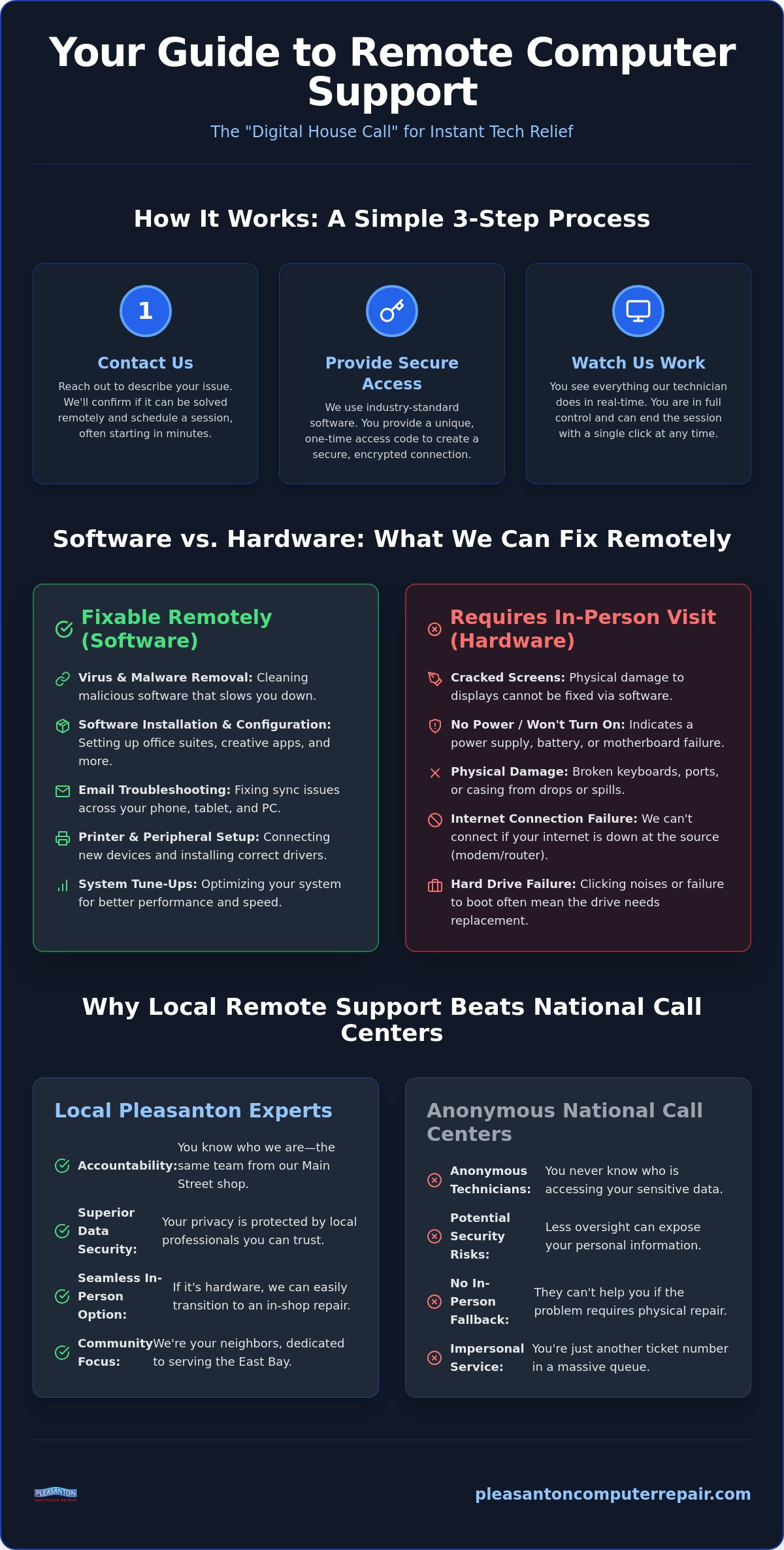
Imagine having a seasoned technician sitting right next to you, guiding you through a complex software glitch without you ever having to leave your desk. That is the essence of modern tech assistance. What is remote support? Simply put, it’s a secure service where a professional accesses your device via the internet to diagnose and repair issues. This “digital house call” has completely changed how we handle technology failures in the East Bay. You don’t need to struggle with a tangle of cables or find a parking spot on Main Street. Instead, you get a direct line to expert remote computer support Pleasanton residents can rely on to get back to work quickly.
The process is designed for speed and transparency. Once you reach out, a session can typically begin in just a few minutes. You’ll see your mouse moving and windows opening as the technician works, allowing you to ask questions and understand exactly what is being fixed. It’s a collaborative experience that removes the mystery from computer repair. You aren’t just dropping a machine off and hoping for the best; you’re watching the restoration of your system in real-time.
The Technology Behind the Connection
We use industry-standard, encrypted screen-sharing software to bridge the gap between our office and your desk. This isn’t a permanent “backdoor” into your life. Every session requires a unique, one-time access code that you provide. This ensures that no one can access your system without your express permission. Most importantly, you remain in total control. If you move your mouse or type on your keyboard, your input takes priority. You can end the connection at any moment with a single click, keeping your privacy and security front and center.
Common Scenarios for Remote Help
- Software Installation: Setting up complex office suites or creative software without configuration errors.
- Email Troubleshooting: Fixing sync issues between your phone, tablet, and PC.
- Printer Setup: Connecting new wireless printers and ensuring drivers are correctly installed.
- Virus Removal: Cleaning out malicious software that hijacks your browser or slows your startup.
If our remote diagnosis reveals a physical hardware failure, you have the added benefit of knowing our physical shop is right here in town. We can seamlessly transition from a remote session to an in-person repair at our local office on Main Street.
Is Remote Tech Support Safe for My Data?
The idea of a stranger accessing your desktop can feel like an invasion of privacy. It’s the most common concern we hear, and it’s a valid one. When you allow someone into your digital space, you’re trusting them with your photos, your documents, and your identity. This is where the “local advantage” becomes your greatest security feature. Unlike anonymous pop-up services or national call centers, our team is part of the East Bay community. You know exactly who is on the other end of the screen because we’re the same people you see at our office on Main Street. Accountability is the foundation of safe remote computer support Pleasanton users can actually trust.
Our data privacy protocols are strict and transparent. We focus entirely on the system files and configurations needed to resolve your issue. We don’t touch, open, or move your personal files unless you specifically request a backup or data recovery service. You also maintain ultimate authority over the session. You can watch every move our technician makes in real-time, and you can terminate the connection with a single click at any point. Once the session ends and you close the software, the one-time access code expires. There is no way for anyone to reconnect to your machine without you initiating a new request.
Avoiding Remote Support Scams
Criminals often pose as “Microsoft” or “Apple” technicians, calling out of the blue to claim your computer has a virus. It is vital to remember that legitimate tech companies will never cold-call you to request remote access. To stay protected, you should always verify the identity of your technician and only use services you have contacted yourself. You can learn more about how to avoid tech support scams through the Federal Trade Commission’s official guidelines. If you’re feeling uneasy about a strange popup or a suspicious message, reaching out for expert virus removal from a verified local professional is the safest way to clear the threat.
Our Secure Connection Standards
Software vs. Hardware: What Can Be Fixed Remotely?
Not every tech headache is created equal. To save yourself time, it’s helpful to understand the clear boundary between a “logical” software error and a “physical” hardware failure. Remote support is an incredible tool for resolving anything related to the code running on your machine. If your computer turns on and connects to the internet, we can likely handle the rest from our office. However, if your screen is dark, your fan is grinding, or your keyboard is missing keys, that is a physical issue that requires a hands-on approach at our shop. Knowing this distinction helps you choose the fastest path to a resolution.
Many Pleasanton residents start with a remote session because it acts as a perfect diagnostic tool. Even if we cannot fix the problem through the cloud, we can often identify exactly which component is failing. This saves you a second trip and ensures we have the right parts ready when you arrive at our Main Street office. For Apple users, this is often the fastest way to determine if a slowdown is a simple OS bug or something requiring the Expert Mac Repair Pleasanton professionals provide for more complex hardware issues. By starting remotely, you get an expert opinion without leaving your home.
Remote-Friendly Services
If your device is behaving strangely but the physical components are intact, remote computer support Pleasanton services are your best bet for a quick fix. We specialize in clearing out the digital clutter that builds up over time and causes system instability. These sessions are perfect for:
- Virus and malware removal: We scrub malicious software that hijacks your browser or slows your startup. For a deeper understanding of the threats targeting East Bay residents, our comprehensive guide to malware removal Pleasanton homeowners and businesses rely on covers the latest 2026 threats and how to stop them.
- Software updates: Ensuring your operating system and drivers are current to prevent security vulnerabilities.
- Browser cleanup: Removing pesky toolbars and pop-ups that disrupt your web surfing.
- System optimization: Adjusting background settings to help an aging PC or Mac run like new again.
In-Store Only Services
There are times when a digital house call simply isn’t enough. When the problem is tangible, you’ll need to visit our local office. This is especially true for mobile devices and internal component changes that require specialized tools. In-store services include:
- Physical screen replacements: We provide expert repairs for cracked iPhone and iPad screens.
- Hardware speed boosts: We perform internal SSD upgrades Pleasanton CA users need to breathe new life into aging laptops.
- Critical recovery: This includes liquid damage restoration and battery replacements for devices that no longer hold a charge.
- Custom builds: Designing and assembling new custom PCs for gaming or professional work.
Preparing for Your Remote Support Session
A few minutes of preparation can turn a standard repair into a seamless, stress-free experience. By taking a moment to organize your digital workspace, you ensure our technicians can focus entirely on the technical hurdles slowing you down. This proactive approach respects your time and protects your privacy. Before our team begins providing the remote computer support Pleasanton residents rely on, we recommend following a simple checklist to get your system ready for its “digital house call.”
Start by closing any sensitive documents, personal photos, or banking websites. While our technicians are focused strictly on system files, clearing your screen of personal information provides an extra layer of peace of mind. Next, write down a clear list of the specific issues you’re experiencing. Is your browser crashing? Is a specific app failing to launch? Having this list ready helps us prioritize our work. Finally, ensure you have your administrative passwords handy. We often need these to authorize software installations or security updates during the repair process.
Technical Requirements
For a smooth session, a stable internet connection is the primary requirement. We recommend a minimum download speed of 10 Mbps to ensure the screen-sharing software operates without lag. Our tools are compatible with modern operating systems, including Windows 10, Windows 11, and the latest versions of macOS. To begin, you’ll simply need to download a small, secure client software from our official portal. This program is a one-time use tool that facilitates the encrypted connection and does not leave any permanent software on your machine.
During the Session
Communication is key to a successful repair. We typically stay on the phone with you or use a built-in chat window within the support software to provide updates. You can watch the entire process as it happens. If your internet connection happens to drop, don’t panic. Our software is designed to attempt a reconnection automatically, or we can simply restart the session once your signal returns. We won’t consider the job finished until we have finalized the repair and you have personally confirmed that the fix meets your expectations. If you’re ready to clear those glitches, you can book your remote session online and get back to your day with confidence.
Why Local Remote Support Beats National Call Centers
When you choose a national call center, you’re often just a ticket number in a massive database. There is a distinct lack of accountability when the person “fixing” your computer is thousands of miles away in a different time zone. Choosing remote computer support Pleasanton residents can visit in person changes that dynamic entirely. Our physical presence on Main Street isn’t just a convenience; it’s a promise of quality. We have served the East Bay since 2002, and we aren’t going anywhere. If a remote session reveals a deeper issue that requires a hands-on touch, you don’t have to start over with a new company. You simply bring your device to the experts who already understand your specific situation.
We understand the unique networking environments and business needs of the Tri-Valley area. Whether you’re a professional working from home near the Bernal exit or a small business owner downtown, we provide personalized service that national providers cannot match. We know the local internet service providers and the common connectivity hurdles unique to our neighborhood. This local context allows us to troubleshoot more efficiently than a technician who doesn’t know our community. You get the peace of mind that comes from working with a neighbor who prioritizes your functional continuity.
The Best of Both Worlds
By choosing a local partner, you get the immediate response time of the cloud without sacrificing the reliability of a brick-and-mortar shop. It’s the ultimate safety net for your technology. Supporting a local business keeps resources within our community while providing you with a higher standard of care. If your current machine is beyond a remote fix and you need a cost-effective replacement, we also offer high-quality Refurbished Laptops Pleasanton CA users can rely on for professional performance. This integration of remote and physical services ensures your work is never interrupted for long.
How to Book Your Session
Getting help is straightforward and stress-free. You can schedule your appointment through our online portal or give our office a quick phone call to speak with a human being. We offer flexible timing designed to fit into your busy schedule, ensuring your repair happens at a time that minimizes disruption to your day. Our pricing for diagnostics and remote labor is transparent and discussed upfront, so there are never any surprises on your bill. We act as a protective barrier between you and your technological headaches, ensuring every session ends with a confident resolution.
Restore Your Peace of Mind Today
Technology should be a tool that empowers your day, not a source of constant frustration. By choosing remote computer support Pleasanton residents can trust, you’re opting for a solution that prioritizes both speed and security. You now know how to distinguish between simple software glitches and complex hardware failures, and you have the checklist needed to ensure your data stays private during every session. Whether you’re troubleshooting email sync issues or need a deep system tune-up, the answer is just a few clicks away.
Our A+ rated local technicians have been serving the East Bay since 2002, combining neighborly warmth with professional authority. We protect every interaction with secure 256-bit encrypted connections, ensuring your “digital house call” is as safe as it is convenient. If a remote session reveals a physical problem, our local office on Main Street is always here to help. Don’t let tech headaches slow you down another minute. Schedule Your Secure Remote Support Session Now and get back to what matters most with confidence.
Frequently Asked Questions
How much does remote computer support cost compared to in-store repair?
Remote support is often a more cost-effective solution because it eliminates the time and logistics of physical intake and travel. While we don’t provide flat-rate pricing here, choosing a remote session saves you the fuel and time spent driving to Main Street. It’s an efficient way to handle software labor without the overhead associated with hardware part replacements or physical storage in a shop.
Do I need to be at my computer the whole time the technician is working?
You need to be present at the start of the session to provide the access code and describe your technical issues, but you don’t have to watch every move. We recommend staying within earshot or keeping your phone nearby in case we need a password or a quick confirmation. We’ll always ask you to test the fix and verify your satisfaction before we officially close the connection.
Can you fix a computer that won’t turn on or has no internet access?
No, a working internet connection and a computer that powers on are the two basic requirements for a remote session. If your device is completely unresponsive or cannot connect to the web, the problem is likely hardware-based or a deep network failure. In these specific scenarios, you’ll need to bring the machine into our Pleasanton office so we can perform a physical diagnostic and repair.
Is it possible for a technician to access my computer later without my permission?
No, it’s impossible for us to access your system without your active participation. Our remote computer support Pleasanton tools rely on unique, one-time access codes that expire the moment the session ends. Once you close the support app, the bridge to your computer is permanently cut. We cannot reconnect unless you manually open the software and generate a brand-new code for us.
How long does a typical remote support session take?
Most sessions are resolved within 30 to 60 minutes, though the exact time depends on the nature of the glitch. Simple tasks like email configuration or printer driver updates are often very quick. More intensive jobs, such as a full system tune-up or deep malware scanning, may take a bit longer. Our goal is to work efficiently so you can return to your normal routine as fast as possible.
Can you help me with iPhone or iPad issues remotely?
Remote help for mobile devices is primarily limited to cloud sync troubleshooting and software account setups. Because of the security design of mobile operating systems, we cannot control an iPhone or iPad screen the same way we do a computer. For physical issues like broken glass or failing batteries, we provide specialized in-store iPhone and iPad repairs at our local physical shop.
What happens if the technician can’t fix my problem remotely?
If our remote diagnostic reveals a physical hardware failure, we’ll coordinate a seamless transition to an in-store repair. The work we do during the remote session isn’t wasted; it helps us identify exactly which parts or tools we’ll need when you arrive. You can simply bring your device to our Main Street location, where our team will continue the repair using our professional shop equipment.
Can you remove a virus remotely without losing my personal files?
Yes, our virus removal process targets malicious software while keeping your personal documents, photos, and files safe. We use specialized tools to scrub the infection from your system files and registry without needing to erase your entire hard drive. This precision remote computer support Pleasanton service is designed to restore your system’s performance and security while ensuring your important data remains exactly where you left it. For a complete breakdown of how we identify and eliminate digital threats, see our dedicated guide to malware removal Pleasanton residents trust to keep their devices clean and secure.