
A screen full of inaccessible files and a ransom demand can make it seem as if paying is the only way forward. It isn’t a guaranteed path to your data: the FBI’s Internet Crime Complaint Center says paying a ransom does not guarantee victims will get their data back. A ransomware removal service in Pleasanton can help assess the infection, remove malicious software, and identify practical recovery options.
Ransomware is malicious software that can encrypt files or block access to a device, then demand payment to restore access. It’s understandable to worry about what may be lost and whether the infection could spread. A careful response starts by limiting further harm, then evaluates recovery options.
This article explains how ransomware works, what to do during an incident, and how professionals approach removal and data recovery. You’ll learn why backups matter, what can affect recovery, and when expert help is useful. The goal is to clarify the next steps without promising that every file can be restored.
Key Takeaways
- Recovery planning starts with identifying which files and systems matter most and determining whether backups remain usable.
- Paying a ransom doesn’t guarantee data recovery, so weigh available recovery paths before making a decision.
- A coordinated incident response can help limit spread while preserving information needed to investigate the attack.
- Removing malicious software is only part of recovery; systems also need careful assessment before they’re restored for use.
- Unusual file activity, unauthorized access tools, or suspicious network traffic are signs that professional help may be needed.
What are the Options for Recovering from a Ransomware Attack?
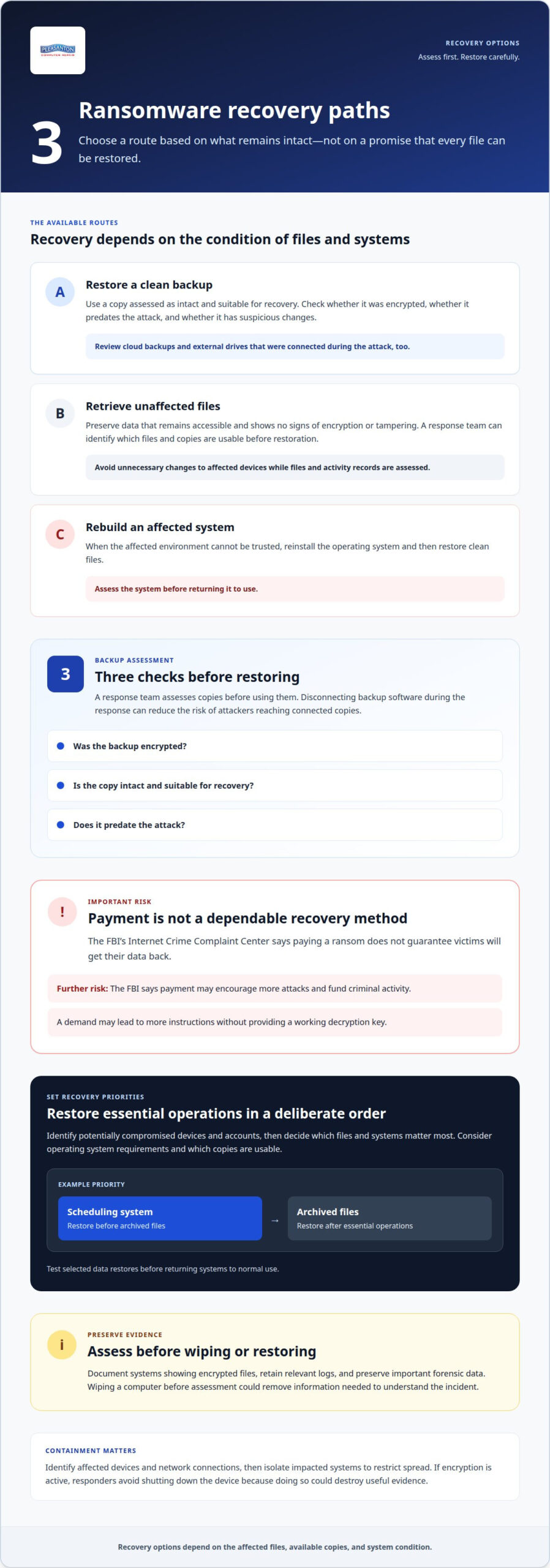
Recovery usually follows one of three paths: restore clean backups, retrieve unaffected files, or rebuild affected systems. An incident response team identifies devices and accounts that may still be compromised, then sets priorities. For example, a business may need its scheduling system restored before archived files. This order helps resume essential operations without bringing infected systems back online.
Paying a ransomware demand carries real risks. The Internet Crime Complaint Center (IC3) says payment doesn’t guarantee victims will get their data back. The Federal Bureau of Investigation says payment may encourage further attacks and fund criminal activity. A demand may also lead to more instructions, without providing a working decryption key.
Backups can provide a recovery route, but assess them before restoring. A response team checks whether backup files were encrypted, whether copies are intact, and whether they predate the attack. Disconnecting backup software during the response can reduce the risk of attackers reaching connected copies. For example, a clean offline copy may be safer to restore than a recent network backup with suspicious changes.
Professionals set recovery priorities with the affected person or organization. They identify critical files and systems, determine operating system requirements, and assess which copies are usable. Recovery may involve restoring a full backup, retrieving unaffected files, or rebuilding a compromised system before returning data. Cloud backups and external drives connected during the attack also need review before use.
- Clean backup: Restore from a copy assessed as intact and suitable for recovery.
- Unaffected files: Preserve data that remains accessible and shows no signs of encryption or tampering.
- Encrypted files: Check for a usable backup or other recovery route before considering decryption options.
- System rebuild: Reinstall the operating system when the affected environment can’t be trusted, then restore clean files.
Data recovery also depends on preserving evidence and avoiding unnecessary changes to affected devices. A professional can document systems showing encrypted files, retain relevant logs, and preserve important forensic data before restoration. For instance, wiping a computer before assessing its files and activity records could remove information needed to understand the incident.
Backup and disaster recovery plans should account for separate copies, access controls, and restoration priorities. A response team can test selected data restores before it returns to normal use. If no clean backup exists, options depend on which files were affected and the storage device’s condition. A careful assessment helps determine the next step without treating payment as a dependable recovery method.
Ransomware incident response
A coordinated incident response aims to limit disruption, contain the attack, and organize decisions. For organizations, clear ownership helps align technical, business, and reporting actions.
Rapid Attack Containment
During a ransomware attack, the response team identifies affected devices and network connections, then isolates impacted systems to restrict spread. If encryption is active, responders avoid shutting down the device because doing so could destroy useful evidence. They can quarantine suspicious files and preserve logs while assessing signs of unauthorized access. Containment should account for shared storage, remote connections, and business-critical systems, not just the first computer displaying a ransom note.
Emergency Response Availability
Not every ransomware removal service provides emergency or 24/7 support; round-the-clock availability is a distinct service commitment. Organizations should understand which contact channels are monitored and whether an incident response team can act outside standard hours. A response plan can identify who raises the alarm, who authorizes containment, and how staff communicate if email or shared systems are unavailable.
Assign incident ownership before a crisis. An organization can designate an incident lead to coordinate technical responders, management, and communications. That person tracks affected systems, decisions, and recovery priorities in one incident record. For example, if a finance computer and a shared file server show unusual activity, the lead ensures both are assessed rather than treating the first alert as the entire event.
Do Pleasanton businesses need to report ransomware attacks to authorities? Applicable data-breach rules may require organizations to report an incident to government bodies or notify affected individuals. Ransomware victims in the United States can also file a report through the FBI Internet Crime Complaint Center (IC3).
Business-focused incident response connects containment with operational decisions. Responders determine which services are disrupted, whether sensitive data may be involved, and which systems should remain isolated. Businesses with ransomware insurance should promptly contact their carrier’s incident hotline. Organizations should preserve forensic data and avoid deleting or erasing it without keeping a copy. If negotiations are considered, responders should avoid direct contact with threat actors and use a third-party negotiator.
- Contain: Isolate affected systems and restrict suspicious connections.
- Coordinate: Assign an incident lead and preserve a record of decisions.
- Escalate: Involve the insurance carrier and consider reporting through the FBI IC3.
Which ransomware removal services serve Pleasanton, California? Local computer repair services may handle virus removal and data recovery, while wider network incidents can require a specialized security response team. The scope depends on whether the incident affects one device, shared systems, or an organization’s wider network.
Investigating and restoring systems after an attack
After containment, an investigation helps determine which endpoints were affected and what can safely return to service. A cybersecurity review connects device activity, access records, and recovery decisions.
How long does ransomware removal and data recovery typically take? The timeline depends on the number of affected endpoints, the condition of available data, and whether systems need rebuilding. Investigation, restoration, and validation each add work, especially when the threat reaches shared systems.
Investigators examine signs such as unauthorized remote access tools, unusual system discovery, atypical file access or downloads, and unexpected network traffic. These indicators help map affected devices and identify possible entry points. For example, unusual access to a shared folder may show that the incident reached beyond the first encrypted computer.
Preserving evidence matters during this review. Responders retain relevant logs and forensic data before systems are erased or changed. They document which endpoint showed suspicious activity, which files were affected, and which accounts or connections need review. This record helps distinguish confirmed impact from systems that still need assessment.
Organizations with disrupted operations may use temporary datacenter hosting to support essential systems while their own environment is investigated. The temporary setup should be separated from compromised infrastructure, with access limited to applications and data needed for immediate business functions. For example, a company might restore a critical scheduling application in a clean environment while its original server remains under review.
A system rebuild can include reinstalling the operating system on an affected endpoint, applying available security updates, and restoring only assessed data. Reinstallation replaces the compromised system environment, but it does not recover encrypted files or establish that other devices are clean. Responders also review connected storage and shared resources before restoring access.
- Map the incident: Document affected endpoints, accounts, files, and suspicious connections.
- Preserve evidence: Retain relevant logs and forensic data before rebuilding systems.
- Plan the restore: Prioritize essential applications and use data assessed for recovery.
- Validate systems: Test restored access and review system activity before normal use.
Before returning a rebuilt endpoint to everyday use, professionals confirm that required applications open and restored files are accessible. They also review network connections and account access for signs of continued threat activity. If a business used temporary hosting, the transition back to rebuilt systems should preserve essential records and avoid reconnecting unassessed devices.
Security professionals should also confirm that restored systems remain separated from suspicious activity. When partnering with a trusted provider for a ransomware removal service in Pleasanton, technicians ensure that protection tools quarantine suspicious files immediately after detection to prevent spread or further encryption. They should automatically block communications with command-and-control servers to limit attacker commands, payload downloads, and data exfiltration. These controls support containment while investigation and recovery continue.
Third-party access also warrants review. External vendor incidents highlight the risks of giving a service provider excessive system access. Organizations can reduce third-party attack risks by vetting providers and including clear cybersecurity clauses in contracts. Paying a ransomware ransom encourages future attacks against the victim’s organization and others.
How professionals remove ransomware with antivirus or anti-malware software
Antivirus software can help identify and remove ransomware, but a scan is only one part of a broader response. Professionals use reputable antivirus or anti-malware software with current definitions, then assess whether malware remains or other systems were compromised.
How can you compare ransomware removal providers in Pleasanton? Compare their stated process for malware detection, containment, removal, and post-scan checks. A clear explanation of how they handle affected files and account access makes the scope easier to understand.
A professional begins by assessing symptoms and available evidence. An encrypted document, ransom note, or unexpected security alert can guide the initial scan. The technician chooses tools suited to the affected operating system and updates malware definitions before scanning. Current definitions help security software recognize threats that outdated information may miss.
Scanning should cover more than the file named in a ransom demand. A technician checks likely locations for malicious files and reviews alerts for suspicious activity. If a scanner detects malware, the professional quarantines or removes the identified threat using the tool’s available options. Follow-up checks then look for additional detections or signs that the infection remains.
Some ransomware variants resist standard removal. If a scan cannot remove the malware, a professional may need specialized removal tools or a different recovery approach. Removing antivirus-detected malware does not automatically decrypt affected files. Those files require a separate recovery assessment based on available clean copies and the storage device’s condition.
Malware can also compromise accounts. For example, suspicious access to an email account alongside an infected computer calls for an assessment beyond file scanning. Professionals review relevant signs of unauthorized access and consider whether credentials may have been exposed. As part of the response, they can help determine which accounts need attention rather than treating a clean scan as proof that every account is secure.
How can you verify a ransomware removal provider’s credentials and reviews? Look for clearly described, relevant experience and credentials, then read reviews for specific details about communication, process, and follow-up. Consistent accounts of completed work are more informative than broad praise alone.
Before closing a removal job, a professional can document scan findings, actions taken, and any remaining concerns. That record helps distinguish detected malware from encrypted files or compromised accounts that need separate attention. The right next step depends on scan results, the affected device, and whether the threat appears elsewhere.
When to consult a professional security team
Bring in a professional security team when suspicious activity extends beyond one clearly understood problem. Unauthorized remote access tools, unusual system discovery, atypical file access or downloads, and unexpected network traffic can indicate ransomware activity. A team can assess whether the threat involves one computer, several endpoints, or wider network access.
These signs matter even before files become unreadable. For example, an unfamiliar remote access tool or sudden downloads from shared folders deserve investigation. Professionals can review activity across affected devices, identify connections that need containment, and determine whether specialized removal tools are needed. Some ransomware variants resist routine removal, making expert investigation more useful than repeated scans.
Microsoft 365 accounts also deserve attention if the incident involves business email or cloud files. A security review can examine unusual sign-in activity, unexpected account changes, and access to shared documents. If an account may be compromised, responders can assess its activity alongside affected computers instead of assuming malware exists only on one endpoint. Multifactor authentication should be enabled on systems and web services where available.
Remote access can complicate an investigation. A professional can review remote access tools, account permissions, and network activity for signs of unauthorized use. VPN access should also be considered in context: responders assess whether its accounts or connections appear in the incident, rather than treating a VPN alone as proof of security. This helps distinguish normal remote work from activity that needs containment.
Patching supports prevention and recovery planning. Organizations should regularly patch operating systems and applications because outdated software can leave known weaknesses available to attackers. After an incident, professionals can identify systems needing updates and plan their return to service. They also consider whether applications or remote access settings should change before affected devices reconnect.
A security team is especially useful when the scope remains unclear, suspicious activity continues, or malware resists removal. It can coordinate endpoint reviews, account assessments, and network monitoring, then document the evidence behind each finding. A small incident may focus on one computer and its accounts. An organizational response may also need to include shared resources and remote connections.
Before engaging a team, gather a concise incident summary: which devices show alerts, what unusual activity appeared, and when the issue began. Preserve relevant records rather than deleting them. Clear information helps responders prioritize the investigation and identify systems needing immediate attention.
Some ransomware variants may resist removal, so organizations may need a professional computer security team or specialized removal tools. This possibility makes it important to choose an appropriate response when standard removal does not work.
Pleasanton Computer Repair: Virus Removal
Pleasanton Computer Repair provides Virus & Spyware Removal to help when ransomware or other malware disrupts a computer. Its Data Recovery service separately assesses affected files, though recovery attempts are not guaranteed to succeed. Turn to these services when a device shows signs of infection or important data becomes inaccessible. The appropriate next step depends on the device, scan findings, and condition of its files.
Share which device is affected, what changed, and any alerts or ransom messages you saw. This gives the technician useful context for assessing the problem. Contact Pleasanton Computer Repair at (925) 460-5200 or visit 915 Main Street Suite A, Pleasanton, CA 94566.
Move forward with a clear recovery plan
After an attack, decide what you need restored first and what information could help explain the disruption. A concise record of affected devices, inaccessible files, and unusual account activity can make the next conversation more productive. If you need a ransomware removal service in Pleasanton, start with a clear assessment of the affected device and its recovery needs.
Pleasanton Computer Repair offers Virus & Spyware Removal, iPhone Repair, iPad Repair, and PC / Mac screen replacement. The right service depends on the device and issue, so describe what happened and what you need working again.
Contact Pleasanton Computer Repair to discuss your situation and take the next step toward getting back to your routine.
Frequently Asked Questions
What is Ransomware?
Ransomware is malicious software that blocks access to files or systems and demands payment. An attack may encrypt documents, display a ransom note, or disrupt access to a device. The demand is part of criminal extortion, not proof that attackers can restore files. For example, a computer may remain usable while its documents become unreadable, or the system itself may be locked.
What ransomware recovery services do Pleasanton providers offer?
Pleasanton Computer Repair offers Virus & Spyware Removal to address malicious software and Data Recovery to assess inaccessible files. The company serves customers in Pleasanton and nearby Livermore, Dublin, San Ramon, Danville, Brentwood (by appointment only), Walnut Creek, and San Jose. Removal and recovery are different tasks: removal addresses the infection, while recovery evaluates available ways to retrieve data. Recovery attempts are not guaranteed to succeed.
What should a ransomware removal service do immediately after an attack?
A service should first assess active encryption and contain affected devices to reduce further spread. If encryption is still underway, responders shouldn’t shut down the device. They should preserve relevant records, quarantine suspicious files, and identify affected systems before planning cleanup. For example, a ransom note on one computer should prompt an assessment of connected shared storage, not just a scan of that device.
Can ransomware files be decrypted without paying the ransom?
Sometimes, but recovery depends on the ransomware variant and available clean copies or decryption options. A clean backup or an unaffected copy may restore files without decrypting the encrypted versions. The Internet Crime Complaint Center (IC3) says paying doesn’t guarantee victims will get their data back. A professional assessment can identify available recovery paths without treating payment as a dependable solution.
