
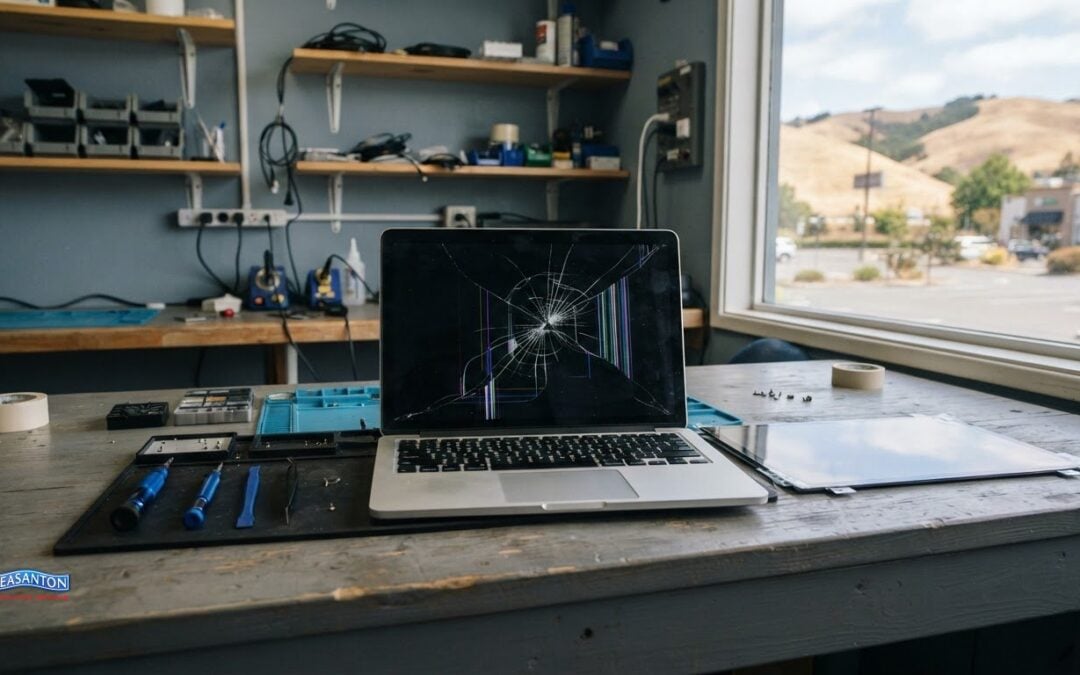
The cost to fix a laptop screen depends on the type of damage, the screen parts required, and the labor involved. A cracked display may need a different repair from a screen with image problems or damage to surrounding components. The price depends on the case and is provided after a quote request, with the damage, parts, and labor shaping the estimate.
A cracked screen can make a laptop difficult to use, and it’s natural to want a clear idea of the expense before deciding what to do. Visible damage may not reveal the full repair needed, so understanding what affects the estimate can help you make a more informed choice.
This guide explains how screen damage, replacement parts, and repair labor affect the estimate, what an in-store assessment can clarify, and what to consider when weighing repair against replacement. You’ll get a practical overview of the process and the details to gather before choosing your next step.
Key Takeaways
- Identify whether the damage is limited to the display or may involve other parts before weighing repair options.
- See how the replacement screen and the labor required to fit it shape an estimate.
- Learn what an in-store assessment can reveal about physical damage and the work involved.
- Compare the factors that make screen repairs differ across laptop brands and models.
- Use practical considerations to decide whether a DIY repair or professional help better suits your situation.
Broken or cracked laptop screens
A crack may affect only the outer glass or extend to the display panel beneath it. The crack pattern, image quality, and laptop model help determine the repair required.
Brand and Model Cost Differences
Brand alone doesn’t determine the cost to fix a laptop screen. The exact model matters because screen size, resolution, touch capability, and panel design vary, even among laptops from the same brand. Two laptops with similar-sized displays, for example, may use different panels or attachment methods. Find the model number on the underside label or in system settings to identify the correct replacement part.
Some models integrate display components more closely than others. A touchscreen laptop, for example, may need a different screen assembly from a model with a standard display. Part availability and compatibility also affect the estimate. When describing the damage or requesting an estimate, provide the full model number, not just the manufacturer.
Repair or Replacement Decisions
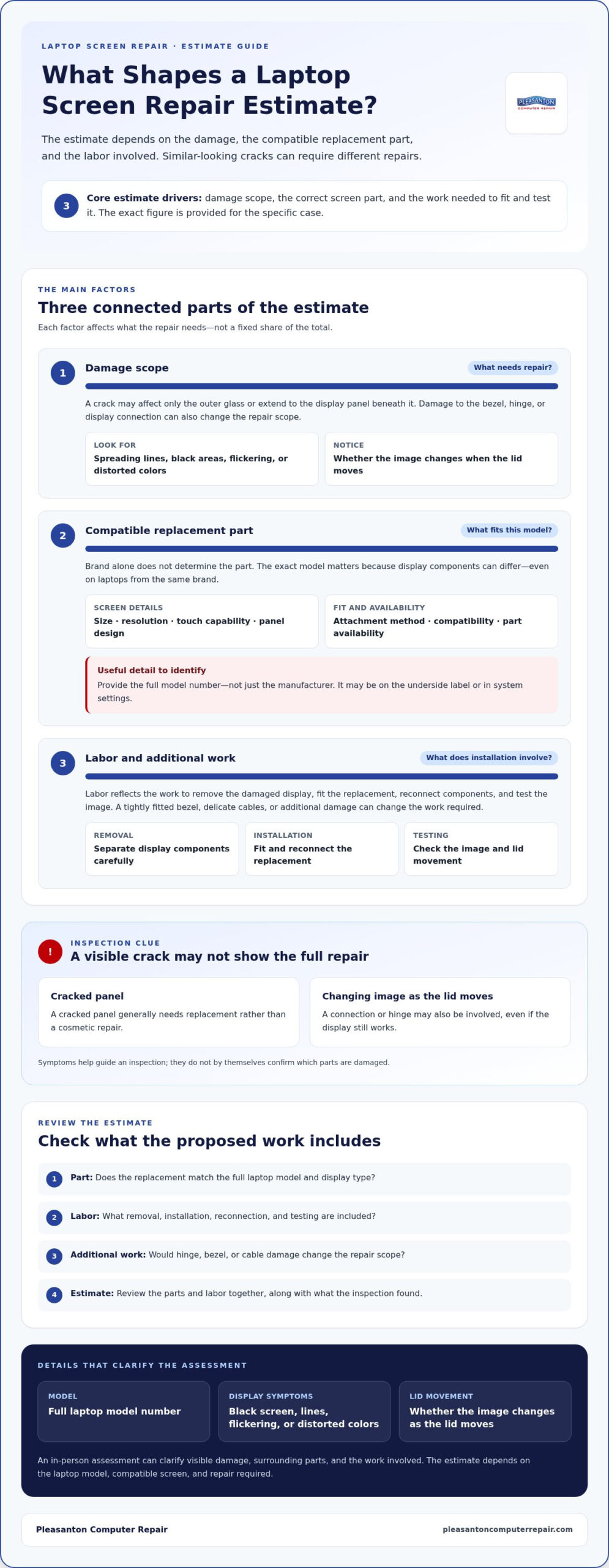
Key factors include where the crack is, whether the image still displays correctly, and whether the bezel, hinges, or display connections are damaged. A small mark on the surface doesn’t prove the inner panel is intact. Look for spreading lines, black areas, flickering, or distorted colors. These symptoms can point to damage beyond a surface scratch and help guide the inspection.
A cracked panel generally needs replacement rather than a cosmetic repair. If the display works but the image changes when you move the lid, a connection or hinge may also be involved. A technician can assess the panel and surrounding parts to identify the work required. Warranty coverage depends on the cause: manufacturer warranties cover eligible defects, while impact damage is typically handled through accidental-damage coverage or insurance, subject to the policy terms.
Replacement Timeframe
Screen replacement time depends on part availability, the model’s assembly, and any additional damage. A laptop with a damaged bezel or hinge, for example, may need more work than one with only a cracked panel. The repair also involves disconnecting and fitting display components safely, then testing the screen and lid movement. The required work, not just the size of the crack, determines the repair.
Before arranging a repair, record the model number and describe what happens when you start the laptop. Note whether the screen stays black, shows colored lines, or changes as you move the lid. These details help distinguish display damage from an image or connection issue. An in-person assessment can then identify the parts and labor required, giving you a clearer basis for deciding what to do.
Flat-rate repair labor fee plus parts
A screen repair estimate can distinguish labor from replacement parts. With flat-rate pricing after a diagnostic, the cost is based on the service needed, while the screen component depends on the laptop’s requirements. This helps explain why two cracked displays can have different totals, even when the visible damage looks similar.
The parts cost depends on the exact model and the display assembly it uses. A standard screen and a touchscreen assembly, for example, aren’t interchangeable just because they fit similar-sized laptops. Resolution, connector placement, panel dimensions, and whether the glass and display are joined all affect which component fits. The full model number helps identify the right part.
Labor reflects the work needed to remove the damaged display and install the replacement. Some laptops have accessible fasteners; others have tightly fitted bezels, delicate cables, or display components that require careful separation. A technician also needs to reconnect the panel and test the image. If inspection reveals a damaged hinge or cable, that additional work can change the repair scope.
Ask for an explanation that separates the replacement part from labor and identifies any additional work. For example, the estimate should make clear whether it covers the display assembly alone or also addresses a damaged bezel. That lets you compare the proposed repair with the laptop’s condition instead of judging only by the total. Clarify how the scope changes if inspection reveals another damaged component.
- Part: Confirm that the replacement matches the laptop’s full model and display type.
- Labor: Understand what removal, installation, and testing involve.
- Additional work: Ask whether hinge, bezel, or cable damage affects the repair scope.
- Estimate: Review the parts and labor together before deciding.
The total depends on the laptop model, the compatible screen, and the work required; the exact figure is provided in a quote for your case. Share the model number and describe symptoms such as flickering, lines, or a black display to make the assessment more useful. A clear breakdown helps you understand what the repair covers and decide whether it suits the laptop’s needs.
Flat-rate pricing doesn’t mean every repair takes the same effort. A straightforward panel replacement differs from a repair involving adhesive, a fragile bezel, or a damaged display cable. Consider parts and labor together: a lower-priced component may not fit the device, and even the correct panel needs careful installation and testing. A detailed estimate links those requirements to the proposed work.
In-store estimates for physical damage
An in-store assessment lets a technician look beyond the visible crack. The estimate can account for the screen, surrounding parts, and repair work required.
To find a reputable repair shop near you, look for a clear, written estimate that identifies the laptop model, proposed parts, and labor. A useful assessment explains what the technician observed and how those findings shape the recommended repair.
Bring the laptop and its exact model information to the appointment. If the display still turns on, describe what you see, such as colored lines, flickering, dark patches, or a normal image behind cracked glass. Note whether the picture changes when you move the lid. These details help distinguish panel damage from possible hinge or cable problems.
During an in-store inspection, a technician can assess visible damage around the display. A cracked corner, bent bezel, loose hinge, and broken panel may each require different work. The technician can also check whether the image appears and whether the lid opens smoothly. This hands-on review helps determine whether the repair involves the display alone or additional components.
- Model: Share the manufacturer and full model number, not just the brand.
- Symptoms: Describe when lines, flicker, or black areas appear.
- Physical condition: Point out cracks, dents, loose trim, or stiff hinges.
- Estimate: Ask for the proposed parts, labor, and repair scope in writing.
Review the estimate before approving work. Check that the proposed screen matches the laptop’s model and display type. If the inspection identifies a damaged bezel or hinge, make sure the estimate explains whether that work is included. A written breakdown helps you understand the planned repair and compare it with the laptop’s condition.
The price depends on the laptop model, compatible screen parts, damage found during inspection, and labor; the exact figure is provided in a quote for your case. A useful estimate connects each cost factor to the work proposed. For example, it should distinguish a display replacement from additional hinge repair, rather than leaving the scope unclear.
Before bringing in a laptop with shattered glass, power it down and avoid pressing the damaged area. Keep loose fragments away from your hands and secure the device in a bag or case. Bring notes about the symptoms and the model number, if available. These steps help the in-store assessment focus on the damage and repair options.
How do laptop screen replacement costs vary by brand and model?
The manufacturer name is only a starting point. Dell, Lenovo, HP, and Apple laptops can use different display parts across models and product generations. Even devices in the same product family may need different screens. The full model number helps identify the panel and avoids estimates based on brand alone.
Screen specifications determine which replacement part fits. A standard LCD, touchscreen assembly, and OLED panel aren’t interchangeable. Resolution, panel dimensions, connector position, and mounting points matter, too. A touch-enabled laptop, for example, may use an assembly with additional layers, unlike a model with a conventional display. Matching these details is essential before estimating parts.
Design also affects the work involved. Some screens sit within a bezel that can be separated from the display; others use a more integrated assembly. A thin laptop may have delicate display cables routed through its hinges. A technician considers these construction details when assessing labor and the care needed to avoid damaging nearby components during removal.
- Manufacturer and model: Record the complete model designation from the underside label or system settings.
- Screen type: Note whether the display supports touch or uses a particular panel technology.
- Resolution and fit: Match the panel dimensions, resolution, connectors, and mounting points.
- Assembly design: Identify whether the job involves a panel alone or a larger display assembly.
Model revisions can make it harder to identify the right part. A laptop’s retail name may cover several hardware configurations, and the same family name doesn’t guarantee the same screen. Check the model code and configuration details before comparing estimates. If the screen label is inaccessible, system information or original purchase records may help identify the exact device.
Compare estimates by what they cover, not by brand. One may include a compatible panel, installation, and testing; another may describe a broader assembly. Ask which screen specification is included and whether a damaged bezel or hinge changes the work. This comparison helps show whether the parts match the device and the labor reflects its design.
For example, a Lenovo touchscreen and a Lenovo laptop with a standard display can require different parts despite sharing a manufacturer. The exact MacBook model and generation matter more than the Apple name alone. The model, panel type, and assembly design explain why estimates vary. Gather these details first, then compare the estimate with the laptop’s actual configuration.
Is it cheaper to replace a laptop screen yourself or hire a professional?
Replacing a laptop screen yourself may avoid a labor charge, but it doesn’t automatically make the repair cheaper. The total also includes a compatible display, tools, and any parts damaged during disassembly. Compare those expenses with a professional estimate, and consider your experience with delicate connectors and laptop hardware.
DIY repair is more practical if you can identify the exact model, source the correct panel, and follow reliable model-specific instructions. Before starting, confirm the replacement’s dimensions, resolution, connector position, and touch compatibility. A screen that looks similar may still be incompatible. Review the repair steps and required tools before opening the laptop.
A professional repair draws on experience with different display assemblies and laptop designs. A technician can inspect the screen, bezel, hinges, and display cable, then determine whether the panel alone needs repair. That assessment matters because a cracked display may hide other damage. Professional installation also includes reconnecting components and checking the image after fitting.
- DIY considerations: Account for the screen, tools, time, and risk of damaging connectors or trim.
- Professional considerations: Review the proposed parts, labor, and testing included in the repair.
- Device condition: Include hinge, bezel, or cable damage when comparing options.
- Your experience: Consider whether you can safely remove the bezel and reconnect delicate display cables.
A laptop with an accessible display assembly may be more manageable for an experienced repairer. A thin device with tightly fitted trim or cables routed through the hinges requires greater care. With either design, forcing a bezel or pulling a cable can cause further damage. Stop if a component resists removal rather than applying extra pressure.
Before choosing DIY, compare the full parts list with a professional estimate. Check whether the replacement matches the complete model number and whether the estimate includes testing. If the repair requires an uncommon assembly or there’s visible hinge damage, a professional assessment can clarify the work. If the laptop is older or has other faults, weigh repair against replacement as well.
Choose the route that fits your repair skills, the laptop’s design, and the full scope of damage. For a cracked PC or Mac display, explore professional PC and Mac screen replacement as an alternative to handling the disassembly yourself.
Pleasanton Computer Repair: iPhone and iPad Repairs
Pleasanton Computer Repair offers PC and Mac screen replacement for laptops with cracked displays or other screen damage. Bring your device in if the image is distorted, the panel is broken, or the screen no longer works. A technician can assess the repair required and provide an estimate.
The laptop’s model and physical damage help determine the replacement parts and labor required. An in-store assessment can clarify whether the work involves only the display or additional components. If replacing the laptop seems more practical, consider how well a repair would meet your everyday needs.
For screen damage on a phone or tablet instead, Pleasanton Computer Repair also provides iPhone and iPad repairs. Contact Pleasanton Computer Repair to discuss your laptop’s screen repair.
Make a clear plan for your laptop
A cracked display can interrupt work, study, and everyday tasks. Let your next decision reflect how you use the laptop, not just the visible damage. Understanding the cost to fix a laptop screen can help you weigh the repair against the role the device plays in your routine.
Before moving forward, consider what you need from the laptop after repair. Think about the programs you rely on, how often you use it, and whether it still suits those tasks. If it does, restoring the display may let you keep using a familiar device. If your needs have changed, factor that in before committing to further work.
Having a clear conversation about the issue and your priorities can make the next step feel more manageable. Pleasanton Computer Repair can help you discuss the screen damage and repair path. Contact Pleasanton Computer Repair when you’re ready to talk through your options and move toward a workable solution.
Frequently Asked Questions
How much does laptop screen repair labor cost at a repair shop?
There isn’t one standard labor charge for every laptop screen repair. The amount depends on the model’s display design and the work needed to remove and fit the screen. An estimate separates labor from the replacement part and any additional work, such as repairing a damaged bezel. Share the laptop’s full model number and describe its symptoms so the estimate reflects the device and repair required.
