
For a refurbished MacBook in Pleasanton, pickup and shipping depend on the seller’s ordering options. Compare those choices alongside the model, condition, certification details, and whether a power charger is included.
A lower price isn’t the only thing that matters when choosing a pre-owned MacBook. You also want a model that suits your work, a clear picture of its condition, and confidence about what comes with it.
This guide explains how to narrow your options by model and condition, what to look for when a MacBook is described as certified, and how to understand charger inclusion. It also covers the practical differences between local pickup and shipping, so you can plan how to receive your purchase in Pleasanton and make a choice that fits your needs.
Key Takeaways
- Compare shipping and local pickup based on how you want to receive your MacBook and what each option involves.
- Use model, memory, storage, and condition filters to narrow choices to machines that fit your everyday needs.
- Look beyond the word “certified” and understand what refurbishment and condition descriptions tell you about a MacBook.
- Review the listing details for the power charger so you know what’s included with the computer.
- If an iPhone or iPad also needs repair, learn how Pleasanton Computer Repair can help with that separate device need.
Shipping and local pickup
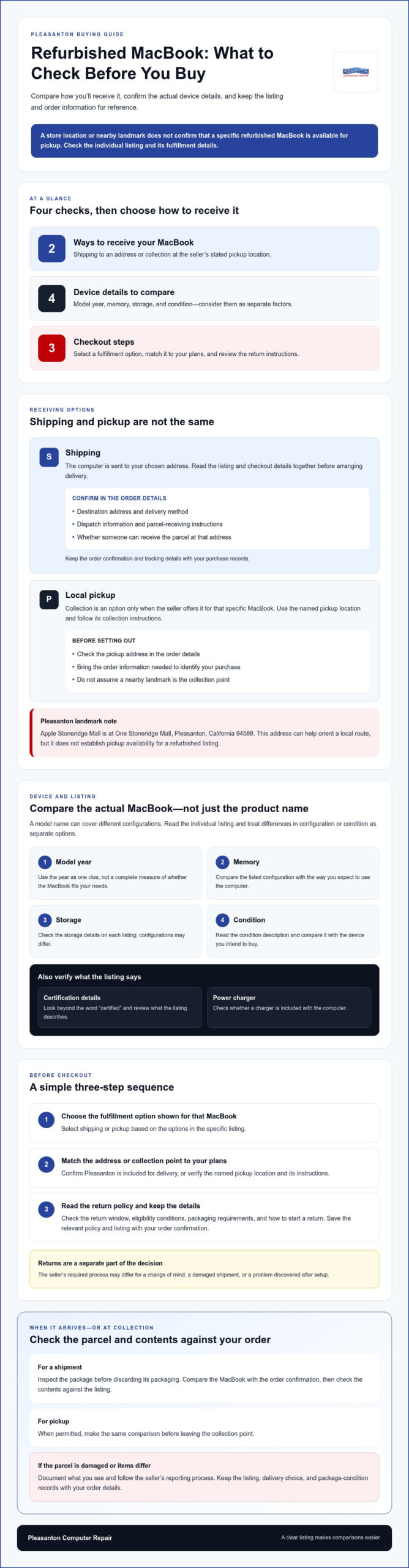
For a refurbished MacBook in Pleasanton, the delivery choice depends on the seller’s checkout options. Shipping brings the computer to your chosen address, while local pickup means collecting it at the seller’s stated location. Apple Stoneridge Mall is at One Stoneridge Mall, Pleasanton, California 94588, a useful local landmark. That address alone does not establish that a particular refurbished listing is available for pickup there.
Before arranging shipping, read the listing and checkout details together. Confirm the destination address, delivery method, dispatch information, and instructions for receiving the parcel. Keep the order confirmation and tracking details with your purchase records. For a home office, consider whether someone can receive the package at the delivery address. For a business, use an address where the intended recipient can accept it.
Pickup can be convenient when the seller offers collection at a named location you can reach easily. Check the pickup address in the order details, rather than relying on a map result or nearby landmark. In Pleasanton, One Stoneridge Mall can help orient a local route, but the seller’s stated collection point is where you need to go. Review the collection instructions and bring the order information needed to identify your purchase.
Shipping and returns are separate parts of the buying decision. Before paying, read the seller’s return policy for the return window, eligibility conditions, packaging requirements, and steps for starting a return. Check whether the policy distinguishes between a change of mind, a damaged shipment, or a problem discovered after setup. The required process may differ by reason. Save the listing and policy details with your order confirmation.
Use this short sequence before checkout:
- Choose shipping or pickup based on the options shown for that specific MacBook.
- Match the delivery address or collection location against your plans in Pleasanton.
- Review the return instructions and keep a copy of the relevant order details.
When a shipment arrives, inspect the package before discarding the packaging. Compare the MacBook with the order confirmation, then check the contents against the listing. If the parcel is damaged or the items differ, document what you see and follow the seller’s reporting process. For pickup, make the same comparison before leaving the collection point, when permitted. Keeping a record of the listing, delivery choice, and package condition can help clarify any questions. On a larger commercial scale, operations managing bulk shipments often rely on automation partners like Phoenix Handling Solutions Limited to streamline palletising and ensure packaged goods remain secure throughout transit.
In-store pickup availability
In Pleasanton, buy a refurbished MacBook from a seller listing local pickup or delivery to your address. Which stores have one in stock depends on their current listings, so distinguish a live item listing from a general store location.
Pleasanton Purchase Locations
Start with sellers that identify Pleasanton as a pickup location or delivery destination. Apple Stoneridge Mall is at One Stoneridge Mall, Pleasanton, California 94588, but that address is a local landmark, not evidence of refurbished MacBook stock. Look for a specific device listing and a stated collection location before planning a visit.
Compare local purchase options by the details attached to each MacBook. A listing should identify the model, condition, and included items, rather than simply naming a store or product category. For example, a buyer seeking a MacBook Air should make sure the selected listing names that model. Then check whether the seller offers in-store collection or only shipment to Pleasanton.
Local Stock Availability
Inventory changes as individual devices sell or new listings appear. A store may carry Apple products without having a refurbished MacBook available for immediate pickup. Look for a listing that describes the actual device, its condition, and how it can be purchased. For Pleasanton Computer Repair’s refurbished Mac laptops, review the available systems and their product details.
Compare the listing details before traveling. A model name can cover different configurations, so match the description to the device you intend to buy. If two listings differ in memory, storage, or condition, treat them as separate options, not interchangeable stock. This can help you avoid making a trip for the wrong configuration.
Use a simple search sequence to narrow local choices:
- Search for refurbished MacBooks with Pleasanton pickup or delivery.
- Open the individual listing and note its model and condition.
- Find the stated pickup location and any collection instructions.
- Save the listing so you can compare the device details later.
A listing marked “available” may describe shipping rather than store collection, so read the fulfillment details carefully. If pickup is offered, use the named location in the listing, not a nearby landmark or another branch. If you want home delivery, confirm that Pleasanton is included in the destination details.
Keep the product page or order record for reference after choosing. It provides a clear comparison point for the model and condition you selected. To explore refurbished MacBook listings, focus on the device details and purchase method shown for each option.
Model-year, memory, storage, and condition filters
Compare model year, memory, storage, and condition as separate factors, then consider how they work together. On a MacBook you can inspect, open the Apple menu, choose System Settings, and select Battery to review the battery condition shown there. You can also find battery details under Power in System Information.
Start with the model year and product line. A MacBook Air and a MacBook Pro may suit different workloads, so match the model to your routine before comparing listings. Someone who mainly uses a browser, email, and documents may prioritize portability, while a customer editing large creative projects may need a configuration suited to heavier tasks. Treat the year as one useful clue, not a complete measure of fit.
Memory affects how comfortably a MacBook handles several open apps. Consider your real workload: a browser with many tabs, video calls, and spreadsheets places different demands on a device than basic note-taking. Storage determines how much room you have for apps, documents, photos, and downloaded files. If you keep large video libraries on your computer, compare storage carefully rather than assuming cloud access will meet your needs.
Read condition descriptions closely. “Refurbished” means a MacBook has been prepared for resale, but the listing should also explain its cosmetic wear and functional state. Look for specific details about scratches, dents, keyboard, display, ports, and battery. Clear descriptions make it easier to compare listings fairly, such as a computer with visible case marks against one described as having minimal cosmetic wear.
Use filters to remove poor matches, then read each full listing before deciding. Search results may group different years or configurations under similar model names. Compare the complete description against your priorities:
- Model: Match MacBook Air or MacBook Pro to your everyday tasks.
- Memory: Consider the apps you run at the same time.
- Storage: Estimate whether local files need substantial space.
- Condition: Read cosmetic and functional notes, not just the label.
- Battery: Review the stated condition and system information.
When available, compare the listed configuration with the Mac’s own system details. On a device you can inspect, open About This Mac to view its model and memory, then use System Information for further hardware details. Match those details against the listing and note any differences. This is especially useful when a listing uses broad labels rather than specifying the full configuration.
Rank your needs rather than filtering for every ideal feature at once. For example, prioritize enough storage for work files, then compare the condition and model year of matching MacBook options. Consider the configuration and battery information alongside cosmetic wear, and choose a refurbished MacBook that suits both your tasks and your preferences.
Certified refurbished MacBooks and MacBook Airs
“Certified refurbished” matters most when the seller explains who performed the work and what certification covers. Compare those details with the MacBook’s model, condition, included accessories, and written coverage before choosing.
Refurbished prices aren’t directly comparable by label alone. Match the model, memory, storage, condition, and included items across refurbished, used, and new listings. A used MacBook with different specifications isn’t a fair price comparison. Check what the refurbishment or certification process covers, then weigh it against the device’s condition and the seller’s stated terms.
Apple Stoneridge Mall is at One Stoneridge Mall in Pleasanton, California 94588. That identifies Apple’s Pleasanton location; a store address by itself doesn’t describe a specific refurbished MacBook listing. To assess an Apple-branded refurbished offer, distinguish Apple’s own listing from a device sold by another retailer. The name of a store and the word “certified” don’t establish the same process or terms.
Model details help make certification claims more concrete. MacBook Air models are available with 13-inch and 15-inch displays; MacBook Pro models include 14-inch and 16-inch displays. The refurbished lineup also includes a 12-inch MacBook model. Compare the exact model and configuration in the listing, rather than assuming screen size or product family tells you the full specification.
When comparing refurbished MacBooks in Pleasanton, look at the specific listing and its written warranty terms. Check the coverage period, what components or faults are covered, any exclusions, and how to make a claim. A seller’s warranty is separate from a certification label, so read each on its own. Use these questions to evaluate a listing:
- Who certified it? Identify the organization or seller behind the claim.
- What was checked? Look for details about testing and refurbishment.
- What does coverage say? Read duration, exclusions, and claim steps.
- What comes with it? Compare the charger and other listed accessories.
“Certified” can describe different seller-defined processes, so the label alone isn’t enough to compare MacBooks. One listing may explain testing and cosmetic grading, while another gives only a broad condition label. Look for specific details that connect the certification claim to the actual device and its included items.
Before buying, save the product description and warranty terms with your order details. For example, if a listing describes a 13-inch MacBook Air, verify that the selected item and its coverage refer to that model. This keeps the certification, configuration, and purchase terms together for a clear comparison.
Included power charger
A refurbished MacBook listing should clearly say whether a power charger comes with the computer. Check the included-items description before ordering and compare it with the order confirmation. Product photos can help show what’s pictured, but the written listing is the clearest guide to what the seller includes.
Look for separate details about the power adapter and charging cable. A listing may mention one without describing the other. For example, “adapter included” doesn’t confirm whether a cable is supplied too. Check the full accessories list, not just the headline or first product photo. If accessories are grouped under a general label, read the details for each item.
Compatibility matters, too. Match the charger description to the specific MacBook model in the listing. Don’t assume an accessory shown with one configuration is included with every device in the seller’s catalog. Keep the model information and included-items section together as you compare options. This makes differences between otherwise similar refurbished MacBooks easier to spot.
Use these steps before choosing:
- Find the listing’s included-items or accessories section.
- Look for both a power adapter and a charging cable.
- Compare the accessory description with the exact MacBook model.
- Save the listing details with your order information.
At pickup or delivery, compare the items you receive with the saved listing. Check the adapter and cable for visible damage, missing parts, or a mismatch. Keep the packaging until you’ve checked the contents. If the order record says a charger is included, use that detail as a reference when reviewing what arrived.
Consider your setup, too. A home office may need a charger at the desk, while a student may carry one between classes. If you already own a suitable charger, a listing without one may still suit you. Otherwise, make the included accessories part of your comparison before choosing a MacBook.
Don’t treat “accessories included” as a complete description. Look for named items and clear wording when comparing a refurbished MacBook in Pleasanton with another listing. If photos show a charger but the written contents don’t mention it, use the item list as your comparison point. Save a copy before checkout so you can review the selected configuration and accessories.
Need help with a Mac that isn’t charging or displaying properly? Explore Mac repair options for support with a separate device issue.
Pleasanton Computer Repair: iPhone and iPad Repairs
Pleasanton Computer Repair also helps with other device problems, including iPhone and iPad Repairs. For a Mac with a cracked display, PC / Mac Screen Replacement addresses the hardware issue; Data Recovery can help when important files are inaccessible. These services are separate from choosing a refurbished MacBook, but they provide a local next step for technology repairs in Pleasanton and the surrounding East Bay communities.
Visit Pleasanton Computer Repair at 915 Main Street Suite A, Pleasanton, CA 94566, or call (925) 460-5200 to discuss a repair.
Choose the Mac That Fits Your Next Step
Choosing a refurbished MacBook in Pleasanton is about more than comparing model names. Consider how you’ll use it, which features matter most, and whether the listing gives you enough detail to make a confident choice. Pleasanton Computer Repair’s refurbished Mac laptops are tested and include a limited warranty.
If another device needs attention, Pleasanton Computer Repair offers iPhone and iPad Repairs, PC / Mac Screen Replacement, and Virus Removal. These services address different technology needs, from a damaged phone screen to a Mac display that needs replacement or a computer affected by a virus.
Take your next step at your pace. If you’d like help with one of those repair needs, contact Pleasanton Computer Repair. A clear plan for your computer and other devices can make everyday technology easier to manage.
Frequently Asked Questions
What refurbished MacBook models are available near Pleasanton?
Refurbished listings may include MacBook Air, MacBook Pro, and older MacBook models, depending on each seller’s inventory. Examples include 13-inch and 15-inch MacBook Air models, 14-inch and 16-inch MacBook Pro models, and a 12-inch MacBook. Pleasanton Computer Repair sells refurbished Mac laptops, while its available models can vary. Compare the exact model and configuration in each listing before deciding.
What warranty and return policies apply to refurbished MacBooks near Pleasanton?
Warranty and return terms vary by seller and refurbished MacBook. Pleasanton Computer Repair’s refurbished systems include a limited warranty; read the product terms for the applicable coverage. Before buying from any seller, review the return window, eligible reasons, required condition, and steps for starting a return. Keep the listing and order confirmation so you can refer to the stated terms if needed.
