
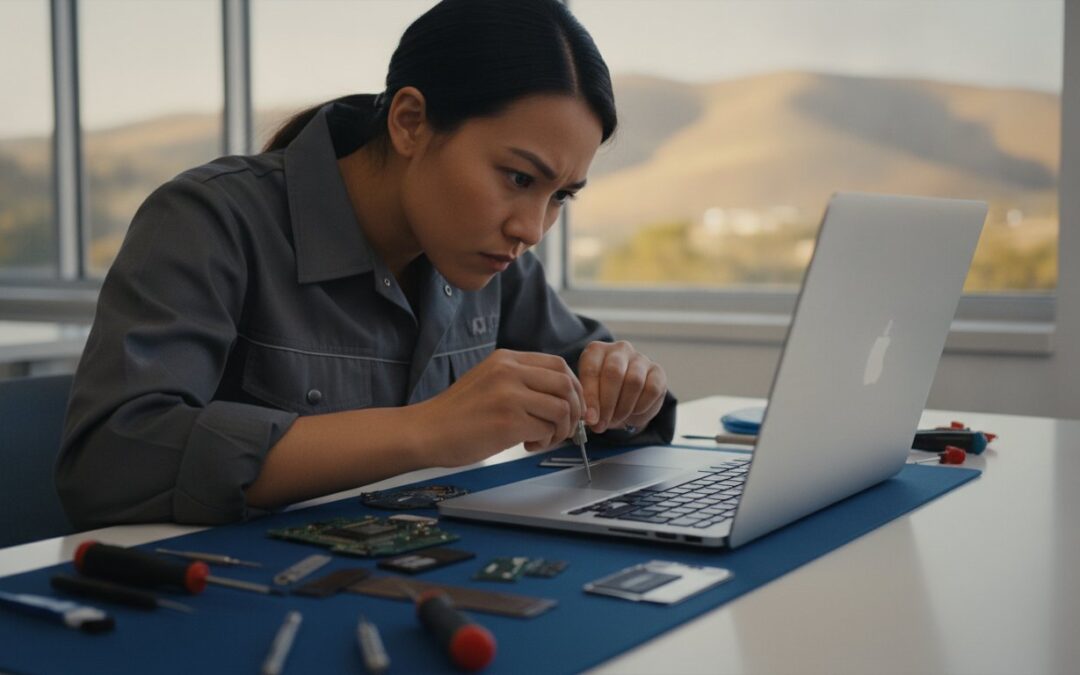
Have you ever stared at a frozen MacBook screen and felt that immediate pit in your stomach? It usually happens right before a major deadline or in the middle of a busy work week. Finding reliable Mac repair Dublin CA shouldn’t feel like a high-stakes gamble with your personal data or your schedule. We all know that the fear of losing years of photos or waiting over a week for a basic diagnostic is the most stressful part of technology failure. It’s exhausting to deal with long wait times and the impersonal nature of big-box retail repair counters.
This 2026 local service guide promises to get your MacBook or iMac back to peak performance with expert insights tailored for Dublin and East Bay residents. We’ll show you how to understand the latest California Right to Repair benefits and choose personalized service that prioritizes data preservation. This guide previews the best local alternatives to corporate mall stores, explains how SSD upgrades can breathe new life into older Macs, and outlines how to secure a fast turnaround from technicians who actually know your name. Whether you’re running the latest macOS 27 or need help with a hardware failure, you can restore your peace of mind with a simple trip just across the interchange.
Key Takeaways
- Learn why local specialists often offer faster turnaround times and more personalized communication than big-box retailers near Dublin.
- Discover how professional SSD upgrades and screen replacements can restore your device to peak performance without the high cost of a new machine.
- Find out why a short drive to Pleasanton is the most reliable path for expert Mac repair Dublin CA, ensuring your data remains safe throughout the process.
- Follow a simple pre-repair checklist, including Time Machine backups and disabling “Find My Mac,” to streamline your service experience.
- Explore the benefits of a neighborly service style backed by over 20 years of local expertise in the East Bay tech corridor.
Navigating Mac Repair Options in Dublin, CA
Living in the heart of the East Bay tech corridor means your digital life moves fast. When your MacBook fails, that momentum stops instantly. For many, the first instinct is to head toward the nearest major shopping center. However, local residents often find that big-box retailers come with hidden costs: long wait times, congested parking, and a lack of personalized attention. Seeking Mac repair Dublin CA shouldn’t require navigating mall traffic just to be told your appointment is three days away. The stress of a broken device is heavy enough without adding logistical headaches to the mix.
Experience counts when dealing with Apple’s proprietary hardware. Since 2002, we’ve seen every iteration of the iMac and MacBook, from the early G4 towers to the latest M-series silicon. This longevity provides a level of diagnostic intuition that corporate training programs often miss. We understand the nuances of logic board architecture and the delicate process of data recovery. This expertise is supported by the broader right to repair movement, which has made it easier for independent specialists to access the tools and schematics needed for high-level restoration. Choosing a specialist means you’re getting a technician who views your Mac as a precision tool, not just another unit in a high-volume queue.
The Dublin Dilemma: Mall Traffic vs. Local Convenience
Dublin is perfectly positioned for easy access, but that doesn’t mean you want to spend your afternoon stuck on I-580 or circling a crowded parking garage. Choosing a local specialist in downtown Pleasanton offers a stress-free alternative. It’s a short drive down I-680 to a quieter, more focused environment. You won’t find the chaotic noise of a generic retail floor here. Instead, you get a direct line to the technician working on your device. This neighborly approach ensures you’re treated as a person, not just a service ticket number. We prioritize your peace of mind by offering clear communication that corporate chains simply cannot replicate.
Signs Your Mac Needs Professional Attention
How do you know when a glitch is a sign of a deeper hardware failure? Some symptoms are more urgent than others. If you notice these issues, it’s time to seek expert help before they lead to permanent data loss:
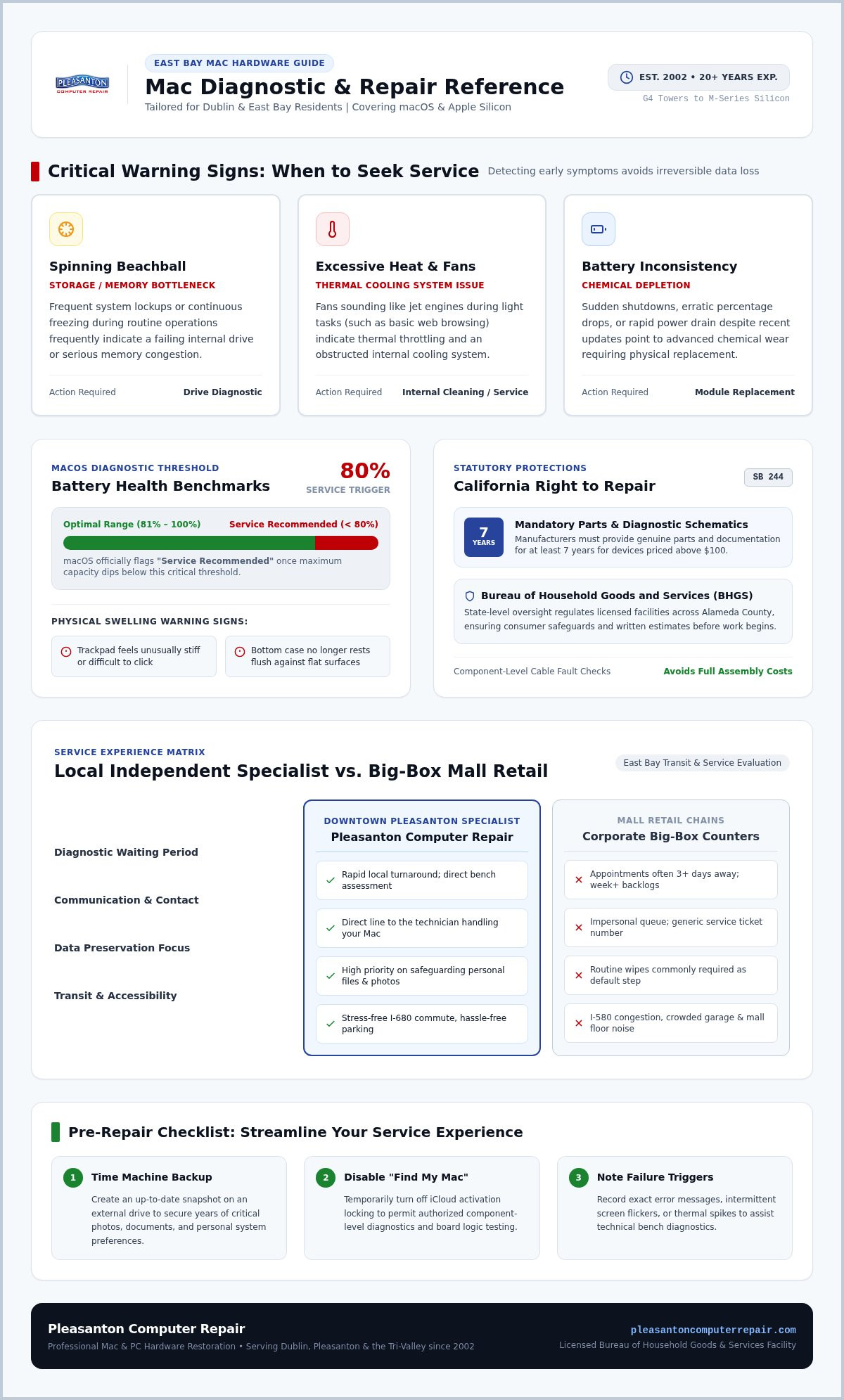
- The Spinning Beachball: Frequent system freezes or the “spinning beachball” icon often indicate a failing drive or memory bottlenecks.
- Excessive Heat and Fan Noise: If your Mac sounds like a jet engine during simple web browsing, your internal cooling system may need professional cleaning or service.
- Battery Inconsistency: Sudden shutdowns or a battery that drains rapidly despite software updates usually point to a chemical age issue that requires a safe replacement.
Don’t ignore these warning signs. Catching a problem early often means a simpler, more affordable fix. When you need Mac repair Dublin CA, starting with a local expert ensures you get an honest assessment of your device’s health.
Common Hardware Failures and Mac Restoration Services
Hardware failures often arrive without warning, turning a productive morning into a search for Mac repair Dublin CA. Understanding the nature of the failure is the first step toward a stress-free resolution. The California Bureau of Household Goods and Services regulates licensed repair facilities in Alameda County, ensuring consumers receive written estimates and protection. This oversight is vital when dealing with complex Apple hardware, where a simple flickering screen could stem from a loose display cable or a failing backlight circuit.
MacBook Screen and Battery Solutions
Is your screen showing vertical lines or staying completely dark? A cracked LCD is obvious, but backlight issues can be deceptive. While corporate retailers often suggest replacing the entire display assembly for hundreds of dollars, local experts can sometimes identify cable-level faults. If your Mac is older, you might wonder if it’s worth the fix. Under the California Right to Repair Act (SB 244), manufacturers must provide parts for seven years for devices over $100. This makes repairing your current MacBook Pro much more economical than buying a new one.
Battery health is another frequent concern. macOS typically flags a battery as “Service Recommended” once it drops below an 80% maximum capacity threshold. A swelling battery typically reveals itself through a trackpad that feels stiff to click or a bottom case that no longer sits flush on a level surface. Replacing the battery can instantly restore your laptop’s portability and prevent internal pressure from damaging the logic board.
Advanced Logic Board and Component Repair
Liquid spills are a common reality for Dublin residents working in local cafes or home offices. When coffee hits the keyboard, the damage often reaches the logic board. Corporate “Genius” bars usually recommend a total board replacement, which can cost nearly as much as a new computer and often results in total data loss. Independent specialists use micro-soldering and ultrasonic cleaning to repair specific components, preserving your original board and your files. This approach often saves 30% to 50% compared to modular replacement prices.
Modern Macs also feature the Apple T2 Security Chip or integrated M-series silicon, which complicates repairs by pairing components to the motherboard. Despite these hurdles, seasoned technicians have the diagnostic tools to navigate these security protocols. If you’re facing a complex failure, seeking professional Mac restoration can save your hardware from the recycling bin. We also specialize in reviving legacy iMacs by replacing slow mechanical drives with modern SSDs, providing a speed boost that makes an old machine feel brand new again.
Comparing Local Specialists vs. Big Box Retailers in the East Bay
When you’re searching for Mac repair Dublin CA, the choice usually boils down to a local specialist or a big-box retailer at the mall. Corporate chains often operate on a high-volume, low-context model. They follow rigid scripts and standardized pricing tiers that don’t always account for your specific needs. In contrast, local experts prioritize the unique requirements of the East Bay community. This difference impacts everything from the safety of your family photos to how quickly you can get back to work.
Turnaround Times and Diagnostic Fees
Big-box retailers frequently act as intake centers rather than actual repair shops. They often ship your MacBook to a remote central depot for complex issues. This process can easily add 5 to 10 business days to a repair cycle. Local specialists perform diagnostics in-house, which significantly cuts down on wait times. Most standard repairs are completed within a 24 to 72 hour window. You also avoid the “hidden fees” often bundled into corporate tech support memberships. You pay for the restoration you need, not a recurring subscription that you’ll likely forget to cancel.
Privacy is another major concern when handing over a personal device. Who is actually looking at your files? Corporate environments involve multiple shifts and remote technicians, creating a longer chain of custody for your sensitive information. Before you drop off your device, it’s wise to consult this FTC guide on securing personal computer data. Local shops offer a shorter, more transparent chain of custody. You often speak directly to the person who will be opening your Mac, providing a level of accountability that corporate counters can’t match.
The Human Element: Speaking to Your Technician
Dealing with an automated status update is frustrating. It doesn’t tell you the “why” behind a delay or offer alternatives. A local technician provides direct, honest answers. They can offer customized repair paths that fit your specific budget. For example, they might suggest an individual component replacement instead of the “total unit overhaul” required by corporate policies. If you want to learn more about the specific standards for Expert Mac Repair Pleasanton, you’ll find that local accountability is our biggest advantage.
Post-repair support matters just as much as the initial fix. A corporate warranty might require you to navigate an online portal or wait days for a new appointment. Local specialists provide immediate, neighborly support. We stand by our work with a 60-day warranty and complimentary remote assistance for our Dublin customers. This ensures your Mac stays running at peak performance long after you leave the shop. Choosing local means choosing a partner who values your functional continuity as much as you do.
Pre-Repair Checklist: Securing Your Data and Device
Taking a few minutes to prepare your device ensures a smoother experience when you seek Mac repair Dublin CA. It’s about protecting your digital life before the physical work begins. Proper preparation helps our technicians focus on the technical solution rather than navigating administrative hurdles. It also gives you peace of mind knowing your information is safe.
Follow these four essential steps before bringing your Mac in for service:
- Perform a Final Backup: Use Time Machine to create a complete snapshot of your system. This is your ultimate safety net if a hardware failure becomes catastrophic.
- Disable “Find My Mac”: You must turn this off in your iCloud settings. Apple’s security protocols block certain hardware diagnostics and motherboard tests if Activation Lock is active.
- Document Symptoms: Note exactly when the problem occurs. Does it happen only when you’re using a specific app? Did the screen flicker after a certain system update? Specific details help us reach a faster diagnosis.
- Clean the Exterior: A quick wipe-down with a lint-free cloth ensures safe and hygienic handling for the technician opening your machine.
Data Security and Privacy Measures
We take your privacy seriously and prioritize the security of your files. You should never share your login password over the phone or via email. Our team doesn’t need your private credentials to verify hardware health. If software testing is required, we’ll guide you through creating a guest account or a separate test profile. This keeps your personal documents encrypted and inaccessible during the repair process. We apply these same rigorous standards to our iPhone data recovery Pleasanton services. Your data remains your property, and we act as its protective barrier.
Performance Boost: The SSD Upgrade Option
Sometimes what feels like a terminal failure is actually just an aging storage drive. Traditional hard drives use spinning platters that eventually slow down and fail. If your older iMac or MacBook is sluggish, an SSD upgrade Pleasanton CA is the most effective way to restore speed. Solid State Drives have no moving parts and offer significantly faster read and write speeds. This upgrade can make a 2017 machine feel as fast as a 2026 model for a fraction of the cost of a new laptop. It’s a sustainable way to extend the life of your hardware.
If you’ve completed these steps and are ready for an expert assessment, contact our team today to schedule your diagnostic.
Reliable Mac Solutions at Pleasanton Computer Repair
Since 2002, Pleasanton Computer Repair has served as a dependable partner for residents and professionals across the Tri-Valley. Finding a partner for Mac repair Dublin CA shouldn’t feel like a transaction with a faceless corporation. We’ve built our reputation on a foundation of calm competence and local reliability, moving far beyond the generic service models found in larger retail chains. You aren’t just looking for a technician; you’re looking for a neighbor who understands the value of your time and the importance of your data. We’ve seen every technical challenge imaginable over the last two decades, and we remain unfazed by even the most complex hardware failures.
Our support model is designed to fit your busy schedule. While many clients prefer the security of our in-store service, we also provide on-site visits and remote support for software-related issues. This flexibility ensures that whether you’re a remote professional in Dublin or a local business owner, your technology stays functional. We’re experts in both the Mac and PC ecosystems, allowing us to provide comprehensive care for households and offices that utilize a mix of different operating systems. From refurbished Mac laptops to new custom PC building, we handle the full spectrum of your digital needs.
Our Commitment to the Dublin Community
We’ve spent over 20 years supporting the people who make the East Bay thrive. This includes everything from helping families recover lost vacation photos to providing Small Business Computer Repair in Pleasanton. We use high-quality parts and maintain transparent labor practices, ensuring you always know exactly what’s happening with your device. We don’t believe in jargon or hidden fees. Instead, we focus on clear, honest communication that empowers you to make the best decision for your hardware and your budget. When you choose us for Mac repair Dublin CA, you’re choosing a seasoned expert who prioritizes your peace of mind.
Visit Us Today for a Diagnostic
Reaching our suite is a straightforward process for Dublin residents. It’s a short, ten-minute drive down I-680 South to the Main Street exit in Pleasanton. You’ll find us located at 400 Main Street, Suite 205, right in the heart of downtown. When you come in for your diagnostic, please remember to bring your MacBook power adapter, especially if you’re experiencing charging issues or have an older model with a specific connector. If you have external drives or specific accessories related to the problem, bring those along too. We’re open Monday through Saturday from 10:00 AM to 6:00 PM to serve you. Take the first step toward a stress-free resolution and schedule your appointment today; we’re ready to get your Mac back to peak performance.
Restore Your Mac’s Performance with Local Expertise
A broken device doesn’t have to disrupt your life for weeks. By choosing a specialized technician over a corporate retail counter, you prioritize your data and your schedule. You’ve learned that expert SSD upgrades can breathe new life into older hardware; taking a few simple steps before your appointment ensures a stress-free experience. Since 2002, East Bay residents have trusted us for reliable Mac repair Dublin CA. Our team combines deep technical knowledge with a neighborly approach that big-box stores simply can’t match.
Whether you need advanced data recovery or a simple screen replacement, our convenient Main Street location is just a short drive away. We’re here to act as a protective barrier between you and your technological headaches. Don’t let a failing battery or a slow drive hold you back any longer. Schedule Your Mac Repair Appointment Today and get back to what matters most. We look forward to helping you restore your peace of mind and your device’s peak performance.
Frequently Asked Questions
How long does a typical Mac repair take in Dublin?
Most standard repairs are completed within 24 to 72 hours depending on parts availability. We perform all diagnostics and labor in-house at our Pleasanton service center to avoid the long shipping delays common with big-box retailers. This efficient turnaround helps Dublin residents and professionals get back to their digital lives quickly. Complex board-level restorations or specialized data recovery may require additional time for thorough testing.
Will I lose my data during a MacBook repair?
We prioritize data preservation and maintain a strict policy to protect your files whenever possible. Hardware fixes like screen or battery replacements don’t typically affect your stored information. However, we always recommend performing a Time Machine backup before any service. If your drive is failing, we offer expert data recovery services to retrieve your important memories and documents before proceeding with hardware repairs.
Is it cheaper to repair an old Mac or buy a new one?
Repairing an existing Mac is often much more cost-effective than purchasing a brand-new machine. With the California Right to Repair Act, we can access quality parts for devices up to seven years old. Simple upgrades like adding a modern SSD can make an older iMac or MacBook feel fast and responsive again. We provide honest assessments to help you decide if a restoration fits your budget.
Do you provide on-site Mac repair for businesses in Dublin?
Yes, we offer on-site technology support for small businesses and residential clients throughout the Dublin area. We understand that transporting multiple workstations is a logistical challenge. Our technicians can visit your office to handle networking issues, system optimizations, or software troubleshooting. For complex hardware failures requiring specialized micro-soldering tools, we may recommend bringing the device to our Main Street suite for a more comprehensive repair.
Can you fix a MacBook screen that is flickering or has lines?
We can certainly resolve screen flickering or display lines through our professional screen replacement services. These symptoms usually indicate a failing LCD panel or a damaged internal display cable. We perform a detailed diagnostic to identify the exact cause of the visual distortion. Replacing just the necessary display components often saves you significant money compared to the total unit replacement approach favored by corporate stores.
Do you offer warranties on Mac hardware repairs?
Every hardware repair we perform comes with a 60-day warranty to ensure your peace of mind. This coverage confirms that your device continues to function at peak performance after you leave our shop. We also include complimentary remote support to help with any minor software adjustments following a hardware fix. Our goal is to provide local customers with a reliable, stress-free resolution and long-term functional continuity.
How do I know if my Mac needs an SSD upgrade?
If your Mac is sluggish, takes a long time to boot, or frequently shows the spinning beachball icon, it likely needs an SSD upgrade. Older mechanical hard drives slow down as they age and eventually fail. Replacing them with a Solid State Drive provides an immediate speed boost. This is a common solution for Dublin professionals who want to extend the life of their reliable hardware.
Is an appointment required for Mac diagnostics?
While we welcome walk-ins at our Pleasanton location, scheduling an appointment is the best way to ensure the fastest service. You can easily book a time online or call us directly. Having a set time allows our technicians to dedicate their full attention to your device’s symptoms immediately. When you arrive for your Mac repair Dublin CA diagnostic, remember to bring your power adapter and any relevant accessories.