
Is that spinning wheel on your screen a sign that you need a new two-thousand dollar laptop, or is your current machine just buried under years of digital clutter? Most people assume a sluggish PC or Mac is a lost cause, but the reality is often much simpler. When you invest in a professional computer tune-up pleasanton residents trust, you aren’t just deleting old files; you’re performing a holistic restoration of your system’s health. We know how draining it is to deal with long boot times, loud fans, and applications that freeze during your most important work. It’s frustrating, and the anxiety of potential data loss during a repair can make you want to avoid the fix altogether.
This guide will show you how to reclaim factory-fresh speed and extend your device’s lifespan without the cost of a new machine. You’ll discover how expert hardware verification and secure data handling can provide an instant performance boost while keeping your files private. We will walk through the specific steps to revive your East Bay setup, from checking component health to why an SSD upgrade is often the ultimate companion for a total system refresh.
Key Takeaways
- Learn to distinguish between permanent hardware failure and common performance killers like background bloatware or thermal throttling.
- Discover how a professional computer tune-up pleasanton residents rely on can restore factory-level speed through deep software optimization and hardware diagnostics.
- Understand why pairing a software refresh with an SSD upgrade is the most effective way to extend the life of your current PC or Mac.
- Identify safe DIY maintenance habits and learn why certain cleanup software can actually do more harm than good to your system.
- Find out how local experts ensure a stress-free repair with a zero data loss guarantee and a fast turnaround at our Pleasanton office.
Why Your Computer Slows Down (And When to Worry)
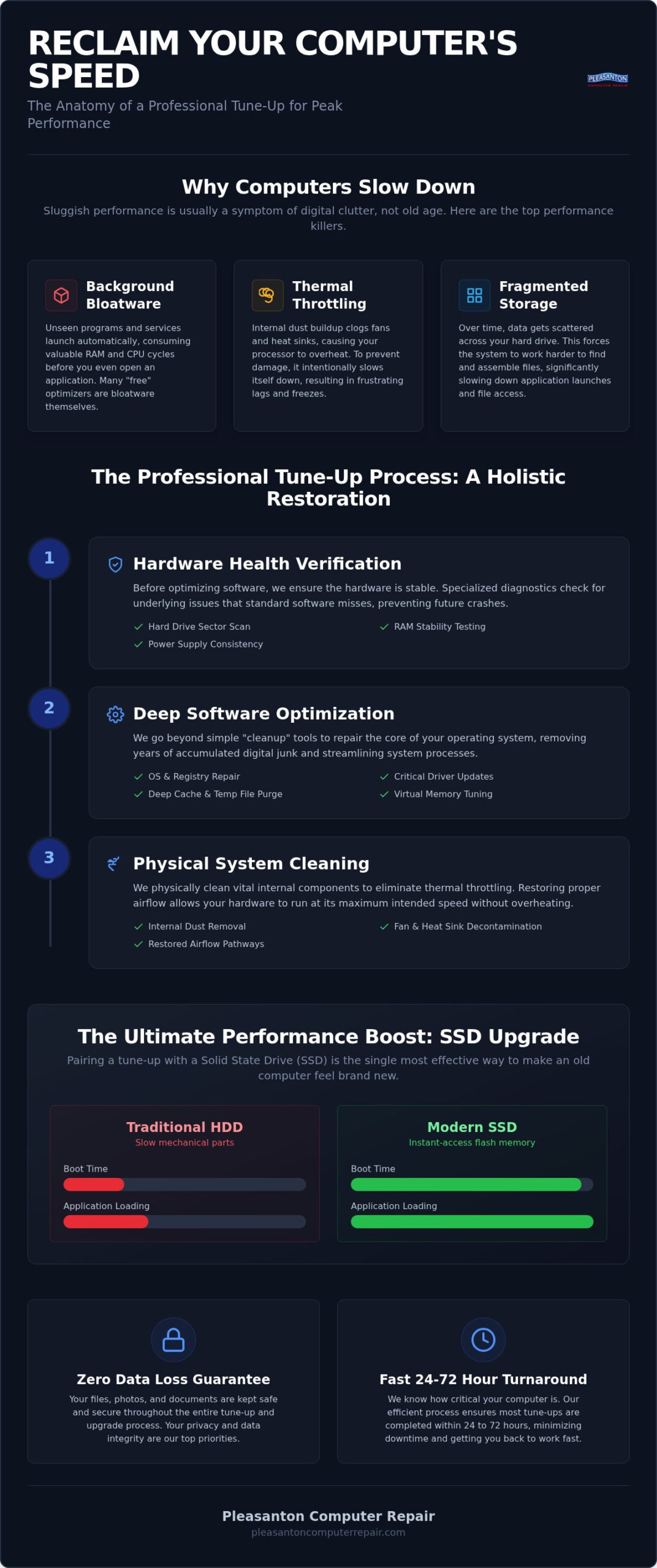
It’s a common misconception that a sluggish PC or Mac is simply “getting old.” In reality, slowness is usually a symptom of fragmented resources rather than a hardware expiration date. Think of your computer like a workspace. If your desk is buried under three years of old mail and unused tools, you can’t find what you need to get work done. A professional computer tune-up pleasanton specialists provide clears that digital clutter so your hardware can perform the way it did on day one.
By 2026, software updates have become significantly more demanding. Modern operating systems and AI-integrated applications require heavy processing power and memory. If your hardware configuration hasn’t been optimized recently, these updates can overwhelm your system. You might notice three primary performance killers:
- Background Bloatware: Programs that launch automatically and stay active.
- Fragmented Storage: Data scattered across your drive, making it harder for the OS to locate files.
- Thermal Throttling: Heat buildup that forces the processor to slow down to prevent damage.
Understanding the difference between a “slow” computer and a “failing” one is crucial for your peace of mind. If your applications take forever to open or your browser tabs hang, you’re likely facing a software resource issue. However, if you hear clicking sounds, see strange lines on your screen, or experience random shutdowns, those are signs of a failing hardware component. Most of the time, a thorough optimization is all that’s needed to restore speed.
The Impact of Background Bloatware
Startup items are the silent thieves of performance. They launch the moment you log in, draining your RAM before you even open a single window. Many modern programs also run hidden “telemetry” services that constantly send data back to developers, consuming your CPU cycles in the background. Don’t be tempted by “free” optimization tools found online. These often act as bloatware themselves, tracking your usage or installing additional junk that makes the sluggishness even worse.
Thermal Throttling in the East Bay Climate
Our local environment plays a surprising role in your computer’s speed. In the East Bay, dust buildup is a constant challenge for electronics in homes and offices. When dust settles on internal fans and heat sinks, your computer can’t dissipate heat effectively. Your CPU then triggers a “throttle” mechanism, intentionally slowing itself down to protect the hardware from melting. If your fan sounds like a jet engine or the bottom of your laptop feels hot, your machine is struggling with poor airflow. A computer tune-up pleasanton service includes cleaning these vital paths to ensure your system stays cool and fast.
The Anatomy of a Professional Computer Tune-Up Service
A professional tune-up is more than just clicking a “clean” button on a free app. It’s a comprehensive overhaul that addresses both the invisible software layers and the physical components that keep your machine running. When you book a computer tune-up pleasanton experts provide, we use specialized diagnostic tools to scan for underlying issues that standard consumer software misses. These scans check hard drive sector health, RAM stability, and power supply consistency to ensure your hardware is actually capable of maintaining peak speed without crashing.
This process isn’t just about speed; it’s about reliability. We look for the root causes of instability, ensuring that every part of your system works in harmony. By the time we finish, your computer doesn’t just feel faster. It operates with the predictable efficiency it had when it was brand new.
Deep Software Optimization and OS Repair
While local shops are excellent for individual repairs, businesses often seek comprehensive technology partners like IT Works to manage their entire digital infrastructure and ensure long-term system health through strategic IT services.
Software optimization starts with the system registry and file system. Over time, deleted programs leave behind “ghost” entries and broken file paths that confuse your operating system. We safely repair these links without risking your data. Our deep cleaning process also includes:
- Updating critical drivers and firmware to ensure your hardware communicates perfectly with 2026-era OS versions.
- Purging deep-seated temporary files and system caches that accumulate in hidden directories.
- Adjusting virtual memory settings to help your PC or Mac handle modern multitasking more efficiently.
This level of care transforms a glitchy experience into a smooth, predictable one. If you’re tired of apps hanging or the system feeling “heavy,” a professional refresh can often solve these issues in 24 to 72 hours. You can learn more about our local computer repair pleasanton ca services to see how we handle these technical deep dives.
Physical Maintenance and Internal Cleaning
Most users forget that software performance is tied to physical health. We open the chassis to remove micro-dust from delicate motherboard components and cooling fins using high-pressure compressed air. While inside, we inspect for “bulging capacitors” or signs of early hardware fatigue that could lead to a sudden crash. Using professional anti-static tools is vital during this process. A single static discharge from a standard vacuum cleaner can fry a motherboard instantly. We also inspect the thermal paste on your CPU. If it has dried out, your processor won’t stay cool regardless of how fast the fans spin.
Finally, we harden your system security. This includes patching OS vulnerabilities and removing hidden adware that might have slipped through. A professional computer tune-up pleasanton doesn’t just make your machine faster; it makes it safer for your private data and extends the life of your investment.
Software Optimization vs. Hardware Upgrades: Which Wins?
Choosing between a software fix and a hardware change depends on your specific goals. A software-focused computer tune-up pleasanton service is perfect for removing viruses, fixing registry errors, and clearing out background bloat. It is the most cost-effective way to see an immediate speed boost. However, software can’t fix a slow mechanical heart. If your hardware is physically outdated, even the best digital cleaning has its limits. We often recommend a hybrid approach to get the best return on your investment.
There is a “point of no return” where software fixes stop being effective. If your processor is several generations behind or the motherboard shows signs of fatigue, a computer tune-up pleasanton might only be a temporary band-aid. We help you decide when an upgrade makes sense and when your money is better spent on one of our refurbished laptops or a custom build. It is about finding the right balance for your budget and your daily needs.
The SSD Transformation: Why It Beats Software Alone
Traditional hard drives use spinning platters that create a massive bottleneck for modern systems. An SSD upgrade Pleasanton CA residents often choose is the single most impactful change you can make for an older machine. It works alongside a professional tune-up to provide maximum longevity. SSDs use flash memory to eliminate mechanical latency. This means your computer boots in seconds rather than minutes. It is like moving from a gravel road to a high-speed paved highway.
Knowing When to Upgrade Your RAM
In 2026, multitasking requirements have reached new heights. If your computer feels like it is “stuttering” when you have multiple browser tabs open, you are likely running out of memory. When RAM is full, the OS starts “swapping” data to your much slower storage drive, which causes those annoying freezes. Our professional diagnostics identify these memory bottlenecks with high accuracy. For most home users and local businesses in the East Bay, 16GB of RAM is now the baseline for a smooth, frustration-free experience. We can quickly determine if your current motherboard supports a memory boost to keep you productive. Additionally, staying informed on modern computing standards through resources like reisinformatica.com can help you maximize your hardware’s potential.
Is it possible to handle your own computer maintenance? Absolutely. For many minor issues, a few simple steps at home can clear up some breathing room on your drive. However, there is a sharp line between basic digital housekeeping and the deep system optimization included in a professional computer tune-up pleasanton service. While deleting old downloads is safe, using “Registry Cleaners” found on the internet is a recipe for disaster. These programs often promise a one-click fix but frequently delete vital pointers in the Windows Registry, leading to blue-screen errors or software that refuses to launch.
Safe DIY Steps You Can Take Today
You don’t need to be a technician to perform basic maintenance. Start by managing your startup applications. On a PC, use the Task Manager; on a Mac, check the Users and Groups section in System Settings. Disabling apps you don’t use daily can save significant RAM. You should also use the built-in disk cleanup utilities provided by your OS rather than third-party bloatware. For physical upkeep, a dry microfiber cloth and a gentle puff of air can keep your screen and keyboard clean. Just remember to never spray liquid directly onto the machine, as moisture can seep into the internal electronics and cause a short circuit.
When DIY Becomes Dangerous
The risks increase the moment you pick up a screwdriver. Opening a modern MacBook or iMac requires specialized suction tools and proprietary drivers to navigate adhesive-heavy designs. Beyond the physical difficulty, static electricity is a silent killer. A single spark from your fingertips can travel through the motherboard and destroy sensitive components in milliseconds. We also see many DIY attempts fail during thermal paste application. If you apply too much or too little to the CPU, your computer will continue to overheat regardless of how clean the fans are. Finally, avoid the temptation to delete “Hidden Files” you don’t recognize. Many of these are essential for your operating system to boot correctly.
At Pleasanton Computer Repair, we’ve been helping the community since 2002. We provide a Zero Data Loss guarantee and a 60-day warranty on our work, giving you total peace of mind. If your system is acting up, don’t risk a DIY disaster. You can trust our local computer repair pleasanton ca team to handle the heavy lifting safely and return your machine in 24 to 72 hours. Let us perform a computer tune-up pleasanton residents can rely on to keep their data secure and their hardware running at peak performance.
Revive Your Tech at Pleasanton Computer Repair
Choosing a local partner for your computer tune-up pleasanton service means choosing accountability and seasoned expertise. Our team at Computer Repair Pleasanton CA brings over two decades of technical knowledge to every diagnostic. We’re located right in the heart of downtown at 400 Main Street, Suite 205. Most tune-up and optimization services are completed within a 24 to 72 hour turnaround, so you aren’t left without your essential tools for long. Whether you’re dealing with a sluggish iMac or a PC that won’t boot, we provide a clear path back to peak performance.
A total tech refresh often goes beyond just software. If your laptop’s mobility is suffering, a specialized MacBook battery replacement Pleasanton service can restore its “all-day” life. We also handle iPhone and iPad repairs, ensuring all your daily devices work in perfect harmony. By addressing both the internal software health and the physical battery or screen issues, we help you avoid the massive expense of buying entirely new hardware in 2026.
A Local Legacy of Trust Since 2002
We’ve spent more than twenty years serving the East Bay area, including our neighbors in Dublin, Livermore, and San Ramon. This deep local root means we treat every client like a member of the community, not just a ticket number. Our “Zero Data Loss” guarantee is a cornerstone of our business; we prioritize the safety of your photos, documents, and professional files above all else. Local support offers a level of personalized care that “Big Box” retailers simply can’t match. You’ll speak directly with the experts who are working on your machine, ensuring total transparency throughout the process.
How to Schedule Your Tune-Up Today
Reclaiming your computer’s speed is a straightforward process. First, schedule an appointment for a drop-off at our Main Street office. Second, our technicians perform a comprehensive diagnosis to identify every bottleneck. Third, we provide a clear quotation and timeline before any work begins. For our commercial partners, we also offer on-site and remote options for small business computer repair Pleasanton. This ensures your office stays productive without the need for an in-house IT department. Don’t let a slow machine drain your productivity any longer. Visit us on Main Street or book your diagnostic online to start your computer tune-up pleasanton today.
Reclaim Your Speed and Peace of Mind
You don’t have to settle for a frustratingly slow machine or the high cost of an unneeded replacement. Most performance issues stem from manageable software clutter or thermal throttling that a professional computer tune-up pleasanton can resolve in just a few days. By combining deep system optimization with physical cleaning or a strategic SSD upgrade, you can extend your device’s lifespan and restore its original factory speed. It’s about making your technology work for you again, not the other way around.
Since 2002, our team has supported the East Bay community with reliable, expert care. We prioritize your security with a Zero Data Loss Guarantee and provide a 60-day warranty on all our services. Whether you’re a home user in Dublin or a business owner in San Ramon, we’re here to ensure your digital life remains smooth and stress-free. Schedule Your Professional Computer Tune-Up in Pleasanton Today and let us handle the technical heavy lifting. We look forward to seeing you at our Main Street office and getting your PC or Mac back to peak performance.
Frequently Asked Questions
How often should I get a professional computer tune-up?
Once every 12 to 18 months is ideal for most users. If you use your machine for intensive business tasks in Pleasanton or San Ramon, you might benefit from an annual check. Regular maintenance prevents the gradual accumulation of background processes and dust that eventually lead to thermal throttling. It’s much easier to maintain a fast system than to revive one that has been neglected for years.
Will a tune-up delete my personal photos or documents?
No, your personal data remains untouched during our optimization process. We stand by our Zero Data Loss guarantee for every residential and business client. Our technicians focus on system files, registry entries, and temporary caches that don’t contain your personal information. We always recommend a backup before any service as a standard safety practice, but our goal is to keep your files exactly where you left them.
Can a tune-up make an 8-year-old computer fast enough for 2026 software?
A software tune-up alone might not be enough for an 8-year-old machine running 2026-era applications. While we can significantly improve responsiveness by clearing bloatware, older processors often struggle with modern AI-integrated software. However, pairing a computer tune-up pleasanton service with an SSD upgrade can often make an older Mac or PC feel remarkably snappy again. We’ll give you an honest assessment of whether your hardware can handle your specific workload.
What is the difference between a software tune-up and an SSD upgrade?
A software tune-up cleans the digital environment; an SSD upgrade replaces the physical storage hardware. The tune-up removes viruses, fixes registry errors, and optimizes startup items. An SSD upgrade replaces a slow, mechanical hard drive with fast flash memory. While a tune-up maximizes your current hardware’s potential, an SSD upgrade fundamentally changes the speed at which your computer can read and write data. Combining both provides the most dramatic and lasting results.
Do you offer tune-up services for both Mac and PC laptops?
Yes, we provide comprehensive optimization for both macOS and Windows systems. Whether you have a MacBook Pro, an iMac, or a Windows-based laptop from brands like Dell or HP, our technicians have the expertise to help. We understand the unique file structures and system requirements of both platforms. We also offer specialized hardware support, such as screen replacements and battery services, for both Apple and PC devices at our local shop.
How long does a typical computer optimization take at your Pleasanton shop?
Most computer tune-up pleasanton services are completed within a 24 to 72 hour turnaround time. We begin with a thorough diagnosis to identify specific bottlenecks before moving into the deep cleaning and optimization phase. This timeframe allows us to run extensive hardware health scans and ensure all updates are installed correctly. We respect your time and work efficiently to get your essential tools back into your hands as quickly as possible.
Is it better to tune up my old laptop or just buy a refurbished one?
This depends on the age and physical condition of your current machine. If your laptop is relatively recent but just feels slow, a tune-up and an SSD upgrade are often the most cost-effective choices. However, if the repair costs approach the value of the machine, we might suggest one of our refurbished PC or Mac laptops. These systems are fully tested, warrantied, and offer a great balance of performance and value for East Bay users.
Can you perform a tune-up remotely, or do I need to bring it in?
We offer both remote support and in-store services at our office at 400 Main Street. Remote support is excellent for software-only issues and minor optimizations. However, a full professional tune-up often requires a physical inspection to clean out dust and check for hardware fatigue. For residents in Dublin, Livermore, Danville, and San Ramon, dropping your device off ensures we can perform a deep physical and digital cleaning for the best performance boost.