
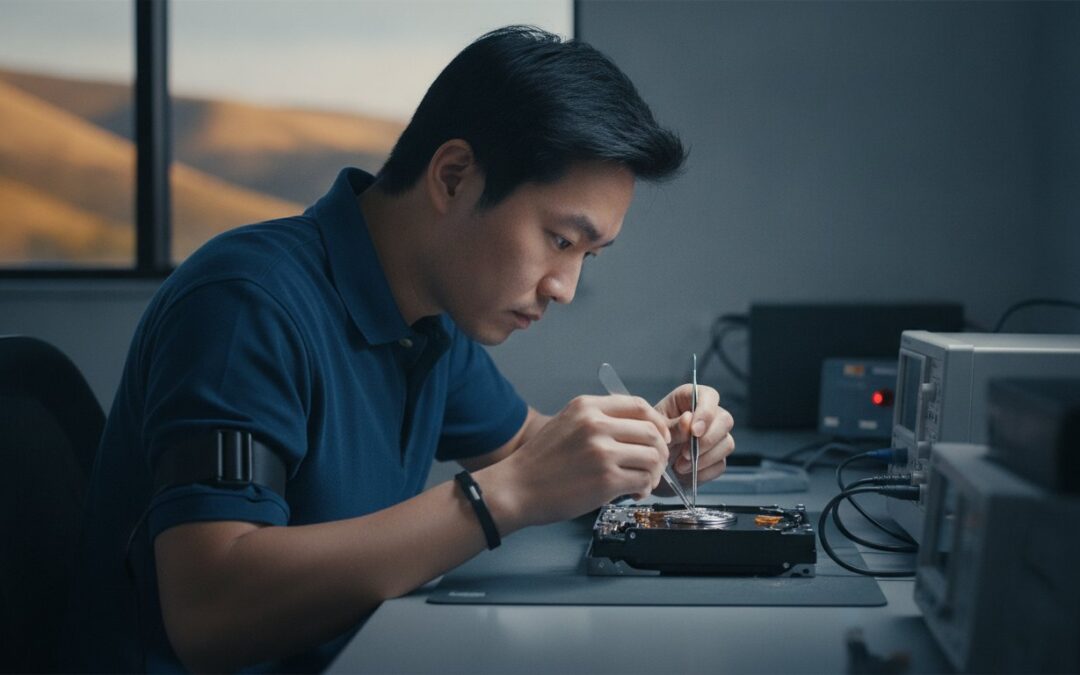
You’re standing at a retail counter, staring at a hard drive that holds ten years of family photos or your entire business’s history, and the technician tells you they need to ship it away for weeks. It feels like a gamble you can’t afford to lose. It’s completely natural to feel anxious when your digital life is suddenly inaccessible. You want the convenience of a big name you recognize, but you’re likely worried about hidden costs and the risks of your hardware traveling across the country in a cardboard box.
We understand that frustration because we’ve helped thousands of neighbors in the East Bay recover from these exact moments for over twenty years. This guide will show you why choosing specialized data recovery services vs Geek Squad in 2026 often means the difference between a permanent loss and a successful restoration. You’ll discover why direct access to an engineer beats a retail middleman every time. We will break down the technical reality of clean-room repairs, compare actual turnaround times, and explain why local expertise provides the transparency and speed you need to get back to your memories without the risks of shipping-based models.
Key Takeaways
- Identify the difference between logical and physical drive failures to choose the safest recovery method for your specific situation.
- Compare data recovery services vs Geek Squad to understand why specialized labs provide higher success rates through in-house technology.
- Learn why big-box retailers often act as shipping hubs, which can lead to longer wait times and less transparency during the process.
- Discover why the first recovery attempt is your best shot and how to avoid common mistakes that make data permanently unrecoverable.
- See how local East Bay expertise since 2002 offers faster results and more predictable outcomes than national retail chains.
Understanding Your Data Recovery Options After a Drive Failure
When your computer suddenly refuses to boot or your external drive starts making a rhythmic clicking sound, the panic is real. You aren’t just losing a piece of hardware; you’re losing access to years of work, financial records, or irreplaceable family memories. Data recovery is the specialized process of salvaging this inaccessible information from damaged, failed, or corrupted storage media. Understanding your options early on is the best way to ensure a successful outcome.
Most people face a crossroads when disaster strikes. Do they head to a big-box retailer or seek out a specialized lab? Comparing data recovery services vs Geek Squad is about more than just price. It’s about where your device goes and who actually handles the delicate internals of your drive. The first 24 hours after a failure are critical. Every time you attempt to power on a failing drive, you risk making the data permanently unrecoverable.
Logical vs. Physical Data Loss: Why It Matters
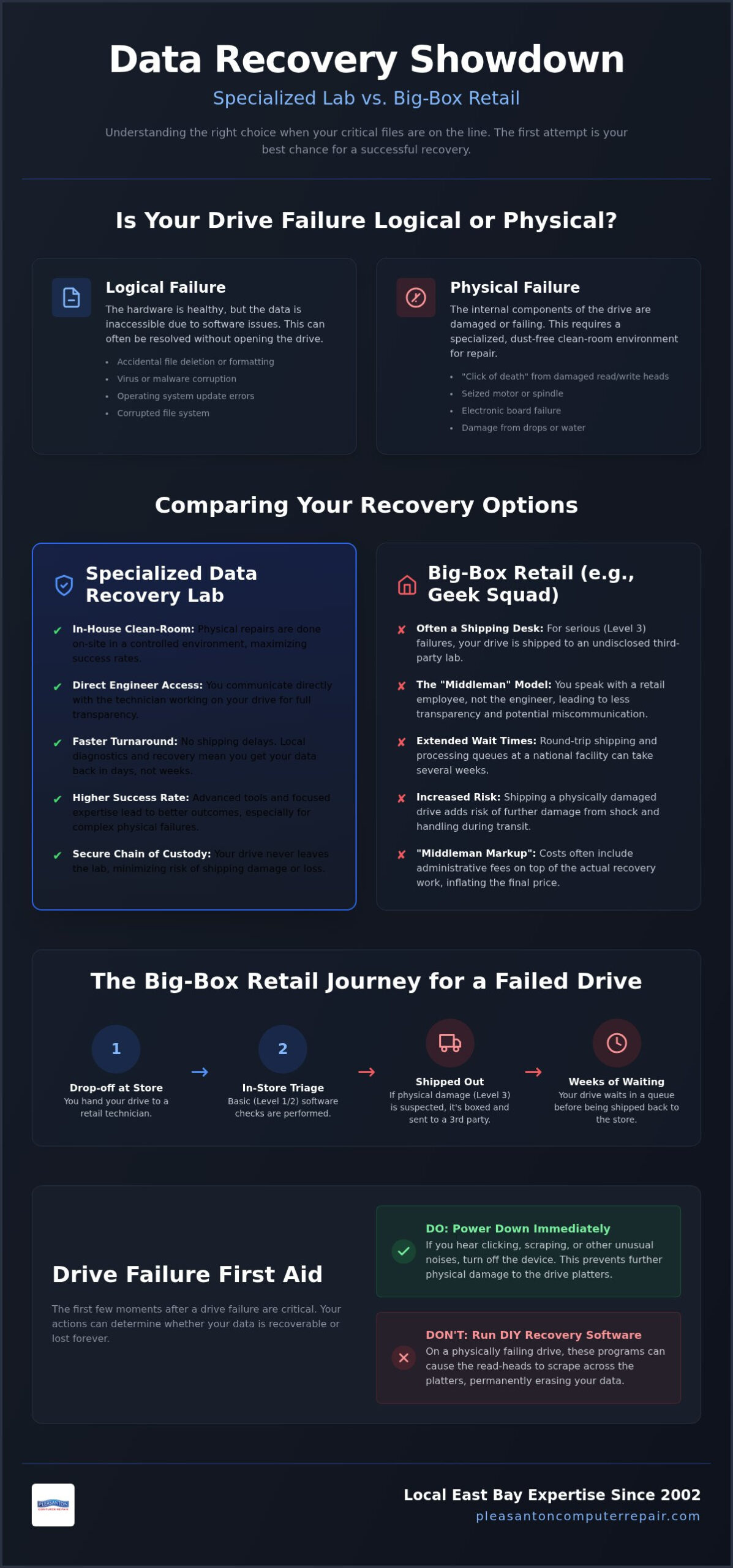
Data loss generally falls into two categories. Logical failure happens when the hardware is healthy, but the software is corrupted. This might be due to a virus, a botched update, or accidental formatting. These issues can often be resolved through advanced software techniques without opening the drive.
Physical failure is a different beast entirely. This involves mechanical issues like a seized motor, damaged read heads, or the infamous “click of death.” Physical recovery requires a clean-room environment to ensure that not a single speck of dust touches the internal platters while the drive is open. Without this controlled environment, the data could be destroyed instantly. This is a level of service that basic retail shops simply cannot provide on-site.
The “First Aid” Steps for a Failing Drive
If you suspect your drive is failing, the best thing you can do is stop. Never run “DIY” recovery software on a drive that is making unusual noises. These programs stress the drive by attempting to read every sector, which can cause the read heads to scrape across the platters and physically erase your files. Power the device down immediately to prevent further damage.
Professional diagnostics are far more thorough than the basic checks you’ll find at a retail counter. While a retail tech might simply plug your drive into a standard PC to see if it mounts, a specialist uses dedicated hardware to clone the drive at a bit-level. This protects the original data from further degradation during the recovery process. Taking the right steps in those first few hours significantly increases the chances of a full restoration.
The Geek Squad Model: Why Best Buy Is Often a Shipping Desk
Most people assume that when they drop off a failing hard drive at a retail store, the work happens right there in the back room. With Geek Squad, that is rarely the case for complex issues. They operate on a tiered system designated as Level 1, 2, and 3. Level 1 and 2 services typically involve basic software fixes or simple file transfers that can be done in-store. However, if your drive has a mechanical failure or a serious partition error, it’s labeled as Level 3. At this point, the retail location effectively becomes a shipping desk.
When you compare data recovery services vs Geek Squad, the biggest difference is the chain of custody. For Level 3 cases, Best Buy ships your sensitive hardware to an undisclosed third-party partner lab. This means your drive, which contains your private documents or business secrets, is boxed up and handed over to a national courier. While these couriers are generally reliable, every mile traveled and every sorting facility visited increases the risk of physical shock or loss. For a drive that is already failing, rough handling during transit can be the final straw that makes the data gone for good.
The Reality of Level 3 Data Recovery
Outsourcing creates what we call a “Middleman Markup.” Because Best Buy isn’t performing the actual surgical recovery on your drive, they add their own administrative fees on top of the partner lab’s costs. You end up paying more for the brand name than for the engineering work itself. While specialized labs might follow high-level enterprise data recovery protocols in-house, the big-box model relies heavily on logistics. This adds significant time to your wait. It’s common for a simple recovery to take several weeks because of the round-trip shipping and the queue at a high-volume national facility.
Communication Gaps in Big-Box Service
One of the most frustrating parts of the shipping-desk model is the lack of direct communication. When you leave your drive at a retail counter, you’re talking to a clerk, not the engineer who will actually open your drive. If there’s a complication, you won’t get a call from the tech with a detailed explanation. Instead, you’ll likely receive a generic status update through a web portal or a call center representative who is reading from a script.
Local specialists operate differently. You can speak directly to the person who diagnosed your device and get real-time feedback on the recovery’s progress. If you prefer this level of transparency and want to avoid the risks of shipping, looking into local data recovery in Pleasanton can save you both time and stress. You deserve to know exactly who is handling your data and where it is at every moment.
Specialized Data Recovery Services vs. Geek Squad: Side-by-Side Comparison
Choosing between data recovery services vs Geek Squad often feels like deciding between a general practitioner and a surgical specialist. While a retail technician can handle basic file transfers or minor software glitches, complex data loss requires a level of precision that generalists aren’t equipped to provide. The difference lies in the environment, the tools, and the ultimate goal of the technician handling your drive.
Specialized labs prioritize the integrity of your original hardware. They use bit-level cloning to create a perfect copy of your data before they even begin the recovery process. This ensures that the original drive isn’t stressed further during the attempt. In a retail setting, a drive might be plugged directly into a standard computer, which can cause a failing device to crash permanently before a single file is saved.
Pricing and Transparency: Avoiding the Bill Shock
Transparency is the foundation of a good recovery experience. Most specialized labs operate on a “No Data, No Fee” policy. This means that if the engineer cannot retrieve your essential documents or photos, you don’t pay for the service. It aligns the technician’s success with your own. You won’t find yourself paying for an unsuccessful attempt.
Big-box retailers often take a different approach. They may charge non-refundable evaluation fees or diagnostic costs just to look at the device. When you receive a quote from a local specialist, it’s typically an all-inclusive price. You won’t have to worry about hidden shipping costs or “lab fees” that appear halfway through the process. Clear, upfront pricing allows you to make an informed decision without the fear of a ballooning bill.
Technical Expertise: Clean Rooms and Specialized Tools
If your hard drive is clicking, beeping, or grinding, it has a physical mechanical failure. Opening such a drive in a standard room is a death sentence for your data. Specialized labs utilize certified Clean Rooms, which are environments where the air is filtered to remove microscopic dust particles. A single speck of dust on a spinning platter can act like a speed bump, causing the read heads to crash and destroy the data forever.
Beyond the environment, specialists use advanced hardware-software complexes like the PC-3000. This tool allows engineers to communicate with a drive’s firmware, bypass damaged sectors, and stabilize the device in ways that retail software cannot. This is especially vital for modern SSDs and MacBooks. Since these devices often have soldered components and encrypted NAND flash memory, they require micro-soldering expertise and specialized firmware access to recover. If a retail tech tells you your SSD is “dead,” a specialist with the right tools might still be able to bring your data back to life.
Evaluating the Risk: When to Avoid Big-Box Retail for Data Loss
When the files you’ve lost represent years of tax returns, proprietary business code, or the only photos of a child’s first steps, the stakes change. You aren’t just looking for a fix anymore. You’re looking for a guarantee of safety. Choosing between data recovery services vs Geek Squad in these high-stakes scenarios isn’t just a matter of convenience. It’s a critical decision about risk management. For business owners in the East Bay, a server failure can halt operations entirely. For families, a dead external drive can mean the permanent loss of a digital legacy. In these moments, the “good enough” approach of big-box retail can lead to heartbreak.
The Danger of the “First Attempt”
For business owners who require similar high-stakes support in other regions, such as the Greater Toronto Area, ITS Canada Inc provides professional technology management and infrastructure support to keep operations secure and resilient.
Every failing hard drive has a limited amount of time left before its platters are physically shredded. When an inexperienced technician at a retail store attempts to run generic recovery software, they often stress the drive to its breaking point. These tools keep trying to read damaged sectors over and over. This process generates heat and physical wear. If the read heads are already unstable, this “check” can cause them to crash into the platter, physically scraping the data away. Once that magnetic layer is gone, no lab in the world can bring it back. Specialized labs prioritize non-destructive imaging. We create a bit-for-bit clone using hardware that handles errors gracefully, ensuring we only “touch” the failing drive once. This preserves your one best chance at a successful recovery.
Privacy and Data Security Standards
Privacy is another major concern when you hand over a device containing financial records or personal medical history. When you use a national shipping-based model, your drive passes through multiple hands and sorting facilities. Each hand-off is a potential security gap. Professional data recovery labs often maintain strict privacy standards, including HIPAA compliance for medical data. You should know exactly who is looking at your files and where they are stored at all times.
Local accountability provides a level of security that a national chain cannot match. At our Pleasanton shop, your drive stays within our secure facility or is handled by known, local experts. We treat your data with the neighborly respect that comes from being part of the same East Bay community for over 20 years. You can walk into our office and speak to the person responsible for your privacy. If you have sensitive documents that need the highest level of care, contact our data recovery specialists for a secure, local evaluation today.
Professional Data Recovery in Pleasanton: Local Expertise You Can Trust
Since 2002, Pleasanton Computer Repair has served as a reliable anchor for technology needs in the East Bay. While national chains might offer name recognition, they lack the deep roots and personal accountability that come from over 20 years of local service. We serve residents and businesses throughout Pleasanton, Dublin, Livermore, and San Ramon, ensuring that help is always just a short drive away. Our team understands that your data isn’t just a collection of bits; it is your business’s livelihood or your family’s history.
Our expertise covers the full spectrum of data loss. Whether you are dealing with a mechanical hard drive failure or need specialized iPhone data recovery to retrieve lost photos, we handle the process with surgical precision. Unlike the tiered shipping models discussed earlier, we provide a direct connection between you and the technician working on your device. You can walk into our shop and get a straight answer from a neighbor who cares about your outcome.
Why East Bay Residents Choose Local
Convenience is a major factor when your digital life is on the line. Our location at 400 Main Street in Pleasanton makes drop-offs and pickups straightforward. You don’t have to worry about your drive being lost in the mail or damaged by a national courier. For businesses in the Tri-Valley area or even as far as San Jose, we offer on-site support to minimize downtime and address complex server issues. We provide comprehensive solutions for both Windows environments and expert Mac repair, ensuring that regardless of your operating system, your data is in capable hands.
Our Process: From Diagnostic to Data Migration
Our diagnostic process is designed for speed and clarity. Instead of waiting weeks for a shipping hub to intake your device, our in-store diagnostics provide answers quickly. We believe in honest technical advice and transparent pricing. Once your files are successfully retrieved, we don’t just hand you a bare drive and wish you luck. Our data migration service ensures your recovered documents and photos are moved safely to a working device so you can get back to your routine immediately.
To prevent future failures, many clients choose to combine their recovery with an SSD upgrade. Moving your data to modern solid-state storage provides a significant boost in performance and reliability compared to older mechanical drives. When evaluating data recovery services vs Geek Squad, remember that the best outcome isn’t just getting your data back. It is the peace of mind that comes from working with a local partner who supports you through every step of the restoration process and helps you build a more resilient digital future.
Secure Your Digital Future with Expert Local Care
Choosing the right path for your lost files is the most important step in the restoration process. You’ve seen that the choice between data recovery services vs Geek Squad isn’t just about brand recognition; it’s about success rates and the physical safety of your hardware. By opting for a specialized local lab, you eliminate the uncertainty of national shipping hubs and gain direct access to the engineers working on your drive. This transparency ensures you aren’t surprised by hidden fees or unexpected delays.
At Pleasanton Computer Repair, we’ve been serving the East Bay since 2002 with a focus on honesty and technical excellence. Our in-house and advanced clean-room recovery options mean your device stays in expert hands from start to finish. You don’t have to navigate technology failures alone when you have a neighborly team ready to help. We’re here to restore your peace of mind and get your daily life back on track as quickly as possible.
Schedule Your Data Recovery Diagnostic in Pleasanton today and let our local experts provide the clear answers you need. Your memories and documents are too valuable to leave to chance. We look forward to helping you.
Frequently Asked Questions
How much does Geek Squad charge for data recovery?
Geek Squad’s initial consultation fee is $49.99, and the actual service starts at a minimum of $200. For logical issues like deleted files or corrupt systems, specialized retail services can range from $195 to $495. If the drive has mechanical failures that require a clean-room, the cost usually jumps to between $995 and $1,295. These prices often exclude the cost of a new destination drive for your recovered data.
Is Geek Squad data recovery successful for dead hard drives?
Success rates vary based on the type of failure, but Geek Squad often struggles with complex mechanical “dead” drives in-store. They typically handle basic software issues locally and ship physical failures to a third-party lab. A specialized engineer uses hardware like the PC-3000 to stabilize a failing drive before attempting recovery. This professional approach usually results in a much higher success rate than the basic software utilities used at a retail counter.
Does Best Buy do data recovery in-store or do they ship it out?
Best Buy performs basic Level 1 and Level 2 recoveries in-store, but they ship out all Level 3 cases. Level 3 includes any drive with physical damage, clicking sounds, or internal mechanical failure. When they ship your drive to an undisclosed partner lab, it adds significant time to the process. It also introduces risks associated with national courier handling. A local specialist keeps your drive in one secure location for the entire process.
What is the best alternative to Geek Squad for data recovery in Pleasanton?
Pleasanton Computer Repair is the premier local alternative, serving the East Bay since 2002 with specialized expertise. We provide in-house diagnostics and advanced clean-room options for residents in Dublin, Livermore, and San Ramon. Unlike national retail chains, we offer direct access to the technician handling your drive. You’ll receive transparent pricing and a personal level of service that big-box stores can’t match. We treat your data with the care a neighbor deserves.
Can I recover data from a clicking hard drive myself?
You should never attempt to recover data from a clicking hard drive yourself using software. The clicking sound is a clear sign of mechanical failure, often involving the read heads touching the platters. Running any software on a physically damaged drive can cause permanent data loss by scratching the magnetic storage surface. Power the drive down immediately and consult a professional who has the specialized equipment and clean-room environment required to handle physical repairs.
How long does professional data recovery typically take?
Professional data recovery typically takes between 2 and 10 business days depending on the severity of the damage. When comparing data recovery services vs Geek Squad, local providers are usually faster because they don’t have to account for round-trip shipping times. While a retail chain might take several weeks to return your files from a national hub, a local expert can often complete the diagnostic and recovery process in a fraction of that time.
Will my data be private and secure during the recovery process?
Professional labs prioritize your privacy by maintaining a strict chain of custody and secure data handling protocols. Local shops are often safer than national chains because your drive isn’t handed off to multiple couriers or sorting facilities. Many specialized services are HIPAA compliant and use encrypted storage to hold your recovered files. Always ask your technician about their security standards to ensure your sensitive business documents or personal photos remain completely confidential.
What happens if a specialized data recovery service cannot find my files?
Most specialized services operate on a “No Data, No Fee” basis, so you don’t pay if your files aren’t found. If the engineer determines the data is unrecoverable after an exhaustive attempt, you are typically only responsible for any initial shipping or specialized part costs if previously agreed. This policy protects you from paying for an unsuccessful result. It’s a much fairer approach than retail models that might charge non-refundable fees for basic attempts.