

A lower iPhone Battery Health percentage isn’t, by itself, a reason to replace your phone’s battery. It’s understandable to worry when the number drops, especially if your iPhone also drains quickly or shuts down unexpectedly. But iphone battery health is a diagnostic signal, not a standalone repair verdict. The reading makes more sense when you consider how your phone performs day to day.
This guide shows you where to find Battery Health in Settings and how to interpret Maximum Capacity alongside cycle count, battery life, and real-world symptoms. You’ll also learn practical ways to reduce battery strain and recognize when it may be time for professional help.
We’ll explain what the percentage does and doesn’t tell you, why a gradual decline can be normal, and what to try if your iPhone isn’t lasting as long as it used to. If checking settings and usage doesn’t resolve the concern, an iPhone repair assessment can help you choose a practical next step.
Key Takeaways
- Learn what the iphone battery health percentage measures, and how it differs from daily runtime and battery lifespan.
- Understand how age and use affect battery capacity, including what a charge cycle actually represents.
- Compare Battery Health readings with your iPhone’s performance before deciding whether to take action.
- Find Battery Health in Settings and review battery usage for apps or activity linked to unexpected drain.
- Recognize when persistent shutdowns, runtime changes, or battery messages may call for a professional assessment in Pleasanton.
What iPhone Battery Health Measures, and What It Doesn’t
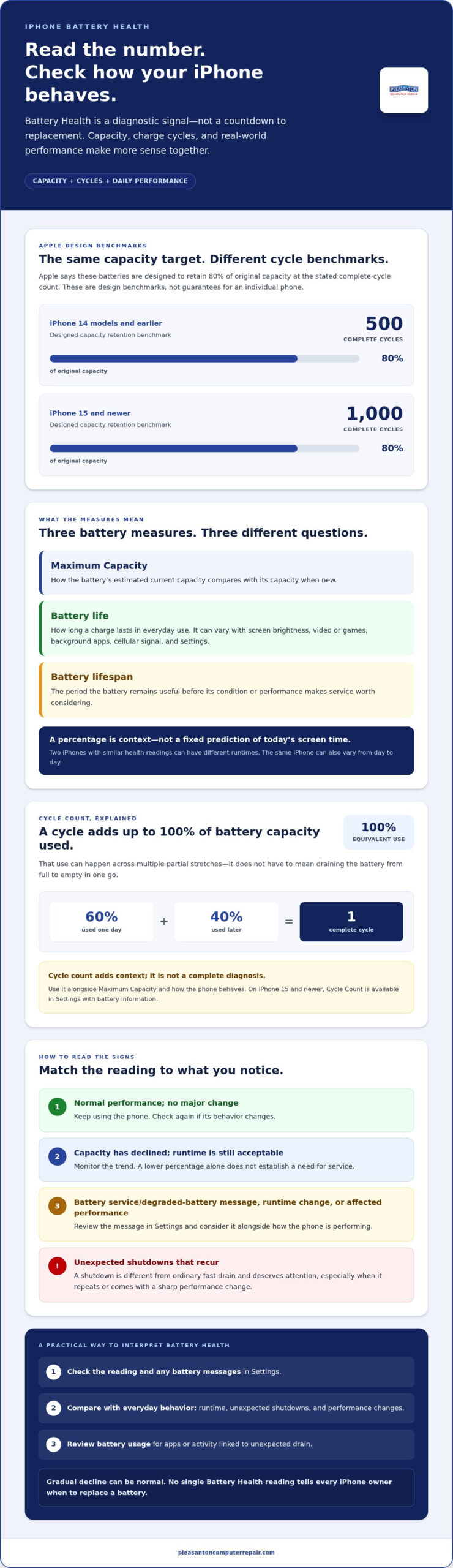
The percentage in Settings can look like a forecast of how long your phone will last today. It isn’t. Battery Health estimates how the battery’s current capacity compares with when it was new; battery life is how long a charge lasts in daily use. That distinction helps you interpret the number without treating it as a countdown to a repair.
iPhones use rechargeable lithium-ion batteries. Over time, age, charging patterns, and use contribute to chemical aging, gradually reducing the amount of charge a battery can hold. A charge cycle means using a total equivalent to 100% of the battery’s capacity, not necessarily draining it from full to empty in one go. For example, using some charge, recharging, and using more later can add up to a cycle. Careful habits may help limit strain, but they can’t stop normal aging.
Battery Health versus battery life: what is the difference?
Battery life is the time you get between charges. Battery lifespan is the period during which the battery remains useful before its condition or performance makes service worth considering. The iphone battery health percentage estimates condition, not the exact hours you have left today.
Daily runtime also depends on what the phone is doing. A bright screen, video or game use, apps running in the background, weak cellular signal, and settings can all affect how quickly the charge falls. Two iPhones with similar health readings may last for different amounts of time, and the same iPhone’s runtime can vary from day to day.
What maximum capacity tells you about an iPhone battery
Maximum Capacity compares the battery’s estimated capacity with its capacity when new. A lower figure generally means it can store less energy than it once could, but it doesn’t translate directly into a fixed number of hours. The estimate may also shift as the battery ages and the phone’s reporting system reassesses its condition.
Use the percentage as context, not a verdict. Consider it alongside your usual runtime, any unexpected shutdowns, and messages shown in Settings. There isn’t one reading that tells every iPhone owner when to replace a battery. The right next step depends on how the device behaves and whether the change is disrupting your day.
How iPhone Battery Health Changes With Age and Use
A battery ages through both use and time. Each charge and discharge contributes to gradual chemical changes inside its cells, while factors such as temperature and charging habits can also affect performance. As a result, two iPhones of the same age may show different battery condition.
Calendar age alone can’t tell you how healthy an iPhone battery is; its use, charging history, and current performance matter too. Cycle count can add context, but it isn’t a complete diagnosis. Apple says batteries in iPhone 14 models and earlier are designed to retain 80% of original capacity at 500 complete charge cycles. For iPhone 15 and newer models, the design target is 80% at 1,000 cycles. These are design benchmarks, not guarantees for an individual phone.
What charge cycles can, and cannot, tell you
A cycle represents using a total equivalent to 100% of the battery’s capacity, even if that energy is used in several partial stretches. For instance, using 60% one day and 40% later adds up to one cycle. A partial discharge and recharge don’t automatically count as a full cycle.
On iPhone 15 and newer models, Cycle Count is available in Settings alongside battery information. The count can help you understand usage, but it doesn’t reveal every factor affecting the battery’s condition. Read it alongside Maximum Capacity and the phone’s behavior. Apple’s iPhone Battery and Performance guide explains how battery condition relates to performance and power delivery.
Why battery condition can affect performance
An aged battery may have more difficulty delivering the peak power an iPhone needs during demanding tasks or other conditions that increase power demands. If the battery can’t provide that power, the phone may shut down unexpectedly. Apple describes performance management as a way to help prevent such shutdowns; its effects can vary based on battery condition and device use. An older battery doesn’t always cause noticeable slowdowns.
Distinguish a sudden shutdown from ordinary fast drain. If the charge falls mainly during heavy screen use or after a particular app has been active, usage or settings may be contributing. A shutdown, especially if it repeats, is a different symptom and deserves attention alongside the Battery Health reading.
If you’ve reviewed your usage and still experience recurring shutdowns or a sharp change in performance, a local iPhone repair assessment can evaluate the device’s condition instead of relying on cycle count alone.
How to Interpret iPhone Battery Health Without Overreacting
A falling number can be unsettling, but a decline by itself doesn’t mean your iPhone needs a new battery today. The iphone battery health reading is most useful when you compare it with the phone’s performance, battery messages, and changes in your routine. Use the guide below as a starting point, not a diagnosis.
| Displayed status or reading | What you notice | Sensible next step |
|---|---|---|
| Normal peak performance status | No major change in runtime or reliability | Keep using your phone and check again if its behavior changes. |
| Maximum Capacity has declined | Runtime remains acceptable under comparable use | Monitor the trend. A lower percentage alone doesn’t establish a need for service. |
| Battery service or degraded-battery message | The phone may need charging more often, or performance may be affected | Review the message and consider a professional assessment. Apple recommends battery replacement below 80% capacity. |
| Unexpected shutdown or performance-management notice | The phone turns off unexpectedly or reports that performance management was applied | Record the message and seek an assessment if the issue recurs. |
Is a lower iPhone Battery Health percentage always a problem?
No. Rechargeable batteries gradually lose capacity as they age, so a visible decline is expected. One percentage point doesn’t tell you whether the phone will meet your needs, and there isn’t a universal cutoff that makes every device behave the same way. Apple’s below-80% service guidance is a useful reference, but consider it alongside symptoms and any service message rather than treating it as an automatic emergency.
When symptoms matter more than the number
Ask yourself: under similar use, does your iPhone now need charging much more often? Has it shut down unexpectedly, or does the Battery Health screen show a service-related message? These changes deserve more attention than a gradual percentage drop that has no impact on daily use.
How to Check and Support iPhone Battery Health
A quick check can help you separate a battery concern from an app or activity using more power than usual. Start with the Battery screen, then compare its health information with recent usage before changing settings.
Where to find Battery Health on your iPhone
- Open Settings and tap Battery.
- On iPhone 15 and newer, tap Battery Health. On older models, tap Battery Health & Charging.
- Note the Maximum Capacity reading and any messages about battery condition or performance. On iPhone 15 and newer, Cycle Count may also be available.
- Return to Battery and review the usage chart and app activity. Look for an app with unexpectedly high use, especially background activity that doesn’t match how you used it.
If your screen uses different wording, search for “Battery” in Settings or check your iPhone model and iOS version. Menu labels and available readings can vary. The iphone battery health percentage is only one clue, so note unusual drain or shutdowns as well.
Everyday habits that support battery lifespan
Battery care can reduce avoidable strain, but it can’t reverse chemical aging or restore capacity that has already been lost. Focus on reasonable habits rather than trying to keep the reading frozen.
- Use Optimized Battery Charging. If the option appears in Battery settings, leave it enabled. It can reduce the time your iPhone spends fully charged, based on your charging routine.
- Limit heat exposure. Avoid leaving your iPhone in hot surroundings, such as direct sun or a parked car. If the device becomes unusually warm during charging or heavy use, move it to a cooler place and let it cool naturally.
- Store it thoughtfully. If you’re putting the iPhone away for an extended period, turn it off and keep it in a cool, dry place. Check Apple’s current storage guidance for the recommended charge level and maintenance interval.
- Address unexpected drain at its source. If one app or activity stands out in Battery usage, update it, limit unnecessary background activity, or adjust how you use it. Then see whether runtime improves under similar conditions.
If you’ve checked usage and adjusted practical settings but battery problems persist, get help with iPhone repair in Pleasanton. An assessment can consider the phone’s symptoms and overall condition, not just a single percentage.
When to Get iPhone Battery Help in Pleasanton
A lower reading alone doesn’t confirm that your iPhone needs service. But if the phone consistently needs charging much more often under similar use, shuts down unexpectedly, or displays a battery service message, it’s reasonable to seek a professional assessment. These symptoms help put your iphone battery health reading into context.
An assessment should consider the phone’s behavior and overall condition, not just its percentage. Note whether the issue happens repeatedly, whether it began after a change in use or settings, and what Battery settings say. That information makes the service conversation more focused without assuming the cause in advance.
What to note before seeking an iPhone battery assessment
Before arranging service, write down your iPhone model and iOS version, the Maximum Capacity reading, and any battery or performance message shown in Settings. Describe changes you’ve noticed in everyday use, such as shorter runtime or recurring shutdowns. If an issue appears only during certain tasks, include that detail too.
Back up important information before service so you have a separate copy of the data you value. If you need guidance, read this iPhone data recovery guide. Having your observations and backup ready can help you explain the concern clearly and prepare for the next steps.
A local next step for East Bay iPhone owners
Pleasanton Computer Repair provides iPhone repairs from its Pleasanton location and serves customers throughout the East Bay, including Pleasanton, Livermore, Dublin, San Ramon, Danville, Brentwood, Walnut Creek, and San Jose. The business serves residential and business customers. You can schedule an appointment online or visit the location to discuss a persistent battery concern and have the device assessed.
There’s no need to decide on a repair based on one number. Bring the reading, any on-screen message, and a clear description of what has changed. That gives the assessment useful context and helps determine a practical next step for your device.
Schedule iPhone repair in Pleasanton for help evaluating ongoing battery concerns.
Use Your Battery Reading to Choose a Clear Next Step
Your iPhone’s Battery Health percentage is a useful clue, not a verdict on how many hours your phone will last or whether it needs service. Read it alongside your everyday runtime, battery messages, and any recurring shutdowns. If the phone drains unexpectedly, check battery usage and settings first, then note whether the problem continues under similar use.
Good charging and storage habits can help limit avoidable strain, but they can’t restore capacity lost through normal battery aging. If your concerns persist, a professional assessment can consider both the iphone battery health reading and the device’s symptoms.
Pleasanton Computer Repair provides iPhone and iPad repairs for customers throughout the East Bay, including Pleasanton, Livermore, Dublin, San Ramon, Danville, Brentwood, Walnut Creek, and San Jose. For a practical next step, schedule iPhone repair in Pleasanton. With the reading, any on-screen message, and your observations ready, you can make a more informed decision about what your iPhone needs.
Frequently Asked Questions
How do I check my iPhone Battery Health?
Open Settings > Battery, then tap Battery Health on iPhone 15 and newer, or Battery Health & Charging on older models. Check Maximum Capacity and note any battery or performance messages. On iPhone 15 and newer, Cycle Count may also appear. Menu labels can vary by iOS version, so if you don’t see these options, search for “Battery” in Settings.
What does iPhone Battery Health percentage mean?
The percentage estimates your battery’s current maximum capacity compared with when it was new. It describes battery condition, not how many hours your iPhone will last today. Daily runtime also depends on screen use, apps, signal strength, and settings. Read the number alongside your usual charging needs and any shutdowns or battery messages, rather than treating it as a precise runtime prediction or a diagnosis on its own.
Is 80% Battery Health bad for an iPhone?
Not necessarily, but Apple recommends battery replacement when capacity falls below 80% of its original level. That’s a useful service reference, not proof that every iPhone at or near 80% will behave the same way. Consider whether you’ve noticed much shorter runtime, unexpected shutdowns, or a service message. If the phone still meets your needs and shows no concerning symptoms, the percentage alone doesn’t establish that it needs immediate service.
Can iPhone Battery Health go back up?
A battery’s lost chemical capacity doesn’t grow back through charging habits or settings. However, the displayed estimate can sometimes change as the phone updates its assessment, so a small increase doesn’t necessarily mean the battery has physically recovered. Optimized charging and avoiding excessive heat may help limit avoidable strain, but they can’t reverse aging. Keep an eye on both the reading and your iPhone’s everyday performance.
Why is my iPhone battery draining quickly even with good Battery Health?
A healthy-looking Battery Health reading doesn’t rule out heavy power use. Brightness, video or game sessions, weak cellular signal, background app activity, and recent software activity can all contribute to faster drain. Open Settings > Battery and review the usage chart and app activity for anything unexpected. If the drain continues under similar use after you adjust settings or app activity, note the pattern and consider an assessment.
Does an iPhone battery cycle count determine its health?
No. Cycle count records cumulative battery use, but it doesn’t account for every factor that affects battery condition or diagnose a fault by itself. Apple’s design benchmarks are 80% capacity after 500 complete charge cycles for iPhone 14 models and earlier, and after 1,000 cycles for iPhone 15 and newer. Cycle Count appears in Settings on iPhone 15 and newer. Interpret it alongside capacity, symptoms, and messages.
When should I get my iPhone battery checked?
Arrange a professional assessment if your iPhone repeatedly shuts down, its runtime has changed noticeably under comparable use, or Settings displays a battery service message. Record the model, iOS version, message, and symptoms first. Pleasanton Computer Repair provides iPhone and iPad repairs for East Bay customers in Pleasanton, Livermore, Dublin, San Ramon, Danville, Brentwood, Walnut Creek, and San Jose. The business serves local customers.