
What if the best laptop buy isn’t the one with the lowest listing price? When you’re searching “used laptops for sale pleasanton,” it’s natural to worry about hidden wear, a weak battery, or a device that can’t keep up with your day. The difference between a used laptop and a refurbished one can matter, too.
A dependable choice starts with your needs, not a long list of specifications. This guide will help you match a laptop to work, school, or home use, and explain how testing, limited warranty coverage, and post-sale support factor into a purchase. You’ll also learn what to consider about condition, memory, storage, and operating system support. Pleasanton Computer Repair sells tested and warrantied refurbished PC and Mac laptops, with post-sale support, from its Pleasanton location. Use the steps below to focus on the fit and support that make buying locally practical.
Key Takeaways
- Start with your everyday tasks, from schoolwork and browsing to office work or creative projects, so you can focus on a laptop that fits.
- Understand the difference between previously owned and refurbished devices, and why testing or restoration can offer more information about a laptop.
- When comparing used laptops for sale Pleasanton, consider the operating system, workload, condition, and possible upgrade needs together.
- Follow a simple buying path: list your needs, choose an operating system, compare device fit, review purchase information, and plan setup.
- Explore tested refurbished PC and Mac laptops with limited warranty coverage and post-sale support from a local business.
Used Laptops in Pleasanton: Start With Your Needs
Affordable laptop listings can look appealing, but photos and brief descriptions don’t always make a device’s condition or suitability clear. Before comparing used laptops for sale pleasanton, ask what you need your laptop to do on an ordinary day. A device for email and school documents has different demands from one used for creative software or technical projects. Defining your routine first helps you compare options by fit instead of chasing a particular model.
What will the laptop need to do every day?
Think about your regular workload, not only the most demanding task you might do occasionally. Browsing, video calls, email, and documents differ from editing large creative files or running specialized technical applications. Note how many programs and browser tabs you typically keep open at once. That can help you judge whether a configuration is a comfortable fit for your multitasking habits.
Next, consider where you’ll use the laptop. If it travels between home, school, and work, portability and battery expectations may matter more. If it mostly stays on a desk, a larger screen may be more convenient. List the software you rely on and the devices or accessories you use. A familiar setup and comfortable screen size may matter more to your routine than a specification that doesn’t solve a real need.
- Schoolwork and browsing: Consider how you handle documents, research, video calls, and several open tabs.
- Office work: Think about your work applications, multitasking habits, and whether you’ll carry the laptop to meetings.
- Creative or technical projects: Identify the specific software and types of tasks you depend on before comparing devices.
Why buy a used laptop locally in Pleasanton?
Online listings can change quickly, and photos alone provide limited context for judging whether a laptop suits your needs. A local visit gives you the opportunity to discuss your workload and compare it with the refurbished PC and Mac laptops offered by Pleasanton Computer Repair. The store is at 915 Main Street Suite A, Pleasanton, CA 94566. Its refurbished systems are tested and include a limited warranty, with post-sale support available.
“Used” and “refurbished” aren’t interchangeable descriptions: used devices have been owned before, while refurbishment involves testing or restoration before resale. For background on refurbished electronics, consider how that process differs from buying based on a listing alone. Local support is another factor to weigh, especially if you value having a nearby business to turn to after the sale. Choose around your tasks, comfort, and software needs first, then consider what support comes with the purchase.
Used vs. refurbished laptops: what the difference means for buyers
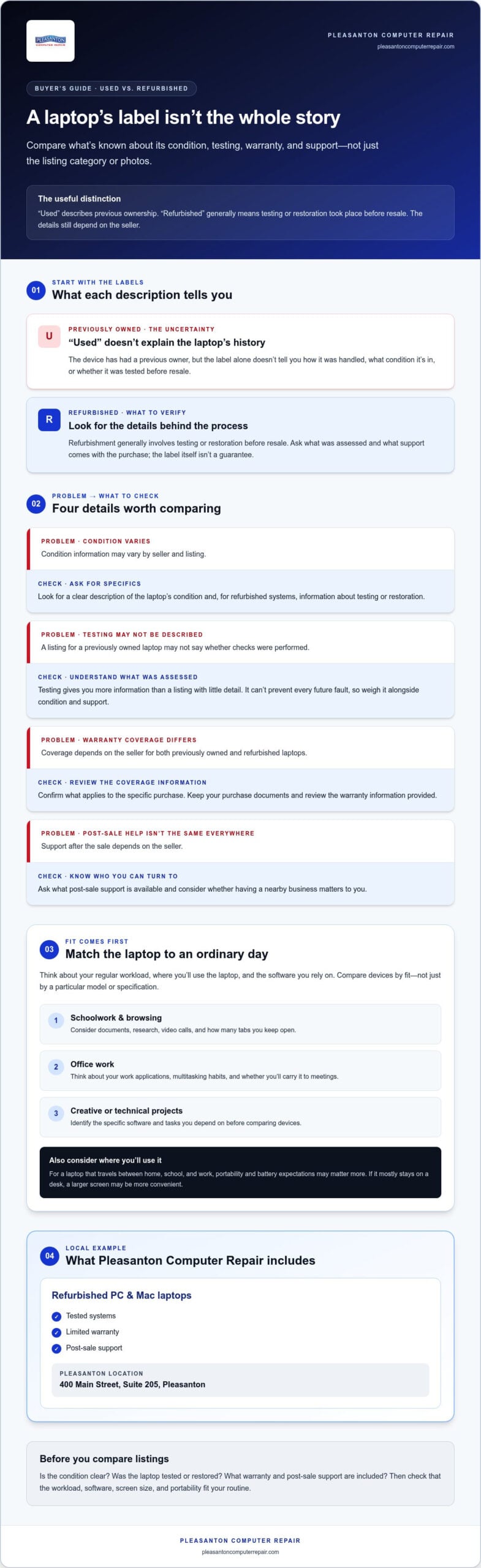
“Used” tells you a laptop has had a previous owner. It doesn’t, on its own, explain how the device was handled, what condition it’s in, or whether it was tested before resale. “Refurbished” generally means the laptop has undergone testing or restoration before being offered again. The label is useful, but the details behind it matter. If you’re searching for used laptops for sale pleasanton, compare what’s known about the laptop’s condition and support, not just the category name or listing photos.
| What to compare | Previously owned, condition varies | Refurbished, details depend on seller |
|---|---|---|
| Condition information | May vary by seller and listing | Look for information about testing or restoration |
| Testing | May not be described | Testing or restoration is part of the process |
| Warranty | Coverage depends on the sale | Coverage depends on the seller |
| Post-sale support | Depends on the seller | Depends on the seller |
These are general distinctions, not guarantees about every transaction. A seller’s description should explain what was assessed and what support comes with the purchase. Pleasanton Computer Repair sells tested refurbished PC and Mac laptops that include a limited warranty and post-sale support. Those details give buyers concrete factors to weigh alongside a laptop’s condition and suitability.
What does professional testing add?
Testing assesses a laptop before it’s sold, giving buyers more information than a listing with little detail about condition. It helps distinguish a prepared refurbished system from one whose history or checks aren’t described. Testing can’t prevent every future fault, so consider it one part of an informed purchase, alongside the laptop’s condition and the support available after the sale.
How should buyers think about limited warranty coverage?
Warranty coverage can matter when comparing a private sale with a refurbished purchase because it defines a layer of support for the transaction. Coverage differs between sellers, so don’t assume every refurbished laptop includes the same protection. Pleasanton Computer Repair’s refurbished systems include a limited warranty. Keep your purchase documents and review the coverage information provided so you understand what applies.
Use the comparison to frame practical questions: Is the condition described clearly? Was the laptop tested or restored? What warranty and post-sale support are included? Those answers make it easier to weigh a listing against a refurbished system with testing and support. For a local option, explore refurbished laptop options from Pleasanton Computer Repair.
Choose a used laptop by operating system, workload, and upgrade needs
Specifications are most useful when you connect them to the work you actually do. A laptop’s processor, memory, storage, operating system, and condition all shape its real-world performance. Two devices with similar descriptions may feel different because their configurations and intended workloads differ. As you compare used laptops for sale pleasanton, evaluate each device against your needs rather than relying on a model name alone.
Which laptop characteristics matter for your workload?
The processor handles instructions, memory supports active tasks, and storage holds your files and software. These parts work together. An SSD is a type of storage to consider when comparing configurations, but performance depends on the whole device and its condition. Check the requirements for the applications you rely on against the exact configuration of the laptop. Don’t assume that a single component tells the whole story.
Use this task-to-feature guide to focus your comparison:
- Browsing, email, and documents: Consider the applications you use together, how many tabs you keep open, and whether the screen feels comfortable for reading and writing.
- Office work and video meetings: Check that the operating system and configuration suit your work software, while weighing portability against screen size.
- Creative or technical applications: Look up the software’s requirements and compare them with the specific processor, memory, and storage configuration.
- File-heavy routines: Think about how much storage your files and applications need, and whether your workflow relies on external or cloud storage.
These are comparison prompts, not minimum specifications. A laptop’s model, configuration, physical condition, and workload all influence how it performs in practice. Battery expectations and upgrade possibilities can also affect whether a device remains convenient for your routine. An SSD upgrade may be a separate consideration, but not every laptop can be upgraded. Judge the configuration as it stands and treat any potential upgrade as a separate decision.
Should you choose a PC laptop or a Mac laptop?
Start with software and familiarity. If school, work, or a personal project depends on a particular application, check which operating system it supports and whether the specific laptop can run it. Consider the devices you already use, too. A familiar setup may make everyday tasks easier, while compatibility with your current files, accessories, and workflows can help avoid unnecessary friction.
Pleasanton Computer Repair sells refurbished PC and Mac laptops, so compare both types through the lens of your tasks rather than assuming one is automatically the better choice. Check application requirements and configuration details for the individual device. If you’re weighing refurbished options and want more context on value, the Pleasanton refurbished laptop guide offers a deeper overview. Bring your regular workload into the decision to make the comparison clearer.
Buying a used laptop in Pleasanton: a practical decision path
A steady process can make the search for used laptops for sale pleasanton less overwhelming. Start with your requirements, compare them with the specific device, then consider how you’ll prepare it for daily use. Follow these five steps to keep the decision practical:
- List your needs. Write down essential applications, your usual tasks, how many programs you use at once, and whether you’ll carry the laptop or mainly use it at a desk.
- Select an operating system. Choose the environment that fits your work or study software, familiar routines, and other devices you already use.
- Compare device fit. Match the laptop’s specific configuration and condition to your workload. Consider comfort, portability, and battery expectations, not just the model name.
- Review purchase information. Look for clear details about the device, its condition, testing, included limited warranty, and post-sale support. Use the comparison earlier in this guide to review condition and support, without treating any single check as a guarantee of future performance.
- Plan setup. Decide how you’ll install or sign in to your applications, connect your usual devices, and move important files from your current computer.
What should you clarify before choosing a device?
Keep your notes close as you compare options. Confirm that the configuration suits your essential applications, the operating system fits your routine, and the laptop’s size makes sense for where you’ll use it. Review the specific device’s condition information, then factor in any limited warranty coverage and post-sale support. These details help you compare the full purchase, not just its headline description.
How can you prepare for setup and file transfer?
Before switching computers, back up important files from your current device. That gives you a separate copy while you plan what to transfer, reinstall, or leave behind. Pleasanton Computer Repair offers data migration services to help transfer files between systems. If your current computer is slow and you’re weighing an upgrade instead of replacing it, an SSD upgrade guide can help you consider that route.
Setup questions can come up after a purchase, so local post-sale support is a useful part of the decision. Pleasanton Computer Repair sells tested refurbished PC and Mac laptops that include a limited warranty and post-sale support. Consider these alongside the laptop’s configuration and condition. To explore refurbished options, explore refurbished laptop options from Pleasanton Computer Repair.
Find refurbished PC and Mac laptops with local support
A good purchase is more than a device that matches your task list. It also means knowing the laptop has been tested and understanding what support is available after the sale. For shoppers comparing used laptops for sale pleasanton, Pleasanton Computer Repair offers refurbished PC and Mac laptops with local support.
What does Pleasanton Computer Repair offer?
Pleasanton Computer Repair’s refurbished PC and Mac laptops are tested and include a limited warranty. Post-sale support is also available for refurbished systems. These are practical considerations when weighing a professionally prepared laptop against a listing with less information about condition or what happens after purchase. A limited warranty isn’t a promise that a device will never need attention, so keep the provided coverage details with your purchase documents.
Pleasanton Computer Repair is an independent local business serving East Bay customers. Its Pleasanton location is at 915 Main Street Suite A. Buyers from Pleasanton, Livermore, Dublin, San Ramon, Danville, Brentwood, Walnut Creek, and San Jose can explore refurbished laptop options and consider post-sale support as part of the decision, rather than focusing only on an online listing.
What is the next step for a local buyer?
Bring a short, practical list to guide your comparison. Include the tasks you expect to do, the software you rely on, your preferred operating system, and whether you’ll carry the laptop or mainly use it at a desk. This makes it easier to focus on what matters in your day-to-day routine instead of getting sidetracked by specifications that don’t affect your work.
As you compare options, focus on the configuration and condition of the specific device, along with the included limited warranty and available post-sale support. If you depend on a particular application for school, work, or a personal project, note its requirements so you can keep that need central to the decision. A clear list also helps you plan setup and decide which files or routines you’ll need to move over.
Choosing between PC and Mac? Start with the software and devices you already use, then compare how each option fits your routine. There’s no need to decide based on a model name alone. A thoughtful conversation about your tasks keeps the choice grounded in practical fit, while testing, limited warranty coverage, and post-sale support add useful context to a refurbished purchase.
Explore refurbished PC and Mac laptops at the Pleasanton location, 915 Main Street Suite A, with your needs in mind. Explore laptop options and local support from Pleasanton Computer Repair.
Make your next laptop choice with confidence
A useful final check is simple: can you explain why this laptop fits your day, beyond saying it looked like a good deal? If your answer connects to real tasks and the way you work, you’re making a considered choice. Your search for used laptops for sale pleasanton doesn’t have to come down to finding a flawless listing. It’s about choosing an option you understand and feel comfortable using.
Give yourself room to decide thoughtfully. Bring your questions, describe what you need the laptop to handle, and focus on practical fit rather than chasing specifications for their own sake. A local conversation can help turn a broad search into a clear next step.
Explore refurbished laptop options and local support at Pleasanton Computer Repair and take the next step toward a laptop that works for you.
Frequently Asked Questions
Is a refurbished laptop better than a used laptop?
A refurbished laptop can come with more purchase information, but the label alone doesn’t guarantee better performance. A privately sold used device may come with little detail about its checks or prior care, while refurbishment involves testing or restoration, with practices varying by seller. If you’re choosing a laptop for school, weigh its actual configuration and condition alongside its testing history. Pleasanton Computer Repair sells tested refurbished PC and Mac laptops with a limited warranty and post-sale support.
How much does a used laptop cost in Pleasanton?
There isn’t one standard price for used laptops in Pleasanton. The model, configuration, condition, included features, and seller all affect the asking price. Buyers searching used laptops for sale pleasanton in Pleasanton, Livermore, Dublin, San Ramon, Danville, Brentwood, Walnut Creek, or San Jose can compare similar devices and the support included. Judge a laptop’s value using the details for that specific device, not its listing headline alone.
Can a used laptop run Windows 11?
Some used laptops can run Windows 11, but compatibility depends on the exact model and hardware configuration. Identify the device’s specifications, then compare them with Microsoft’s current Windows 11 system requirements. Also check that the applications you rely on support the operating system. A listing that calls a device a “PC laptop” doesn’t establish compatibility, so base your decision on the specific computer rather than its category.
How long will a refurbished laptop last?
There’s no fixed lifespan for a refurbished laptop. Its age, condition, configuration, workload, and care all affect how long it remains useful. A laptop that handles documents and browsing has different demands from one used for intensive applications, but neither general use nor a seller’s description can guarantee an individual device’s lifespan. Consider how long you expect to use it, review its condition information, and factor support and warranty coverage into your decision.
Can I transfer files from my old laptop to a used one?
Yes, files can generally be moved, though the best method depends on the computers’ operating systems, the amount of data, and the condition of the old device. Back up important files before starting. Gather the account passwords and recovery information you’ll need to sign in to applications and cloud storage. Pleasanton Computer Repair offers data migration services to help transfer files between systems.
Do refurbished laptops come with a warranty?
Yes. Refurbished systems sold by Pleasanton Computer Repair include a limited warranty. Consider that coverage alongside the laptop’s condition and whether its configuration suits your needs. Keep the purchase receipt and warranty documents together, and review the stated terms to understand the coverage and what to do if an issue arises. Use the information provided with the system for the applicable duration and coverage details.