
The lowest-priced refurbished laptop isn’t always the best value. If it can’t keep up with your daily work or comes with unclear warranty terms, the savings may not feel like a win. If you’re searching for “refurbished laptops Livermore ca,” compare the laptop’s condition, fit for your needs, and available support, not just its price.
It’s reasonable to wonder how much life a used laptop has left, which specifications matter, and what happens if a problem appears after purchase. You don’t need to be a tech expert to make a sound choice. Start by listing the tasks and software you rely on. Then compare each laptop’s specifications with those needs, and ask what was checked, what the warranty covers, and how to get help after purchase.
This guide walks you through those questions so you can compare options for everyday tasks, school, or work. Pleasanton Computer Repair serves Livermore from its Pleasanton location and sells tested, warrantied refurbished PC and Mac laptops. Confirm current models, condition, written warranty terms, and appointment details directly before making a decision.
Key Takeaways
- Compare the laptop’s condition, performance, and support together rather than choosing by price alone.
- Ask what was checked on the specific device. A general claim that laptops are tested may not explain its condition.
- Match the processor, memory, storage, display, battery, and operating-system support to the work you actually do.
- Before buying, review the written warranty, exclusions, return terms, and how to reach the seller for support.
- Use this checklist to compare refurbished laptops Livermore ca, including options from Pleasanton Computer Repair, which serves Livermore from its Pleasanton location.
Shopping for a Refurbished Laptop in Livermore, CA: What to Expect
To balance budget, condition, performance, and support, compare the specific laptop and the seller’s terms. The word “refurbished” alone doesn’t tell you what was inspected or repaired. A refurbished laptop is previously owned equipment that has been inspected or prepared for resale. The process varies by seller, so one laptop may have undergone different checks or repairs than another.
Unlike a new laptop, a refurbished one has had a previous owner, and its cosmetic condition or included accessories may differ. A privately sold used laptop may come with little information about its history or checks. Sellers set their own refurbishment standards, so don’t assume every refurbished device has been tested, repaired, reset, or covered by the same terms. For a neutral overview of what refurbished means, see the electronics refurbishment entry.
What does refurbished mean when buying a laptop?
The label is a starting point, not a complete condition report. Ask what was tested or repaired on the specific laptop, whether its previous data was removed, and which accessories are included. Ask how the seller describes its condition and whether any known issues remain. Distinguish between what the seller says about its general process and what it can confirm about the individual device.
Pleasanton Computer Repair sells tested, warrantied refurbished PC and Mac laptops and provides a limited warranty and post-sale support. Those general details don’t establish a particular laptop’s specifications, condition, testing history, or warranty coverage. Confirm those points, along with current availability, directly before choosing a device.
Where can Livermore shoppers look for local support?
A business can serve a city without having a storefront there. Pleasanton Computer Repair serves Livermore from its listed location in Pleasanton, so check the location and appointment details before planning a visit. Online appointment scheduling is available; confirm the details directly when arranging a visit. For a closer look at the nearby market, read this refurbished laptops Pleasanton buyer guide.
As you compare refurbished laptops Livermore ca options, keep your questions specific: What was checked on this unit? What condition is it in? What does the written limited warranty cover? Clear answers make it easier to compare local sellers and choose a laptop that fits your needs and comfort level.
How to Assess a Refurbished Laptop’s Condition and Testing
A laptop can look clean and still have a fault that appears during use. Before choosing one, inspect its physical condition, try its main functions where possible, and ask what was checked on that particular device. These details are more useful than a broad “tested” label by itself.
What should you inspect before choosing a refurbished laptop?
Work through a simple check, in person if possible. Look at the display for lines, flickering, or uneven areas. Type across the keyboard, test the trackpad, and gently open and close the screen to check the hinges. Look for visible damage around the ports, and confirm the charger is included and connects properly.
- Ask whether Wi-Fi, the camera, and speakers were tested on this unit.
- Ask whether the battery and charging function were checked, and what the seller can tell you about battery condition.
- Look for scratches, dents, or other cosmetic wear, and confirm that any wear is disclosed.
- Check which accessories are included rather than assuming the laptop comes with everything you need.
Some checks, such as Wi-Fi or camera function, require the laptop to be powered on. If you can’t inspect it yourself, ask the seller to describe the condition and confirm the checks in writing. CNET’s guide to what to ask before you buy a refurbished laptop offers another useful set of buyer questions.
What does a seller’s testing process actually tell you?
“Tested” is useful only when you know what it means for the laptop you’re considering. Ask which hardware and functions were checked, whether any repairs were made, and whether the device was reset and prepared for its next owner. A general description of the seller’s process isn’t necessarily a record of the checks performed on an individual laptop.
Refurbishment standards vary by seller, so ask what was checked on the specific laptop rather than assuming every seller follows the same process.
Pleasanton Computer Repair describes its refurbished PC and Mac laptops as tested and warrantied. Confirm the testing details, condition, and written limited-warranty terms for the particular device. For Livermore shoppers comparing refurbished laptops Livermore ca, those answers clarify what you’re buying. You can review refurbished laptop options from Pleasanton Computer Repair and confirm current details directly before deciding.
Choose Refurbished Laptop Specs for Your Livermore Work or Home
The right configuration depends on what you do, not a one-size-fits-all spec sheet. Browsing, email, and documents call for a responsive system, enough memory for your usual apps, and a screen you can comfortably use. Creative or demanding software may need stronger hardware, so check the application’s requirements before comparing laptops. Whether you are shopping locally or want to discover LaptopSouq to compare laptops, accessories, and parts online, having clear hardware benchmarks will keep your search focused.
Which laptop specifications matter for everyday use?
Use this table to compare details that affect everyday experience. Treat it as a guide, not a universal minimum. The right choice depends on the software, workload, and exact laptop configuration.
| Specification | What to consider |
|---|---|
| Processor | Compare the processor in each device against the apps and tasks you rely on. |
| Memory | Consider how many programs and browser tabs you typically keep open. |
| Storage | Check both capacity and type. An SSD stores files on solid-state memory and can help a computer feel more responsive. |
| Display | Choose a screen size and viewing experience that suits your workspace and daily use. |
| Battery | Ask about battery condition and whether the laptop’s expected unplugged use fits your routine. |
| Operating-system support | Confirm the operating system can run the software and peripherals you need. |
An SSD can improve responsiveness, but it can’t fix every performance limitation. Processor, memory, battery condition, and software compatibility still matter. For more context on solid-state storage, see this SSD upgrade guide.
Should you choose a refurbished PC laptop or Mac laptop?
Start with the software and workflow you already use. Check whether your work or school applications run on the operating system, and whether your printers, docks, accessories, or other peripherals are compatible. Familiarity matters too: switching systems can mean adjusting to different settings and routines.
Before deciding, confirm the exact laptop model, processor, memory, storage, and operating-system version. A product category alone doesn’t establish the configuration, and availability can change. Ask the seller to verify the details of the individual device. The FTC advice for online shoppers also encourages consumers to understand seller policies before placing an order.
For shoppers comparing refurbished laptops Livermore ca, matching specifications to your actual workload can help you avoid paying for power you don’t need or choosing a laptop that falls short. Pleasanton Computer Repair sells refurbished PC and Mac laptops and serves Livermore from its Pleasanton location. Confirm current models and configurations directly.
Compare Refurbished Laptop Warranty, Support, and Seller Terms
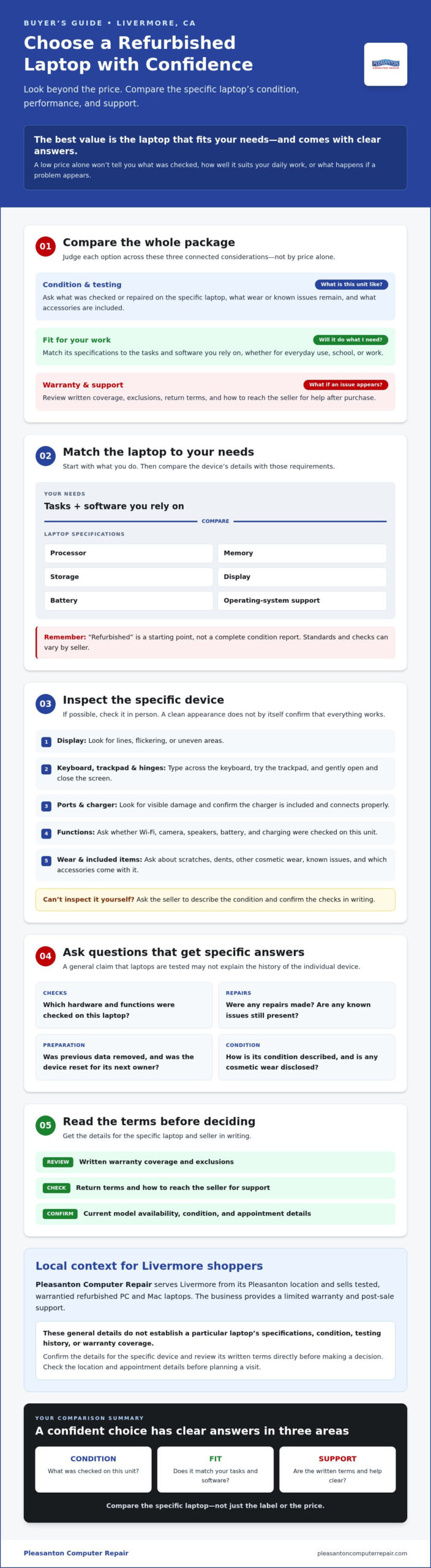
A refurbished laptop isn’t automatically unreliable, but its condition and the seller’s terms deserve a careful review. A written warranty and a clear way to get help make it easier to understand what happens if a fault appears. Before you commit, compare support offered for the specific laptop, not just its headline specifications.
What warranty questions should you ask before buying?
Ask the seller to provide the warranty terms in writing and confirm they apply to the exact laptop you’re considering. Check these details before purchase:
- Duration: How long does the warranty last, and when does coverage begin?
- Covered components: Which parts or types of faults are included?
- Exclusions: Are there conditions or types of damage that aren’t covered?
- Claim process: Who should you contact, and what steps should you follow if the laptop develops a problem?
- Return terms: Is there a return option, and what conditions or deadlines apply?
Don’t rely on a verbal summary if you need to understand the details later. Read the written terms, and ask for clarification on anything that’s unclear. A limited warranty doesn’t specify its duration or coverage by itself, so verify both for the particular device.
How can you reduce the risk of buying refurbished?
Get a clear description of the laptop’s condition and ask what testing was documented for that unit. If the seller says it was tested, find out which functions were checked and whether any repairs or known issues should be disclosed. Then confirm what post-sale support is available and who to contact if a fault appears. Clear answers set expectations before you buy.
Pleasanton Computer Repair states that its refurbished PC and Mac laptops include a limited warranty and post-sale support. The exact warranty duration, coverage, exclusions, and support process aren’t specified here, so confirm the written terms and contact details directly before choosing a laptop.
Compare the whole purchase: condition, suitability for your tasks, warranty terms, return policy, and support. A strong specification alone won’t tell you how a seller will respond if something goes wrong. For shoppers comparing refurbished laptops Livermore ca, these questions make it easier to weigh options with confidence.
For current refurbished laptop options, review Pleasanton Computer Repair and confirm inventory and terms directly. The shop serves Livermore from its listed Pleasanton location.
Find Refurbished Laptops Serving Livermore and Plan Your Next Step
You’ve narrowed down what you need. Before planning a visit, check current availability and get the key details. Pleasanton Computer Repair serves Livermore with refurbished PC and Mac laptops from its listed Pleasanton location. Selection can change, so confirm current inventory directly rather than assuming a particular model is available.
What should you confirm before visiting or arranging an appointment?
Bring a short list of your everyday tasks, required software, and accessories, such as a printer or external monitor. This gives the seller useful context when discussing whether a particular configuration may suit you. Before arranging an appointment, ask:
- Which refurbished PC or Mac laptops are currently available, and what are each device’s exact specifications?
- What condition is each laptop in, and what testing information can the seller provide for that unit?
- What written limited-warranty terms apply, and what post-sale support is included?
- Is the listed location in Pleasanton, and what appointment arrangements should you follow?
Confirming these details first helps you compare actual options, not just broad product categories. It also makes it easier to decide whether the trip and a particular configuration fit your needs.
When is local computer support useful after purchase?
A new-to-you laptop may involve a transition: you might need to reconnect peripherals, install the applications you rely on, or move files from an older computer. Ask the seller which, if any, setup or data-transfer assistance is available rather than assuming it’s included. If a fault appears later, clarify the support contact and process under the laptop’s written terms. For background on local services, see this computer repair services guide for Pleasanton.
Pleasanton Computer Repair sells refurbished PC and Mac laptops and provides post-sale support for refurbished systems. The business serves Livermore from its Pleasanton location; its listed address is not a Livermore storefront. Confirm current laptop selection, condition, warranty terms, support details, and appointment arrangements directly before making a trip.
For shoppers researching refurbished laptops Livermore ca, a clear next step is simple: define your tasks, shortlist the specifications you need, ask what’s in stock, and review the terms. If you’re considering a refurbished PC or Mac laptop, contact Pleasanton Computer Repair to ask about current options and the post-sale support available for the device.
Choose Your Next Laptop with Confidence
A confident refurbished laptop choice starts with three checks: make sure its condition is clearly described, match its specifications to your daily tasks, and read the written warranty and support terms before buying. That approach helps you compare refurbished laptops Livermore ca based on practical fit, not just a product label or headline specification.
Pleasanton Computer Repair serves Livermore from its listed Pleasanton location and has served the East Bay since 2002. Its refurbished PC and Mac laptops are described as tested and warrantied, with a limited warranty and post-sale support. Confirm current models, configurations, testing details, and exact warranty terms directly before making a decision or planning a visit. The business also serves Pleasanton, Dublin, San Ramon, Danville, Brentwood, Walnut Creek, and San Jose.
Ready to explore a local option? Ask Pleasanton Computer Repair about refurbished PC and Mac laptops. Confirm current availability and the written terms for the laptop you’re considering.
Frequently Asked Questions
Is a refurbished laptop reliable?
A refurbished laptop can be reliable, but it depends on the individual device, its condition, the seller’s testing, and the written warranty. Ask which functions were checked on that specific unit, whether repairs or known issues are disclosed, and what the warranty covers. Review the claim process before buying. The refurbished label alone can’t guarantee that every laptop will perform alike, so base your decision on details for the device you’re considering.
What should I check before buying a refurbished laptop?
Inspect the screen, keyboard, ports, charger, and visible condition, and ask about battery health and the operating system installed. Find out which hardware and functions were tested on the exact laptop, and confirm that any cosmetic wear or known issues are disclosed. Before committing, read the written warranty terms, including its duration, coverage, exclusions, and claim process. These checks help you compare refurbished laptops Livermore ca options with clearer expectations.
Can I buy a refurbished laptop in Livermore from Pleasanton Computer Repair?
Pleasanton Computer Repair sells refurbished PC and Mac laptops and serves Livermore, but its listed shop location is in Pleasanton, not Livermore. The business also serves Pleasanton, Dublin, San Ramon, Danville, Brentwood, Walnut Creek, and San Jose. Contact the shop to confirm current inventory, exact configurations, and appointment details before making a trip. Ask for the written warranty terms for the particular laptop you’re considering.
How much does a refurbished laptop cost?
The cost varies by laptop model, age, configuration, condition, and seller, so there isn’t one price that applies to every refurbished device. Compare the specific laptop’s features and condition alongside its warranty and support terms rather than judging by a headline price alone. For an accurate figure, ask the seller about current availability and request a quote for the exact laptop and configuration you’re considering.
Is a refurbished laptop better than a used laptop?
Neither label alone establishes a laptop’s quality. Compare what the seller can document about inspection and testing, how clearly the device’s condition is disclosed, and whether written warranty coverage and post-sale support are available. A privately sold used laptop may come with different information and terms, so review each offer individually. Check the condition and written terms for the exact device before deciding which option better fits your needs.
What warranty comes with a refurbished laptop from Pleasanton Computer Repair?
Pleasanton Computer Repair describes its refurbished systems as including a limited warranty and post-sale support. The exact duration, covered components, exclusions, and claim process aren’t specified here, so confirm them in writing for the particular laptop before buying. Ask who to contact if a fault appears and what steps to follow. Checking those details directly helps you understand the protection and support that apply to your device.
Should I buy a refurbished PC laptop or Mac laptop?
Choose based on the software and workflow you already rely on. Check that required work or school applications, accessories, and peripherals are compatible with the laptop’s operating system. Then compare the exact configuration, including processor, memory, storage, and operating-system version, against your usual tasks. Neither category is the right fit for everyone. Ask which PC or Mac laptops are currently available and verify each device’s specifications before deciding.