
Imagine the sudden, cold pit in your stomach when those irreplaceable family photos or a critical business presentation simply vanish from your screen. You’ve likely spent the last hour frantically checking the trash bin and restarting your device, hoping for a miracle that hasn’t arrived. It’s an isolating feeling to think that years of work or memories could disappear in a single click, leaving you with nothing but anxiety and questions about what went wrong with your drive.
We understand that data loss feels like a personal emergency, but you don’t have to face this digital crisis alone. Your files are often still there, waiting for the right tools to bring them back. This 2026 guide shows you exactly how to recover deleted files in Pleasanton by using proven local expertise to bypass the high risks of DIY software. You’ll learn the immediate steps you must take to prevent permanent erasure on modern SSDs and why a professional East Bay recovery is the fastest path to peace of mind. We’ll preview the recovery process, clarify what to expect regarding timelines, and explain how a neighborly expert can get your digital life back on track without the stress of mailing your drive to a distant lab.
Key Takeaways
- Stop using your device immediately to prevent the system from overwriting your lost data or worsening existing hardware damage.
- Differentiate between logical software errors and physical mechanical failure to choose the most successful recovery strategy for your drive.
- Identify the specific risks associated with “free” DIY recovery tools and why professional cloning is necessary for a safe, permanent restoration.
- See how you can recover deleted files in Pleasanton with a local expert to avoid the delays and transit risks of national mail-in labs.
- Follow our step-by-step diagnostic process that prioritizes the integrity of your original drive while maximizing the probability of file retrieval.
Stop! Immediate Steps to Take When You Lose Files
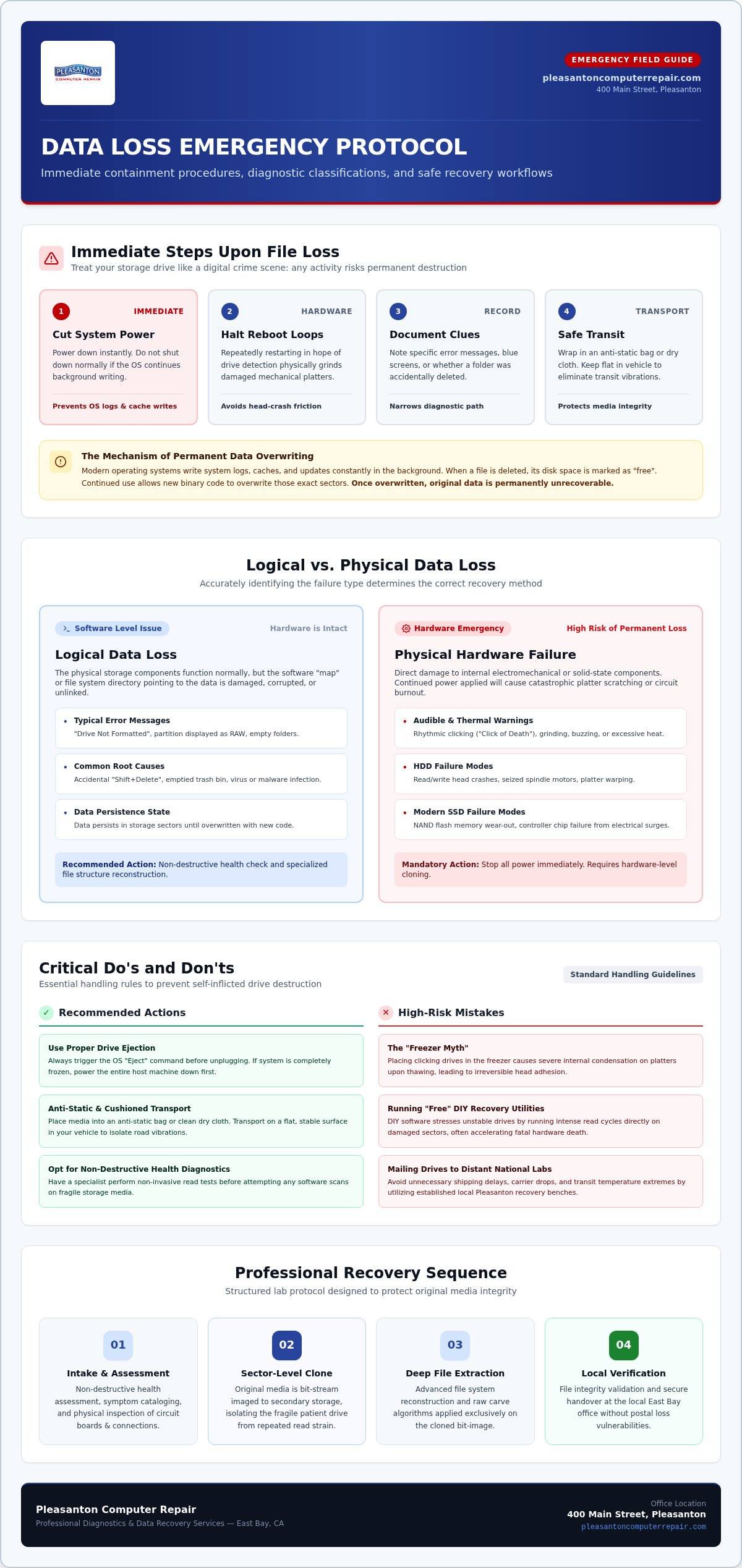
The moment you realize files are missing, your instincts might scream at you to keep looking. Don’t. The most critical step you can take to successfully recover deleted files in Pleasanton is to power down your device immediately. Whether it’s a laptop, a desktop, or an external drive, any continued activity increases the risk of permanent loss. Think of your drive like a crime scene; the more you move around, the more evidence you accidentally destroy.
Heat is a silent killer for storage media. If a drive is failing, it often runs hotter than usual, which can warp delicate internal components. Likewise, you must avoid the reboot loop. Constantly restarting your computer in hopes the drive will suddenly reappear can physically grind down a mechanical hard drive’s internal platters. If you hear clicking, grinding, or buzzing, those are physical warnings that your hardware is failing. Knowing whether you’re dealing with logical vs. physical data loss helps us narrow down the recovery path much faster.
Before you bring your device to us, take a quick note of the symptoms. Was there a specific error message? Did the screen go blue? Did you simply click “delete” on the wrong folder? This context is incredibly helpful for our diagnostic team.
The Danger of Continued Use
Modern operating systems are incredibly busy. Even when you aren’t actively saving a document, your PC or Mac is writing temporary logs, cache files, and system updates in the background. Data overwriting is the process where new binary code replaces the space of your “deleted” file. Once that space is claimed by a new system log, the original data is gone forever. Trying “one more time” to find the file yourself is the most common cause of permanent data loss we see at our shop.
Handling External Media Safely
If the failure involves a USB stick or an external HDD, don’t just yank it out. Use the proper “Eject” command if the system allows it; if the system is frozen, power the whole machine down first. Also, please ignore the old internet myths about putting a clicking hard drive in the freezer. This actually causes condensation to form on the platters, which can lead to catastrophic failure once it thaws. When you’re ready to head to our Pleasanton office at 400 Main Street, place your device in an anti-static bag or wrap it in a clean, dry cloth. Keep it on a flat surface in your car to avoid unnecessary vibration during the drive.
Logical vs. Physical Data Loss: Understanding the Difference
Before you can successfully recover deleted files in Pleasanton, you must identify what type of failure you’re facing. Data loss generally falls into two categories: logical and physical. Logical failure happens when your storage hardware is perfectly fine, but the software “map” that tells your computer where files are located has been damaged. This often manifests as a “Drive Not Formatted” error or a partition that suddenly appears as RAW. The good news is that CISA explains how deleted data persists on storage drives even after the file system loses track of it. As long as you don’t overwrite those sectors with new information, the data is usually retrievable.
Physical failure is a hardware emergency. This involves actual damage to the internal components of your drive, such as a head crash or a seized motor in a traditional hard drive. In 2026, we see this frequently with modern SSDs as well. While they don’t have moving parts, their NAND flash chips can wear out, or the controller chip can fail due to electrical surges. If your computer doesn’t even recognize that a drive is plugged in, you’re likely dealing with a physical issue that requires professional intervention. It’s a high-stakes situation. Stop all power.
Common Signs of Logical File Loss
Logical issues are frequently caused by human error or software conflicts. You might have emptied the trash bin too quickly or used “Shift+Delete” on a folder you still needed. In other cases, a virus or malware infection might have hidden your data or corrupted the file directory. If your drive is still visible in your system settings but shows up as empty or unreadable, it’s likely a logical problem. If you aren’t sure where to start, it’s helpful to consult with a local specialist who can run a non-destructive health check on your media.
Signs Your Drive is Physically Failing
Physical failure often gives you a warning, though it can be subtle. On older mechanical drives, listen for the “Click of Death,” a rhythmic tapping sound that means the read/write heads are failing. For both HDDs and SSDs, excessive heat or the faint smell of burning electronics are major red flags. If the drive is completely absent from the BIOS or Disk Management, the hardware has likely lost its ability to communicate with the rest of your system. To recover deleted files in Pleasanton when the hardware is dying, you must avoid running any “fix-it” software. This only puts more strain on a dying component and could lead to total data destruction.
DIY Recovery Software vs. Professional Services
The internet is flooded with promises of “instant” and “free” data recovery tools. It’s easy to see the appeal. When you’re trying to recover deleted files in Pleasanton, a quick download seems like the fastest path back to normalcy. However, these consumer-grade utilities have significant limitations that can turn a minor mishap into a permanent digital loss. Professional-grade hardware, such as the PC-3000 system we use, allows us to communicate directly with a drive’s firmware. This bypasses the operating system errors that cause standard software to hang or crash when it encounters a bad sector.
The biggest risk is the “Write-Back” trap. When you delete a file, the space it occupied is simply marked as available by the system. If you download recovery software to that same drive, the computer might save that new program right over the top of your missing data. Once those bits are overwritten, no amount of expertise can bring them back. Professional tools work by creating a “read-only” clone first, ensuring the original data remains untouched throughout the process.
When to Attempt DIY Recovery
DIY software is only a viable option if your drive is 100% physically healthy. This means no clicking, no freezing, and no disappearing acts in your file explorer. According to PCMag’s file recovery overview, these tools work best for simple accidental deletions from a functioning external USB or SD card. If you choose this route, follow these rules:
- Always install the recovery software on a separate, healthy computer.
- Connect the affected drive as a secondary, non-boot device.
- Never save recovered files back onto the original drive; always use a different destination.
When DIY Becomes Dangerous
If your drive is running slow or causing your computer to lock up, stop immediately. These are signs of physical degradation or NAND flash wear on an SSD. Running intensive scanning software on a failing drive is like forcing a car with a broken engine to run at 100 mph. The software relentlessly polls every sector, which can cause a weak read-head to physically crash into the platter. We often see drives that could have been saved easily but are now unrecoverable because of a failed DIY attempt. Botched software scans make professional work much harder. If you’re in the Tri-Valley area, bringing your device to a local expert is the safest way to recover deleted files in Pleasanton without risking total destruction.
Data Recovery in Pleasanton: Why Local Expertise Matters
Shipping a drive across the country is a nerve-wracking experience. You’re handing over your most sensitive data to a courier, hoping it doesn’t get tossed around or lost in transit. Choosing to recover deleted files in Pleasanton with a local partner removes this anxiety entirely. Instead of waiting days for a shipping label and a confirmation email, you can simply drive to our office at 400 Main Street, Suite 205. This face-to-face interaction allows you to describe exactly which folders are missing, giving us a clear target for the recovery. You’ll know exactly who is handling your data.
Local expertise also means a faster turnaround. Without the shipping lag of four to six days in the mail, we can often begin the diagnostic process the same day you drop off your device. It’s about more than just speed; it’s about the security of knowing where your drive is at every moment. You’re supporting a local East Bay business while receiving the same high-level technical results you’d expect from a national lab. We’ve seen every type of failure common to the Tri-Valley area, from office server crashes to home laptop spills.
Serving the East Bay Community
We’ve been serving the East Bay since 2002, building a legacy of trust with thousands of successful recoveries. Our location is strategically placed for quick drop-offs from neighbors in Livermore, Dublin, and San Ramon. For local businesses facing critical downtime, we also provide on-site support for server or NAS failures. We understand that every hour your system is down costs money. Being just a few miles away allows us to respond with the urgency your business requires to recover deleted files in Pleasanton and get back to work.
Advanced Recovery Capabilities
Our in-store diagnostics provide a fast, clear answer on whether your files are recoverable. If the issue is complex, we utilize advanced tools and maintain partnerships for clean-room recovery when physical internal repairs are necessary. While many people focus on computers, we also specialize in mobile devices. If you’ve lost data on a smartphone, our guide to iPhone data recovery Pleasanton provides specific steps for saving those mobile memories. We handle the technical heavy lifting so you can focus on what matters most.
When every file counts, don’t risk the uncertainty of a mail-in service. You can contact our local expert team to start your recovery process today.
The Recovery Process at Pleasanton Computer Repair
When you choose to recover deleted files in Pleasanton with our team, we follow a clear, professional protocol. This methodical approach is designed to maximize your chances of a full recovery while protecting the fragile state of your storage media. We treat every drive with extreme care, knowing that the data inside is often irreplaceable. Our process ensures that we don’t put unnecessary stress on a failing device.
- Step 1: The Initial Diagnostic. We perform a thorough analysis to identify the failure type. We’ll tell you if it’s a logical software error or a physical hardware issue, providing a realistic probability of success before we proceed.
- Step 2: Sector-by-Sector Cloning. We never run recovery tools directly on your original drive. Instead, we create a bit-for-bit clone of the media. This protects your original data from the stress of repeated scans.
- Step 3: File System Reconstruction. Using professional-grade tools, we rebuild the file structure and carve out the data from the clone. This allows us to find files even when the directory “map” is completely gone.
- Step 4: Verification and Transfer. We verify that the recovered files are healthy and open correctly. Finally, we move your data to a secure new drive for you to take home.
What to Expect During Your Visit
Preparing for your visit to our Suite 205 office is simple. Bring your computer or external drive along with any cables it uses. It’s also helpful to provide a “target drive,” such as a new external hard drive, where we can save your recovered files. If you don’t have one, you can purchase a high-quality drive directly from our shop. We take data privacy seriously. Your sensitive information is handled with strict confidentiality and never leaves our secure local environment during the recovery process.
Preventing Future Data Loss
While we love helping our neighbors, we want to help you avoid this stress in the future. We recommend the 3-2-1 backup rule: keep three copies of your data, on two different media types, with one copy stored off-site. For many users, a simple SSD upgrade Pleasanton CA is a great first step. Moving away from old mechanical drives significantly reduces the risk of physical head crashes. Pairing this with an automated cloud backup service ensures that your files are protected against both hardware failure and accidental deletion. We can help you set up these automated systems during your visit to ensure you never have to worry about missing files again.
Get Your Digital Life Back on Track
Losing access to your files is a stressful experience, but it doesn’t have to be permanent. The single most important thing you can do is power down your device immediately to prevent overwriting your data. Whether you’ve encountered a simple accidental deletion or a complex hardware failure, professional intervention is the safest way to ensure a successful outcome.
Since 2002, our team at 400 Main Street has served as the East Bay’s trusted specialists in Mac, PC, and mobile data recovery. We have the advanced tools and local expertise required to recover deleted files in Pleasanton without the risks of DIY software or the delays of mail-in labs. We’re here to act as your technical guide, providing a clear path from digital panic to a complete restoration of your important documents and memories.
Schedule Your Data Recovery Diagnostic in Pleasanton today and let our seasoned experts give you the peace of mind you deserve. Your data is often just one professional step away from being found.
Frequently Asked Questions
How much does data recovery cost in Pleasanton?
Costs depend on the failure type and the storage capacity of your media. Logical recoveries, such as accidental deletions, involve different protocols than physical failures that require clean-room intervention. We provide a thorough diagnostic to evaluate the health of your drive and determine the complexity of the retrieval. Our team focuses on clear, honest communication so you understand the scope of the work before we begin the recovery process.
Can you recover files from a hard drive that is clicking?
Yes, we can often retrieve data from clicking drives, but you must power down the device immediately. A clicking sound typically indicates a mechanical failure of the read/write heads. If you keep the drive running, those heads can physically scratch the internal platters, leading to permanent data loss. We use specialized hardware to stabilize the drive and may utilize clean-room partnerships to perform necessary internal repairs safely.
How long does the data recovery process typically take?
Most standard recoveries are completed within 24 to 72 hours after we finish the initial diagnostic. To recover deleted files in Pleasanton efficiently, we prioritize creating a secure clone of your media first. The total time depends on the physical health of the drive and the volume of data. While smaller logical issues move quickly, drives with bad sectors require a slower, more methodical reading process to ensure data integrity.
Is it possible to recover data from an SSD that won’t turn on?
Yes, we can often extract data from non-functional SSDs through controller-level repairs or advanced chip-off techniques. SSDs don’t have moving parts, but they frequently fail due to electrical surges, firmware corruption, or NAND flash wear. Even if your laptop doesn’t recognize the drive, the data is usually still present on the flash chips. We use specialized tools to bypass failed components and communicate directly with the storage hardware.
Will my data remain private during the recovery process?
We maintain strict confidentiality and data privacy protocols to protect your sensitive information. Your files stay within our secure local environment at our 400 Main Street office and are never uploaded to the cloud. Our technicians only verify file headers to ensure the recovery is successful. Once you’ve confirmed that you have your recovered data, we securely wipe our temporary working clones to ensure your privacy remains intact.
What if you are unable to recover any of my files?
We believe in providing an honest, upfront assessment of your drive’s condition during the diagnostic phase. If a device is too physically damaged for a successful retrieval, we’ll explain the technical reasons why. Our goal is to exhaust every professional resource, from firmware reconstruction to clean-room hardware swaps, before determining a drive is unrecoverable. We prioritize your peace of mind by giving you a realistic outlook from the start.
Do you offer data recovery for iPhones and iPads as well?
Yes, we provide specialized mobile data recovery for both iPhones and iPads. We help neighbors in Dublin and San Ramon retrieve photos and documents from devices with liquid damage, broken screens, or boot loop issues. Mobile storage is encrypted and requires specific hardware interfaces to bypass software locks. Whether it’s irreplaceable family memories or critical business contacts, our team has the expertise to handle the unique challenges of mobile hardware.
Can I recover files that were deleted several months ago?
Recovery is possible as long as the specific sectors where those files lived haven’t been overwritten by new data. Time alone doesn’t destroy files, but actively using the device after a deletion does. If you want to recover deleted files in Pleasanton that were lost months ago, your success rate is much higher if the drive has been sitting unused. We can perform a deep carve of the drive’s unallocated space to find these older fragments.