
That spinning wheel of death on your screen doesn’t always mean your hardware is dying; it often means your system is simply suffocating under modern software. It’s incredibly frustrating when simple application launches take minutes or your cursor freezes mid-task. You might worry that a total system crash is imminent or feel confused about whether you need a expensive new machine or just a professional computer tune up Pleasanton CA. We understand that stress because we’ve seen it every day at our Main Street shop since 2002. You deserve a device that keeps up with your pace without the constant fear of losing your precious data.
This guide will show you exactly how to breathe new life into your slow PC or Mac using our proven 2026 performance checklist. You’ll discover how to achieve an instant performance boost and extend your device’s lifespan without the “new computer” price tag. We’re going to walk through the “Hygiene-Hardware-Heat” framework. This covers everything from the latest macOS Tahoe and Windows 11 optimizations to why an SSD upgrade remains the ultimate fountain of youth for older systems. By the end, you’ll have total peace of mind that your computer is secure, efficient, and ready for another year of hard work.
Key Takeaways
- Identify the signs of system fatigue and learn how a comprehensive software deep clean can reclaim your RAM and speed up application launches.
- Explore why hardware upgrades, like transitioning to an SSD, offer a “fountain of youth” effect that makes older laptops feel brand new again.
- Guard your device against Pleasanton’s specific environmental challenges, including dust accumulation and heat-related processor throttling.
- Secure your data and avoid the traps of “scareware” by choosing a professional computer tune up Pleasanton CA at a trusted local shop.
Why Your Computer is Slow: Identifying the Need for a Tune-Up
A professional computer tune up Pleasanton CA isn’t just a quick scan; it’s a comprehensive multi-point inspection of your system’s health. Since 2002, we’ve helped our neighbors in the East Bay realize that a slow PC doesn’t always need to be replaced. We look at both the software logic and the physical hardware to ensure they’re working in harmony. This process involves systematic performance tuning to identify bottlenecks that slow you down. Many people assume they need a new machine when they see the “Spinning Wheel of Death.” Often, your computer isn’t broken; it’s simply overwhelmed by years of digital debris and outdated configurations.
Common Symptoms of a Clogged System
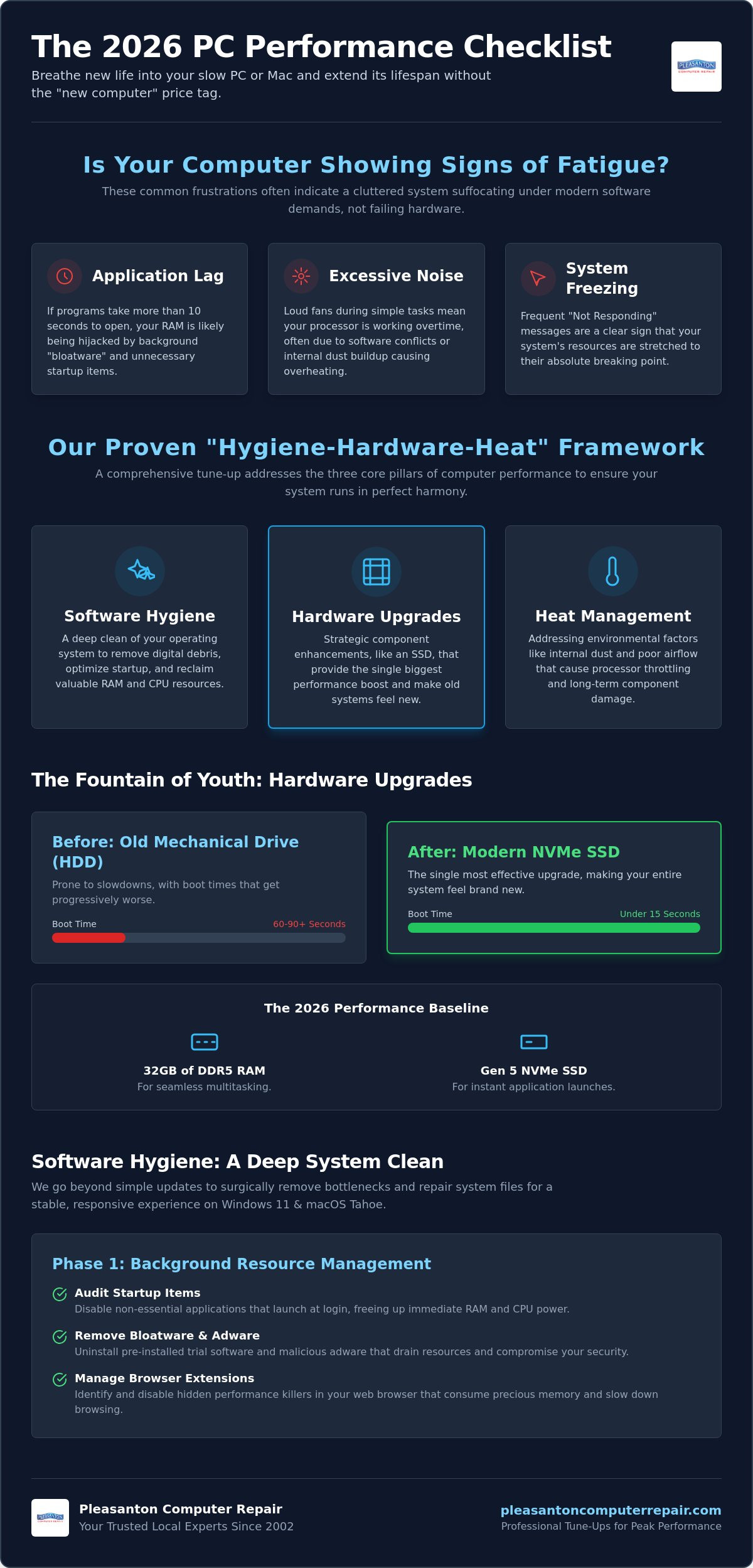
How do you know it’s time for a professional look? Watch for these red flags:
- Application Lag: If your browser or Word takes more than 10 seconds to open, your RAM is likely being hijacked by background “bloatware.”
- Excessive Noise: Hearing loud fans during simple tasks like checking email? This often means your processor is working overtime because of heat or software conflicts.
- Freezing: Frequent “Not Responding” messages are a sign that your system’s resources are stretched to the breaking point.
The 2026 Performance Baseline
The 2026 Software Optimization Checklist
Software optimization is more than just clicking “Update All.” In 2026, it requires a surgical approach to how your operating system handles background tasks. Even the most powerful machines can feel sluggish if they are fighting through layers of digital debris. A professional computer tune up Pleasanton CA focuses on clearing these bottlenecks to ensure your software runs as fast as the day you bought the machine. By following a structured checklist, we can transform a stuttering system into a responsive tool that respects your time.
The first step in any deep clean is addressing the registry and system files. Over time, installing and uninstalling applications leaves behind “orphaned” entries that confuse your OS. Repairing these system files and cleaning the registry prevents the minor glitches that eventually lead to total system freezes. We also prioritize updating drivers and applying the latest OS patches for Windows 11 26H1 or macOS Tahoe. These updates often contain critical performance fixes that resolve known bugs in how your processor interacts with your hardware.
Phase 1: Background Resource Management
Do you feel like your computer starts slowing down the moment you log in? This is often due to a “cluttered” startup sequence where too many apps compete for your system resources. You can take control of this by using Task Manager on Windows or Activity Monitor on Mac to identify “resource hogs.”
- Audit Startup Items: Disable any application that doesn’t need to be running the second you turn on your device.
- Remove Bloatware: Manufacturers often pre-install “trial” software that drains background resources. If you don’t use it, delete it.
- Manage Browser Extensions: These are the hidden performance killers of 2026. Each active extension consumes precious RAM and can significantly slow down your web browsing experience.
Phase 2: Security and Data Hygiene
Security isn’t just about protection; it’s about performance. Malware and aggressive adware often run hidden processes that hijack your CPU power. We recommend running professional-grade scans to ensure no “stealth” programs are dragging down your speed. If these steps feel a bit overwhelming, our team can perform a professional computer tune up Pleasanton CA at our Main Street office to handle the heavy lifting for you.
Finally, don’t overlook your cache folders and temporary files. These directories can grow to dozens of gigabytes, making your file indexing slow and inefficient. Clearing these out, combined with a thorough verification of your disk health, ensures that your data is not only accessible but also safe from sudden drive failure. This proactive hygiene is the best way to prevent the “Spinning Wheel of Death” from returning.
Beyond Software: Hardware Upgrades for Maximum Speed
Sometimes, even the most thorough software cleaning hits a physical wall. While we focus on digital hygiene in the earlier stages of a computer tune up Pleasanton CA, we must also address the physical components that might be holding your system back. If your computer still uses a traditional mechanical hard drive (HDD), no amount of software optimization will make it feel truly fast. These older drives rely on physical spinning platters that simply cannot keep up with the data-heavy demands of 2026 applications. When your hardware is the bottleneck, a strategic upgrade is the only way to restore performance and extend the life of your device.
The SSD Transformation
We often call the Solid State Drive (SSD) upgrade the “fountain of youth” for aging computers. Modern NVMe SSDs are exponentially faster than old-fashioned mechanical drives. While an HDD might struggle to reach read speeds of 100 MB/s, a modern Gen 5 NVMe drive can exceed 10,000 MB/s. This difference is what eliminates the “spinning wheel of death” and makes your computer boot in seconds rather than minutes. We strongly recommend an SSD upgrade Pleasanton CA for every client with an older iMac or laptop. It’s the single most impactful change you can make to your hardware.
Memory (RAM) and Thermal Management
In 2026, 8GB of RAM is no longer sufficient for smooth multitasking. With modern browsers and office suites consuming more resources, we find that 16GB is the new baseline, while 32GB is recommended for professionals. If your device supports expansion, adding RAM allows your computer to handle more tasks simultaneously without stuttering. However, speed isn’t just about capacity; it’s also about temperature. Over time, the thermal paste that transfers heat away from your processor dries out. This leads to CPU throttling, where your computer intentionally slows down to prevent overheating. Replacing this paste and cleaning internal cooling fans is a standard part of our professional computer tune up Pleasanton CA. If your device is struggling to power on at all, see our laptop troubleshooting guide for a deeper look at power-related issues.
Keeping Tech Clean in the Tri-Valley: Dust and Heat Management
The Hidden Danger of Dust Buildup
Professional Internal Cleaning
A professional computer tune up Pleasanton CA at our Main Street shop involves a careful teardown to access the areas you can’t reach from the outside. We use specialized, static-safe tools to remove debris from keyboard mechanisms and internal cooling fins without risking a short circuit. This process ensures that your system can breathe properly, even during the hottest July heatwaves. We also inspect the fans for physical wear and tear that might lead to a future failure. If you want to protect your investment and keep your system running cool, schedule a professional internal cleaning with our expert team today. We’ll make sure your machine is ready to handle the Tri-Valley heat with ease.
Professional Computer Tune-Up in Pleasanton: When to Call the Experts
While the checklists provided in this guide can help you manage basic maintenance, there comes a point where a professional hand is necessary. Many users turn to free “speed up your PC” software found online, but these programs are often “scareware” in disguise. They might report hundreds of fake errors just to trick you into a paid subscription or, worse, install tracking cookies. These generic tools can conflict with your specific operating system settings and cause even more instability. A professional computer tune up Pleasanton CA at a dedicated shop ensures that your system is handled with precision rather than generic, automated scripts. We’ve seen every possible software conflict and remain unfazed by even the most stubborn system errors.
Choosing a local expert over a big-box retailer offers several distinct advantages. Large chains often ship your computer to a central depot, leaving you without a device for weeks. We handle every optimization right here in the Tri-Valley. This allows us to maintain a strict 24-72 hour turnaround time for most residents. Our process is designed to be transparent and stress-free, acting as a protective barrier between you and your technical headaches. You get to speak directly with the person working on your machine, ensuring your specific concerns are addressed. For business owners or users with complex desktop setups who prefer not to disconnect their equipment, our on-site computer repair Pleasanton service brings expert tech support directly to your door.
The Pleasanton Computer Repair Difference
We don’t just clear your cache and call it a day. Our comprehensive 24-point tune-up includes deep-level system file repair, hardware stress testing, and the detailed physical cleaning we discussed earlier. We check your battery health, verify your SSD’s remaining lifespan, and ensure your security software is actually doing its job. We stand behind our work with a “Zero Data Loss” promise. This ensures your family photos, tax documents, and personal files remain exactly where they belong throughout the optimization. Plus, every service comes with a 60-day warranty and free remote support. If a question pops up after you get home, we’re still here to help.
Getting Started Today
Ready to reclaim your speed? You can find us at 400 Main Street, Suite 205, right in the heart of downtown Pleasanton. When you’re ready to bring your system in, just bring the laptop and its power adapter. For desktop towers, we only need the machine itself; no cables, keyboards, or monitors are necessary. We’ve been serving the East Bay since 2002, and we’re ready to help you get that “new computer feel” back without the “new computer” price tag. Schedule your computer tune-up at our Pleasanton location today!
Restore Your Computer’s Potential Today
You don’t have to settle for a sluggish machine or the constant anxiety of a potential system crash. By combining the software optimization steps we’ve discussed with a physical deep clean to combat the Tri-Valley dust, you can significantly extend your device’s lifespan. Whether you’re looking for a simple software refresh or a transformative SSD upgrade, professional maintenance is the most cost-effective way to keep your technology working for you. We’ve helped thousands of neighbors navigate these technical challenges with a focus on efficiency and data integrity.
Since 2002, our team has served the East Bay with a commitment to technical precision and local reliability. We take the stress out of technology by offering a 60-day warranty on all labor and free remote support for your peace of mind. If you’re ready for an instant performance boost, Book Your Performance Tune-Up at Pleasanton Computer Repair. We’ll handle your computer tune up Pleasanton CA with the care it deserves so you can get back to what matters most. Your faster, more reliable computer is just a short visit away.
Frequently Asked Questions
Is a computer tune-up worth it for a 5-year-old laptop?
Yes, a tune-up is highly effective for a five-year-old laptop. Most machines from that era still have capable processors but are held back by cluttered software or slow mechanical drives. By performing a professional computer tune up Pleasanton CA, we can often double your usable speed. It’s a sustainable choice that keeps your device out of the landfill while saving you significant money compared to buying a brand-new model in 2026.
How long does a professional computer tune-up take in Pleasanton?
Most professional tune-ups at our Main Street shop are completed within 24 to 72 hours. We understand that your computer is essential for work and daily life, so we prioritize a brisk, efficient process. Unlike big-box retailers that might ship your device away to a distant depot for weeks, we handle everything locally. This ensures your machine is back on your desk and running at peak performance as quickly as possible.
Will I lose any of my files or photos during the tune-up process?
You will not lose any of your files, photos, or personal documents during our optimization process. We operate with a strict “Zero Data Loss” promise to alleviate the common fear of losing precious memories or critical work files. Our technicians focus on system configurations and background processes rather than your personal data folders. Your information remains secure and untouched while we restore your system’s speed and efficiency.
What is the difference between a software tune-up and an SSD upgrade?
A software tune-up focuses on cleaning the operating system, while an SSD upgrade is a physical hardware replacement. Software optimization removes bloatware and repairs registry errors to reclaim RAM. An SSD upgrade replaces your slow mechanical hard drive with modern flash storage. Combining both services during a computer tune up Pleasanton CA provides the ultimate performance boost, making an older machine feel faster than the day you bought it.
Can a tune-up fix a computer that is overheating?
Yes, a professional tune-up is specifically designed to address overheating issues. We perform a deep internal cleaning to remove the insulating blanket of dust that accumulates in the Tri-Valley’s dry climate. We also inspect the cooling fans and can replace dried-out thermal paste on your processor. These steps ensure your system can breathe properly, preventing the CPU throttling that causes your computer to slow down during heavy tasks or summer heatwaves.
Do you offer on-site tune-ups for businesses in Dublin or San Ramon?
We do offer on-site support for business owners and home users throughout Dublin and San Ramon. While many comprehensive tune-ups are best handled at our specialized Main Street workbench, we can certainly come to your location for system assessments and network optimizations. Our goal is to provide convenient, local reliability to the entire Tri-Valley area. Just let us know your location when you call to schedule your optimization service.
How often should I have my computer professionally optimized?
We recommend a professional optimization once every 12 months for most users. If you work in a particularly dusty environment or use your computer for demanding professional tasks, a semi-annual checkup might be better. Regular maintenance prevents the gradual buildup of background processes and physical debris. This proactive approach extends your device’s lifespan and ensures you never have to deal with the frustration of a sudden, avoidable slowdown.