
What if the right repair path matters more than finding the closest shop? When a computer problem interrupts work, study, or everyday tasks, it can be hard to tell whether the cause is hardware, software, or a data issue. Local computer help Walnut Creek residents can rely on starts with matching the support approach to the problem.
You don’t need to diagnose the issue yourself before asking for help. A cracked screen, virus warning, slow computer, or missing files each calls for a different solution. The right support option can also make the process simpler, whether the problem is suited to remote guidance, on-site service, or in-store repair.
This guide compares those support routes, explains what details to prepare before requesting help, and shows how to choose a practical next step. You’ll also learn how Pleasanton Computer Repair serves Walnut Creek customers with PC and Mac support, including screen replacement, virus removal, data recovery, and SSD upgrades. With a clearer picture of the issue and your options, you can move forward with less guesswork.
Key Takeaways
- Describe what your computer is doing, when the problem began, and how it affects your tasks instead of guessing at the technical cause.
- Match the symptoms to a repair category: screen replacement for a damaged display, virus removal for malware concerns, data recovery for inaccessible files, or an SSD upgrade for storage-related needs.
- Before requesting local computer help Walnut Creek, note your device type and operating system, and back up accessible files if you can.
- Choose a support format that suits the issue and your circumstances, then share clear details so the next steps are easier to understand.
- Look for an East Bay business that serves Walnut Creek and can support the device and repair need you’ve described.
When Walnut Creek Residents Need Local Computer Help
A slow computer can stall a workday. A damaged screen makes a laptop difficult to use, a malware warning raises security concerns, and inaccessible files can put important work out of reach. The right support depends on what the device is doing, whether it’s a PC or Mac, and what kind of repair the symptoms suggest.
Local computer help is support matched to a device problem and the customer’s location. For residents and businesses in Walnut Creek, California, that means finding a practical repair route for the issue at hand. If your computer already has a problem, start by describing its symptoms rather than shopping for a replacement or trying to name the technical cause.
Which computer problems call for professional help?
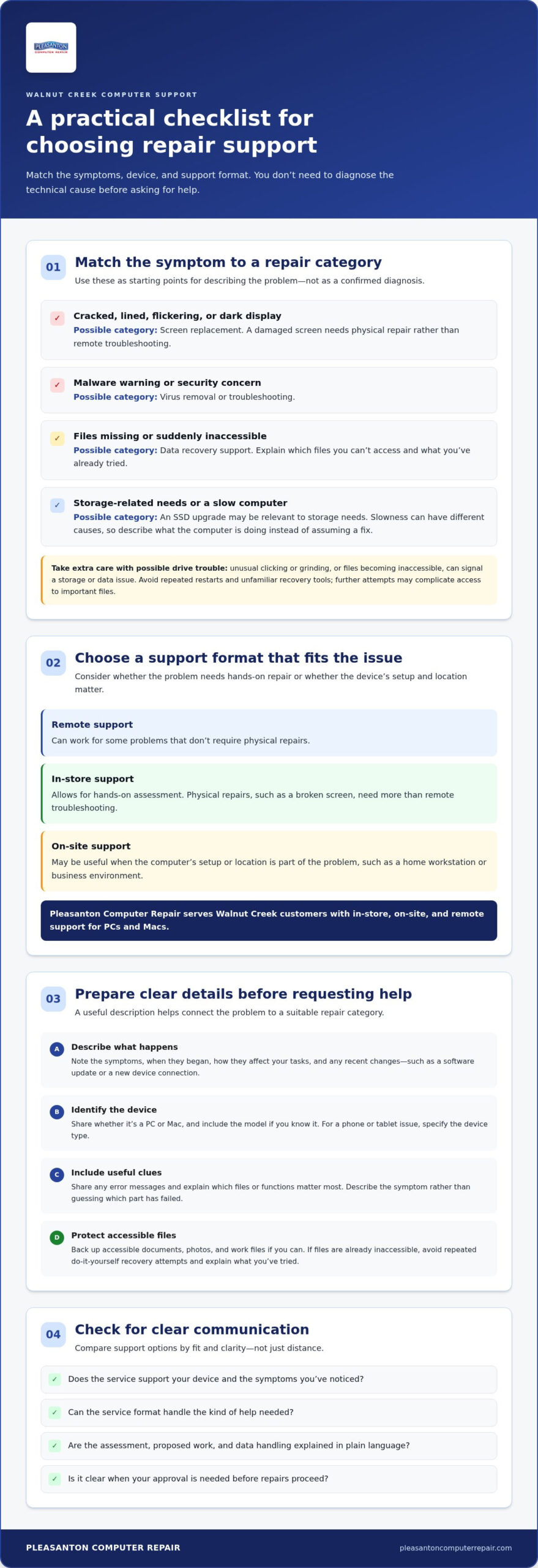
Visible damage, such as a cracked display, may call for screen replacement. A computer that won’t start, repeatedly freezes, or shows a malware warning may need troubleshooting or virus removal. You don’t have to know which repair applies. Note what happens, when it began, and whether anything changed shortly beforehand.
Take extra care with possible drive trouble. Unusual clicking or grinding noises, or files that suddenly become inaccessible, can signal a problem involving storage or data. Avoid repeatedly restarting the device or trying unfamiliar repair tools, since further attempts may complicate access to important files. Data recovery support can help assess missing or inaccessible data.
Does the problem need remote, in-store, or on-site support?
The issue often points toward the most suitable format. Remote support can work for some problems that don’t require physical repairs, while in-store support allows for hands-on assessment. A broken screen, for example, needs physical repair rather than remote troubleshooting.
On-site support can be useful when a computer’s setup or location is part of the problem, such as a home workstation or business environment. For small to medium-sized businesses requiring comprehensive outsourced IT services alongside individual device fixes, resources like jobtechnologies.net provide ongoing management. Pleasanton Computer Repair serves Walnut Creek customers with in-store, on-site, and remote support for PCs and Macs. Sharing the device type and symptoms helps identify which route fits the situation, without requiring you to diagnose it yourself.
How to Compare Local Computer Help in Walnut Creek
To compare local computer help Walnut Creek options, focus on fit and clarity, not just distance. Does the support match your device and the symptoms you’ve noticed? Can the service format handle the kind of help needed? A useful comparison also considers how clearly the repair process and data handling are explained.
What should you compare before choosing computer support?
Use the details of your problem to narrow down the right kind of support. A physical repair requires a different approach from a software concern, and troubleshooting a PC may differ from troubleshooting a Mac. Compare the essentials:
| What to compare | What to consider |
|---|---|
| Service format | Remote help may suit some non-physical issues; in-store or on-site support can be more appropriate when hands-on assessment or a location-based setup matters. |
| Device type | Share whether you use a PC or Mac, and include the model if you know it. For a phone or tablet issue, specify the device type. |
| Problem category | Describe the symptom, such as a damaged display, malware warning, missing files, or a computer that won’t start. This helps connect the issue to a suitable repair category. |
| Communication | Look for plain-language explanations of what the assessment shows, what work is proposed, and when your approval is needed before repairs proceed. |
Clear symptoms are more useful than a guessed diagnosis. Instead of saying “the hard drive is broken,” explain that the computer makes an unusual sound, freezes during startup, or no longer opens certain files. Include error messages when possible, along with recent changes such as a software update or a new device connection.
How can you reduce uncertainty about data and repair scope?
Before repair, back up accessible files if you can. A copy of important documents, photos, and work files gives you another way to access them if troubleshooting affects the device’s stored data. If files are already inaccessible, avoid repeated do-it-yourself recovery attempts and explain what you’ve tried so far. For additional guidance on protecting devices and accounts, Ready.gov outlines cybersecurity best practices.
Share what you need the computer to do, what has changed, and which files or functions matter most. The right repair options depend on the device and the assessment, so avoid assuming a particular part needs replacement. Pleasanton Computer Repair supports Walnut Creek customers with PC and Mac repair through in-store, on-site, and remote options. Learn more about local computer repair support.
Which Computer Repair Service Fits Your Walnut Creek Problem?
A symptom can point toward a useful repair category, but it doesn’t confirm the underlying cause. A slow computer, for example, could relate to storage, software, or another issue. Treat the categories below as a starting point for describing the problem, not as a diagnosis. An assessment can help determine which repair options fit what’s happening with your device.
When do screen repair, virus removal, or an SSD upgrade apply?
- Screen replacement: A cracked display, visible lines, flickering, or a screen that stays dark after the computer starts may call for a screen assessment. Describe what you can see and whether the damage followed a drop or other incident.
- Virus removal: Unexpected pop-ups, unfamiliar programs, browser changes, or other suspicious activity can be reasons to explore virus removal. Avoid clicking unfamiliar alerts or downloading tools they recommend. Describe what appeared and when the behavior began.
- SSD upgrade: An SSD upgrade may be worth considering when a compatible computer feels slow, particularly during startup or file access. Slowness has several possible causes, so an assessment helps determine whether storage is relevant instead of assuming an upgrade will address every slowdown.
These categories aren’t interchangeable. A damaged display is a physical repair; suspicious software behavior calls for a different kind of investigation. For broader context, review Pleasanton Computer Repair’s computer repair options.
When should you consider data recovery?
Missing files, folders that won’t open, or a device that no longer gives access to important information may call for a data-recovery assessment. Explain which files are affected and whether anything changed before they disappeared. If the drive makes unusual noises or seems to be failing, minimize further use and avoid repeated restarts or do-it-yourself recovery attempts. Continued activity may put additional stress on a troubled device.
Keep the goal clear: recovery is about assessing access to lost or unavailable data, while a repair may address the device itself. The right approach depends on the computer and its condition, so don’t assume that replacing a part or running recovery software is the answer.
For local computer help Walnut Creek, share the symptom, device type, and any recent changes. That gives a technician a practical starting point without requiring you to identify the technical cause yourself.
What to Prepare Before Requesting Computer Help Near Walnut Creek
A few clear details can make it easier to understand the problem and choose a useful next step. You don’t need to identify the technical cause. Focus on what you see, when it started, and how it affects your work or daily routine.
What details help a technician understand the issue?
- Device details: Note whether it’s a PC or Mac, plus the brand and model if readily available. Include the operating system if you know it.
- Symptoms and timing: Describe what happens and when it began. For example, say the computer freezes during startup or a message appears when you open a program.
- Recent changes: Mention new software, updates, connected devices, or other changes shortly before the issue appeared.
- Messages and steps tried: Copy down an error message or take a photo of it. List any troubleshooting steps you’ve already attempted and what happened afterward.
- Impact: Explain what you can no longer do, such as access work files, join a meeting, or use the computer normally.
Specific observations are more helpful than a guessed diagnosis. “The screen shows colored lines after I open the laptop” gives a clearer starting point than “the graphics card is broken.”
How should you prepare your files and device?
If important files are accessible, back them up before service when possible. Copy essential documents, photos, and other needed files to a separate storage location you can access. If files are missing or the device may have a storage problem, avoid repeated restart or recovery attempts and explain what you’ve noticed instead.
Choose a support format that fits the situation. Remote help may suit an issue that can be addressed without physically handling the device. If the computer needs hands-on assessment, consider in-store support; on-site service may be practical when the computer’s location or setup is part of the problem. Bring the charger or accessories only if they relate to the reported issue, such as a power problem or an external display that isn’t working.
Having these notes ready can make it easier to discuss local computer help Walnut Creek and the repair options that fit your device. For support details, explore computer repair support.
Get Local Computer Help Serving Walnut Creek
For residents and businesses seeking local computer help Walnut Creek, Pleasanton Computer Repair serves East Bay customers with support for PCs, Macs, and consumer electronics. Help is available in-store, on-site, and remotely, so the support format can suit both the device issue and where you need assistance.
What support can Walnut Creek customers access?
Support covers common repair needs such as PC and Mac screen replacement, virus removal, data recovery, and SSD upgrades. Remote assistance can suit some issues that don’t require a technician to handle the computer physically. A damaged screen or other hands-on repair calls for a different approach, such as in-store service or on-site support where appropriate.
The in-store service location is in Pleasanton at 400 Main Street, Suite 205, not in Walnut Creek. On-site support provides another option for home users and businesses whose computer setup or location matters to the issue. Sharing your device type and symptoms helps identify a suitable support format without requiring you to diagnose the problem first.
How do you take the next step?
Before arranging support, gather a few basics: whether the device is a PC or Mac, what it’s doing, when the symptoms began, and any error message you’ve seen. Note whether you prefer remote assistance, can bring the device to the Pleasanton location, or need help at your home or business. Clear details help frame the conversation around the problem and the appropriate repair options.
Appointments can be scheduled online. Choose the support option that best fits the issue, then share the device and symptom details as part of the next step. There’s no need to arrive with a technical diagnosis. A straightforward description of what’s happening gives the repair process a practical starting point.
Explore computer repair and support options to see how Pleasanton Computer Repair can help with PC and Mac issues serving Walnut Creek.
Choose a Clear Path to Getting Your Computer Working
The most useful first step is to match the support approach to the problem. A damaged screen, suspicious pop-ups, a slow computer, or inaccessible files can each call for a different repair path. You don’t need to diagnose the cause yourself. Note your device type, symptoms, and when they began, and back up accessible files when possible.
Pleasanton Computer Repair serves residential and business customers in Walnut Creek and across the East Bay, including Pleasanton, Livermore, Dublin, San Ramon, Danville, Brentwood, and San Jose. In-store, on-site, and remote support options help connect the issue with a practical way to get assistance.
Ready to take the next step? Get help with your computer issue and share what’s happening with your device. With clear information and the right support format, you can move forward with greater confidence and less guesswork.
Frequently Asked Questions
Can I get computer help in Walnut Creek if the repair business is based in Pleasanton?
Yes, Walnut Creek residents can get support from Pleasanton Computer Repair even though its service location is in Pleasanton. This independent East Bay business serves Walnut Creek customers with in-store, on-site, and remote support. The Pleasanton location is at 400 Main Street, Suite 205, not in Walnut Creek. For local computer help Walnut Creek, choose a support format that fits whether the issue needs hands-on repair.
What types of computer problems can local repair services help with?
Computer repair can address hardware, software, and data concerns. Examples include a cracked PC or Mac display, suspicious pop-ups that may call for virus removal, inaccessible files that may need data recovery, or a compatible computer that could benefit from an SSD upgrade. A symptom doesn’t confirm its cause, so describe what you’re seeing and let the assessment guide the repair options.
Can a computer repair technician help remotely?
Yes, remote support can help with some issues that don’t require physical work on the device. It may be suitable for certain software or troubleshooting concerns, while a cracked screen or other hardware repair needs hands-on attention. Pleasanton Computer Repair offers remote support for PCs, Macs, and consumer electronics. Describe the symptoms and device type so the support approach can match the issue.
Should I back up my files before taking my computer in for repair?
Yes, back up important files if they’re accessible before service. Copy essential documents, photos, and work files to a separate storage location you can access. A backup gives you another copy if the computer becomes unavailable during repair. If files are already missing or the device shows signs of a drive problem, don’t keep restarting it or trying unfamiliar recovery tools. Share what’s happening when arranging support.
When should I seek professional data recovery instead of trying DIY fixes?
Consider professional data recovery when important files become inaccessible, disappear, or a drive may be failing. Unusual clicking or grinding noises are a reason to stop repeated restarts and avoid running do-it-yourself recovery tools, which can add activity to a troubled device. Note what files you can’t access and what happened before the issue began. A technician can assess the device and explain suitable options without promising a particular recovery result.
Can a slow computer be improved with an SSD upgrade?
Possibly. An SSD upgrade may be an option for a compatible computer that feels slow, especially during startup or file access. But slowness can have several causes, including software or other hardware issues, so an upgrade isn’t automatically the right fix. Share when the slowdown occurs and any recent changes. An assessment can help determine whether an SSD upgrade is appropriate for that device.
Does Pleasanton Computer Repair offer on-site computer support for businesses?
Yes, Pleasanton Computer Repair offers on-site support for business customers, as well as residential customers across the East Bay. Its service area includes Pleasanton, Livermore, Dublin, San Ramon, Danville, Brentwood, Walnut Creek, and San Jose. On-site support can be useful when the computer’s location or setup is part of the issue. Describe the business device, symptoms, and preferred support format when arranging help.