
A blue screen is a clue, not a diagnosis. Searching for “Windows blue screen fix Pleasanton” often means you’re seeing an unfamiliar stop code, facing repeated restarts, or dealing with Windows that won’t load. A crash can come from a driver or Windows problem, not just failing hardware, so guessing at a fix may add stress without solving the cause.
Before trying anything risky, note what the computer is doing and protect your files if Windows still opens. This guide explains what a stop code and crash pattern may indicate, which low-risk checks to try first, and when recurring crashes call for local PC repair. You’ll also find what details to bring to a repair visit, including the exact stop-code wording, when the crashes began, and any recent updates or new devices.
Pleasanton Computer Repair provides PC repair in-store, on-site, and remotely for residential and business customers in the East Bay. Start with the symptoms, not guesswork, and use the steps below to decide what to do next.
Key Takeaways
- A blue screen is a system stop, not a diagnosis. The stop code and crash pattern offer clues, but don’t confirm the cause.
- Start with low-risk checks, such as recording the error and disconnecting recently added, nonessential devices, before attempting major recovery changes.
- Repeated crashes don’t automatically mean hardware failure. Patterns may point to software, drivers, memory, storage, or another issue.
- For a Windows blue screen fix Pleasanton, bring the stop code, crash history, recent changes, and backup details to help focus the repair process.
- If safe troubleshooting doesn’t resolve persistent blue screens, local PC repair can help identify the next step.
What a Windows Blue Screen in Pleasanton Means, and What to Notice First
A Windows blue screen is a system stop screen. Windows has encountered a serious error and stopped running to prevent further problems. The message may show a stop code or file name, but it doesn’t necessarily identify the root cause. A stop code is a diagnostic clue, not a complete diagnosis. Drivers, updates, damaged system files, and hardware problems can produce similar symptoms. Use the screen as a starting point, not proof that a specific component has failed. For additional background, see this overview of the Blue Screen of Death.
One crash followed by a normal restart is different from repeated blue screens, a computer that can’t finish starting, or crashes that return during the same activity. A consistent pattern can help narrow down what changed or what part of Windows is struggling. It can also help distinguish a one-time interruption from an issue that needs closer attention.
Which details on the stop screen are useful?
If the screen stays visible long enough, photograph it. Capture the exact stop-code wording and any file or driver name shown. Then note what was happening just before the crash, such as starting the computer, gaming, installing updates, or waking it from sleep. After it restarts, record whether Windows loads normally, restarts repeatedly, or returns to the same error. These details make a Windows blue screen fix in Pleasanton more focused than a general description like “it keeps crashing.”
What commonly causes Windows blue screens?
Consider a few broad possibilities rather than guessing that a particular part has failed. Common causes include:
- Driver or update problems: A device driver may be incompatible or malfunctioning, or a Windows update may conflict with the system.
- Corrupted system files: Windows files needed for normal operation may be damaged, causing instability or a failed startup.
- Hardware issues: Memory faults, storage problems, overheating, or another hardware fault can trigger a stop screen.
The circumstances offer context. A crash that began after adding a device or installing an update points to a possible connection, but doesn’t confirm the cause. Overheating, memory faults, and storage trouble also require diagnosis, not assumptions based on one stop code. If Windows restarts successfully, note whether the same task brings the crash back. If it won’t load or keeps returning to the stop screen, record that pattern too. That history helps guide safe troubleshooting and any later repair.
Safe Windows Blue Screen Fixes to Try Before Seeking Pleasanton Repair
Keep troubleshooting simple and protect your files first. Make one change at a time so you can tell whether it affects the crash pattern. If the computer is responsive, a single restart may be reasonable. Repeated forced restarts and advanced repair steps are not a safe substitute for diagnosing recurring failures.
Start with low-risk checks
Follow this sequence, stopping if the computer shows signs of a hardware problem or becomes less stable:
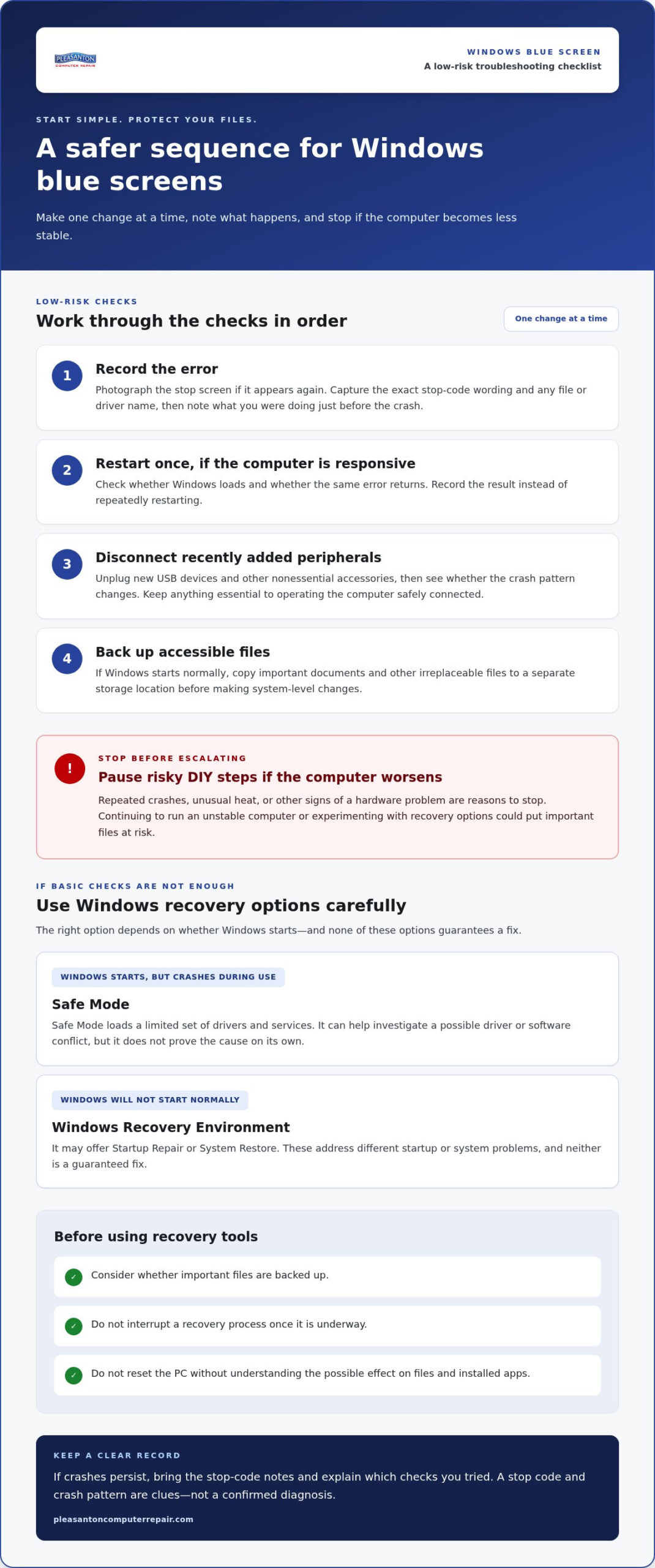
- 1. Record the error. Photograph the stop screen if it appears again, including the stop code and any file or driver name. Note what you were doing when the crash happened.
- 2. Restart once, if responsive. See whether Windows loads and whether the same error returns. Record the result rather than repeatedly restarting.
- 3. Disconnect recently added peripherals. Unplug new USB devices and other nonessential accessories, then see whether the pattern changes. Don’t disconnect anything essential to operating the computer safely.
- 4. Back up accessible files. If Windows starts normally, copy important documents and other irreplaceable files to a separate storage location before making system-level changes.
Repeated crashes, unusual heat, or other signs of hardware trouble are reasons to stop risky DIY steps and seek help. Continuing to run an unstable computer or experimenting with recovery options could put important files at risk.
Use Windows recovery options carefully
If Windows starts but crashes during normal use, Safe Mode loads a limited set of drivers and services. It can help investigate whether a driver or software conflict is involved, but it won’t prove the cause on its own. If Windows won’t start normally, Windows Recovery Environment may offer Startup Repair or System Restore. These options address different startup or system problems, and neither is a guaranteed fix.
Before using recovery tools, consider whether important files are backed up. Don’t interrupt a recovery process once it’s underway, and don’t reset the PC without understanding the possible effect on files and installed apps. For Windows-specific instructions, consult Microsoft’s official Microsoft troubleshooting guide.
If safe checks don’t stop the crashes, avoid escalating to unfamiliar commands or repeated resets. For a Windows blue screen fix Pleasanton, bring your error notes and explain which steps you tried. That gives local PC repair a clearer starting point. Pleasanton PC repair is a practical next step when the problem persists.
Does Every Windows Blue Screen Mean Hardware Failure? How to Tell in Pleasanton
No. A blue screen alone doesn’t prove that a component has failed. Driver conflicts, Windows updates, corrupted system files, memory faults, and storage problems can produce overlapping symptoms. The useful questions are whether crashes follow a particular change or activity, happen across different tasks, or prevent Windows from starting. Those patterns guide investigation, but none confirms a cause by itself.
Software or driver clues versus possible hardware clues
A crash that begins after a driver or Windows update is a reason to investigate that change, not proof it caused the error. A failure limited to one program or connected device may suggest a software or compatibility issue. Crashes across different tasks, startup problems, unusual noises, or files that become inaccessible can raise concern about hardware or storage. Testing is needed because these signs can overlap.
| Clue | Possible direction to investigate |
|---|---|
| Crashes began after an update or driver change | Windows update, driver, or software conflict |
| Crashes occur only with one program or device | That software, its driver, or device compatibility |
| Crashes happen across different tasks or during startup | System files, memory, storage, or another underlying issue |
| Unusual drive noise or files becoming inaccessible | Possible storage trouble that needs diagnosis |
Think of these as diagnostic signals, not verdicts. Even a stop code that sounds specific doesn’t confirm a failed part. Reliable diagnosis depends on the full crash history and appropriate testing. For a Windows blue screen fix Pleasanton, sharing when the problem started and what triggers it can help focus local PC repair on the right possibilities.
When should you stop troubleshooting?
Pause if the computer crashes repeatedly before you can back up important files, or if you hear unusual noises, notice excessive heat, or can’t access files. Avoid repeated resets, Windows reinstallations, or firmware changes when you’re unsure what they’ll affect. If startup keeps failing or memory or storage trouble seems possible, professional diagnosis is safer than continuing with uncertain steps.
Bring your stop-code notes, recent-change history, and a clear description of what happens before each crash. Pleasanton Computer Repair provides PC repair for local residential and business customers, with in-store, on-site, and remote support. A documented pattern helps make the diagnostic process more focused.
Prepare for a Windows Blue Screen Repair Visit in Pleasanton
A little preparation can make a repair visit more focused. You don’t need to identify the cause yourself. Gather what you’ve observed so the technician can understand how often the blue screen appears, what changed beforehand, and whether Windows still starts.
What information should you gather?
Write down the date the issue began and whether it followed a Windows update, driver change, or newly connected device. If the stop screen appears again, save a clear photo showing the stop code and any file or driver name. Include how often the PC crashes and whether it happens during startup, a particular task, or at unpredictable times.
- Startup status: Can you reach the desktop, Safe Mode, or only the recovery screen?
- Recent changes: Which updates, programs, or devices were added shortly before the first crash?
- Troubleshooting tried: Note restarts, disconnected peripherals, or recovery options you’ve used, and whether anything changed.
- Files and backups: Say whether important files are backed up and identify anything you’re worried may be inaccessible.
These details provide a useful starting point, not a predetermined diagnosis or repair. If the computer can still load Windows, avoid making major system changes just to gather more information. The crash pattern and what you’ve already tried are often more helpful than a long list of unverified fixes.
Choose a practical support route
Different situations may suit different support options. Remote support can be useful when Windows starts and the issue can be investigated through an accessible computer. In-store support may be practical if the PC needs hands-on assessment or won’t boot reliably. On-site support can help when the setup and connected equipment are important context for understanding the problem.
Pleasanton Computer Repair’s local in-store location is at 400 Main Street, Suite 205. For an overview of local options, see the computer repair services in Pleasanton. If your notes also point to slow storage performance, the SSD upgrade guide offers related context, though a blue screen alone doesn’t establish that an SSD is the cause.
To discuss a persistent crash, arrange local PC repair support and bring your stop-code photo, symptom notes, and backup information. A clear account helps the team begin with your actual experience rather than guesswork.
Get Local Help for a Persistent Windows Blue Screen in Pleasanton
If safe checks haven’t stopped recurring crashes, pause before trying more invasive fixes. Arrange PC support and share the pattern you’ve documented. The exact stop code, when the crash occurs, what changed beforehand, and whether Windows reaches the desktop can help guide the next diagnostic steps.
Pleasanton Computer Repair provides PC repair for persistent blue-screen problems. The goal is to understand what’s causing the instability before deciding what repair, if any, is appropriate. A stop screen can stem from software, a driver, or hardware, and the next step depends on the symptoms rather than guesswork.
What to expect from a focused diagnosis
A focused assessment takes the crash timing and frequency into account, along with stop-screen details, recent changes, and startup behavior. Depending on those clues, investigation may include software or driver issues, Windows system problems, or hardware concerns such as memory or storage. These are possible diagnostic paths, not conclusions based on one code or symptom. The cause and repair scope need to be understood before anyone can responsibly describe a likely resolution.
That’s why the notes you’ve collected matter. A crash that began after a driver change gives a different starting point from a computer that fails during startup or crashes across unrelated tasks. Clear information makes the diagnostic conversation more useful without promising a fixed outcome in advance.
Make the next step easier
Bring the PC if practical, along with a short record of the stop code, crash pattern, recent updates or devices, and troubleshooting steps already attempted. If you can’t bring it, describe whether it starts, reaches a recovery screen, or repeatedly returns to the error. Mention any backup concerns and identify important files at risk before repair or recovery actions begin.
In-store, on-site, and remote support offer different ways to approach a problem, depending on whether Windows is accessible and whether the computer’s setup needs to be seen in person. Pleasanton Computer Repair serves local residential and business customers. For organizations looking beyond individual workstation repairs to broader stability and cybersecurity, cloudchoicetech.com provides an executive overview of managed IT solutions. A measured diagnosis can help move you toward reliable computer use without adding unnecessary troubleshooting.
If you’re ready for a local next step, schedule an appointment or explore local computer repair. For a Windows blue screen fix Pleasanton, bring your notes and backup information so the team can start with the symptoms you’ve actually experienced.
Move Toward a Stable, Reliable PC
A blue screen can be unsettling, but the stop code and crash pattern offer useful starting points, not an instant diagnosis. Try low-risk checks first, protect accessible files before major recovery steps, and pause if crashes keep returning or you suspect a hardware problem. If troubleshooting doesn’t resolve the issue, clear notes about what happened can help make local PC repair more focused.
Pleasanton Computer Repair provides in-store, on-site, and remote support. The Pleasanton location is at 400 Main Street, Suite 205. For a Windows blue screen fix Pleasanton and a practical next step, schedule an appointment or explore local computer repair.
You don’t have to solve the cause on your own. With a careful diagnosis and the right information, you can move toward getting your computer working reliably again.
Frequently Asked Questions
What should I do first when my Windows computer shows a blue screen?
Photograph the stop screen and note the exact stop code and any file or driver name shown. If the computer is responsive, restart it once and record whether Windows loads or the same error returns. Disconnect recently added, nonessential USB devices to see if the pattern changes. If Windows starts, back up important files before attempting system-level changes. Avoid repeated restarts if crashes continue.
Can I fix a Windows blue screen without losing my files?
Troubleshooting may resolve the cause without removing personal files, but no fix can guarantee that files will be unaffected. If Windows still opens, back up important documents before trying recovery or repair steps. Be cautious with Reset this PC, reinstalling Windows, or other major changes, since their effects can depend on the options selected. If files are inaccessible or at risk, mention that before repair begins.
Does a blue screen mean my computer needs a new hard drive?
No. A blue screen by itself doesn’t prove that a hard drive or SSD has failed. Driver conflicts, Windows updates, corrupted system files, memory problems, and other hardware faults can cause similar crashes. Repeated startup failures, unusual drive noises, or files becoming inaccessible are reasons to stop guessing and seek diagnosis. A stop code can help guide investigation, but it can’t confirm a specific failed component on its own.
How much does a Windows blue screen fix cost in Pleasanton?
There isn’t one reliable price for every blue-screen problem because the needed work depends on the cause. A software or driver issue may call for different work than suspected memory or storage trouble, and the stop code alone can’t determine the scope. For a Windows blue screen fix Pleasanton, bring the error details and troubleshooting history so the issue can be assessed before deciding what repair is appropriate.
What happens if my PC keeps blue-screening before Windows starts?
If Windows can’t load, recovery options such as Startup Repair or System Restore may be available through the Windows Recovery Environment. Their usefulness depends on the cause, and recovery actions can affect your setup or files. Don’t repeatedly reset or reinstall Windows if you’re unsure what may be removed. If important files aren’t backed up or the computer keeps returning to the same error, pause and seek help.
Can a Windows update or driver cause a blue screen?
Yes. An update or device driver can sometimes conflict with Windows or other hardware, and crashes that begin after a change make it worth investigating. That timing is a clue, not proof of the cause. Note the update or device involved, when the first crash occurred, and whether the error repeats during a particular task. These details help distinguish a possible software issue from other causes that need testing.
When should I take a blue-screening computer to a repair shop?
Seek professional diagnosis if crashes keep returning, Windows won’t start, or you suspect memory or storage trouble. Stop experimenting if the PC fails before you can back up important files, or if you notice unusual noises or excessive heat. Pleasanton Computer Repair offers in-store, on-site, and remote PC support for customers in Pleasanton, Livermore, Dublin, San Ramon, Danville, Brentwood, Walnut Creek, and San Jose. Bring your stop-code notes and backup concerns.