
You’ve tried three different cables and two wall adapters, but that battery icon still hasn’t turned green. It’s a sinking feeling when your phone is at 1% and you’re worried about losing your data or facing a massive bill. Many people assume they need a brand-new device, but a professional iphone charging port repair is often all it takes to get back to 100% power. We know how disruptive a dead phone is to your daily life and your business.
Between the conflicting advice found online and the high cost of official replacements, it’s easy to feel stuck. You deserve transparent answers and a permanent fix that doesn’t break the bank. Most charging issues aren’t terminal; they are usually just simple maintenance or routine component swaps that can be handled quickly by a local expert.
This 2026 guide will help you identify the real cause of your power issues and provide simple troubleshooting steps you can try right now. You’ll learn exactly how to handle everything from the new USB-C ports on the latest models to the classic Lightning connectors found on older devices.
We’ll walk through common culprits like pocket lint and hardware failure, giving you the confidence to get your device working again by the end of the day. Let’s get your iPhone back in action and restore your peace of mind.
Key Takeaways
- Learn how to use the “Wiggle Test” to determine if your charging issues are caused by a loose port or a faulty cable.
- Understand the critical differences between older Lightning connectors and the newer USB-C ports found on the iPhone 15 and 16 series.
- Discover why a professional iphone charging port repair is often safer and more cost-effective than risking a DIY fix that could damage your expensive screen.
- Get expert tips on how to extend the life of your device by avoiding “gas station” cables and following the “straight in, straight out” rule.
- Find out how a “diagnostic first” approach ensures you only pay for the repairs you actually need, starting with a simple professional cleaning.
Common Signs Your iPhone Charging Port Needs Repair
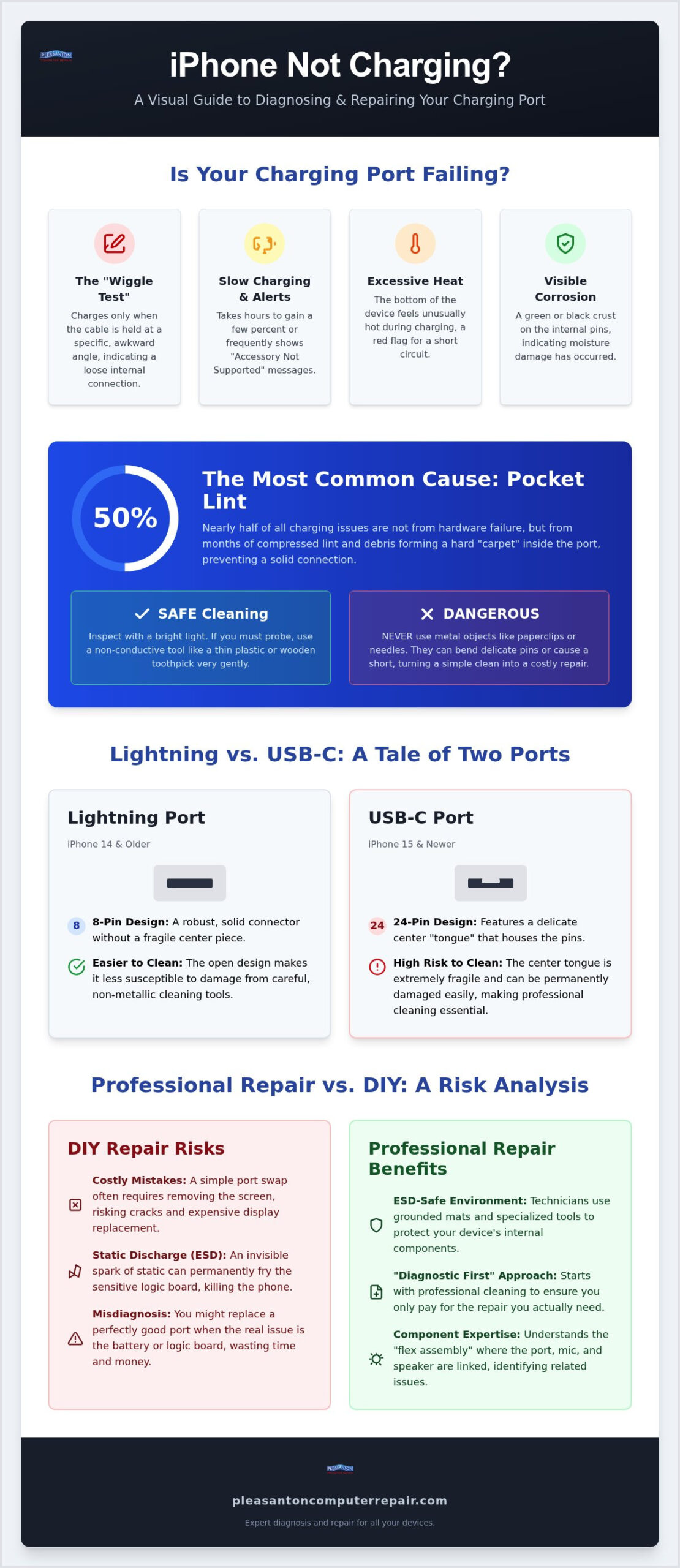
Identifying a failing port early can save you from the stress of a completely dead battery. One of the most telling signs is the “Wiggle Test.” If your phone only charges when the cable is held at a specific, awkward angle, the internal pins are likely losing their physical connection. You might also see “Accessory Not Supported” alerts or notice that your phone takes hours to gain just a few percentage points despite using an original cable. If the bottom of your device feels excessively hot during a charging attempt, it is a red flag for a short circuit or high resistance within the port itself. Visible corrosion, which often looks like a green or black crust on the internal pins, is another clear indicator that moisture has done its damage.
Is it the Cable, the Wall Brick, or the Port?
Before committing to an iphone charging port repair, you should perform a quick cross-check. Swap your current cable and wall brick with known working accessories from a friend or family member. Check the connector for signs of fraying or “pin wear,” which is common on older devices. To understand the technical details of the Lightning port, it helps to know that each of those eight pins has a specific job that can be interrupted by physical wear. Voltage drop is a technical term for the loss of electrical potential as current flows through a high-resistance connection, often caused by a failing or dirty port. If a new cable doesn’t fix the slow charging, the issue is likely internal.
The “Pocket Lint” Diagnostic
In our experience serving the East Bay, nearly 50% of charging issues we see at our Pleasanton location are actually caused by compressed debris rather than hardware failure. Every time you slide your phone into your pocket, tiny bits of lint get pushed into the opening. Over months, this debris forms a hard “carpet” at the back of the port that prevents the cable from seating fully. You can safely inspect the port using a bright light and a non-conductive tool like a thin plastic toothpick. Never use a metal paperclip or needle. These metal tools can easily bend the delicate internal pins, turning a simple cleaning job into a necessary iphone charging port repair. If the cable doesn’t “click” into place firmly, there’s likely something blocking the path that needs professional attention.
The Technical Side of iPhone Port Replacement
An iphone charging port repair involves much more than just swapping a simple plug. Inside your device, the port is part of a complex component known as the “flex assembly.” This thin, ribbon-like cable winds around the internal battery and connects directly to the logic board. In most models, this single assembly also houses the primary microphone and the contact points for the loud-speaker. This integrated design is why a technician might ask if people can hear you clearly during calls when you bring a phone in for power issues. If the port is failing, these other vital functions often begin to degrade as well.
Professional repair also requires strict Electrostatic Discharge (ESD) protection. Even a tiny spark of static electricity, invisible to the human eye, can instantly fry the sensitive chips on an iPhone logic board. We use grounded mats and specialized tools to ensure your device remains safe throughout the process. It’s a level of precision that protects the long-term health of your hardware.
Lightning vs. USB-C: Different Ports, Different Problems
The shift from the Lightning connector (iPhone 14 and older) to the USB-C port (iPhone 15 and 16) has changed the repair landscape. USB-C ports are structurally more robust because they are designed for higher power delivery, but they feature a delicate center “tongue” with 24 pins. This makes them significantly harder to clean without causing permanent damage compared to the 8-pin Lightning style. While there is a growing legislative movement to give Americans the right to repair their own electronics, the physical complexity of these newer connectors requires a steady hand. If a port failure is actually a symptom of a deeper logic board issue, you might need specialized iPhone data recovery Pleasanton services to save your files before the battery drains completely.
Why Soldering Knowledge is a “Pro” Requirement
Modern iPhones are packed with microscopic components that leave zero room for error. One of the most common pitfalls for home repairs is “Long Screw Damage.” This happens when a screw that is just a fraction of a millimeter too long is driven into the wrong hole, piercing the logic board traces underneath and causing permanent failure. Professionals use magnetic mats to track every individual fastener. We also use industrial-grade adhesives to reseal the chassis after the repair. This is essential for maintaining the phone’s resistance to dust and moisture. If you aren’t comfortable managing dozens of microscopic parts, our team at Pleasanton Computer Repair is here to help with a reliable, local solution.
Professional Repair vs. DIY: A Cost and Risk Analysis
Deciding whether to tackle an iphone charging port repair yourself or hire a professional is a common dilemma. While a cheap kit from an online marketplace might seem like a bargain, it rarely accounts for the “oops” factor. Modern iPhones are held together by aggressive industrial adhesives and microscopic screws that require steady hands and specialized heat guns to manage safely. The biggest risk during this process is the screen. It is the single most expensive part of your device. One wrong move with a pry tool or a slip of the hand can crack the glass or sever the delicate OLED display cable. Suddenly, your affordable weekend project becomes a major financial setback that costs hundreds more than a professional service would have.
Professional shops provide something a DIY kit simply cannot: a safety net. A 90-day or 1-year guarantee should be a non-negotiable requirement for any reputable repair service. It ensures that if the new component fails due to a manufacturing defect or installation error, you aren’t stuck paying for the same job twice. It is about buying peace of mind alongside a working phone.
The Hidden Dangers of Cheap DIY Kits
Many budget replacement parts found online skip the essential electromagnetic shielding found in original components. This lack of protection can cause interference with your cellular signal or lead to unexpected battery drain as the phone struggles to maintain a connection. Amazon kits often lack the specialized pentalobe and tri-point drivers needed for a clean opening. Using a sub-par part ignores the dangers of a damaged charging port, which can include short circuits that permanently damage the logic board. Saving a few dollars on a part isn’t worth the risk of a total hardware failure.
Apple Authorized vs. Local Independent Shops
Choosing between an official Apple repair and an independent East Bay shop usually comes down to time and personal attention. Apple might require you to leave your phone for several days or ship it to a central depot for processing. Most local shops aim for a one-hour turnaround for an iphone charging port repair. You also get to speak directly with the technician who is actually opening your device. This level of transparency is exactly what we discuss in our Computer Repair Pleasanton CA guide. It builds confidence that your phone is in good hands and will be back in your pocket by the end of the day.
How to Prevent iPhone Charging Port Damage
Prevention is always more affordable than a repair. One of the simplest habits you can adopt is the “Straight In, Straight Out” rule. When you plug in your device, ensure the connector is perfectly aligned with the port. Wiggling the cable side-to-side to find the “sweet spot” actually widens the port opening and loosens the internal pins over time. This physical stress is a leading cause for people eventually needing a professional iphone charging port repair. If you work on construction sites or live in the windier, dustier areas of the East Bay, consider using a small silicone port cover. These inexpensive plugs keep fine grit and pocket lint from accumulating in the first place.
Utilizing wireless charging, such as MagSafe or Qi-certified pads, is another excellent way to reduce physical wear. By only using the physical port for data transfers or occasional fast-charging needs, you significantly extend the mechanical life of the connector. It’s a simple change that keeps the hardware pristine for years.
Choosing the Right Charging Accessories
Those $5 cables found at gas stations are often the biggest enemy of your phone’s health. You should always look for “MFi Certified” accessories. This stands for “Made for iPhone,” and it means the cable contains a tiny authentication chip that regulates power flow. Non-certified cables can deliver inconsistent voltage, which can lead to a short circuit. High-wattage power bricks designed for modern laptops can also be dangerous for older iPhone models that aren’t built to handle that much current. You can often spot a counterfeit Apple cable by looking for grainy metallic finishes on the plug or blurry, off-center text on the cable sheath. If you’re unsure if your accessories are safe, bring your device to Pleasanton Computer Repair for a quick professional assessment.
Routine Maintenance for Your Device
For heavy users, a safe cleaning schedule every three to four months can prevent debris from compacting. Use a bright light to check for buildup. If you see lint, use a non-conductive plastic tool to gently sweep it out. However, you must know when to stop. If the debris doesn’t move with light pressure, or if the pins look bent, continuing to pick at it will only cause more damage. There is also a direct link between battery health and port efficiency. A port that is struggling to maintain a connection generates excess heat, which is the primary killer of lithium-ion batteries. Keeping your port clean ensures your battery stays healthy and your charging remains fast and reliable.
IPhone Charging Port Repair at Pleasanton Computer Repair
Pleasanton Computer Repair has been a reliable fixture in the East Bay community since 2002. We take pride in serving our neighbors in Pleasanton, Dublin, and Livermore with a level of care you won’t find at a generic mall kiosk. Our “Diagnostic First” philosophy is the cornerstone of our service. Before we ever suggest a full iphone charging port repair, we perform a thorough visual inspection. If we find that your charging issues are caused by simple debris or a minor obstruction, we’ll clean it out on the spot. We believe in honesty; we won’t charge you for a hardware replacement if a professional cleaning is all your device needs to get back to 100% power.
Convenience is vital when your primary tool for work and family life is down. Most iPhone models can be serviced with a same-day turnaround at our Suite 205 location in Pleasanton. For local business owners managing multiple devices, we offer on-site support. Our technicians can travel to your East Bay office to handle fleet repairs, keeping your team productive without the need for anyone to leave the building. This local, flexible approach is designed to fit the fast-paced lifestyle of the Tri-Valley area.
Our Step-by-Step Repair Process
Every device follows a logical, secure path through our shop. We start with intake and testing to verify the exact point of failure. It’s important to confirm whether the issue lies in the port itself, the battery, or the charging IC on the logic board. Once we identify the culprit, we move to the precision repair phase. Our experts use specialized tools to swap the flex assembly during your iphone charging port repair while protecting your screen and internal data. After the hardware is installed, we perform a rigorous post-repair quality check. We test the charging speeds, the primary microphone, and the loud-speaker to ensure your phone functions perfectly before it leaves our hands.
Why East Bay Residents Trust Our Team
Transparency is what has kept us in business for over two decades. We provide straightforward pricing with no hidden “diagnostic fees” if we handle the fix for you. As a local business, we understand the needs of our community, from busy parents to professional clients. We act as a dependable partner to help you navigate technical headaches with ease. Schedule your iPhone repair at our Pleasanton location today! and see why your neighbors have trusted our expert team since 2002.
Restore Your Device with Local East Bay Expertise
A dead battery doesn’t have to mean a dead phone. Many power issues stem from simple debris or routine wear that a professional iphone charging port repair can resolve quickly. By choosing quality MFi-certified accessories and practicing safe cleaning habits, you can keep your hardware running smoothly for years to come. Don’t let the frustration of a loose connection disrupt your day when a permanent, transparent solution is right around the corner.
Since 2002, our team has provided the Tri-Valley community with expert diagnostics for PC, Mac, and mobile devices. Whether you prefer to visit us at our Suite 205 location or need on-site support at your office, we are here to help. We prioritize your peace of mind by offering honest assessments and reliable results that get you back to full power without the stress. Book Your iPhone Repair at Our Pleasanton Suite 205 Location and experience the difference of a neighborly, seasoned expert. Let’s get your technology working for you again.
Frequently Asked Questions
How much does it cost to fix an iPhone charging port in Pleasanton?
The price for an iphone charging port repair varies based on your specific model and the extent of the damage. We always start with a free visual inspection at our Pleasanton office to see if a professional cleaning can solve the problem first. If a component replacement is necessary, we provide a transparent quote before any work begins. This ensures you only pay for the exact service your device requires to function again.
Can I clean my iPhone charging port with a toothpick?
You can use a wooden or plastic toothpick to gently remove lint, but you must be extremely careful. Never use metal tools like needles or paperclips, as these can short circuit the device or bend the delicate internal pins. If the debris is compacted and won’t come out with light pressure, it is safer to bring it to our Suite 205 location. We have specialized tools to clean ports without causing permanent hardware damage.
How long does a professional iPhone port repair take?
Most charging port repairs are completed on the same day you drop off your device. At our Pleasanton service center, we stock parts for a wide range of models to minimize your downtime. While the actual labor takes about an hour, we perform a series of quality tests afterward to verify that the microphone and speakers are also working perfectly. We respect your schedule and aim for a quick, reliable turnaround for the Tri-Valley area.
Will I lose my data during a charging port replacement?
A standard iphone charging port repair is a hardware-only procedure that does not involve the phone’s storage or software. Your photos, contacts, and messages remain untouched on the logic board. While data loss is highly unlikely during this specific repair, we always recommend maintaining a current iCloud or iTunes backup. It is a simple safety measure that provides peace of mind whenever any electronic device is opened for service by a professional technician.
What happens if my iPhone still won’t charge after a port repair?
If a new port doesn’t resolve the issue, the problem might lie with the battery or the charging chip on the logic board. Our technicians perform advanced diagnostics to pinpoint the exact failure point. In cases where a logic board failure prevents the phone from powering on, we can assist with specialized data recovery services. We won’t stop until we find a clear path forward for your device and your important personal files.
Is it worth fixing the charging port on an older iPhone?
Repairing an older model is often a smart financial choice, especially if the screen and battery are still in good condition. The cost of a port replacement is significantly lower than purchasing a new device or a refurbished laptop. Many residents in Dublin and Livermore choose to fix their older iPhones to use as dedicated music players or emergency backup phones. It is an effective way to extend the life of your technology and reduce electronic waste.
Does a broken charging port affect my iPhone’s warranty?
Physical damage to a port is usually not covered by the standard one-year Apple warranty. Choosing an independent repair shop will typically void any remaining official warranty you have with the manufacturer. However, we provide our own local warranty on all parts and labor to ensure your investment is protected. This gives you a reliable alternative to the high costs and long wait times often found at big-box retail service centers in the East Bay.
Can a bad charging port cause my iPhone battery to drain fast?
Yes, a damaged or dirty port can lead to increased electrical resistance, which generates excess heat during charging cycles. This heat is a primary cause of battery degradation and can make your battery drain faster than usual. A failing port might also cause the phone to “wake up” repeatedly as it connects and disconnects, further consuming power. Resolving the port issue often stabilizes the battery’s performance and improves the overall efficiency of your device.